





ConnerVT
Members
-
Joined
-
Last visited
Everything posted by ConnerVT
-
I've run Unraid on a 1500X, a 2600, and now on a 5700G and 5600GT. So I skipped around the 3600 somehow. 🙃 The first 3 CPUs were in my main server, as a NAS and media server with as many as 20 running dockers at a time. Only played around setting up a VM on the early systems, never giving them much of a workload. The only concern (as long as you have a healthy amount of DRAM) is the limited number of CPU cores. If you are just using the Unraid side of things as a NAS, you should have no issues. Give Cores 0-1 to Unraid and 2-5 for the VM to use. If Unraid will be doing other tasks as well (media server, download app, etc) you may find a 6 core CPU to be limiting.
-
I do use the Share Exclude on the array of my main server. I have my media library share exclusively on two of the disks in the array. All of the rest of the shares reside exclusively on the other three disks in the array. The main reason for this is that my Plex clients sometimes time out with an error if it takes too long to spin up a disk. So I keep the two disks containing media always spun up, and the other three disks can spin down after a short time of inactivity.
-
First question: Can you update the Proxmox systems to another system via SMB? If you can, then there is a configuration issue to be addressed on the Unraid side. You can possibly use what works to model what you need. If you can't, then it is likely an issue on the Proxmox side of things which you'll need to figure out an address.
-
Some good information in the User Script support thread. Without knowing what you have built for your scripts, it is better that I allow you to look and find your way to what works best for you. User Scripts is really just a GUI front end to manage scripts, without needing to manually drop into CLI, and it also manages cron scheduling for you. Also, in the first post of the support thread is a link to another thread, where people have posted examples of scripts they have developed. This is also a good thread to browse, for ideas and examples.
-
If you already have scripts you are happy with, download the User Scripts plugin from Community Apps. I use this to automate several of my backup and maintenance activities, with a custom cron schedule.
-
And you have data to support that the corruption was due to NAND memory cells losing their stored data charge from not being accessed for several years? There are a number of ways to corrupt/damage files on a flash drive. I don't recall seeing many that I would attribute to this. But I will take this moment to remind everyone they should always have a recent backup of their flash drive, stored somewhere that they can easily access it if their server goes down. Recreating a new flash drive (either on the original one or a new one) is not that difficult and will get the server back up fairly quickly.
-
Theoretically, what you are saying is correct. But this seems like a solution looking for a problem. For I can't recall ever reading someone saying "My almost 10 year old flash drive has a corrupted file..." similar to a bit rot scenario. I simple and cheaper solution, for those concerned, would be to back up your flash drive, reformat, then restore the backup on it. Wouldn't even require a new key file as the GUID remains the same.
-
A GPU can be shared by the Unraid OS and the Docker service and the containers running that service (as long as the container has the needed resources to use the GPU). So containers such as media servers (Plex/Jellyfin/Emby) and others (Immich/Frigate/etc) all play nicely with each other, as the Docker service manages the GPU resources. With VM, things get more difficult. It relies on using either virtualized devices or hardware which is "passed through" to the VM. One will "Bind" the device (such as a GPU or a NIC) to the VM by selecting the IOMMU Group the device is in, through System Devices in the Unraid Tools tab. Once the device is bound, it is no longer seen by the Unraid OS, so it cannot be used for Docker containers (or for Unraid GUI access). Binding the device allows you to select it in the VM template for use in a VM. You can assign the device to more than one VM, but you would only want to have one of those VMs running at the same time to prevent conflicts.
-
Veering off topic here, but this can apply to SSD drives as well, as both are using basically the same NAND technologies.
-
You shouldn't share a GPU with Docker and VMs. You will have issues (crashes). Think of it as a car with two steering wheels and two drivers. As long as only one person is turning the steering wheel all is OK. When two start turning? The car doesn't go where either driver wants, and usually ends up off the road.
-
I believe this to be 10 years unpowered, as in sitting in a drawer of your desk.
-
Looks as you may be a AMD guy (as am I). The 5700G in my main server can handle the 25 Docker containers I run full time and not break a sweat. Has a 80TB array, 3 SSD pools, and running Plex, a full compliment of arrs, and a few other things as well. The 5700G can run on older motherboards (update BIOS first) and is selling on Amazon right now for under $160 USD. It also is a 65W CPU, always a plus. But... If you are running a media server, check that your server application of choice can transcode with a AMD iGPU. Otherwise you'll need to either pick up a discrete GPU with added cost and power usage. The nVidia T400 or older P400 Quadro cards do a great job (unless you are serving dozens of clients at once) for $150 or less. Single slot and 35W max. Otherwise I would usually recommend Intel for a media server only setup, as the Quicksync of Intel's iGPU is very well supported by most everyone and does a good job at transcoding. The 11700 is about par with the 5700G, and even the 10700 would likely fill your needs. (I'll let Intel guys chime in on this). But you will be paying close to the same or more once you tally up CPU/MB with Intel vs CPU/GPU/MB with AMD. But most any CPU *can* work. Only a few years ago, my main server ran a first generation Ryzen 1500X.
-
Check/set your system's clock would be a good place to start.
-
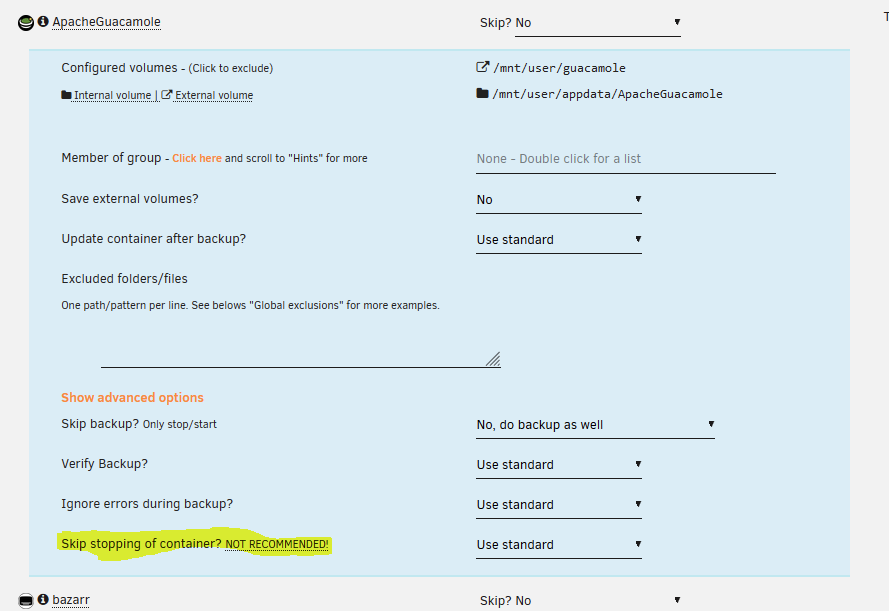
You mean like this, in Show advanced options?
-
Final setup here will be 6 cameras: four Amcrest 4K, one Amcrest 2K and a Reolink Doorbell. Still need to physically install 2 of the 4K cameras. All are running both main and sub channels through go2rtc (rtsp from Amcrest cameras, ffmpeg from Reolink), which frigate then uses the go2rtc rtsp restream feeds for record (main stream) and detect (sub stream). Coral USB for detection, and AMD iGPU for hardware acceleration. CPU is AMD Ryzen 5 5600GT (6 core) and video is stored on a 6TB pool drive dedicated to NVR. All seems to be running well at the moment. Started with only 2 cameras and a bare bones config, and have slowly been adding/changing things, so to learn on the way. I use projects like this to learn stuff. I had the global "record" setting with mode: motion. Yesterday I changed it to mode: all so I could characterize its behavior: record: enabled: true retain: days: 7 mode: all events: retain: default: 30 mode: motion My location is a bit of a challenge. House is in a suburban development built in the middle of a former managed forest. So close neighbors, passing cars and *lots* of moving leaves. So I've needed many motion and object masks to filter out needless false positives. The flip side of that is - What if I want to go back and review to see if I potentially recorded something which I may have filtered out? I generally don't need to track my neighbors walking their dog or cars driving by the house. But what if there was something that happened that I may wish to see after the fact? Since I changed to "mode: all" I see that I am recording all of the video streams. Frigate now has at least a rudimentary way of scrubbing/reviewing the video (I hadn't played much with this before, if at all). Hopefully the GUI for this will be improved in time, as it certainly isn't a great interface. But it likely will meet my needs for now.
-
Frigate can be configured to save/record based either on motion or the full stream. However, the files it generates are only about 10 seconds (a few MB) each. Frigate is still a beta application. Its initial focus is development of combining motion detection and AI, and that works very well. It is the other things that make a NVR/surveillance camera application good to use that have been slowly added, as each next major beta version is released. So I believe what I'm looking for is an application that creates reasonable video files (10 seconds isn't him) and an interface which is basic and reasonable to find/scrub/review video feeds from the cameras knowing a specific date/time of interest.
-
I've installed Frigate on my previously under utilized backup server and slowly have it configured that it is running well. Currently have 3 cameras, and have 3 more to physically install. I really like what Frigate does, and my next step is to integrate it into my Home Assistant VM (which runs on my main server). The one additional thing I would like to add is recording the entire main stream from each camera. The backup server has the storage, bandwidth and CPU reserves for the task. I am just looking for suggestions to what might be the best way to go about this. Frigate is great for storing video of events, but it would also be good to have full video on hand. Ideally I would be able to leverage the rtsp streams from Frigate's go2rtc. Use this to feed another application (via docker?) using this as input, and for a GUI to navigate and display the video. Frigate can handle all of motion/object detection and the HA integration can handle notification and viewing real time and events. So I really don't need much from what I'm looking for, except reliability. Open to suggestions and ideas. What are you running, and will it fill my needs?
-
Was the entire UPS replaced, or just the batteries? When I replaced the battery on my APC UPS, I continued to get messages from Unraid and Runtime Left still reported only a few minutes (when actually was 30+ minutes). I needed to connect the UPS to a Windows machine so I could run the APC PowerChute program to reset the battery replacement date. Everything cleared up after that. https://www.apc.com/us/en/faqs/FA408884/
-
There's this: https://www.techradar.com/news/controversial-hard-drive-vendor-breaks-new-record-with-cheapest-hdd-yet All of my drives are refurbished HGST. Not a single issue so far.
-
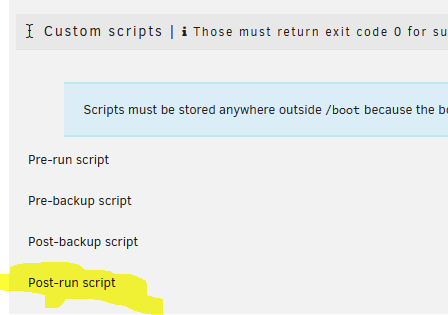
I would thing the simplest thing would be to have a "Post-run script" copy the backup file once it is complete. Certainly would have less risk of problems from trying to create two compressed archives at the same time.
-
@tiffanyjI think that's a great idea for some Unraid merch. I'll buy one if you make it happen.
-
So you spent 3 years worth of extra energy usage on hardware which you didn't research if it would work in your application? Adding WiFi to Unraid is not a trivial task. Linux OS in general has a hit/miss history with WiFi support. Changing standards, multiple hardware solutions, closed source proprietary drivers are just some of the issues to address. General purpose Linux distributions can allow for installing the latest/greatest unknown driver release, but systems such as Unraid have a much greater integration. Look at Realtek Ethernet NIC drivers. They have been problematic for many users (both Unraid and general Linux distros) where the in tree drivers and drivers available from others have a spotty history.
-
For about half the cost of the WiFi adapter you could of bought a 1Gbe switch and some Ethernet cables.
-
I would comment these two out of your config.yaml file. My best guess and 5 minutes of Googling make me think that they are not supported and/or no longer needed in 0.14.
-
How about this, from the first page of this thread:





