





ConnerVT
Members
-
Joined
-
Last visited
Everything posted by ConnerVT
-
That the two use cases you gave, using it as a display adapter for Unraid GUI and for use in a VM, does not use this Nvidia driver in any manner.
-
I did a bit of research on the Intel i225/i226 chips when planning out my 2.5Gbe update to my network. Sometimes searching for info on the Internet is like reading product reviews on Amazon - You need to sift through a lot of 'stuff' and cull out what is actually useful. The vast majority of people having issues with the i225/i226 were Windows users. While the root issue may be hardware (semiconductor) related, it seems that Windows drivers really have not done anything to help with the issue. Move on to the Linux world, and the user bases of both pfsense and OPNsense will swear by the Intel nic, with no reports of issues (which I could find). These are networking knowledgeable people, many who would happily show off their smarts by bashing Intel if given a chance. My own experience has my firewall device with i225 B3 chips working with no issues. I did start with a Realtek 2.5Gbe nic in my Unraid server, but never could get it to iperf (anywhere near) full speed, no matter what I tried. Swapped in an i225 nic, and it was basically plug-and-play.
-
Obviously, you must have a 3-2-1 backup plan for all of the data on the backup server. 😝 I don't run a parity drive on my backup server. While it is nice to have a way to rebuild a lost drive from parity, there is a real cost of implementing parity as well: Write speed is much slower with parity. Extra drive could be used for additional data storage.
-
I'm willing to be a lab rat tester as well. I am a well educated novice of both VM and Mac, but recently have upgraded my server enough that I've been setting up several VMs just for the learning experience. My fresh eyes may see things that other folks who have spent more time doing this would just accept (or had configured long in the past).
-
Happy Halloween! Hope all has been good with you. I recently upgraded my ISP to 1G symmetrical fiber. Like a little kid waiting for Christmas, I could not wait to try out my new blazing speed. Spent the last week making the last configuration changes to the home network, and all is working as I wish - Unraid server speed tests all in the 1000/1000 Mb/s range, be it from docker or VM. Same for my daily driver desktop. But noticed I really didn't see a speed increase from this SABnzbdVPN docker. VPN provider is PIA. Test from the app itself reports ~19 MB/S (152 Mbps) and downloads track about the same speed. Speed tests, via VPN to the same server, are ~500 Mbps from my desktop and ~400 Mbps from the VM (Win11) on the server. I was looking through your VPN Docker FAQ and tried what you suggested in Q6. Either I don't follow directions well, or maybe the info in the FAQ is outdated? I added the following to the .ovpn file (replacing the existing cipher and auth entries): cipher aes-128-gcm auth sh**A256 ncp-disable (note: It doesn't format into separate lines in the FAQ) The docker started, but did not see any change in speed. But did note this in my log, regarding cipher being deprecated. 2023-10-31 11:20:53 DEPRECATED OPTION: --cipher set to 'aes-128-gcm' but missing in --data-ciphers (AES-256-GCM:AES-128-GCM:CHACHA20-POLY1305). OpenVPN ignores --cipher for cipher negotiations. Curious if I did something wrong here, and any other suggestions you may have. It would be great to get some more speed out of SABnzbd. Another quick question - To disable VPN, shouldn't I just need to set VPN_ENABLED to no in the Docker template? I tried it once for troubleshooting, but had issues restarting. As always, thanks for your guidance and the great packages.
-
Both drawings are basically the same setup. Routers with WiFi have what is basically a 5 port switch - 1 port wired internally to the WiFi AP and 4 external ports.
-
Good choice. In fact, I have that same TEG-25GECTX in a drawer under the desk my server resides. Had all sorts of issues with that card, with iperf tests running from 1.6G all the way down to 400M (between the server and my 2.5G firewall). It was before the RealTek driver plugins hit Community Apps, so maybe it can be made to work now. But the Intel chips are plug and play forget and nics are the same price, so why bother? Someday I will pop the unused card into my backup server. Right now, I only have available jacks in my 1G switches, the 2.5G is full. As the server only wakes twice a month to rsync backup media from the main server, 1G is more than fast enough.
-
For all of the devices on my network (including VMs) I just reserve a IP address on my router.
-
Well yes, and no. While obviously the size of the largest drive in the array (and by design, the Parity drive) is a major factor, having smaller, slower drives mixed in can also play a significant role in how fast the overall parity check/rebuild takes. Assuming, of course, that other drive activity isn't interfering with the drives 'syncing up' their access cycles to maximize the parity check speed. All spinning drives start off the check at their fastest speed, and end at their slowest speed at the top end of their capacity. As parity checks will run only as fast as the slowest drive, having mixed sizes in your array will increase the overall time it takes to run a parity check. Let's look at this example: 10 drives + 1 parity in the array - a 16TB parity drive, 9 16TB data drives, 1 8TB data drive. All drives have a linear access speed curve - 250 MB/s at the first sector, 150 MB/s at the last sector. Once you start the parity check (and give the drives a little time to sync up) you are moving right along around 250 MB/s. The 8 TB drive starts slowing down faster than the others. 4TB along, you are now down to 200 MB/S, at 7.9TB you are at 150 MB/s. Once you clear the 8TB done point, the speeds will increase from 150 MB/s to 200 MB/s, then ramp down to 150MB/s for the rest of the check, but at a rate that is half as slow as the first 8TB slowed down. This is exactly what I saw when I recently replaced the remaining 8TB drives in my array with those which matched the 16TB drives. My average speed jumped up to 186 MB/s from 166 MB/s.
-
Greetings Adam. Welcome! You may not have been told this during on-boarding, but it is tradition that you buy everyone on the forum a drink, as they are truly your most important support staff. 😄
-
I can't/won't write up a complete guide (I don't have the time now) but here is what to have on hand that will help you recover from most issues: Flash drive backup Appdata folder backup (assuming all Dockers have their config files in this default location) Print/Pic/PDF of Main Tab (shows drive assignments) Diagnostic zip file The first two (Flash and Appdata) can be backed up manually (Flash has backup button on Main > flash tab), with Appdata plugin or from Unraid Connect. Appdata either manually or with the plugin. The flash drive holds all of the Unraid system configs, as well as your configured Docker templates that you can restore. Appdata backup has all of the files for your dockers - how you configured the application, databases, metadata, etc. Main tab showing drive assignments helps if you have major array issues and need to figure out which drive was assigned where. Diagnostic files are always good to have on hand, as it gives you a human readable version of many of the configurations and such that may be helpful in a bad system fail. I usually grab a fresh copy of these before a major upgrade (hardware or OS).
-
You should ask over on the pfsense forum. The typical pfsense/OPNsense configuration is as a router/firewall device. You can likely use it with only the intrusion protection filtering, but will require more than the basic install and configuration (which you get from the many tutorials out there). I agree with JonathanM. I use one of the Chinese 4-port systems with OPNsense on my network. No complaints on my end, and the quality of the units seem to have improved some since they hit the market a couple of years ago. https://forum.pfsense.org/category/38/general-pfsense-questions
-
Short answer: If you are just swapping the CPU/MB/DRAM, then it is no problem at all. Long(er) answer: If you have VMs, expect to do some reconfiguration (and possible reinstall) of them. As far as the array and cache, unless you have odd HBA controllers that are being changed, all of the drive configurations should just boot up configured as before.
-
Looks as the max height for CPU cooler in the N3 is 130mm. So you will need to look at low profile coolers. Nothing with a vertical oriented fan will fit.
-
Coolers: Thermalright Assassin - $18 on Amazon. Likely all you need for a 2600. Thermalright Peerless Assassin - $35 on Amazon. I have this on my 5700G. Overkill, but dropped my temps significantly from the stock AMD cooler.
-
Just read an article on this. It is a Linux kernel bug. Edit: First article I found on Google - https://www.phoronix.com/news/Logitech-USB-Unplug-Linux-Crash
-
Be sure to read through this:
-
Thank you for the reply, but I am aware of the purpose of New Config. I am hoping for a bit more specific insight as to the specific settings/configurations it changes. I'm sure I am not alone when I say it is a bit stressful when reconfiguring an array holding many TB of data. Knowing what happens behind the scenes is always a good thing.
-
No problems here to resolve. Just a question that has me curious. Today I updated my array. Removed some 8TB drives, moved the 16TB parity to data and installed a new 18TB parity drive. All is good, and parity is currently rebuilding. Used the New Config tool, obviously something one doesn't use often. It got me wondering - What exactly does this tool do? I did note it did a few things I did not expect. It reset the file system from XFS to Auto, reset the notification temperatures and spin down times. Just wondering if someone in the know could give me a quick run down on its function and things it affects/updates. I'm one of those folks who likes to know how things work vs what to do to make things work.
-
People seem quick to complain about many things on the Internet. I try to buck that trend, and take time to acknowledge those things I find which are good. I'm in the process of upgrading some drives in my array, replacing the remaining 8TB drives with the the cold spare 16TB on hand and moving the 16TB Parity drive to data. I was looking to buy the same model WD/HGST drives, and ended up buying two 18TB drives. Unfortunately, the only model in stock were the Pin 3/Power Disable model. Not a big issue, as I have some Kapton tape in hand and know how to deal with this issue. I opened up the box to put the new Parity drive in the server. To my surprise, not only had the seller included cards explaining the issue of Power Disable drives and legacy hardware, the card includes a small strip of Kapton tape. And they also included a SATA to SATA power adapter for each drive. Totally unexpected by me. So a shout out to ServerPartDeals.com - I have bought a number of reconditioned drives from them. I have had no issues with any of them, the pricing was very competitive, shipping has been very fast, well packaged and free. Being forward thinking (I'm sure it saves them some grief) with addressing this power disable feature and not telling customers "Too bad, not our problem..." is just the icing on the cake that compelled me to post this. Kudos to them.
-
This is kind of a big ask, if you think about it. First, how do you wish ti be notified? Email, SMS, telegram, one of the many notification methods out there? Then LT would need to monitor the entire Unraid user base of servers running Connect. How do you handle those no longer running servers, or even just no longer using connect? A logistical nightmare. I use https://uptimerobot.com/ to do what you ask. I have one monitor which pings my firewall, another which checks one of my web services that I run in Docker. Between the two, I can monitor both that the network is up and that my server is up (as well as seeing my weekly appdata backup is run). I get notifications both by email and Telegram
-
Check your BIOS settings for GPU/Display/Multi Monitor/ etc, and try different choices for one that hopefully works. If no success with BIOS settings, toss any cheap GPU in the machine to make it happy. I have a Zoltac GT710 in my backup server (Ryzen 1500X) that's only there for troubleshooting. If you need buy a cheap card, a Quadro P400 can be had for less than $100 USD new, half that used. (Fun Fact: The GT 710 was the lowest capable card that Microsoft allowed one to install Windows 10. That's why I had one on hand.)
-
I am using this one. - https://www.amazon.com/gp/product/B09SSD3HMB Intel i225, PCIe x1 slot, ~$25 USD. I originally started with a Realtek card, but I couldn't get it to work reliably near 2.5Gb speeds in both directions with the other two 2.5Gb capable devices on my network. Installed it when running 6.10.3, now on 6.12.4. Plug and play. No issues.
-
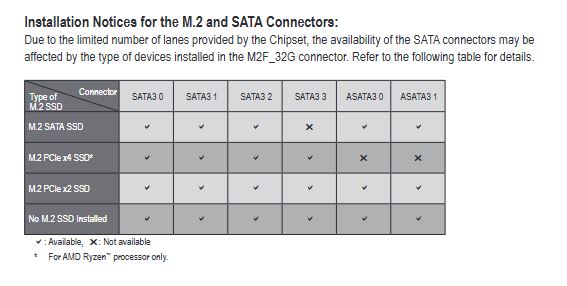
It really depends on the design of the motherboard, and how they deal out the available PCIe lanes to the motherboard resources. I've seen some where it only affects things if the NVMe is SATA interface (vs PCIe), others where it is even more nuanced than that. On one Gigabyte AB350M MB I have, it will disable 0, 1 or 2 SATA connections, depending on the M.2 NVMe interface. On my MSI B-550-A Pro, adding a PCIe x4 NVMe (in the second M.2 slot) disables the motherboard's PCIe x4 slot. As they say, YMMV.
-
I will defer to others whom have much more experience with running VM. I'm still a novice when it comes to virtualization (but deep into this world of hardware and software for about 40 years). Only about a year since I rebuilt my server with enough horsepower to support running VM and everything else I had running on it.





