





ConnerVT
Members
-
Joined
-
Last visited
Everything posted by ConnerVT
-
Thanks for the reply. I figured that would be part of the solution. Sometime this year I will have my Internet upgraded to 500/500 fiber, and know my SOHO router isn't going to cut it. So researching if pfSense on my server is the solution. It is a good time to rethink my entire network here at home. So laying the ground work, to plan ahead as to what I'll need to do. there will be some stuff I'll need figure out once I actually have pfSense installed.
-
Did you find an answer to this? Planning to install a pfSense VM in my server soon, and this is one of the configuration questions I have as well.
-
Obviously one isn't backing up 130TB to USB external HDDs. 😆 But TimTheSettler is correct - Drive and network throughput is likely the limiting factor. Especially painful for non-fiber Internet users and cloud backup solutions.
-
Backup strategy is very personal. Everyone has a different opinion of what is valuable, and what is irreplaceable. So the first thing to do is assess what of your 130TB is irreplaceable. Is the data business or personal? For me, it is personal data. Photos, personal movies, important documents and the like. Backups of my personal daily driver computer. I have backup up (with Macrium) that system where I can easily re-image over 1TB of data. While I would miss my media library, built up over a number of years, the cost to back it up is more than I am willing to invest a backup system to do. I would rebuild if all was lost. A bigger concern is where, physically, you store the backup. It does no good to have it in a system sitting next to the current one if some major tragedy happens at your site. I back up my backups, on drives in USB enclosures. Roughly each month, I swapped drives and keep one in my desk at work. Backup to a system at your location is certain to be faster than cloud backups. While the initial backup will take some time (especially if you chose to back up all 130TB) at least you don't need to sit and watch while it takes place. Afterward, a periodic incremental backup can be scheduled to keep the backup in sync. My computers back up to my server daily. Weekly, Unraid backs up my appdata and VMs, followed by a backup to the aforementioned USB external drives.
-
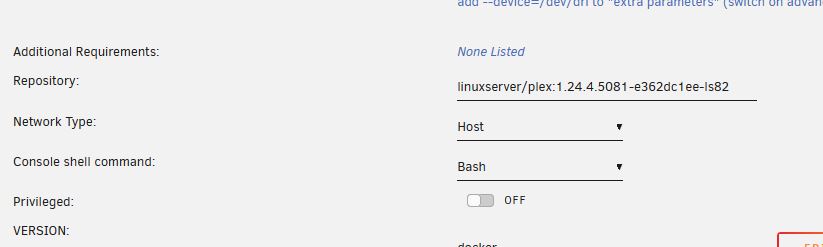
This is exactly what I do (along with Unmanic as well). My drive is a *very* old Kingston HyperX 120GB. It has been in at least a half dozen machines previously. Figured I'd just beat the snot out of it until it finally dies. I can't complain for the use it has given me all of these years. How exactly did you revert back to the previous version? I needed to do this awhile back, as Plex broke their live TV streaming. It would stop the playback every 10 minutes or so. Hard to watch a football game that way. After some searching around the Internet, I found which was the best version for this issue. Then searched the linuxserver.io tags for that version. Goes in the Repository line as in my screenshot. Plex always has issues. They fix or add one thing, and break two or more. Their regression testing is terrible to non-existent. It isn't linuxserver.io's fault - They take the application's current release, put it in a Docker container with the appropriate hooks, and put it up for download. Issues with the application are on the application's developers, not them.
-
Switch to Advanced View. Then a few lines down from the Repository entry.
-
We'll find out Soon™️
-
Latest Quadro T400 currently selling @ $150-200 new. Previous Quadro P400 can be found used in the $50-75 range. I have a Quadro P400 in my system, does fine with a couple of transcodes and a basic display duties for the server.
-
It's much more nuanced than that. I get more of an inside look how the sausage is made where I work. There are other ways to manage profit margins during inflationary times. Just ask the several hundred folks who worked there before Christmas who don't now.
-
Memory (both DRAM and NAND) is a commodity market, much like soybeans or orange juice. It is an early indicator of the greater semiconductor market, which in turn is driven by demand of the products these semi chips go into. The semiconductor market as a whole is cyclical, with memory being the easiest to be impacted by supply and demand due to its high volume/low profit margin nature. But now other parts of the semi industry are seeing orders being scaled back. Many companies had placed large orders during 2022, reaching out through 2023-24. They are now renegotiating them, as they now have too much inventory and see their customers scaling back orders. Everyone in the industry, from semi manufacturers to distributors of finished electronic products are forecasting a bleak 2023. While everyone in the industry would love to just raise prices to cover the lost revenue, it will not stimulate more sales. As the value of today's technology falls as the next greatest tech is released, clearing out inventory, even at a loss, is much more preferred than just dumping it in a landfill. There will be bargains, as distributors fight for scraps.
-
Scroll to the bottom of your Docker tab. Last button on the right.
-
Check prices again in 4-6 months. Coming out of the 4Q 2022, semiconductor and most tech businesses slammed on the breaks, anticipating there will be 2 quarters of low sales volume, at the minimum. Prices on consumer grade components already are starting to drop, especially memory. Enterprise/server grade stuff should follow. There was such a big demand on all semiconductors with the pandemic - With everyone at home, people discovered their home network sucked. Need a new PC, some tablets for the kids. ISPs suddenly were seeing peak demand all hours of the day. The big data guys, like AWS, couldn't put hardware in fast enough. With components in short supply, every company was ordering and buying more than they needed to not be left short handed. That's now over, and most everyone has more inventory than they can use. Especially for things in the tech world which get old as fast as potato salad left out on the picnic table during summer. There will be bargains. You just need to wait a little bit.
-
NGINX Proxy Manager (NPM) NGINX Proxy Manager: How to Install and Setup Reverse Proxy on Unraid (2021)As CA isn't part of the paid base Unraid software, but the work of people who volunteer their time and skills to create this plugin, perhaps the option is to uninstall it from your system and write your own plugin that meets your expectations?Check that the date and time are correct on your server.Try it without the SRT subtitles, and see what happens.Check your memory speed in BIOS. I would suggest you set it for 2133. Your memory (F4-2400C15-4GIS) only has a native speed of 2133, regardless of the marketing/XMP speed of 2400. https://www.gskill.com/specification/165/185/1535967340/F4-2400C15S-4GIS-SpecificationI also have only one Media share. I do, however, use the Exclude Disks to force media files to a few drives which I do not allow to spin down. This eliminates the delay when spinning up a disk that the Plex client will sometimes end up with a timeout error. That my media files (Movies, 4K Movies, TV, Music) are scattered across several disks aren't an issue, for unless you are doing some sort of system maintenance/upgrade, you are typically either working with shares or some sort of software client GUI such as Plex.Well, the server won't be able to do anything by itself if it is down. Be it a power outage, system lock up, etc, it can't do anything. That would be like expending someone to reply to an email "If you don't receive this email, let me know..." So there really is only two models that work, and both rely on another system. You already mentioned Uptime Robot, which queries your server for a response. No response? They send you a notification. The other model would be your server communicating with another system. Maybe it is something simple as a heartbeat, maybe it is full blown system statistics. The remote system would need some automation to identify when your server goes quiet, and then send you a notification. The first model is much simpler to set up. But if you have everything locked down, that's an issue. The second model is more complex to set up, but it is easier to establish a secure connection out of the server.The 5700G will give you a significant performance boost, not even considering the 2 extra cores. Adding in the graphics and that it is the same 65W TDP, it is a good value with it recently selling for just under $180 USD.Do you have an internal USB header on your motherboard available? I use a cable with a header to USB connector for my boot flash drive.There is no way to force TRIM on the Array. For SSD in Pools, you have 2 choices: - Use BTFS, which has native TRIM, or - Use the TRIM plugin with other filesystems. Unraid requires at least one drive on the array. It can just be a small Flash drive if you wish.This is on my roadmap as well. Plans are to replace my 1500X with a 5700X in the next few months. First thing is to check the board's manufacturer's website. The Gigabyte board in my server says that it supports the 5700X. The ASRock board in my daily driver doesn't explicitly list either Renoir or Cezanne (Ryzen 4xxx or 5xxx) CPUs, but the latest BIOS says that it added support for these CPUs. So I am more confident to do this in the server, less so for my desktop. As you noted, you will definitely need to update your BIOS (to AGESA 1.2.0.7) before installing the 5xxx CPU. You are hopefully replacing an earlier Ryzen, as the new BIOS likely doesn't support the Athlon/Ax CPUs. Everything *should* work as before. The MB won't support PCIe 4.0 even though the new CPU may be capable (depending on what model you buy). But depending on what you are replacing, the CPU should be faster, more power efficient, and you likely will be able to use better stock/base memory timings. edit: Here is a Techspot article: Does the Ryzen 7 5800X3D Work on AMD B350 and X370 Motherboards?Because the house was on fire after being struck by lightning?



