





Lolight
Members
-
Joined
Everything posted by Lolight
-
Welcome! You might want to add a second cache drive - the first one to be used for downloads and the second one for app data. But then you'd have to change the processor to the 11th gen. Even though your selected motherboard features three M.2 slots, it has specific limitations on their usage. e.g. the first M.2 slot gets activated only with the 11th gen processors. the second M.2 slot if populated will disable one of SATA ports, but only if used by a SATA M.2 drive (make sure to purchase only NVMe M.2 drives). the third M.2 slot disables two SATA ports if populated by any of the m.2 drives, making it unusable for a NAS.
-
Memory prices have been very cyclical in the past. But I doubt we will see much of discounting for the rest. More likely the prices will continue to increase across the board.
-
Welcome! https://pcpartpicker.com/list/
-
I'm sorry but I don't quite understand your dilemma and the perceived need for HBA cards in the new system. I also don't think that there're any advantages left nowdays (reliability wise) to running the business oriented gear in a home environment. The modern consumer boards proved to be very reliable. By buying new SATA 16-18 TB drives and building a new system with a consumer market motherboard having at least 6 SATA ports, you could have plenty of the onboard SATA ports left and would still have lots of room for future expansion, if judged by your current amount of stored data.
-
The 8TB version of the WD Blue is CMR, the smaller capacities are SMR. Still, the price difference is not that great. WD Blues are inferior drives as compared to the rest. You might also look for the Seagate's Ironwolf Pro and Exos. In many markets the Exos, which is in certain aspects superior to the Ironwolf, sells at a discount to the latter therefore is being favored by many NAS users.
-
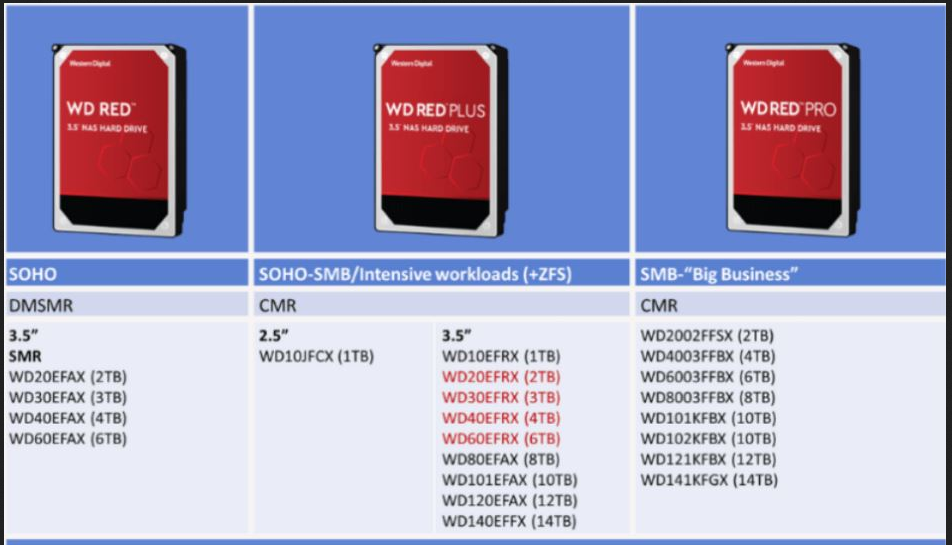
Stay away from WD Reds. Get WD Red Plus or Seagate Ironwolf/Exos
-
You don't need much RAM to get started. For a basic use case 16GB (2 x 8GB) is all you need. Non-ECC is fine.
-
That's why I've mentioned choosing motherboards with at least 6 or 8 SATA ports to allow for future expansion. Why to complicate the build by selecting small motherboards with few available SATA ports? A HBA card will also use non-trivial amount of electricity.
-
The motherboard's M.2 slots configuration needs to be checked via the mobo's manual. Thankfully you can find them published on the manufacturer's sites. So do some research before purchasing. Every motherboard is configured differently. e.g. my old Asus motherboard disables one of the SATA ports if one of the M.2 sockets is set to the SATA mode when populated by a SATA SSD. Yet, if the same M.2 socket is set to the PCIe mode and populated by a NVMe SSD then that restriction doesn't apply and no SATA ports get disabled. Is it going to be a direct connection between your NAS and PC? If not then the rest of the network would also need to support 10Gbps speeds, e.g. the router, switch... And I would advise to stay away from the newest and untested chips. All current gen processors are very efficient at idle. btw, you might also want to consider Jellyfin as an alternative to Plex.
-
The Node 804 is a very good case. I'd say select another mATX motherboard with at least 6, preferably 8 SATA ports that also features a couple of M.2 slots that are configured by the manufacturer not to disable any of the SATA ports when both M.2 slots are in use.
-
A good question. I had no idea that it was possible to run Unraid on Odroid-H2. Odroid-H3 looks to be very similar in every way while having more processing power. https://www.hardkernel.com/shop/odroid-h3-plus/
-
From Seagate Return Policy: "Products that are determined to be No Trouble Found (NTF) are not eligible for warranty service. Before returning your product, you may use the Seagate SeaTools diagnostic tool to determine the condition of your product and whether it is eligible to be returned under warranty. Seagate reserves the right to return NTF products back to their owner and may charge for associated shipping costs. If you send us through this RMA process any products that are not covered by justified warranty claims, we may retain these products."
-
-
Don't bother with ECC
-
His list contains a Node 304, that only accepts mini ITX boards. I'd agree on the advice to get a bigger case, e.g. a Node 804 running a mATX board - for better expandability, air flow and easier component access.
-
Could you please elaborate a little more on BlueIris and why it didn't suit your needs? I've tested BlueIris a few years back but haven't setup permanent camera's at that point. Now I'm thinking of installing a permanent system in the near future and would appreciated your thoughts on the monitoring software.
-
-
Sorry to hear about the problem. I'd suggest to repost this question into the "General Support" forum section.
-
If your clients are direct play capable then no transcoding required. You can even make any client TV 4K direct play capable if you want to go that route but that normally requires some additional hardware.
-
-
No need for new hardware
-
Can you run https://usb-device-tree-viewer.en.lo4d.com/windows on a Windows machine with the drive attached? Wonder how it would get identified by that utility.
-
The Fractal 304 was the small case that I've initially considered for my first NAS system. But had to drop it off my list after discovering the cost and availability issues associated with the mini ITX MBs featuring 6 SATA ports. The situation seems to be remaining unchanged since then. If I'm not mistaken even the pcpartpicker site doesn't list a single LGA1151 with SATA 6 ports currently available for purchase. And yeah, the Fractal 304 is one of the very few small factor cases that is specifically designed to have enough of cooling airflow to keep HDs from roasting over time.
-
Any specific need for a 10GB network? What is the reason you're replacing your old NAS? Was it running Unraid or something else? Four 8TB drives? To get started, get two bigger HDs. The bigger the better. The PSU... It's a a very old, outdated model with a 80mm fan. There are much newer and better PSUs available for similar money. I'm unclear about your usage case. Do you just want to stream video files locally, on your own network? Then all you need is a cheaper modern Intel i3 chip (non-F) with iGPU and a compatible non-fancy motherboard with at least 6 SATA ports. You can use your Nvidia Shield on the client side to direct play 4K files without any transcoding.



