






Everything posted by MAM59
-
Hmm, wenn sie nicht meckern, macht es wenig Sinn. Die Zeit (und das Stirnrunzeln) kannst Du Dir sparen. Bau später die Parity neu auf (kein Unterschied zu "Check") und dann sollte Ruhe sein. Kannst ja noch in lost+found gucken, ob die gefundenen Dateien irgendeinen Sinn machen, ansonsten löschen. Und einen bösen Blick auf den Stromanschluß der Platte werfen, nicht, dass da ein Wackelkontakt ist und es bald wieder passiert....
-
Dann brich den Check ab. Warte noch 1-2 Stunden, dann haben sich die Platten "gesetzt". Danach läuft der Check wieder flott. Und Du solltest ihn mit Schreibberechtigung machen, die Parität kann nach dem Repair nicht mehr stimmen (was aber kein Fehler ist in diesem Fall)
-
und? geht nu? Den Check NIEMALS auf gemounteten Platten laufen lassen!!! Dafür gibts ja den "Maintanance Mode" beim Array start. Das Dateisystem schreibt Änderungen erstmal in ein Log File. Das wird dann im Leerlauf abgearbeitet. Wenn der Strom ausfällt (Wackelkontakt???) stimmt das Log nicht mit dem Platteninhalt überein. Deshalb hier das Repair: 1) xfs_repair auf das Laufwerk (repariert / erzeugt neuen Superblock und listet auf, was für Fehler gefunden wurden (4 Dateien, 2 Verzeichnisse)) 2) Versuch lwk zu mounten (kann klappen, muss aber nicht) 3) lwk wieder unmounten 4) nochmal xfs_repair (das spielt dann das log ein und löscht den Fehlerstatus und verchiebt die angedrohten Dateien/Verz. in /lost+found (nur auf der Shell sichtbar)) 5) fertig, nun sollte das Array normal starten
-
tnx. switched to the brightest green, now the text is readable. But you might consider to add config for the text and background colors and do not use the theme values that might be invisible.
-
na dann viel Glück mit "xfs_repair" (Ansonsten formattieren und Backup Daten zurückspielen) Dumm nur, dass man nirgends sehen kann, WAS eigentlich passiert ist.
-
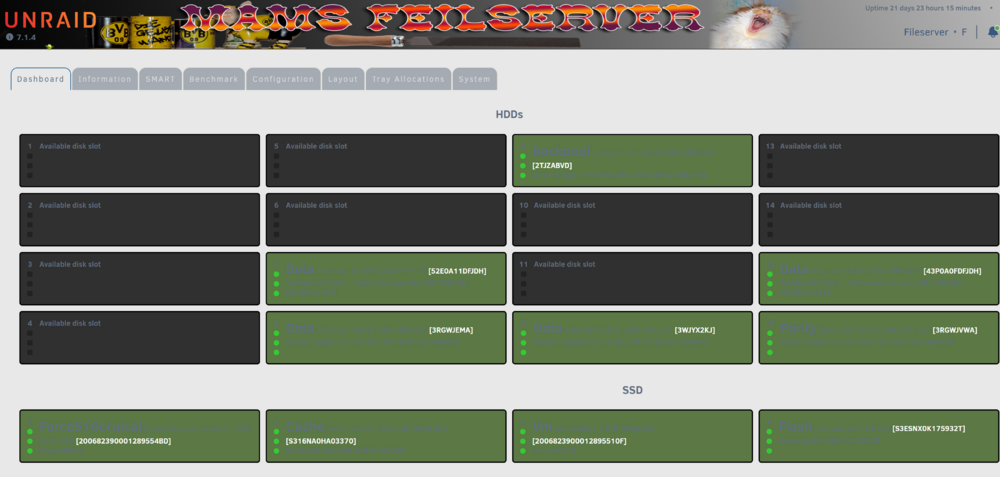
Color Scheme somewhere? When running UNRAID with skins beside "black" and "white" this plugin is barely readable :-( Example (with "Azure"): There should be a way to configure text and background colors somewhere (yeah, I know "green" means "ok", but the text colors should give at least a little bit contrast...)
-
Zitat CT: "Die hohen Werte beim Schreiben erreicht Samsung über einen SLC-Cache, der bei der 1-TByte-Version 42 GByte groß ist. Ist dieser voll, sinkt die Geschwindigkeit auf 1,7 GByte/s. In der Praxis wird man davon jedoch nur in speziellen Anwendungsfällen etwas bemerken, etwa beim Kopieren großer Datenmengen. Die von Samsung aufgerufenen Preise liegen zwischen den Straßenpreisen der 970 Evo und der 970 Pro. Sollten sie etwas sinken, kann Samsung die Evo-Modelle ausmustern – aber auch der Kauf einer 970 Pro lohnt sich nur noch in wenigen Fällen." Genau diese "speziellen Anwendungsfälle" hat er ja hier... (Mag sein, dass die 2Tb Version mehr Cache hat, aber glaube ich nicht wirklich. Also sind nach etwa 42Gb immer Einbrüche zu erwarten) (Quelle: https://www.heise.de/tests/Samsung-970-Evo-Plus-Zwischen-Evo-und-Pro-aber-besser-4283375.html) Nachtrag: bei der 2Tb Version kann der Cache "bis zu 80Gb" groß sein. Seine Datei sollte also locker weggeschnupft werden können, der Singvogel liegt also woanders.
-
"EVO Plus"... tscha... da hast Du deine Amsel, äääh Drossel. :-) Diese billigen SSDs haben nur eine sehr überschaubare Menge SLC Cache (schnell), danach geht es dann direkt in den lahmen QLC Speicher über. Und da Du immer weiterschreibst, schafft er es auch nie den Cache wieder freizukriegen (bis die Datei fertig ist). Wenn Du bessere Schreibraten haben willst, musst Du auf Platten mit Dauerschreibfähigkeit achten (Bei den Tests in der CT wird das mit angeführt, die Hersteller sagen es Dir nie). Aber wenn es bei Samsung bleiben soll, musst Du zur "PRO" Serie greifen. (Selbst da gibt es nach (mehr) MB kurze Einbrüche, die erholen sich aber recht schnell und es geht flott weiter, aber in zyklischen Wellen) Bei den Plattenbewerbungsdaten werden immer nur die maximale Schreib- und Leserate angegeben, man verrät Dir nicht, WIE LANG (wie viel) die Platte das durchhält. Bei den billigen meist nur wenige MB (Sekunden). Hinzu kommt, dass NVMe SSD bei Überhitzung die Raten zusätzlich dramatisch drosseln. (deshalb immer genau die Tests lesen und auf "sustained writes" achten)
-
na ja, folge den Anweisungen: Aug 26 03:14:38 Tower emhttpd: mounting /mnt/disk1 Aug 26 03:14:38 Tower emhttpd: shcmd (53): mkdir -m 0666 -p /mnt/disk1 Aug 26 03:14:38 Tower emhttpd: /sbin/blkid /dev/md1p1 2>&1 Aug 26 03:14:39 Tower emhttpd: /dev/md1p1: UUID="ff0dbf99-e0d1-4182-b7d8-a1d668236cca" BLOCK_SIZE="512" TYPE="xfs" Aug 26 03:14:39 Tower emhttpd: shcmd (54): mount -t xfs -o noatime,nodiscard,nouuid /dev/md1p1 /mnt/disk1 Aug 26 03:14:39 Tower kernel: XFS (md1p1): Mounting V5 Filesystem ff0dbf99-e0d1-4182-b7d8-a1d668236cca Aug 26 03:14:39 Tower kernel: XFS (md1p1): Corruption warning: Metadata has LSN (16:121437) ahead of current LSN (16:118034). Please unmount and run xfs_repair (>= v4.3) to resolve. Aug 26 03:14:39 Tower kernel: XFS (md1p1): log mount/recovery failed: error -22 Aug 26 03:14:39 Tower kernel: XFS (md1p1): log mount failed Aug 26 03:14:39 Tower root: mount: /mnt/disk1: wrong fs type, bad option, bad superblock on /dev/md1p1, missing codepage or helper program, or other error. Aug 26 03:14:39 Tower root: dmesg(1) may have more information after failed mount system call. Aug 26 03:14:39 Tower emhttpd: shcmd (54): exit status: 32 Aug 26 03:14:39 Tower emhttpd: shcmd (55): rmdir /mnt/disk1 Aug 26 03:14:39 Tower emhttpd: disk1: mount error: wrong or no file system Oder war die Platte noch gar nicht formattiert???
-
Es ist ziemlich sinnfrei den Laptop mit 2,5Gb/s anbinden zu wollen, wenn dahinter ein 850Mbit/s Schnarchrepeater kommt. Also etwa ein Lamborghini in der Berliner Innenstadt zur Rush Hour... Abgesehen davon sind USB "LAN Karten" bislang noch nie mit besonders guter und stabiler Funktion aufgefallen, die meisten davon sind einfach nur Schrott. Flow Control ist überlebenswichtig wenn Geschwindigkeitsunterschiede ins Spiel kommen.
-
Dunno, keep in mind that most of those articles do not apply to UNRAID, its hard to tell what is correct and what not. UNRAID's ZFS is still under development, some features are still missing. So just keep cool and take what is available. Don't fiddle around too much, you may run into surprising problems. I did not even know what settings I had (just looked them up, its "overlayfs2", whatever it is good for). It works, thats good.
-
LOL, we have vodafone over here, I guess it is the same "quality" :-) Anyway, nobody can know the special features or demands of a remotely (pre-)configured device. So, nobody can help, only guess.
-
I guess you need to contact your ISP they should tell you how to configure that beast or what settings in the LAN you need to apply before it works. Maybe it is "stealing MACs" trying to hide your machines to the net. Or something strange... Give them a ring Or, maybe, you do not have IPV4 anymore, just V6 with a stupid DSLITE Tunnel... this happens all over now. Try to turn on IPV6 in UNRAID and the other boxes and see what happens
-
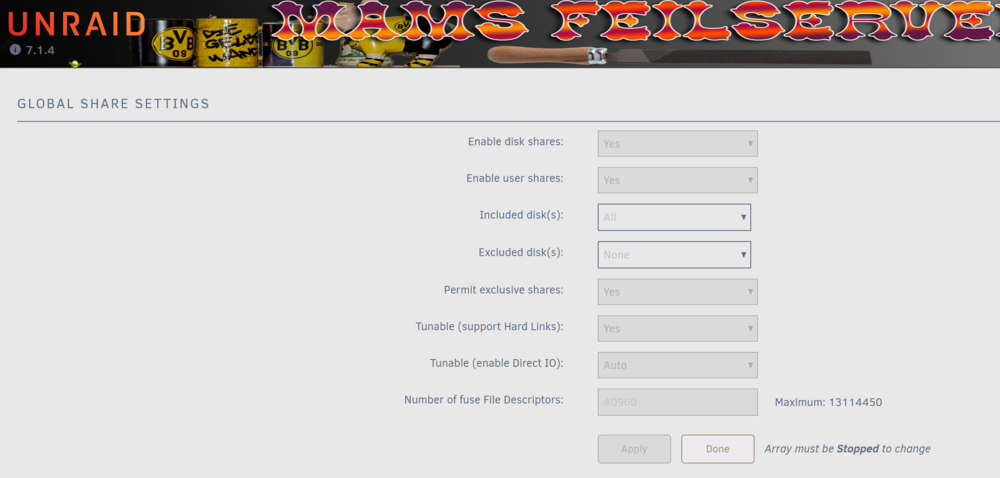
you can safely enable exclusive shares / access (the term is quite misleading I think) you need to turn it on globally: Afterwards the shares that match the criteria automatically will be converted and show the hook (you can never set it directly for a share)
-
not necessarily. UNRAID "sees" if a directory is only on a single disk and automatically sets the attribute "exclusive" for that share. Check the appdata for this bit. If set, FUSE is avoided, there will be a direct symbolic link in /mnt/user for that share. No speed degregation then. (your "trick" was used on older versions of UNRAID)
-
This does not mean a thing. A router CAN proxy a DNS request but is not forced to do it. (Actually no real router I am aware of does it. It just hands over the proposed DNS Addresses to the DHCP clients. There is no benefit in proxying it beside it also does some filtering like PIhole or something) your logs show that your box requests an address, gets one but when it want to use it, some other device claims that it is using this address already. This happens for EVERY address (counting them up from 210 to 250, did not check further). This means there is something in your LAN that thinks it should be everybody. Can be a broken device or a serious misconfiguration. Try to unplug devices one by one and see if the problem goes away. Can be also your new "router" which can be configured to support only a single (or a few) devices accourding to your contract. Check the Virgin :-)
-
Just wait and see now. Maybe your problem is already gone now? I dont know about any "overlayfs" and /mnt/tank does not exist in UNRAID as far as I know. As far as I know is that "overlayfs" is mostly used to allow writing to write protected filesystems. This is not needed on UNRAID, all OS is run from a ramdisk, all changes are lost at reboot. UNRAID is not Raspian :-)
-
No idea what drove them to "image", maybe it is like the always turned on bonding in networking too? I dont know for sure, but "image" is easier to handle because for the OS it is a single (big) file. I've once swiched to "dir" because I wanted to be able to access the docker's configs from outside the docker too. For instance for Backup purposes. And to isolate actions between dockers (if one goes crazy it does not wreck the configs of the others too). The switch is easy, but it may be always wise to do a backup first in case you need to go back whatever for.
-
I would switch the docker stuff to "directory" instead of "image". Then the files will reside in the normal filesystem and benefit from features list mirroring and so on. Also the cache is "closer to the data" and corruption (which usually is a result of wrongly synced cache contents) is less likely. (Also backup is much easier this way!)
-
Wie gesagt, das ist Wortklauberei. "Arrays" (RAID) gab es schon 20 Jahre BEVOR Unraid das Licht der Welt erblickt hat. Es war eben sehr unglücklich, das Limetech diesen Terminus versucht hat sich anzueignen. Damit kommen wir also nicht weiter, sobald jemand ausserhalb der UNRAID Blase guckt, findet er eben (RAID) Arrays. (RAIDZ ist nur ne Sonderversion, weil hier das Dateisystem die RAID Funktion gleich eingebaut hat und man nicht einen extra Controller oder Treiber braucht).
-
RAIDZ ist ein Array, wenn mit mehr als 3 Platten. Du musst Dich langsam begrifflich verabschieden von Bezeichnung und Funktion. Ein "Array" ist eine Gruppe von Festplatten, die sich irgendwie gegen einen Ausfall einer Platte schützen kann. Ich gehe mal davon aus, dass in zukünftigen UNRAID Versionen die Definitionen nochmal überarbeitet werden, zur Zeit stiften sie nur Verwirrung.
-
"DAS" Array ist seit Unraid 7 "DIE" Arrays. Das eine (alte) Unraid Array sollte weiterhin mit XFS betrieben werden. Das neue RAIDZ Array hingegen ist mit ZFS (und RAID 5 oder 6) zu erstellen. Beide haben Vor- und Nachteile. Musst Du schon selber auf die Details schauen. Aber beide habe nix mit ECC RAM zu tun (oder profitieren davon).
-
Weil das ziemlicher Schwachsinn ist. Du willst UNRAID administrieren? (oder einen anderen der installierten VMs / Docker) Dein Internet/LAN hat gerade mal einen Schluckauf? -> Du kommst nicht auf Deine eigenen Seiten, weil der Browser das Zertifikat nicht überprüfen kann! Also, genau in dem Falle, wo Du die Admin Seiten wohl am dringensten brauchst, versagen sie kläglich... So sägt man sich selber schön den Ast ab!
-
Ok, but you are aware that the stupid question instantly follows: how do I check this??? :-)
-
Mit die Augens würde ich sagen... Guck rein, ob das Kabel überhaupt angeschlossen ist. (und wenn ja, ob auch auf dem richtigen Jumper...)





