





b_tob
Members
-
Joined
-
Last visited
Everything posted by b_tob
-
I'm running the Backblaze_Personal Docker Container without any issues, followed the installation process on their Github Page. Can easily upload the files with the GUI.
-
Steht irgendetwas in den Logs vom Container oder von Unraid selber? Die Containerlogs kannst du mit einem Klick auf das Container Logo -> Logs / Protokolldateien anzeigen.
-
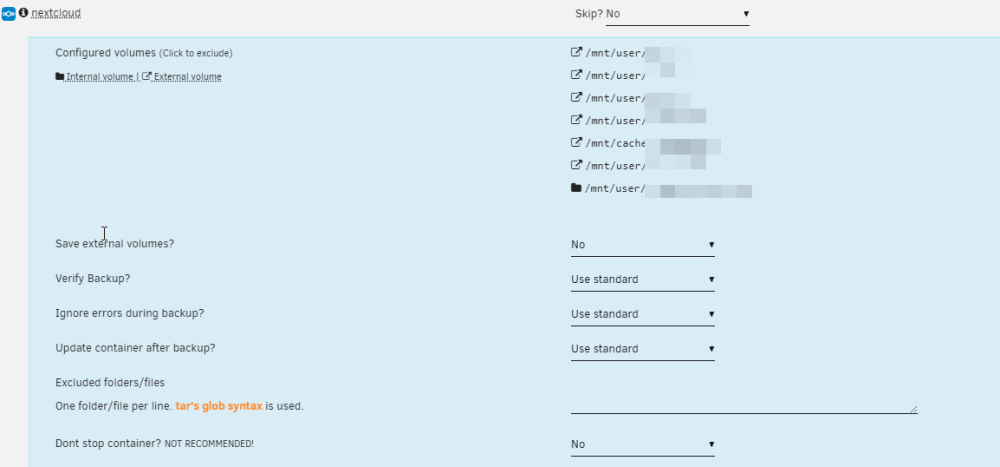
Du kannst sehr wohl im "Appdata Backup" Plugin zusätzliche Ordner sichern welche nicht im "appdata" Ordner liegen, dafür gibt es die Option "Include extra files/folders", befindet sich unter der "Custom script" Option. Ich sichere zB den Nextcloud Ordner mit dieser Option. Alles was du hier einträgst wird dann im Backup in das Archiv "extrafiles.tar" gepackt. EDIT: Ausserdem kannst du in der Übersicht auf den Namen von jedem Container klicken und dort auswählen ob die externen Pfade gesichert werden sollen.

-
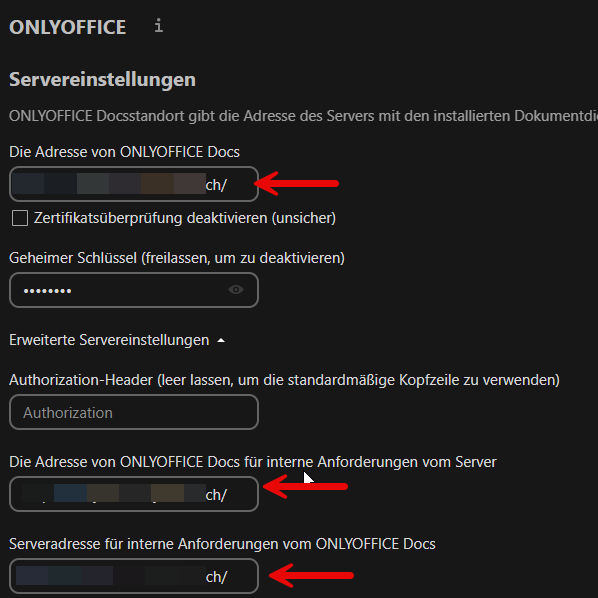
Das "ch/" ist die TLD, da ich eine Schweizer Domain habe. Ich weiss nicht wie es im AiO Container funktioniert, aber ich musste Onlyoffice mit dem Proxy Manager über das Internet mit einer eigenen Domain erreichbar machen und diese Domain habe ich dann in Nextcloud eingetragen. Das ganze ist schon einige Zeit her und ich weiss nicht mehr wo ich die Anleitung damals gefunden habe. Ich bin mir auch nicht sicher ob das dir richtige Vorgehensweise ist oder ob es auch funktionieren würde ohne Onlyoffice eine eigene Domain zu erstellen.
-
rclone sollte mit Backblaze funktionieren (Klick) Ansonsten gibt es noch Duplicacy welches auch mit Backblaze funktionieren sollte, weiss aber nicht ob das mit rsync läuft und habe auch beide Applikationen noch nicht selber getestet.
-
Hatte vor einiger Zeit ebenfalls das Problem dass die Meldung alle paar Minuten erschien, wenn ich in den Einstellungen wie bei dir im Screenshot auf Speichern geklickt habe funktionierte Onlyoffice wieder für ein paar Minuten, danach kam wieder die Meldung. Habe dann in irgendeinem Forum den Hinweis gefunden dass in den erweiterten Einstellungen die URL von Onlyoffice auch eingegeben werden muss, seither funktioniert Onlyoffice bei mir ohne Probleme.
-
Hi everyone A few minutes ago i received the message "Your flash drive is corrupted or offline, Post your diagnostics in the Forum". The VM an Docker Tab are not available and the GUI says "Missing key file". Tried to pull the diagnostics but i get a 404 error from NGINX. The last entries in the logs are: text error warn system array login Dec 12 11:04:45 ZEUS kernel: FAT-fs (sda1): Directory bread(block 29784) failed Dec 12 11:04:45 ZEUS kernel: FAT-fs (sda1): Directory bread(block 29785) failed Dec 12 11:04:49 ZEUS kernel: fat__get_entry: 30 callbacks suppressed Dec 12 11:04:49 ZEUS kernel: FAT-fs (sda1): Directory bread(block 29784) failed Dec 12 11:04:49 ZEUS kernel: FAT-fs (sda1): Directory bread(block 29785) failed Dec 12 11:04:49 ZEUS kernel: FAT-fs (sda1): Directory bread(block 29786) failed Dec 12 11:04:49 ZEUS kernel: FAT-fs (sda1): Directory bread(block 29787) failed Dec 12 11:04:49 ZEUS kernel: FAT-fs (sda1): Directory bread(block 29788) failed Dec 12 11:04:49 ZEUS kernel: FAT-fs (sda1): Directory bread(block 29789) failed Dec 12 11:04:49 ZEUS kernel: FAT-fs (sda1): Directory bread(block 29790) failed Dec 12 11:04:49 ZEUS kernel: FAT-fs (sda1): Directory bread(block 29791) failed Dec 12 11:04:50 ZEUS kernel: FAT-fs (sda1): Directory bread(block 29784) failed Dec 12 11:04:50 ZEUS kernel: FAT-fs (sda1): Directory bread(block 29785) failed Dec 12 11:04:54 ZEUS kernel: fat__get_entry: 30 callbacks suppressed Dec 12 11:04:54 ZEUS kernel: FAT-fs (sda1): Directory bread(block 29784) failed Dec 12 11:04:54 ZEUS kernel: FAT-fs (sda1): Directory bread(block 29785) failed Dec 12 11:04:54 ZEUS kernel: FAT-fs (sda1): Directory bread(block 29786) failed Dec 12 11:04:54 ZEUS kernel: FAT-fs (sda1): Directory bread(block 29787) failed Dec 12 11:04:54 ZEUS kernel: FAT-fs (sda1): Directory bread(block 29788) failed Dec 12 11:04:54 ZEUS kernel: FAT-fs (sda1): Directory bread(block 29789) failed Dec 12 11:04:54 ZEUS kernel: FAT-fs (sda1): Directory bread(block 29790) failed Dec 12 11:04:54 ZEUS kernel: FAT-fs (sda1): Directory bread(block 29791) failed Dec 12 11:04:54 ZEUS nginx: 2023/12/12 11:04:54 [crit] 6958#6958: *303905 pread() "/usr/local/emhttp/webGui/javascript/translate.en_US.js" failed (5: Input/output error) while sending response to client, client: 192.168.1.138, server: , request: "GET /webGui/javascript/translate.en_US.js?v=1700086926 HTTP/1.1", host: "192.168.1.193", referrer: "http://192.168.1.193/Tools" Dec 12 11:04:54 ZEUS kernel: SQUASHFS error: Unable to read fragment cache entry [104738dc] Dec 12 11:04:54 ZEUS kernel: SQUASHFS error: Unable to read page, block 104738dc, size 74e4 Dec 12 11:04:54 ZEUS nginx: 2023/12/12 11:04:54 [crit] 6958#6958: *303921 pread() "/usr/local/emhttp/webGui/javascript/translate.en_US.js" failed (5: Input/output error) while sending response to client, client: 192.168.1.138, server: , request: "GET /webGui/javascript/translate.en_US.js?v=1700086926 HTTP/1.1", host: "192.168.1.193", referrer: "http://192.168.1.193/Tools" Dec 12 11:04:54 ZEUS kernel: SQUASHFS error: Unable to read fragment cache entry [104738dc] Dec 12 11:04:54 ZEUS kernel: SQUASHFS error: Unable to read page, block 104738dc, size 74e4 Dec 12 11:04:54 ZEUS nginx: 2023/12/12 11:04:54 [crit] 6958#6958: *304498 pread() "/usr/local/emhttp/webGui/javascript/translate.en_US.js" failed (5: Input/output error) while sending response to client, client: 192.168.1.138, server: , request: "GET /webGui/javascript/translate.en_US.js?v=1700086926 HTTP/1.1", host: "192.168.1.193", referrer: "http://192.168.1.193/Tools" Dec 12 11:04:54 ZEUS kernel: SQUASHFS error: Unable to read fragment cache entry [104738dc] Dec 12 11:04:54 ZEUS kernel: SQUASHFS error: Unable to read page, block 104738dc, size 74e4 Dec 12 11:04:55 ZEUS kernel: FAT-fs (sda1): Directory bread(block 29784) failed Dec 12 11:04:55 ZEUS kernel: FAT-fs (sda1): Directory bread(block 29785) failed Dec 12 11:04:59 ZEUS kernel: fat__get_entry: 30 callbacks suppressed Dec 12 11:04:59 ZEUS kernel: FAT-fs (sda1): Directory bread(block 29784) failed Dec 12 11:04:59 ZEUS kernel: FAT-fs (sda1): Directory bread(block 29785) failed Dec 12 11:04:59 ZEUS kernel: FAT-fs (sda1): Directory bread(block 29786) failed Dec 12 11:04:59 ZEUS kernel: FAT-fs (sda1): Directory bread(block 29787) failed Dec 12 11:04:59 ZEUS kernel: FAT-fs (sda1): Directory bread(block 29788) failed Dec 12 11:04:59 ZEUS kernel: FAT-fs (sda1): Directory bread(block 29789) failed Dec 12 11:04:59 ZEUS kernel: FAT-fs (sda1): Directory bread(block 29790) failed Dec 12 11:04:59 ZEUS kernel: FAT-fs (sda1): Directory bread(block 29791) failed Dec 12 11:05:00 ZEUS kernel: FAT-fs (sda1): Directory bread(block 29784) failed Dec 12 11:05:00 ZEUS kernel: FAT-fs (sda1): Directory bread(block 29785) failed Dec 12 11:05:01 ZEUS nginx: 2023/12/12 11:05:01 [crit] 6958#6958: *304501 pread() "/usr/local/emhttp/webGui/javascript/translate.en_US.js" failed (5: Input/output error) while sending response to client, client: 192.168.1.138, server: , request: "GET /webGui/javascript/translate.en_US.js?v=1700086926 HTTP/1.1", host: "192.168.1.193", referrer: "http://192.168.1.193/Settings" Dec 12 11:05:01 ZEUS kernel: SQUASHFS error: Unable to read fragment cache entry [104738dc] Dec 12 11:05:01 ZEUS kernel: SQUASHFS error: Unable to read page, block 104738dc, size 74e4 Dec 12 11:05:01 ZEUS nginx: 2023/12/12 11:05:01 [crit] 6958#6958: *304585 pread() "/usr/local/emhttp/webGui/javascript/translate.en_US.js" failed (5: Input/output error) while sending response to client, client: 192.168.1.138, server: , request: "GET /webGui/javascript/translate.en_US.js?v=1700086926 HTTP/1.1", host: "192.168.1.193", referrer: "http://192.168.1.193/Settings" Dec 12 11:05:01 ZEUS kernel: SQUASHFS error: Unable to read fragment cache entry [104738dc] Dec 12 11:05:01 ZEUS kernel: SQUASHFS error: Unable to read page, block 104738dc, size 74e4 Dec 12 11:05:03 ZEUS nginx: 2023/12/12 11:05:03 [crit] 6958#6958: *304589 pread() "/usr/local/emhttp/webGui/javascript/translate.en_US.js" failed (5: Input/output error) while sending response to client, client: 192.168.1.138, server: , request: "GET /webGui/javascript/translate.en_US.js?v=1700086926 HTTP/1.1", host: "192.168.1.193", referrer: "http://192.168.1.193/Settings/SyslogSettings" Dec 12 11:05:03 ZEUS kernel: SQUASHFS error: Unable to read fragment cache entry [104738dc] Dec 12 11:05:03 ZEUS kernel: SQUASHFS error: Unable to read page, block 104738dc, size 74e4 Dec 12 11:05:03 ZEUS nginx: 2023/12/12 11:05:03 [crit] 6958#6958: *304629 pread() "/usr/local/emhttp/webGui/javascript/translate.en_US.js" failed (5: Input/output error) while sending response to client, client: 192.168.1.138, server: , request: "GET /webGui/javascript/translate.en_US.js?v=1700086926 HTTP/1.1", host: "192.168.1.193", referrer: "http://192.168.1.193/Settings/SyslogSettings" Dec 12 11:05:03 ZEUS kernel: SQUASHFS error: Unable to read fragment cache entry [104738dc] Dec 12 11:05:03 ZEUS kernel: SQUASHFS error: Unable to read page, block 104738dc, size 74e4 Dec 12 11:05:03 ZEUS nginx: 2023/12/12 11:05:03 [crit] 6958#6958: *304632 pread() "/usr/local/emhttp/webGui/javascript/translate.en_US.js" failed (5: Input/output error) while sending response to client, client: 192.168.1.138, server: , request: "GET /webGui/javascript/translate.en_US.js?v=1700086926 HTTP/1.1", host: "192.168.1.193", referrer: "http://192.168.1.193/Settings/SyslogSettings" Dec 12 11:05:03 ZEUS kernel: SQUASHFS error: Unable to read fragment cache entry [104738dc] Dec 12 11:05:03 ZEUS kernel: SQUASHFS error: Unable to read page, block 104738dc, size 74e4 Dec 12 11:05:04 ZEUS kernel: fat__get_entry: 46 callbacks suppressed Dec 12 11:05:04 ZEUS kernel: FAT-fs (sda1): Directory bread(block 29784) failed Dec 12 11:05:04 ZEUS kernel: FAT-fs (sda1): Directory bread(block 29785) failed Dec 12 11:05:04 ZEUS kernel: FAT-fs (sda1): Directory bread(block 29786) failed Dec 12 11:05:04 ZEUS kernel: FAT-fs (sda1): Directory bread(block 29787) failed Dec 12 11:05:04 ZEUS kernel: FAT-fs (sda1): Directory bread(block 29788) failed Dec 12 11:05:04 ZEUS kernel: FAT-fs (sda1): Directory bread(block 29789) failed Dec 12 11:05:04 ZEUS kernel: FAT-fs (sda1): Directory bread(block 29790) failed Dec 12 11:05:04 ZEUS kernel: FAT-fs (sda1): Directory bread(block 29791) failed Dec 12 11:05:05 ZEUS kernel: FAT-fs (sda1): Directory bread(block 29784) failed Dec 12 11:05:05 ZEUS kernel: FAT-fs (sda1): Directory bread(block 29785) failed Dec 12 11:05:09 ZEUS kernel: fat__get_entry: 30 callbacks suppressed Dec 12 11:05:09 ZEUS kernel: FAT-fs (sda1): Directory bread(block 29784) failed Dec 12 11:05:09 ZEUS kernel: FAT-fs (sda1): Directory bread(block 29785) failed Dec 12 11:05:09 ZEUS kernel: FAT-fs (sda1): Directory bread(block 29786) failed Dec 12 11:05:09 ZEUS kernel: FAT-fs (sda1): Directory bread(block 29787) failed Dec 12 11:05:09 ZEUS kernel: FAT-fs (sda1): Directory bread(block 29788) failed Dec 12 11:05:09 ZEUS kernel: FAT-fs (sda1): Directory bread(block 29789) failed Dec 12 11:05:09 ZEUS kernel: FAT-fs (sda1): Directory bread(block 29790) failed Dec 12 11:05:09 ZEUS kernel: FAT-fs (sda1): Directory bread(block 29791) failed Dec 12 11:05:10 ZEUS kernel: FAT-fs (sda1): Directory bread(block 29784) failed Dec 12 11:05:10 ZEUS kernel: FAT-fs (sda1): Directory bread(block 29785) failed Dec 12 11:05:12 ZEUS ool www[24117]: /usr/local/emhttp/plugins/dynamix/scripts/rsyslog_config Dec 12 11:05:12 ZEUS kernel: I/O error, dev loop1, sector 681824 op 0x0:(READ) flags 0x800 phys_seg 2 prio class 2 Dec 12 11:05:12 ZEUS kernel: SQUASHFS error: Failed to read block 0x14cec532: -5 Dec 12 11:05:12 ZEUS kernel: SQUASHFS error: Unable to read metadata cache entry [14cec530] Dec 12 11:05:12 ZEUS kernel: SQUASHFS error: Unable to read directory block [14ceb54a:1455] Dec 12 11:05:12 ZEUS kernel: I/O error, dev loop1, sector 681736 op 0x0:(READ) flags 0x800 phys_seg 1 prio class 2 Dec 12 11:05:12 ZEUS kernel: SQUASHFS error: Failed to read block 0x14ce1c24: -5 Dec 12 11:05:12 ZEUS kernel: SQUASHFS error: Unable to read metadata cache entry [14ce1c24] Dec 12 11:05:12 ZEUS kernel: SQUASHFS error: Unable to read directory block [14ce0a7a:58] Is there another way to pull the diagnostics other than via the GUI? I still have SSH access to the Server. Or is it safe to reboot the Server? Or ist the Flash Stick dead? It is a USB 2.0 Stick attached to a USB 2.0 Port. The latest Backup is from yesterday, right before i updated Unraid from 6.12.0-rc3 to 6.12.6. Thanks for your help!
-
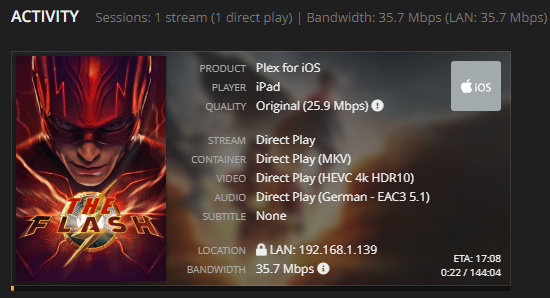
I have a very similar setup like you, i5-10400 CPU, but 62GB RAM an d 1Gbit Network. The CPU is more than capable to stream "Direct Play". I can even play 4K on my iPad via WiFi. EDIT: The movies are stored on 6TB WD Red Plus and 18 TB Thosiba HDDs.
-
Thanks, this was the solution!
-
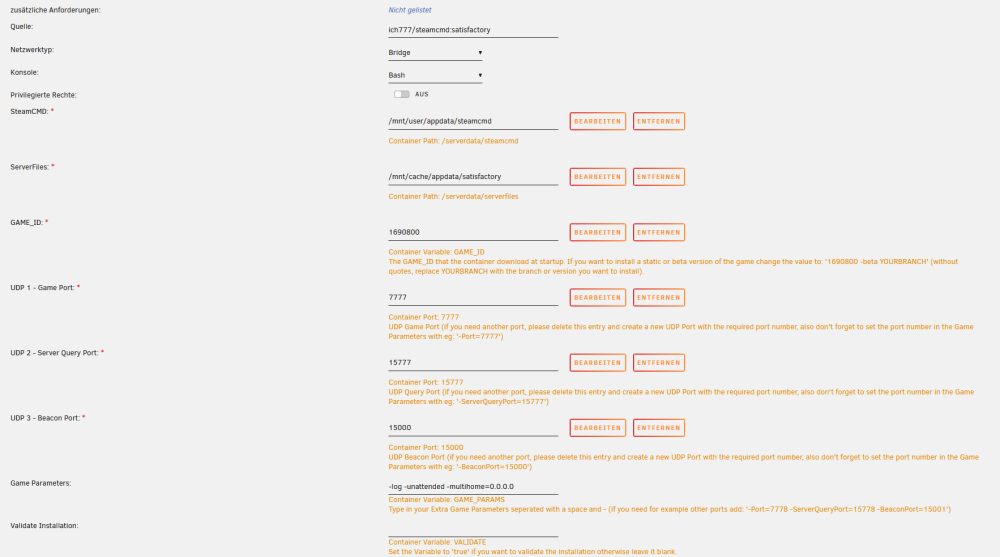
Yes, I set the Validate Installation to true, updatet the container and removet the variable, still doesn't work. Just set up a new container, also don't work. Could there be a problem with steamcmd?
-
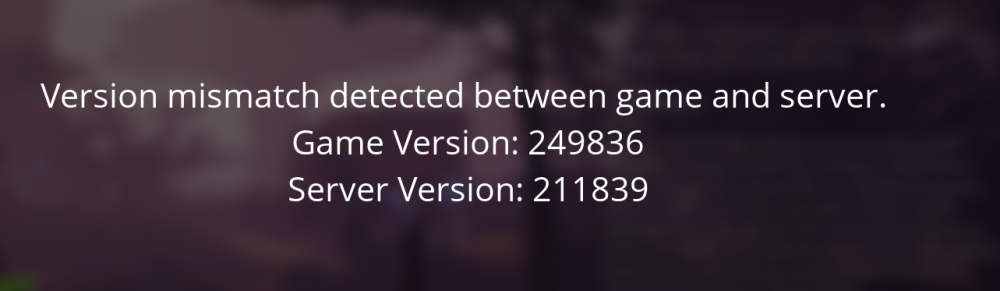
When I start the Game and got to Server Manager to start a session from my Server, i get the following Screen: I'm not completly sure how to view the Version. I attach some screenshot from the game and the Docker page, maybe you can see whats mismatching. This config worked for quite a long time, but since I updatet the game some weeks ago, I always get the message of the mismatch.

-
Hallo @ich777 ich habe gemäss dem Post hier den appdata Ordner gelöscht und den Container neu installiert. Leider kommt immer noch die Meldung dass die Versionen nicht übereinstimmen. Gibt es noch etwas was man machen kann? Besten Dank.
-
Ahh peinlich, das Plugin war sogar schon installiert, wusste aber nicht mehr dass es das gibt. Werde mal schauen ob ich damit herausfinde was die HDD aktiviert. ZFS ist nicht aktiv, benutze im Array xfs.
-
Hallo zusammen mir ist zufällig aufgefallen das auch dem Nichts eine HDD hochgefahren wird und dann mit ca. 110 - 140 MB/s etwas gelesen wird. Leider weiss ich nicht genau durch was das verursacht wird und möchte das gerne herausfinden. In letzter Zeit habe ich keine Änderungen am Server vorgenommen, Plex Streams oder dergleichen sind auch nicht aktiv. Weiss jemand wie ich herausfinden kann welcher Dienst oder Prozess diese Leseaktivität verursacht? Besten Dank.

-
Fractal Node 304 oder 804 ist "NASig" 😀
-
Hi @ich777 would it be possible to Update the Satisfactory Server so that it works with the latest Update of the Game? When I will join my Server, there is the following message: Version mismatch detected between game and server. Game Version: 239901 Server Version: 211839 Thanks in advance!
-
I don't have the TR-002, but the TS-451. I installed Unraid as well, because it was really slow with the QNAP OS. Unraid works perfectly with the TS-451, but because of the very limited power I only use the QNAP as a Backup destination for my Main Server. Spin-Down worked out of the Box.
-
Swisscom wäre auch ein Möglichkeit. Ist zwar nicht wirklich günstig, aber ich habe eine öffentliche IPv4 Adresse und kann somit alles von extern per NPM erreichen. Die Internet Box 3 lässt sich auch ziemlich gut konfigurieren und hat auch einen integrierten VPN Service, falls benötigt.
-
Same problem here! 😃
-
Kannst du mal einen Screenshot vom VM Template machen wo die vDisk Zuweisungen ersichtlich sind?
-
Ich glaube du hast das Format falsch eingegeben. Bei mir funktioniert es mit /dev/disk/by-id/ata-WDC_WD2001FASS-00W2B0_WD-WMAxxxxxxxx". Pfad auf Manuell und vDisk Bus auf SATA.
-
@mgutt Kennst du dich allenfalls mit ZFS aus? Wenn ich den Pool als btrfs neu erstellen will, wie kann ich die Daten die aktuell auf dem Cache sind da weg kopieren? Vom appdata Share habe ich ein ziemlich aktuelles Backup, vom System oder Domains Share jedoch nicht. Vielen Dank. Beste Grüsse
-
Hello everyone posting first time in the English Section, so please bear with me. 😅 I upgraded to 6.12.0-rc2 a couple of weeks ago and created an ZFS pool for my appdata an domains share. Everything worked until last week when the server crashed. I tried to reboot the machine, but ever since, when I start the Array after the reboot, i get the following error (screen connected via HDMI): ZEUS login: VERIFY3(size <= rt->rt_space) failed (281442915282944 <= 7946706944) PANIC at range_tree.c:436:range_tree_remove_impl() The GUI will then load indefinitely, until i turn the server off with the Power Swtich. Starting the Array in the Maintenance Mode does not create the error. Someone in the german section of the forum pointed me to the following github site, but there are a lot of informations I don't really understand: https://github.com/openzfs/zfs/issues/11893 Does anybody have an idea how to fix this issue? zeus-diagnostics-20230423-1431.zip
-
Danke für deine Antwort @cz13. Ich werde wohl mal eine neue Diskussion im englischen Forum öffnen, vielleicht kann mir dort jemand helfen bei der Problemlösung, auf der verlinkten Seite habe ich leider keine Lösung gefunden. Trotzdem Danke!
-
Hallo zusammen ich habe seit gestern das Problem dass mein Array nicht mehr startet. Das WebGUI wird mir angezeigt, sobald ich beim Array auf "Starten" drücke wird mir am angeschlossenen Bildschirm folgende Meldung angezeigt: ZEUS login: VERIFY3(size <= rt->rt_space) failed (281442915282944 <= 7946706944) PANIC at range_tree.c:436:range_tree_remove_impl() Wenn ich das Array im Wartungsmodus starte tritt der Fehler nicht auf. Der Server läuft aktuell auf Version 6.12.0-rc2. Weiss jemand wie man herausfinden kann was den Fehler produziert? Vielen Dank für eure Hilfe. Beste Grüsse



