





Mainfrezzer
Members
-
Joined
-
Last visited
Everything posted by Mainfrezzer
-
Mostly privacy since you dont interact with 3rd parties that you need to trust, i.e. Google etc. Unbound asks the rootservers directly.
-
IPad has Minecraft Bedrock not Minecraft Java or did something change about that?
-
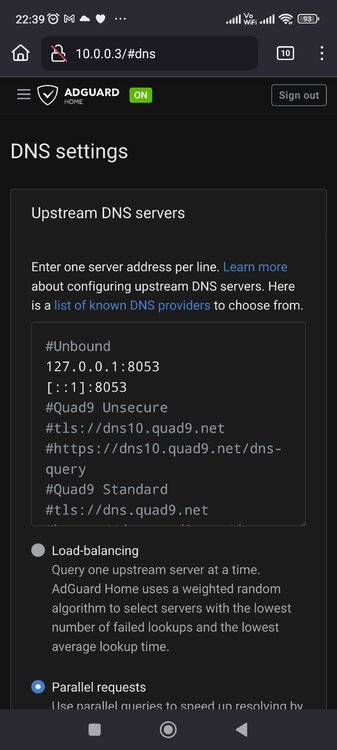
Im good, how are you? The ip is only used after you finished the Installation process. you get redirected to the login page. After you logged in, you can enter the ip in the DNS settings Edit: i just noticed that you changed the DNS port to 8053, you need to change that back to 53
-
yep. everytime you do something in the gui, it resets to the "default". You would have to create your clients etc beforehand and then stop the tunnel, edit the file to the shim network, start the tunnel.
-
I assume you mean that you can reach your pi-hole from your vpn client? Absolutely, if you have the "Host access to custom networks" enabled. The wireguard file for that tunnel just needs to be changed from the default br0 to the shim-br0 as mentioned in the first post.
-
Template Repo: https://github.com/Mainfrezzer/UnRaid-Templates App: Adguard Home with Unbound https://adguard.com/adguard-home/overview.html & https://www.nlnetlabs.nl/projects/unbound/about/ Docker Hub: https://hub.docker.com/r/mainfrezzer/adguardhome Github: https://github.com/Mainfrezzer/adguardhome-unbound Docs: https://github.com/adguardteam/adguardhome/wiki/Configuration & https://nlnetlabs.nl/documentation/unbound/unbound.conf/ App: ArchiveBox https://archivebox.io/ GitHub: https://github.com/ArchiveBox/ArchiveBox Docs: https://github.com/ArchiveBox/ArchiveBox/wiki App: Pelican Panel & Pelican Wings https://pelican.dev/ GitHub: https://github.com/pelican-dev Docs: https://github.com/pelican-dev/docs Including the modified variants: Mainfrezzer-Pelican-Panel & Mainfrezzer-Pelican-Wings https://hub.docker.com/r/mainfrezzer/pelican-panel/ & https://hub.docker.com/r/mainfrezzer/pelican-wing/ GitHub: https://github.com/Mainfrezzer/Mainfrezzer-Pelican-Panel & https://github.com/Mainfrezzer/Mainfrezzer-Pelican-Wing App: Roundcubemail https://roundcube.net/ Docker Hub: https://hub.docker.com/r/roundcube/roundcubemail/ GitHub: https://github.com/roundcube/roundcubemail-docker App: mitmproxy https://mitmproxy.org/ Docker Hub: https://hub.docker.com/r/mitmproxy/mitmproxy/ GitHub: https://github.com/mitmproxy/mitmproxy Docs: https://docs.mitmproxy.org/stable/ App: GPTWOL https://github.com/Misterbabou/gptwol Docker Hub: https://hub.docker.com/r/misterbabou/gptwol App: Wireguard-Client https://github.com/Mainfrezzer/wireguard-bridge App: Bashupload https://github.com/IO-Technologies/bashupload Github: https://github.com/Mainfrezzer/docker-bashupload
-
thats because the minimum version is 6.12.13
-
Do you have "Persistent keepalive" set at all? Ive an endpoint set via domain that updates daily too but keeps the connection running just fine
-
Is there are way to restrict the interfaces tailscale can use? I just use it as Point to Point connection atm and on every bootup, its grabbing my wireguard site to site interface to establish a direct link and that breaks traffic, somewhat. A restart of the tunnel does fix it, but its still a tat annoying for having to deal with it
-
The number shows the number of partitions afaik. The pencil is for "asthetics" and just indicates that you can change the mountpoint by clicking on the name
-
You have some call traces that would let me to recommend you to run a memtest.
-
Davon mal abgesehen sollte es eigentlich mehr Bedenken aufwerfen warum die Schule überhaupt "Ancient Technology" jetzt erst einsetzt. Selbst die Android App wurde nicht mal geupdated, seit über einem Jahr. Edit: Ich hab mir mal deren Website genauer angeguckt. Musst doch lachen. Hier ist nur ein einziger Jahresbericht, für deren Tätigkeit, aus dem Jahre 2022 zu finden. Dem Upload nach, wurde das Ding erst dieses Jahr im Juni hochgeladen. Der Inhalt ist sogar noch nen Brüller Auf deren Website, bei den FAQ Sehr schön alles. Man gibt sich richtig Mühe.
-
Thats because the container saves the config files still in an old way. You *could* change all the config files manually BUT if you change anything through the GUI it will resurface. Gotta wait till the container is updated. The fix was already merged for that To temporarily fix it, stop the container and edit any listen X.X.X.X:443 ssl http2; needs the http2 line removed to look like listen X.X.X.X:443 ssl; and only place http2 on; below it once
-
Its one of your youtube download containers which is limited to 262,144 MB of RAM, lol
-
I wonder why😄
-
Schreit ja förmlich nach Up2Date. Debian Stretch Der Docker-Container fürs Backend lässt sich nicht bauen. Die postgrestapi in der Compose von delibrium-postgrest ist 6 Jahre alt und nicht existent Würde die Finger davon lassen. Aber, falls man bissel Langeweile hat. Compose Manager installieren aus dem Appstore Auf der Dockerseite einen neuen Stack hinzufügen Composefile und env file bearbeiten Das ist eine Composefile, die auch funktioniert version: '2' services: ### DB START # This is the database to which the all the other components in the stack will connect and interact with # (but mostly it's PostgREST that is going to be responsible for the bulk of the db traffic) # Having the database in a container is very convenient in development but in production you will # use a separate database instance, like Amazon RDS, i.e. in production this section will be # commented and in the .env file you will specify the ip of your separate database instance db: image: delibrium/postgres ports: - "5435:5432" environment: # env vars specific to postgres image used on first boot - POSTGRES_USER=${SUPER_USER} - POSTGRES_PASSWORD=${SUPER_USER_PASSWORD} - POSTGRES_DB=${DB_NAME} # env vars useful for our sql scripts - SUPER_USER=${SUPER_USER} - SUPER_USER_PASSWORD=${SUPER_USER_PASSWORD} - DB_NAME=${DB_NAME} - DB_USER=${DB_USER} - DB_PASS=${DB_PASS} - DB_ANON_ROLE=${DB_ANON_ROLE} - DEVELOPMENT=${DEVELOPMENT} - JWT_SECRET=${JWT_SECRET} volumes: - "/mnt/user/appdata/aula/database:/docker-entrypoint-initdb.d" ### DB END # PostgREST instance, is responsible for communicating with the database # and providing a REST api, (almost) every request that is sent to the database goes through it postgrest: image: postgrest/postgrest:v5.2.0 ports: - "3001:3000" links: - db:db environment: - PGRST_DB_URI=postgres://${DB_USER}:${DB_PASS}@${DB_HOST}:${DB_PORT}/${DB_NAME} - PGRST_DB_SCHEMA=${DB_SCHEMA} - PGRST_DB_ANON_ROLE=${DB_ANON_ROLE} - PGRST_DB_POOL=${DB_POOL} - PGRST_JWT_SECRET=${JWT_SECRET} - PGRST_MAX_ROWS=${MAX_ROWS} - PGRST_PRE_REQUEST=${PRE_REQUEST} - PGRST_SERVER_PROXY_URI=${SERVER_PROXY_URI} nginx: image: nginx links: - postgrest:postgrest ports: - "8082:80" volumes: - /mnt/user/appdata/aula/./nginx.conf:/etc/nginx/conf.d/aula.conf - /mnt/user/appdata/aula/./www:/usr/share/nginx/html command: /bin/bash -c "cat /etc/nginx/conf.d/aula.conf > /etc/nginx/conf.d/default.conf && exec nginx -g 'daemon off;'" Kann man einmal starten, dann wieder stoppen. Im Ordner /appdata/aula (sofern nicht geändert) den nginx.conf Ordner löschen und mit der echten Datei aus dem Repo ersetzen. Terminal in Unraid öffnen cd /mnt/user/appdata/aula/ wget https://releases.aula.de/latest.tar.bz2 tar xjvf latest.tar.bz2 Edit: Vergessen zu erwähnen dass der Database Ordner selbstverständlich im Database Ordner landen müsste bei den Appdata Dann kann man wieder auf die Dockerseite und den Compose Stack starten. Jetzt kommt allerdings der Spaß, dass man sich nicht mal mit den "default"-Logindaten einloggen kann.🤣
-
i did already fix it by adding a / at the beginning of href in the LXCBackup.page Certainly wasnt expecting that to pop up
-
@ich777 i am not sure if you noticed this but i think this needs to be fixed 🤣 Desktop 2024.12.14 - 21.21.21.02.mp4 Edit: seems like adding a just a / to the href fixes it
-
I would recommend purchasing Unraid before doing anything 🤣 Apart from that, youre running macvlan on 6.12.6 🤷♂️
-
Not yet. 2.3 is afaik still a release candidate
-
This seems to be all correct and the behavior of it. The USB id Points to the BMC being the culprit and enabling out of band management.
-
Welche Docker laufen denn alle? Das muss ja was geplantes sein. Ich würde auch vorschlagen, die Cores für die VM zu isolieren. Im Moment teilt sich ja die VM alles mit Unraid und den Docker Containern. (Edit: Ich sehe ja dass da in der VM die Cores bereits deklariert wurden, meine damit Unter Settings/Einstellungen -> CPU Pinning)

-
I wonder why nobody asked for the diagnostics at some point. Cause working of incomplete screenshots is like putting a jigsaw puzzle together while being blind.
-
The Webui? Turn off the container and go to your appdata for the container and open the web.conf. Delete the "pwd_salt" and "pwd_sha1" variables so theyre empty like this "pwd_salt": "", "pwd_sha1": "", Then start the container and you enter the webui without any password and you can set a new one Edit: it seems like i fell trap to cookies. Damn it The actual solution is to delete the whole "pwd_salt" & "pwd_sha1" line and then its the default password, aka deluge
-
You are correct with that assumption, thats wild! Well at least that mystery is solved







