






Zonediver
Members
-
Joined
-
Last visited
Everything posted by Zonediver
-
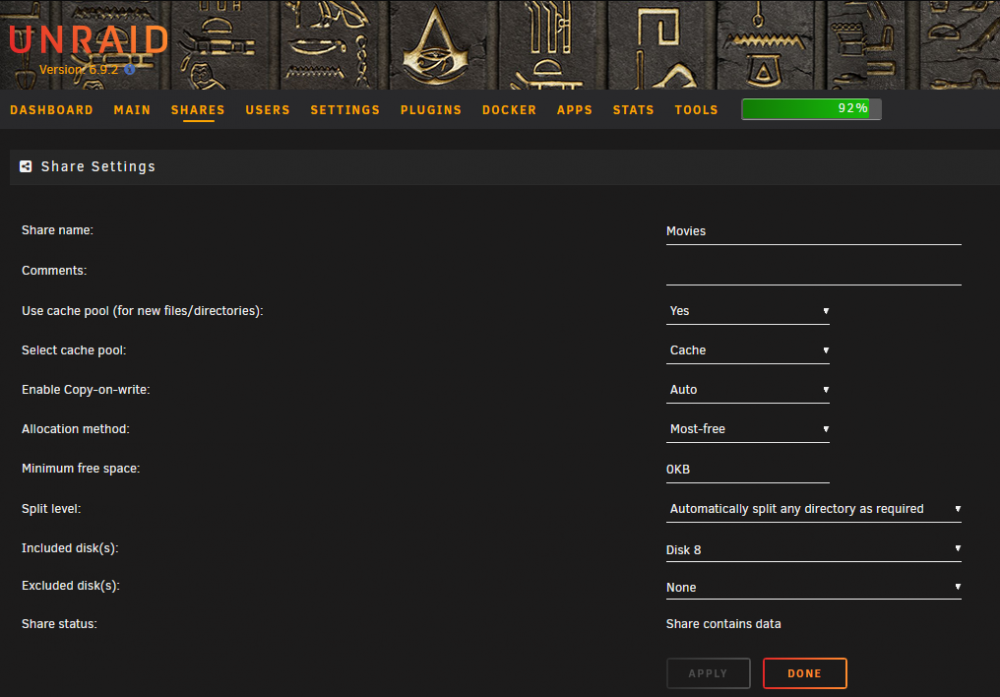
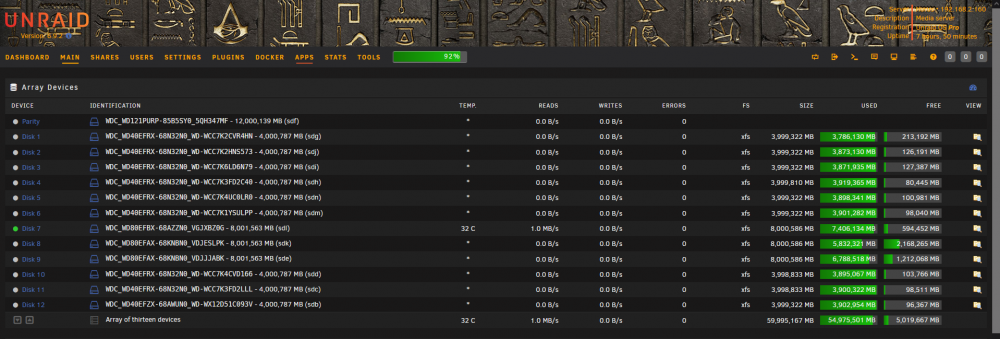
Ja das mag verwirrend aussehen, tatsächlich ist es das aber nicht. Das Share "Movies" befindet sich auf allen 12 Disks, aber "zur Zeit" ist nur die Disk 8 für das Share freigegeben, sodass die 2,1TB langsam aufgefüllt werden können. Und nachdem ich ja "nur" 300GB kopiert habe, gibt's auch kein Problem mit dem Speicherplatz 👍
-
root@Horus:~# df -h /mnt/user/Movies/ Filesystem Size Used Avail Use% Mounted on shfs 55T 50T 4.6T 92% /mnt/user root@Horus:~# Komisch an der Sache: Die Filesystem Size wird mit 55TB angezeigt und im Screen (und real) sind es aber 60TB... Und "Filesystem Used" wird auch falsch angezeigt... was isn da los bitte?
-
Jo - für beide jeweils 0KB (Cache/Movies), weil ich alles händisch verteile und die Limits nicht benötige.
-
Nö... Min free Space 0KB. Zur Ergänzung: man kann die Files "einzeln" rüberschaufeln, sodas sie dann gemeinsam auf der SSD landen - damit hat unraid kein Problem. Man kann sie nur nicht "gemeinsam auf einmal" rüberkopieren...
-
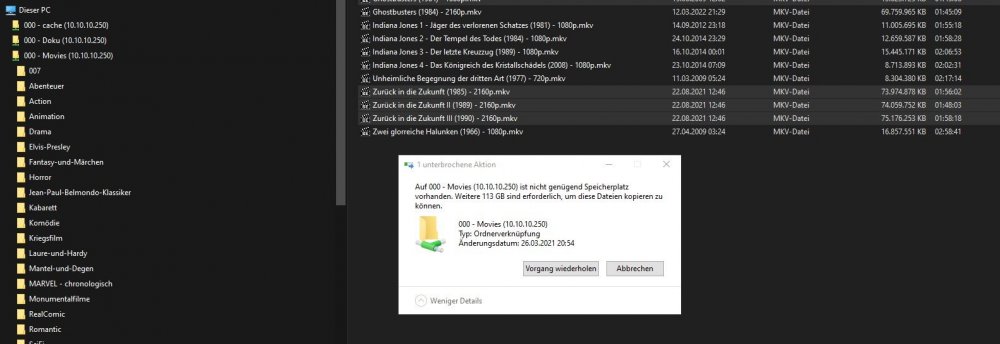
Hallo Experten, ich hab da seit Langem ein Problem, das ich nicht wirklich zuordnen kann. Ich woilte gerade 300GB in einem Rutsch auf meinen Server schippern - freier Speicher 5,33TB. Auf der Cache-SSD sind 471GB frei - sollte also kein Problem darstellen... Sagt mir doch diese unraid-Gurke: NEIN, da is kein Platz! Es fehlen 113GB... WTF? Dieser Mist taucht 1-2x pro Monat auf und verschwindet so sang- und klanglos, wie er gekommen ist. Ich hätte nur die Vermutung, dass die 32GB-RAM vielleicht zu wenig sind... testen kann ich's leider nicht, da ich keinen zusätzlichen Speicher habe. Falls jemand dieses Problem schonmal gesehen hat, kann er mir vielleicht verraten, wo diese dämliche Meldung herkommt. Danke im Voraus für Eure Hilfe.
-
QUESTION: Will we ever see a new stable unraid-version? It's over a year since the last update...
-
Is this a "RC-only" problem or what is it? I never saw this on my unraid...
-
Well... i did some changes to my post 😉
-
How long have we had RC2 now? Hardware-Support is still crap... well... I am happy with my i7-9700... Plex is working... HW-Transcoding is working... HDR-Tonemapping is working...
-
What says the manual? Gigabyte isn't the best choise for a sys like unraid... sorry for that... They always have problems with various components and the BIOS itself...
-
Not fully supported yet...
-
Maybe transcoding over the iGPU...
-
Sure (?) Why should it be unmounted??? I removed the UD SATA-SSD and all is fine again - sleep-timer is working again and Server goes to sleep like normal... this is really weird... It seems this plugin is confused as soon as a second UD is installed...
-
Here is the Disk Log Information... This UD is active for no reason... Feb 3 11:28:38 Horus s3_sleep: Disk activity on going: sdc Feb 3 11:29:38 Horus s3_sleep: Disk activity on going: sdc Feb 3 11:30:38 Horus s3_sleep: Disk activity on going: sdc Feb 3 11:31:05 Horus unassigned.devices: Changed Disk Name on 'Samsung_SSD_850_EVO_250GB_S2R6NB0HA47730M (sdc)' to 'UD-3' Feb 3 11:31:38 Horus s3_sleep: Disk activity on going: sdc Feb 3 11:31:45 Horus unassigned.devices: Changed Disk Name on 'Samsung_SSD_850_EVO_250GB_S2R6NB0HA47730M (sdc)' to 'UD-3' Feb 3 11:32:38 Horus s3_sleep: Disk activity on going: sdc Feb 3 11:33:38 Horus s3_sleep: Disk activity on going: sdc Feb 3 11:34:38 Horus s3_sleep: Disk activity on going: sdc Feb 3 11:35:38 Horus s3_sleep: Disk activity on going: sdc Feb 3 11:36:38 Horus s3_sleep: Disk activity on going: sdc Feb 3 15:57:29 Horus kernel: sd 3:0:0:0: [sdc] Synchronizing SCSI cache Feb 3 15:57:29 Horus kernel: sd 3:0:0:0: [sdc] Stopping disk Feb 3 15:57:29 Horus kernel: sd 3:0:0:0: [sdc] Starting disk Feb 3 15:57:29 Horus kernel: ata2: SATA link up 6.0 Gbps (SStatus 133 SControl 300) Feb 3 15:57:29 Horus kernel: ata2.00: ACPI cmd ef/10:06:00:00:00:00 (SET FEATURES) succeeded Feb 3 15:57:29 Horus kernel: ata2.00: ACPI cmd f5/00:00:00:00:00:00 (SECURITY FREEZE LOCK) filtered out Feb 3 15:57:29 Horus kernel: ata2.00: ACPI cmd b1/c1:00:00:00:00:00 (DEVICE CONFIGURATION OVERLAY) filtered out Feb 3 15:57:29 Horus kernel: ata2.00: supports DRM functions and may not be fully accessible Feb 3 15:57:29 Horus kernel: ata2.00: disabling queued TRIM support Feb 3 15:57:29 Horus kernel: ata2.00: ACPI cmd ef/10:06:00:00:00:00 (SET FEATURES) succeeded Feb 3 15:57:29 Horus kernel: ata2.00: ACPI cmd f5/00:00:00:00:00:00 (SECURITY FREEZE LOCK) filtered out Feb 3 15:57:29 Horus kernel: ata2.00: ACPI cmd b1/c1:00:00:00:00:00 (DEVICE CONFIGURATION OVERLAY) filtered out Feb 3 15:57:29 Horus kernel: ata2.00: supports DRM functions and may not be fully accessible Feb 3 15:57:29 Horus kernel: ata2.00: disabling queued TRIM support Feb 3 15:57:29 Horus kernel: ata2.00: configured for UDMA/133 Feb 3 15:58:05 Horus s3_sleep: Disk activity on going: sdc ...and this is the log of the first UD... completely different... Feb 3 16:03:23 Horus kernel: nvme1n1: p1 Feb 3 16:03:38 Horus root: [160338] system.php:1101 @ loop: Scanning: N:1:4:1 Node: /dev/nvme1n1 Feb 3 16:03:45 Horus emhttpd: Samsung_SSD_970_EVO_Plus_500GB_S4EVNX0NB30735A (nvme1n1) 512 976773168 Feb 3 16:03:45 Horus emhttpd: read SMART /dev/nvme1n1 Feb 3 16:03:56 Horus unassigned.devices: Adding partition 'nvme1n1p1'... Feb 3 16:03:56 Horus unassigned.devices: Mounting partition 'nvme1n1p1' at mountpoint '/mnt/disks/SSD970EVO'... Feb 3 16:03:56 Horus unassigned.devices: Mount drive command: /sbin/mount -t 'xfs' -o rw,noatime,nodiratime,discard '/dev/nvme1n1p1' '/mnt/disks/SSD970EVO' Feb 3 16:03:56 Horus kernel: XFS (nvme1n1p1): Mounting V5 Filesystem Feb 3 16:03:56 Horus kernel: XFS (nvme1n1p1): Ending clean mount Feb 3 16:03:56 Horus unassigned.devices: Successfully mounted 'nvme1n1p1' on '/mnt/disks/SSD970EVO'. It seems, this plugin is broken 👎
-
No because its just a Backup-Drive. I do a backup of the plex-database twice a week - thats all...
-
Since the last update of UD (maybe - i dont exactly know), i have a problem with the second UD-SSD - a Samsung 870 Evo 500GB. This SATA-SSD didnt go to sleep and prevents the server from going to sleep. It's either a problem with UD or the SSD itself - I'll probably have to remove the SSD again... EDIT: Tried an old SSD 850 from Samsung... same behavior... no sleep anymore Feb 3 11:25:37 Horus s3_sleep: Disk activity on going: sdc Feb 3 11:25:38 Horus s3_sleep: Disk activity detected. Reset timers. So this second UD is also not going to sleep... strange... How can i send the second UD to sleep? It says "SSD CANNNOT BE SPUN DOWN" - What is this?
-
Ok... und wie mach ich das? Da steh ich jetzt etwas an... EDIT: Also das war wirklich dieser User-Share... Ich kopier die Daten gerade auf ein phys. Share am UD und das läuft wie der Blitz 👍🤣 Danke nochmals für die Hilfe
-
So ist es 👍 Alles klar - dann werd ich statt dem User-Share ein Disk-Share einrichten und schaun, ob das schneller ist... Das heißt aber dann auch, dass ich die schnelle NVMe nicht nutzen kann... bled... Und wenn ich das Ganze auf das Unassigned Devise draufkopiere? Das ist nämlich auch eine NVMe...
-
Hallo Experten, ich benutze mein unraid zwar schon sehr lange, aber niemals für Daten. Gestern hatte ich die Idee, ein Backup meiner Daten auf einem unraid-Share zu sichern. Was dann kam, war echt fad... Zur Ausgangssituation: Auf meiner Win 10 Maschine liegen ca. 400GB wichtige Daten auf einer SATA-SSD. Unraid hat eine 512GB NVMe (Cache) und beide Maschinen sind über einen 10GBit-Link verbunden. Zum Sichern der Daten hab ich TrayBackup verwendet. Eine Sicherung auf eine externe USB 3.0 HDD dauert in etwa 8-12min... Und jetzt zu dem Vorgang selbst: Nach 10 Std. (!) waren gerade mal 89GB von 400GB gesichert... Jetzt wollte ich mal nachfragen, was da so dermaßen langsam ist... liegt das am SMB-Share? Liegt's an Windows? Oder hab ich da wo "den Wurm" drinnen? Falls mir da jemand weiterhelfen könnte, währe ich sehr dankbar 👍
-
Ich hab das in den letzten 12 Jahren 5x gemacht... zu beachten ist die neue MAC der OnBoard-Netzwerkkarte (sofern die verwendet wird). Die sollte man sich aufschreiben, wenn man WOL für den Server nutzt. Sofern eine feste Zuordnung einer IP über einen DHCP-Server erfolgt, muß das ebenfalls neu eingestellt werden - das is alles 👍
-
Where is the poll?
-
For Plex HW-Transcoding you can use every iGPU starting with UHD 630 (recommended) or newer... also for 4K. Older iGPUs on Intel-CPUs are also working but the Quality is lower/bad and maybe not sufficient for 4K.
-
I think, it's not working yet...
-
Last i3 with ECC-Support was the i3-9100...
-
Ich behaupte mal, das die 9er-Serie weniger Energie frißt als die 10/11er...



