






craigr
Members
-
Joined
-
Last visited
Everything posted by craigr
-
And now it just connected... using my local unbound DNS 192.168.1.1
-
Tried changing my DNS: 2024-07-03 08:45:27,752 DEBG 'start-script' stdout output: 2024-07-03 08:45:27 NOTE: the current --script-security setting may allow this configuration to call user-defined scripts 2024-07-03 08:45:27,752 DEBG 'start-script' stdout output: 2024-07-03 08:45:27 TCP/UDP: Preserving recently used remote address: [AF_INET]149.88.97.241:1198 2024-07-03 08:45:27 UDPv4 link local: (not bound) 2024-07-03 08:45:27 UDPv4 link remote: [AF_INET]149.88.97.241:1198 2024-07-03 08:45:30,315 DEBG 'start-script' stdout output: 2024-07-03 08:45:30 [toronto402] Peer Connection Initiated with [AF_INET]149.88.97.241:1198 2024-07-03 08:45:30,345 DEBG 'start-script' stdout output: 2024-07-03 08:45:30 TUN/TAP device tun0 opened 2024-07-03 08:45:30 net_iface_mtu_set: mtu 1500 for tun0 2024-07-03 08:45:30,345 DEBG 'start-script' stdout output: 2024-07-03 08:45:30 net_iface_up: set tun0 up 2024-07-03 08:45:30 net_addr_v4_add: 10.21.112.9/24 dev tun0 2024-07-03 08:45:30 /root/openvpnup.sh tun0 1500 0 10.21.112.9 255.255.255.0 init 2024-07-03 08:45:30,355 DEBG 'start-script' stdout output: 2024-07-03 08:45:30 Initialization Sequence Completed 2024-07-03 08:46:27,525 DEBG 'start-script' stdout output: [info] DNS failure, creating file '/tmp/dnsfailure' to indicate failure... 2024-07-03 08:46:27,528 DEBG 'start-script' stdout output: [info] Attempting to get external IP using 'http://checkip.amazonaws.com'... 2024-07-03 08:46:27,563 DEBG 'start-script' stdout output: [info] Failed on last attempt, attempting to get external IP using 'http://whatismyip.akamai.com'... 2024-07-03 08:46:27,573 DEBG 'start-script' stdout output: [info] Failed on last attempt, attempting to get external IP using 'https://ifconfig.co/ip'... 2024-07-03 08:46:27,583 DEBG 'start-script' stdout output: [info] Failed on last attempt, attempting to get external IP using 'https://showextip.azurewebsites.net'... 2024-07-03 08:46:27,593 DEBG 'start-script' stdout output: [warn] Cannot determine external IP address, performing tests before setting to '127.0.0.1'... [info] Show name servers defined for container 2024-07-03 08:46:27,594 DEBG 'start-script' stdout output: nameserver 192.168.1.1 2024-07-03 08:46:27,594 DEBG 'start-script' stdout output: [info] Show contents of hosts file 2024-07-03 08:46:27,594 DEBG 'start-script' stdout output: 127.0.0.1 localhost ::1 localhost ip6-localhost ip6-loopback fe00::0 ip6-localnet ff00::0 ip6-mcastprefix ff02::1 ip6-allnodes ff02::2 ip6-allrouters 172.17.0.3 8258d56b9091 191.96.36.104 ca-toronto.privacy.network 104.18.36.183 www.privateinternetaccess.com 104.19.240.167 serverlist.piaservers.net 2024-07-03 08:46:27,596 DEBG 'start-script' stdout output: [info] Script started to assign incoming port for 'pia' 2024-07-03 08:46:27,596 DEBG 'start-script' stdout output: [info] Port forwarding is enabled [info] Checking endpoint 'ca-toronto.privacy.network' is port forward enabled... 2024-07-03 08:46:27,710 DEBG 'start-script' stdout output: [info] Sending SIGTERM (-15) to 'openvpn' due to dns failure... 2024-07-03 08:46:27,764 DEBG 'start-script' stdout output: 2024-07-03 08:46:27 event_wait : Interrupted system call (fd=-1,code=4) 2024-07-03 08:46:27,764 DEBG 'start-script' stdout output: 2024-07-03 08:46:27 net_addr_v4_del: 10.21.112.9 dev tun0 2024-07-03 08:46:27,787 DEBG 'start-script' stdout output: 2024-07-03 08:46:27 /root/openvpndown.sh tun0 1500 0 10.21.112.9 255.255.255.0 init 2024-07-03 08:46:27,804 DEBG 'start-script' stdout output: 2024-07-03 08:46:27 SIGTERM[hard,] received, process exiting 2024-07-03 08:46:27,810 DEBG 'start-script' stdout output: [info] Starting OpenVPN (non daemonised)... 2024-07-03 08:46:27,833 DEBG 'start-script' stdout output: 2024-07-03 08:46:27 DEPRECATED OPTION: --cipher set to 'aes-128-cbc' but missing in --data-ciphers (AES-256-GCM:AES-128-GCM:CHACHA20-POLY1305). OpenVPN ignores --cipher for cipher negotiations. 2024-07-03 08:46:27 WARNING: file 'credentials.conf' is group or others accessible 2024-07-03 08:46:27,833 DEBG 'start-script' stdout output: 2024-07-03 08:46:27 OpenVPN 2.6.11 [git:makepkg/ddf6bf6d2a135835+] x86_64-pc-linux-gnu [SSL (OpenSSL)] [LZO] [LZ4] [EPOLL] [PKCS11] [MH/PKTINFO] [AEAD] [DCO] built on Jun 20 2024 2024-07-03 08:46:27 library versions: OpenSSL 3.3.1 4 Jun 2024, LZO 2.10 2024-07-03 08:46:27 DCO version: N/A 2024-07-03 08:46:27,834 DEBG 'start-script' stdout output: 2024-07-03 08:46:27 NOTE: the current --script-security setting may allow this configuration to call user-defined scripts 2024-07-03 08:46:27,836 DEBG 'start-script' stdout output: 2024-07-03 08:46:27 TCP/UDP: Preserving recently used remote address: [AF_INET]104.18.159.201:1198 2024-07-03 08:46:27 UDPv4 link local: (not bound) 2024-07-03 08:46:27,836 DEBG 'start-script' stdout output: 2024-07-03 08:46:27 UDPv4 link remote: [AF_INET]104.18.159.201:1198
-
Just updated last night and realized I cannot connect. Have to go to hospital for two procedures right now so can't post more. \_ |__ |__| ____ | |__ ____ ___ ___ | __ \| |/ \| | \_/ __ \\ \/ / | \_\ \ | | \ Y \ ___/ > < |___ /__|___| /___| /\___ >__/\_ \ \/ \/ \/ \/ \/ https://hub.docker.com/u/binhex/ 2024-07-03 08:32:04.737222 [info] Host is running unRAID 2024-07-03 08:32:04.758591 [info] System information Linux 4147556f4dbf 6.1.79-Unraid #1 SMP PREEMPT_DYNAMIC Fri Mar 29 13:34:03 PDT 2024 x86_64 GNU/Linux 2024-07-03 08:32:04.776293 [info] SHARED_NETWORK not defined (via -e SHARED_NETWORK), defaulting to 'no' 2024-07-03 08:32:04.793744 [info] PUID defined as '99' 2024-07-03 08:32:04.813363 [info] PGID defined as '100' 2024-07-03 08:32:04.915804 [info] UMASK defined as '000' 2024-07-03 08:32:04.938860 [info] Permissions already set for '/config' 2024-07-03 08:32:04.961340 [info] Deleting files in /tmp (non recursive)... 2024-07-03 08:32:04.985296 [info] VPN_ENABLED defined as 'yes' 2024-07-03 08:32:05.003445 [warn] VPN_CLIENT not defined (via -e VPN_CLIENT), defaulting to 'openvpn' 2024-07-03 08:32:05.020984 [info] VPN_PROV defined as 'pia' 2024-07-03 08:32:05.041050 [info] OpenVPN config file (ovpn extension) is located at /config/openvpn/ca_toronto.ovpn 2024-07-03 08:32:05.075031 [info] VPN remote server(s) defined as 'ca-toronto.privacy.network,' 2024-07-03 08:32:05.090500 [info] VPN remote port(s) defined as '1198,' 2024-07-03 08:32:05.105898 [info] VPN remote protcol(s) defined as 'udp,' 2024-07-03 08:32:05.123468 [info] VPN_DEVICE_TYPE defined as 'tun0' 2024-07-03 08:32:05.141027 [info] VPN_OPTIONS not defined (via -e VPN_OPTIONS) 2024-07-03 08:32:05.158545 [info] NAME_SERVERS defined as '1.1.1.1,8.8.8.8,1.0.0.1,8.8.4.4' Error: error sending query: Could not send or receive, because of network error Error: error sending query: Could not send or receive, because of network error Error: error sending query: Could not send or receive, because of network error Error: error sending query: Could not send or receive, because of network error Error: error sending query: Could not send or receive, because of network error Error: error sending query: Could not send or receive, because of network error Error: error sending query: Could not send or receive, because of network error Error: error sending query: Could not send or receive, because of network error Error: error sending query: Could not send or receive, because of network error Error: error sending query: Could not send or receive, because of network error
-
Updated from 6.12.8 to 6.12.9 14 hours ago without any issues.
-
6.12.6 to 6.12.8 so far so good. Did not stop the array, but did do a full power down instead of a restart. No crash on first boot as I have dealt with in the past. Thanks guys, craigr
-
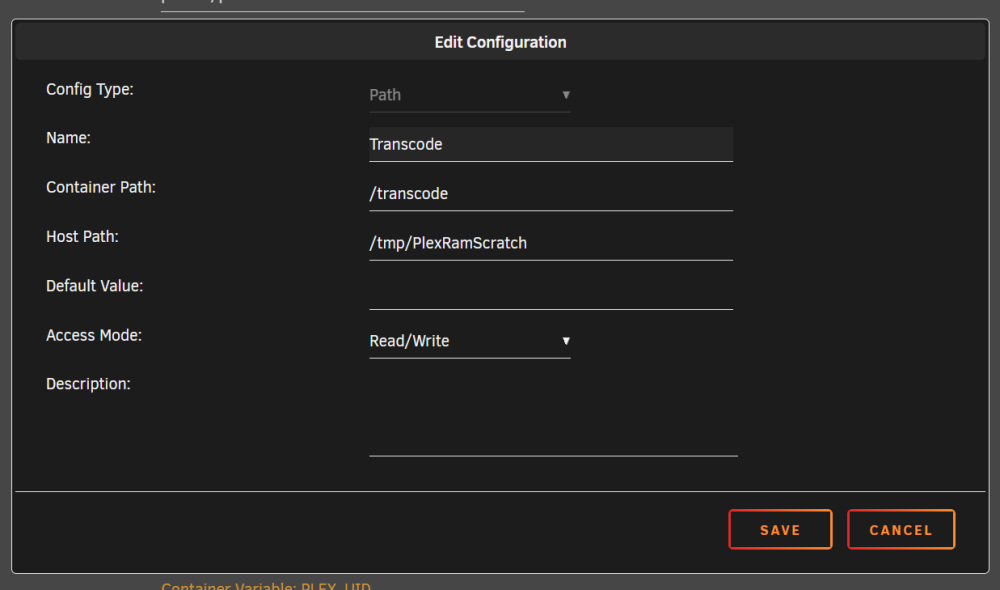
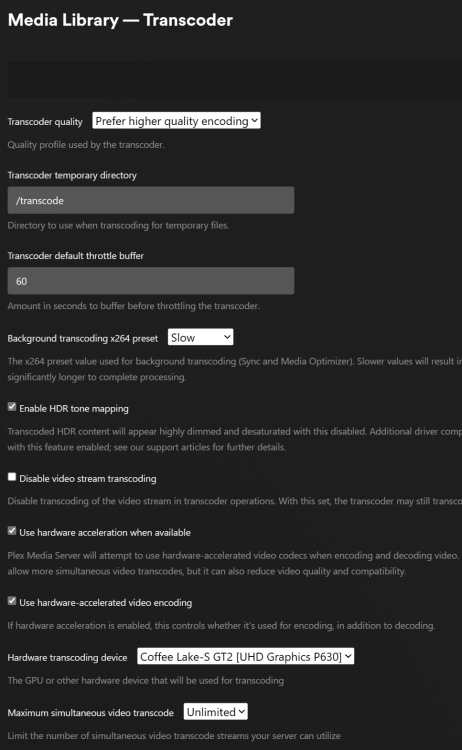
My go file PLEX lines: #Limit PLEX Transcode RAM Drive Size mkdir /tmp/PlexRamScratch chmod -R 777 /tmp/PlexRamScratch mount -t tmpfs -o size=32g tmpfs /tmp/PlexRamScratch I do not have any extra parameters. I am however using the Intel IGPU not Nvidia. Good luck!

-
A lot has changed with this between many releases. I'd remove any plugins and code relating to the iGPU and start from scratch. Maybe someone will have a better answer.
-
Well if noise is not an issue. I find my NF-A8's to be too loud already. I use four SS-500's.
-
Updated from 6.12.5. No issues to report. I appreciate the updates, but it does make me nervous when sequential updates fly out at this rate. Thanks
-
Do the SS-500's have a temp sensor and fan control? I have four SS-500's that are very old, but it seemed to me when I installed them so long ago that their fans always spun at 100%. I ran the fans to the motherboard to gain some control. That said, it seems gnollo's fans ran faster when he did the same and his drives ran cooler. Right now I am stuck having all four fans on one controller channel. So one hard drive hot means all for POD fans spin up faster. It's loud and annoying. I may have to try connecting the fans back to each SS-500 and see what happens if I don't find an answer.
-
Yeah, there is a fan in each POD. I forget if it's 80mm or 92mm (think it's 80mm, but I ordered four Noctua of both sizes for two different projects at the same time). I ran the fan power cord outside the Norco PODs when I upgraded the fans. Right now all four fans are connected to one fan header on my MB. So, the fans in all for PODS run at higher speed even if just one drive is hot. A lot better than full speed 24/7 like the original wiring, but far from optimal. And as I said, IPMI tools (and possibly MB) only allows for two fan speed controls; CPU and other. Therefore, my chassis fan speeds are all based on the tempo of the hottest hard drive as well. I'd really like to at least get the chassis and POD fans separated, but it would be so nice if each POD had its own control and all the chassis fans were on another.
-
I had dropped back plexserver version, but I went back a couple more to version 1.32.6.7468-07e0d4a7e. It seems to be working now but I was only able to try manual recordeings, not scheduled recordings.
-
Do you mean ISP? I have been having an issue for several weeks where I cannot watch a channel while that channel is recording a program. I have not found a solution yet.
-
Sorry, but than again, switching to 3x4 enclosures instead of 3x5 would also have benefits. When I switched to 3x5 the temperature of all my discs went up 10C degrees. So the full tower would be really good in that regard as well... maybe I should buy one!
-
The other thing is that I have 20x spinners now. I'm hoping that maybe on my next hard drive upgrade I can have enough storage space with just 15x spinners. Right now, I have 204TB of storage with 18 data drives. If I drop to 13 data drives and they are 20TB than I would already have 260TB. If I hold out long enough, I bet I can get 300TB with 13 data drives, one parity, and a cache drive.
-
I've decided I'm not getting it. My existing Xigmatek Elysium case is truly functionally a bit better, so I'm sticking with it. But if I were buying a case now it would certainly be the AI Raider. I mean, "Art of Server" likes it and I trust his judgement. It seems like as close to a perfect case as one could hope. I'd like to buy it because it looks cooler and more modern than mine, and it's no doubt quieter, but it's kind of a lateral move in most respects for me.
-
I had been unable to find these for months, but they are back in stock at Amazon. I really want to pull the trigger.
-
In case anyone ever comes along and finds this helpful, the new memory has continued to work flawlessly. It's great!
-
That's really nice. I just wish I could get my son into ANYTHING! He's nine and if it's not video games or TV he's out. I watched my dad build everything and that's how I learned to build. Now my dad's passed, and I fix everything around my families' house while my sone looks at a screen in another room...
-
PS: I'd love to get the Noctua NH-D15 in mine as well, but the Supermicro board just won't allow it. I have sooo much space in my case, it's a shame.
-
Nice Build! Like you, mine changes over the years, but the heart has remained the same I don't know anything about fan controllers, but what I would love is more control of each individual fan rather than groups of fans. With IPMI control in unRAID you can select two sensors to monitor; CPU and another. The second controls the speed of every fan in the machine. I have four hard drive PODs with five discs each and a fan on each. I then also have four chassis fans. Right now, IPMI monitors HDD temps and adjusts ALL fans (except CPU) based on the hottest HDD. I'd really love to have the chassis fans separate from the HD POD fans. Also, I'd really really love to have each POD fan controlled independently. Is there are way you know of to accomplish this?
-
For reference, this has been my issue. I did a shutdown this time and did not have the crash after reboot.
-
Upgraded from 6.12.4 seemingly without issue. Did a full shutdown this time instead of restarting. System did not crash after upgrade reboot as it has been doing on all but one of the 6.12.x updates; after only the first reboot after an upgrade.
-
Is this what I should see? root@unRAID:~# cat /etc/modprobe.d/zfs.conf zfs_dmu_offset_next_sync=0root@unRAID:~#
-
Awesome!




