





tjb_altf4
Members
-
Joined
-
Last visited
Everything posted by tjb_altf4
-
I did a test plot yesterday and it was at least 30% faster
-
According to docs it is: chia plotnft create -u https://poolnamehere.com I think the -s pool is not needed as it is indicated by the pool parameter, but it shouldn't hurt to leave it there.
-
This is a quick start guide for users migrating from previous version (solo plots), but more info is available here in the official pooling guide: https://github.com/Chia-Network/chia-blockchain/wiki/Pooling-User-Guide New plots on this release require creation of a single NFT, this is the mechanism that is used to direct which pool you want to join for new plots (including self pooling). NFT creation requires mojo (tiny amount of XCH currency), if you haven't already, go over to official Chia faucet and follow the prompts to add mojo for free to your wallet. https://faucet.chia.net/ For those that are waiting for their pool of choice to become available, you can create a self-pool NFT using the following command from Unraid terminal: docker exec -it chia chia plotnft create -s local You will be asked to confirm, if agreed you will get a transaction ID. Process is slightly different if joining a pool immediately, please consult the official guide linked above. You can now retrieve your NFT address, pooling state and other details with this command on the Unraid terminal: docker exec -it chia chia plotnft show Read the addresses descriptions carefully, the NFT (singleton) is very clearly marked as being an address for plotting. Use this address when creating plots. When creating a new plot, the new -c switch followed by the NFT (singleton) address is used. Reading the help documentation, it seems the -p switch no longer required when using -c switch -c, --pool_contract_address TEXT Address of where the pool reward will be sent to. Only used if alt_fingerprint and pool public key are None -f, --farmer_public_key TEXT Hex farmer public key -p, --pool_public_key TEXT Hex public key of pool WARNING: if self pooling, you need to manually claim rewards, if you forget and you join a pool, the pool can claim those rewards you have forgotten to claim.
-
Chia 1.2.0 aka release for portable plots (pooling) is out!
-
Time for a pool party! 1.2.0 is released
-
I think you are looking at CPU clock, not RAM clock.
-
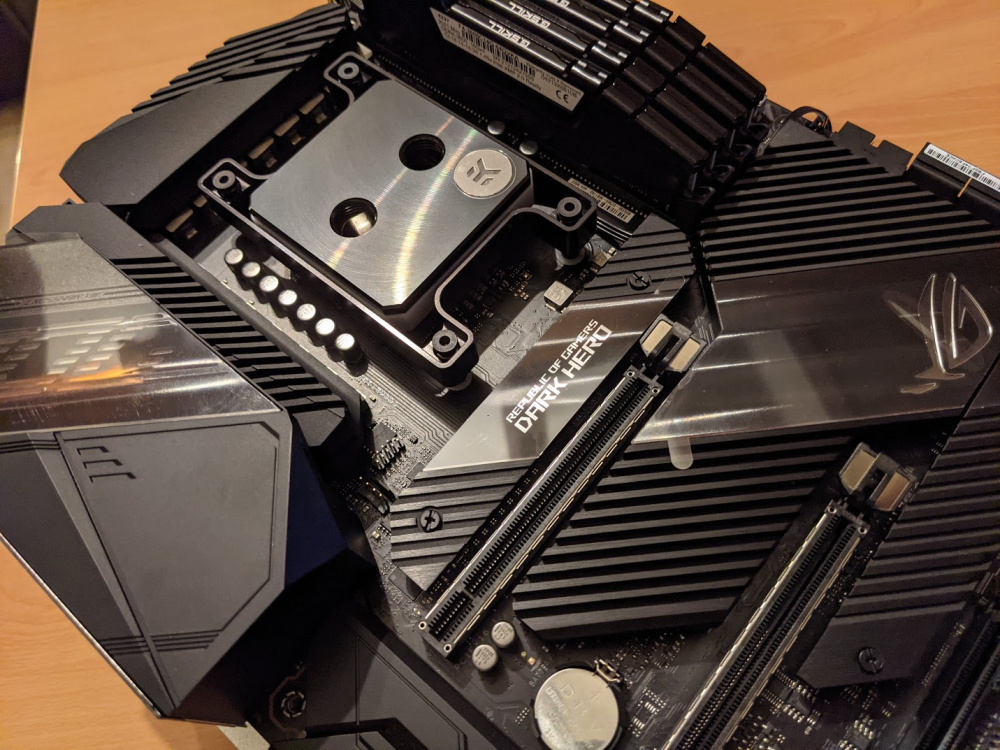
Part 3. Last year I felt it was time to upgrade my workstation/gaming-rig... well covid and its supply chain shocks ruined that. Things are better now, and I've recently picked up a 5950X and a 3090, which I will be watercooling with some nice EKWB bits and some more 3D printed parts I've designed. This will be replacing my aging 7700K build in my second RSV-L4500, while the Titan X(p) in there currently will be rehomed to the server, hopefully for use as a "daily" development VM. At this stage, the workstation/game-rig build will be a Unraid build, centered around virtualisation and some supporting dockers, with only a minimum storage footprint, with "fortytwo" remaining the primary NAS and appserver. As I've been sending walls of text, here's a pic of the (slow) progress
-
Part 2. At this point my RSV-L4500 is max capacity, but I still have drives I want to add (mutil-array when??). I dusted off my 3D printer from my recent house move, jumped into CAD and designed a simple prototype to gauge how I could expand capacity, while maximising airflow to drives. At this point I should be able to jump from 15 HDDs to 24, being conservative with airflow gaps... with room in the case to expand to 36 Hoping to finalize that design this weekend, do some testing and get that into the server pending getting the cables I need
-
Part 1. For about 5 years I've had a 2TB WD Blue (xfs) that has been hammered with torrents all day every day,. About 6 months ago I had a random disconnect from it, but came good after a restart. Well its happened again, twice in the last few days in fact, so I took that as a warning of impending doom! I had been putting off migrating my downloads from an unassigned device to its own pool (now that 6.9 has unleashed multi-pools upon us). I put it off as I knew this would mean remapping about 10 dockers and a bunch of data migration... I guess no time like when the missus is on night shift and the kiddies are sleeping So the solution you ask? Well I upgraded my array from 4TB drives to 10TB drives this time last year and not really found a use so far, so I've grabbed 2 of those 4TB Reds in RAID0 btrfs pool. This pool will be a scratch pool that will be a dumping ground for all sorts of in progress stuff that is highly replaceable: downloads, video conversion jobs, temp folders etc.
-
-
I reckon you could probably drop that further by selling off the cpu/mobo and setting it up as a DAS. Would just need an expander per 1U, and HBA to control it all. @sota you would probably be able to get more drives in too, you'd have awesome drive density with 12-16 HDD per U 😁
-
It's all coming back down now
-
are you planning on holding for a while, or cashing in to recover costs?
-
Upgraded this plugin and removed the old iscsi target plugin and everything is still humming along, great job all! Interface updates from the last few versions look great!
-
Yes, so the situation that where it would be noticeable would be during parity check when your reading from all drives, where with a single link you would see slower (but not terrible) speeds. Unless you plan on using the other port for more drives, using dual link should just give you headroom when the array is under heavy use.
-
Are you using unassigned device plugin? There is a setting (per disk) that you need to enable, "passed through" to prevent the system from mounting the disk.
-
Also I wouldn't trust random having the private key, what you buy the hardware, pay the power bill, but he could still swipe the loot? And you'll need to wipe if you want to pool? Yeah no thanks haha.
-
not even a good price, amazon has got stock again of most capacities and prices aren't that bad.
-
Should be able to do it though diskspeed
-
Nice work, might have to copy that idea 😛 Finally got mine yesterday. You should be able to add some bandwidth (will help for parity checks) by dual linking your HBA, see below
-
Ah missed that in the later post.
-
Are these enterprise or shucked HDDs? Might be the 3.3V issue
-
Latest release from 2 days ago seems to be dead, had to roll back to the previous working version v2021.04.10-1-01 Seems the latest SickChill release had a number of breaking changes, I think you've already onto this looking at your commit history, but thought I'd raise it all the same

-
Did you measure power usage by any chance ? That would be an interesting comparison to see if it was a noticeable or negligible difference.
-
What version of unraid are you on? It's dead simple on 6.9 onwards.




