





MowMdown
Members
-
Joined
-
Last visited
Everything posted by MowMdown
-
It could just be an empty folder existing part of the share. you would have to browse the contents of the specific pool to see what is triggering the message. Even just the share folder itself. In that case you can just ignore the message.
-
I see a bunch of "Mover Finished" logs which means mover is working correctly, which means you likely have files that are open for read. Mover cant move these until theyre no longer accessed by whatever process is accessing them.
-
Try the "open files v2" plugin. It might be what you might be looking for. I will say though this plugin might currently not work under certain conditions due to a missing kernel parameter that has not been activated. Also the File Activity V2 plugin.
-
Remove the flash drive, reboot and see if the system will boot unraid since no other boot media is present.
-
Ill be honest, I dont think many people use USB NICs and the user pool on the unraid forums is pretty small. I would suggest checking a mainline linux forum (arch forums for example) for questions/answers for something Linux Kernel related.
-
For future reference, just attach the zip file, no need to extract the contents.
-
You seem to have a docker container in a boot loop, consider addressing as it might be causing issues with the rest of the system
-
Either you are hitting a free space roadblock with a too restrictive share split level or the files are in use.
-
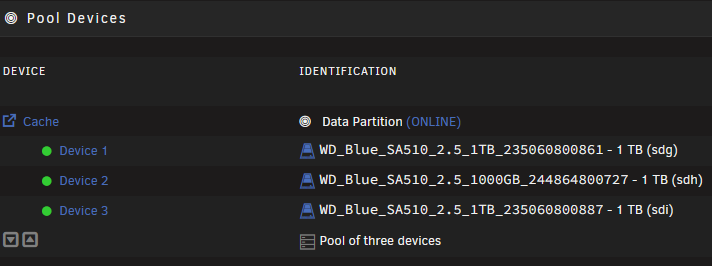
Unprotected means you don't have disk redundancy in your pool (single disk vs mirror/RAID) For array shares this shows you have a parity disk or two but for pool shares (or files on a pool) that pool is a single disk pool. I mean, personally I would have combined the two disks into a single pool so they were mirrored and just run a more aggressive mover schedule. (it's what I already personally do)
-
Just set the boot order priority. also check CMOS battery in case it needs replacement (if you notice the time keeps resetting for example)
-
You will need to backup your USB and recreate it using the USB creator tool, then restore the contents of your backup to the USB. 7.3 is more strict about partitions
-
Without diagnostics its impossible to tell but my first guess is your disk/pool dropped offline make sure all your disks are mounted and contents of your “system” share are in tact.
-
Does running unraid in safe mode with docker service disabled produce the same results? At a minimum you need to rule out docker entirely by leaving it off for an extended period of time.
-
Honestly its probably the nvidia driver not playing nice with sleep. Not really much anyone can do about it. Sleep is also not officially supported by unraid either.
-
Storage layout makes perfect sense. SMB should more/less generally just work out of the box. Refer to the unraid docs for more info on SMB shares. Community apps does a pretty good job of "spotlighting" apps/plugins. Couple of my favorites are: Appdata backup, Auto Disk Unlock, GPU Stats, NUT for UPS, par2cron, tailscale, user scripts. 16GB is fine since most of your work will be performed on another machine. Unraid doesn't really use a lot of RAM unless you run RAM heavy containers. A pitfall of your system is it does not have an intel iGPU and AMD is basically "not supported" by plex for hardware transcoding, so you likely wont see any benefit from that. Plan if you want to encrypt your disks ahead of time. Doing it after the fact will not be fun as there is no way to "encrypt in place" and requires a disk format.
-
Yes that is the same conclusion I came to with some other people. Arc requires rebar enabled
-
This setting would let unraid accept private subnets on another tailnet (someone elses private LAN). You do not need to enable this feature for unraid. That's why this feature is greyed out, it's not needed for unraid to connect to other private LANs.
-
With unraid you cannot start the "array" without also unlocking all encrypted drives and mounting them. This means you have to unlock and mount all pools and the array on the system.
-
Please post diagnostics <- click here to see how
-
Please post diagnostics
-
Correct you’d need to either run them from a drive location or copy them each boot to whatever executable directory you want using a script
-
do both devices and the router show link speeds negotiating at full speed?
-
GPUs do yes, Im not sure if other PCIe devices do.
-
Please also post your diagnostics
-
https://docs.immich.app/install/upgrading/#migrating-to-vectorchord


