





MowMdown
Members
-
Joined
-
Last visited
-
Currently
Viewing Topic: How to check if my (new-ish) parity drives are valid after OS crash
Everything posted by MowMdown
-
That would be correct everything within seafile would be stored in the same place.
-
That's odd because I've been using an MSI B550 board without any of these issues.

-
Currently you have it set to "Cache -> Array" so mover will move data off of your cache pool onto your spinning disks. Switching this to "Array -> Cache" will move the data back if it's not in use when mover operates.
-
use /mnt/cache/... instead of /mnt/user/... And/Or set the share to be primary storage cache and secondary storage to none. You will have to move that share to cache first.
-
access.conf is my allow/deny rules for only allowing private IP ranges, so that one you can ignore entirely. resolver.conf: # This file is auto-generated only on first start, based on the container's /etc/resolv.conf file. Feel free to modify it as you wish. resolver 10.0.0.1 valid=30s; proxy.conf: ## Version 2023/02/09 - Changelog: https://github.com/linuxserver/docker-swag/commits/master/root/defaults/nginx/proxy.conf.sample # Timeout if the real server is dead proxy_next_upstream error timeout invalid_header http_500 http_502 http_503; # Proxy Connection Settings proxy_buffers 32 4k; proxy_connect_timeout 240; proxy_headers_hash_bucket_size 128; proxy_headers_hash_max_size 1024; proxy_http_version 1.1; proxy_read_timeout 240; proxy_redirect http:// $scheme://; proxy_send_timeout 240; # Proxy Cache and Cookie Settings proxy_cache_bypass $cookie_session; #proxy_cookie_path / "/; Secure"; # enable at your own risk, may break certain apps proxy_no_cache $cookie_session; # Proxy Header Settings proxy_set_header Connection $connection_upgrade; proxy_set_header Early-Data $ssl_early_data; proxy_set_header Host $host; proxy_set_header Proxy ""; proxy_set_header Upgrade $http_upgrade; proxy_set_header X-Forwarded-For $proxy_add_x_forwarded_for; proxy_set_header X-Forwarded-Host $host; proxy_set_header X-Forwarded-Method $request_method; proxy_set_header X-Forwarded-Port $server_port; proxy_set_header X-Forwarded-Proto $scheme; proxy_set_header X-Forwarded-Server $host; proxy_set_header X-Forwarded-Ssl on; proxy_set_header X-Forwarded-Uri $request_uri; proxy_set_header X-Original-Method $request_method; proxy_set_header X-Original-URL $scheme://$http_host$request_uri; proxy_set_header X-Real-IP $remote_addr;ssl.conf: ## Version 2024/12/06 - Changelog: https://github.com/linuxserver/docker-baseimage-alpine-nginx/commits/master/root/defaults/nginx/ssl.conf.sample ### Mozilla Recommendations # generated 2024-12-06, Mozilla Guideline v5.7, nginx 1.26.2, OpenSSL 3.3.2, intermediate config, no OCSP # https://ssl-config.mozilla.org/#server=nginx&version=1.26.2&config=intermediate&openssl=3.3.2&ocsp=false&guideline=5.7 ssl_certificate /config/keys/cert.crt; ssl_certificate_key /config/keys/cert.key; ssl_session_timeout 1d; ssl_session_cache shared:MozSSL:10m; # about 40000 sessions ssl_session_tickets off; # curl https://ssl-config.mozilla.org/ffdhe2048.txt > /path/to/dhparam ssl_dhparam /config/nginx/dhparams.pem; # intermediate configuration ssl_protocols TLSv1.2 TLSv1.3; ssl_ciphers ECDHE-ECDSA-AES128-GCM-SHA256:ECDHE-RSA-AES128-GCM-SHA256:ECDHE-ECDSA-AES256-GCM-SHA384:ECDHE-RSA-AES256-GCM-SHA384:ECDHE-ECDSA-CHACHA20-POLY1305:ECDHE-RSA-CHACHA20-POLY1305:DHE-RSA-AES128-GCM-SHA256:DHE-RSA-AES256-GCM-SHA384:DHE-RSA-CHACHA20-POLY1305; ssl_prefer_server_ciphers off; # HSTS (ngx_http_headers_module is required) (63072000 seconds) add_header Strict-Transport-Security "max-age=63072000; includeSubDomains; preload" always; # Optional additional headers #add_header Cache-Control "no-transform" always; #add_header Content-Security-Policy "upgrade-insecure-requests; frame-ancestors 'self'" always; #add_header Permissions-Policy "interest-cohort=()" always; add_header Referrer-Policy "same-origin" always; add_header X-Content-Type-Options "nosniff" always; add_header X-Frame-Options "SAMEORIGIN" always; #add_header X-UA-Compatible "IE=Edge" always; add_header X-XSS-Protection "1; mode=block" always; add_header X-Robots-Tag "noindex, nofollow, nosnippet, noarchive";
-
Well in that case those SSL certs will be located in the Proxy Manager's appdata folder.
-
Best way to get started is with a mirrored (raid1) cache pool of SSDs (matching size of course) and then your Array of HDDs. Appdata, VMs, Docker should live on the cache pool for speed. Ensure to enable Exclusive Shares under settings > global share settings > exclusive shres: yes.
-
I'd suggest running memtest for 24hours to rule out any more bad ram.
-
Im running SWAG (nginx revrse proxy by linuxserver) server { listen 443 ssl; listen [::]:443 ssl; server_name nas.*; include /config/nginx/ssl.conf; include /config/nginx/access.conf; client_max_body_size 0; location / { include /config/nginx/proxy.conf; include /config/nginx/resolver.conf; set $upstream_app 10.0.0.2; set $upstream_port 443; set $upstream_proto https; proxy_pass $upstream_proto://$upstream_app:$upstream_port; } } No issues.
-
Just add a proxy in nginx-proxy-manager to unraid's server IP and use the port for the webgui (default is 80 and 443) and you wont have to worry about it. I would suggest adding allow and deny rules to the config to block external access. This block below covers all private IP ranges which cannot be accessed from the web. allow 10.0.0.0/8; allow 172.16.0.0/12; allow 192.168.0.0/16; deny all; Then also if you want to add tailscale add this one above the deny rule allow 100.64.0.0/10; These allow rules will let you access the domain as long as your connection originates from an IP in the allowed range. (which again are only private networks like your LAN)
-
You should actually leave the fields blank that you don't intend to use. You ideally want to use "Time On Battery" only and have unraid shut down after X amount of time when on battery. Leaving everything else blank
-
Worst case is you screenshot your current drive configuration and make sure to assign the disks back to the same slots.
-
Have you actually verified if the files are actually missing(being deleted) from the server? Or are they just ending up in a different share/folder outside of what sonarr/radarr can see? You have duplicate shares on your server is it possible that some of those files are in that media share and the others in the data share? Sonarr and Radarr are great at monitoring files, that is, if they're configured correctly. So other than those, there's not really an app that I am aware of to monitor files being deleted. Best suggestion I have is to make a script to take inventory of your files and just run it once a day or whatever. Unless you're deleting the files yourself or you have hardware problems, unraid does not delete files. Sonarr does not delete files unless you manually delete them or they get upgraded and replaced. If you're so sure sonarr is deleteing files, enable the recycling bin feature within sonarr. Files "deleted" will end up in the recycling bin. If after that there are no files in the recycling bin, the files aren't being deleted, they're being moved outside of where sonarr can see them.
-
There's nothing unraid will do to delete the files. I suspect either you have a program/app/script removing them or you have your paths misconfiguration for your containers. You need to browse all your shares and actually verify the contents you're expecting to be there aren't I would suggest revisiting all your container paths as well.
-
That would probably require more work than simply plugging the GPUs existing fan into the motherboard. You'd have to remove the cover and the fan, then find a way to attach a small 40mm fan to it and still plug it into the motherboard for control. It would not be a 1:1 fan swap.
-
If you keep any terminal connections open or SMB connections unraid might not finish unmounting the disks which may prevent shutdown. Next time it happens, SSH in and tail the syslog tail -f /var/log/syslog and see what is stuck.
-
Interesting, I've not ran across any issues with using 99 and 100 for the names I still cannot get FR to set "nobody" as the user for my unraid files. it still shows up as "UNKNOWN" I actually believe UID Name should be "abc" and the GUID name should be "users"
-
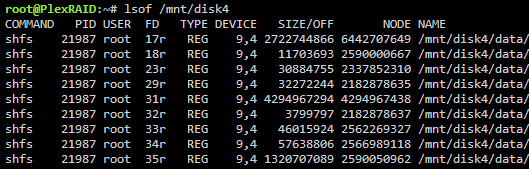
If you get no results from running lsof /mnt/disk1(for example) then you have no files open on the disk. That's a good sign. Here's an example of what it might look like if there is file activity.
-
It will allow you to control the fan speed and set it to a single setting so it's not ramping up and down constantly.
-
Here's what I recommend, stop docker service, stop VM service if it's running. move the data from the docker pool to the cache pool, remove the docker pool and replace that disk with the new disk, move the data back to the docker pool and you should be good to go.
-
Have you tried booting into safe mode?
-
If this is NOT the case, best suggestion is to post a before and after screenshot of the permission changes for further evaluation.
-
The issue is you've changed permissions, the docker containers are trying to use their own permissions so it is partially reverting those permissions to what they need. This is how docker works. You should never change permissions in the appdata share manually as it will break docker containers. Also I noticed in your appdata backup plugin you have both /mnt/user/appdata as well as /mnt/cache/appdata where you only really need to specify /mnt/user/appdata as that location covers all disks/pools. You should remove /mnt/cache/appdata.
-
You have a "data" share as well as a "media" share. You have sonarr pointed to /mnt/user/data/media/tv which does not include /mnt/user/media At any point have to changed these? also your /data path for sonarr is using what I assume is an unassigned device. you've got some stuff to look into on your own server. might explain the "missing" files which might just be in the wrong share.
-
Best you can do is get a JST to PWM style cable and plug the gpu ran into your motherboard. It's not possible to control the gpu fan speed from unraid.


