





Frank1940
Members
-
Joined
-
Last visited
Everything posted by Frank1940
-
Make a Backup of the Flash Drive first. Then you can roll back easily if you have to.
-
This section of the Manual may be of help also: https://docs.unraid.net/unraid-os/manual/shares/user-shares/ And make sure that you create Shares using the SHARES menu in the GUI. Not with a file manager. I believe it can still be done with a File manager but you have to know the fine points of the how Unraid handles Shares to get things set up correctly.
-
Make sure you are writing to the Share and not to the pool...
-
There is another Sub-sub-forum called 'NFS' under the more general 'File Sharing Protocol Support' Sub-forum. You might find someone there who is more knowledgeable. (I would wait for about 48 hours before you create a post there.) As I see it, NFS is a bit of security nightmare because the user is the sole person responsible to getting things setup properly. I have done a bit googling in the past and there does not seem to be much help in the wider world with setting things up. BTW, 'Group' permissions of rw- and rwx for directories are absolutely necessary for a secured SMB setup to work. If one is using secure SMB practices, the 'Other' permissions (rw- and rwx) are really a little bit of security risk. However, since LimeTech has made a decision to still support Guest access to Unraid Shares, the rw- and rwx are still needed for 'Other'.
-
I didn't say to do this. What I said was: This requested that you post the Diagnostics in a new post in this thread. (A thread is a series of posts for a single topic/discussion. You are reading my new post in your thread right now.) The reason for this is that if you simply an edit an existing post in this thread, anyone following this thread never receives notification that anything occurred in this thread! With a new post, any follower will see notification of that action. It also serves as a 'bump' to the thread to move it to the top of the page in the sub-forum which makes it more likely that more folks will notice your thread and look at it. ( @Unraid-arr, I am not picking on on you with this long explanation but writing it so that other Forum users realize how things work and why editing a post to add new information is a bad idea if you want keep your thread active.)
-
You have not give us much information. To begin with, please provide your diagnostics file in a new post in this thread. What details of your Windows 10 OS-- (Home, PRO) and what is the Update version (21H2, 22H2)? (I don't use Win10 any more but Win 11 is very similiar in how it works) What does the 'They' refer to? The 'new' mappings or the 'old' mappings. How did you map these drives? Did you browse for them or manually type the path into the box?***** Can you navigate to the share you want to map using Windows File Manager? ***** I just tried browsing on a Windows 11 Client (WIN 11 PRO, 24H2) to map a drive and found that it took several tries before it 'found' my two Unraid servers. Personally, I prefer to use a 'Pin to Quick Access' which points to a Network location using Windows File Explorer as opposed to a 'Mapped' drive. (To try this, use Windows File Manager to navigate to the desire folder on your server. Then 'right-click' on the folder and pick 'Pin to Quick Access' from the menu.) But I also realize that this method may not work for certain programs and applications.
-
Attach your Diagnostics file to a new post in this thread. (I can assure that there is a section for scheduling a Parity check in v7..1.2)
-
I run a simple NAS with a very few Docker containers with mysql being the principle one. (For storing my KODI Database which is accessed by upto seven PC of which three are dedicated HTPC running KODI.) You can see the hardware that I use in my signature.
-
I sync two shares-- one on each of my Unraid servers- using rsync. This is the command line (I store it in a text file on my desktop) that I use: rsync -avhPX /mnt/remotes/192.168.1.245_Media/All\ Movies/ /mnt/user/BackupMedia/All\ Movies/ Note that the full path is required! I have setup a 'SMB Share' on one of my servers using the Unassigned Devices plugin that mounts the share on the other server to the first server. The command is run in the GUI terminal on the first server. One of the requirements of rsync to be able to run over a network is that the rsync program has to be installed on both computers. (This was not a problem for me as rsync is included in the Unraid distribution. If it not installed in your second computer, you will have to figure out how to install it there.) BTW, one of the nice things about rsync is that it can be run from either end. In the example I am sharing, the source is remote and the backup is local. It could be run from other end. In that case, the source would be local and backup would be remote.
-
Give us a clue as to what one should be looking for. A screenshot of the portion you have a question about would probably suffice. (Your question is equivalent to "What's wrong with my car?")
-
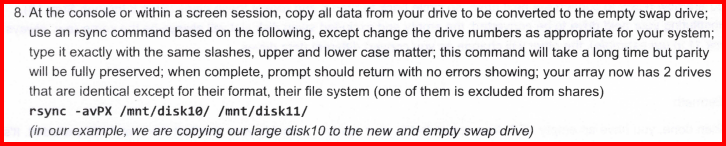
Back in the olden days when it first announced that the Reiserfs was going to be removed from the Linux Kernel there was a set of instructions for converting to XFS (the only choice at the time). I am attaching a screen capture of the rsync instructions to copy the contents of one disk onto another disk. A link to these instructions is found here: https://forums.unraid.net/topic/35815-re-format-xfs-on-replacement-drive-convert-from-rfs-to-xfs-discussion-only/page/40/#comment-1454446
-
Setup the Wireguard VPN manager which is built into Unraid. You can find instructions here: https://docs.unraid.net/unraid-os/manual/security/vpn/#wireguard Also see here for SpaceInvader video:
-
Run the MAC equivalent of Windows' chkdsk on the Unraid Flash drive. I suspect that some sectors on the flash drive may have gotten corrupted when the new files were being written to the drive. EDIT: If this does not fix it, start a new thread in the General Support forum. This thread is for comments not solving problems that take more then one of two posts.
-
273 CRC errors are really not that many. (I have one disk with 72,300 CRC errors on it. It also has 67,000+ hours of Power-On time! The problem was corrected so long I can't remember exactly what caused it!) Write down on post-it note the current number of errors and the Power-On hours. If you get another Error notice, compare the two. Other possible causes. Bundling SATA data cables together for 'neatness' allowing for cross-talk between the cables. Bundling single cables for 'neatness' without sufficient slack that that there is a tension of the connector and its socket so that it loosens due to vibration. (I have always said that the SATA connector design is the 'Poster Child' for how NOT to design an connector system!!!) If a backplane is involved, consider the possibility that the backplane connector could have dust or other dirt in it.
-
This is good advice whether you use parity protection or not on your Unraid server or not for any data that is irreplaceable from any other source. There are many ways to lose data besides a disk-failure. Think of fire, theft, flooding, etc...
-
What is the MTU set at? As I recall, 1500 is standard...
-
First thing. I remember going through this sort of issue with Windows a number of years ago. I spent a lot of time troubleshooting. What finally resolved the issue was upgrade to the WIN10 NIC driver! (Think it was a Raaltek NIC but not sure at this point.) Another thing. Is this a PC or a laptop? If a laptop, HD or an SSD. How old is this Win10 computer? Are you transferring a small number of large files (>3GB) or hundreds of small files (<100KB)?
-
Off the wall suggestion. Try deleting the 'cookies' for unraid.net in your browser.
-
Look at my Forum Signature. (You may have to turn them on to see mine.) I have been using the Seagate Iron Wolf drives. I just want to use a drive 'rated' for NAS usage rather than for standard usage. (And I am not sure if that rational is really totally valid!) Spending the extra money for a drive for commercial Server use does not seem really necessary as I don't think they have have much additional quality and value for the extra money except for the longer warranties that the professional drives generally have. (I have always considered that the length of the warranty is a marketing decision and not based on Technical information. Remember that the cost for a possible replacement under that warranty is a future expense and not one in the current quarter thus it does not affect the current 'bottom line'. If I were a IT manager for a mid-to-large size corporation, I would probably buy the 'Pro' drives because it a disaster were to happen, I could always tell my non-tech bosses that I bought the best drives available for our company use. 😁) I know folks swear that they would never buy X-company drives because a failure or two that they have experienced. I had four of the worst model (Seagate 3000DM001) and I know that, at least, two of them failed within the warranty period. BUT I pulled the last one out-of-service (because I needed a more storage), the counter for the 'Power on hours' had rolled over!
-
For the lack of any other data, have a look at Backblaze's report for 2024: https://www.backblaze.com/blog/backblaze-drive-stats-for-2024/
-
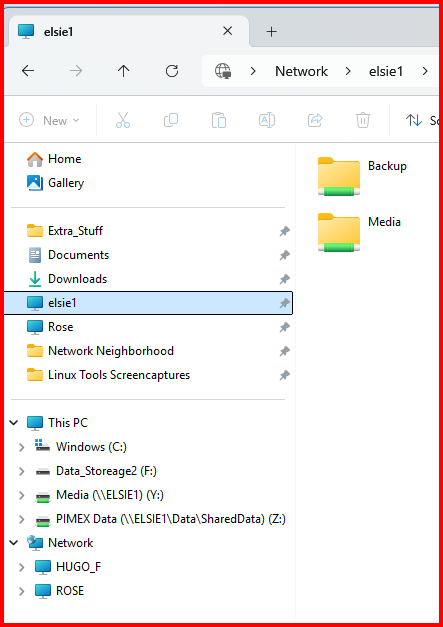
One more thing. You may want to add your servers to the quick access list in Window File Manager. How to do this is explained the attachment (An Alternative Method to Network Neighborhood.pdf) in the first post of this thread. https://forums.unraid.net/topic/110580-security-is-not-a-dirty-word-unraid-windows-1011-smb-setup/ Windows File Manger with quick access links to my Unraid server looks like this: Notice that the Unraid server 'elsie1' does not even show up under "Network"! ('ROSE' is my other Unraid server and 'HUGO_F' is a Windows 11 Pro running peer-to-peer sharing.) Why all the servers don't show up is a question to which no one seems to have an answer. Tomorrow, 'elsie1' may be there......... In my experience, the quick access link will always worked. I don't even look under "Network" for a server anymore. In case you are wondering, that 'Network Neighborhood' is a quick access link to a folder on my desktop that contains shortcuts to nine different computers-- The two Unraid servers and seven Windows computers in a Windows peer-to-peer setup.
-
I was just preparing a post with a series of things to check and that was one of them. It has been years since I started from scratch in setting up an Unraid server and I do not remember all of the default settings. Plus, many of the old defaults have been changed as security concerns have become a bigger issue. Many things are now turned off and you have deliberately turn them on (Telnet and SSH, for example). I suspect that all of the Network services are turned off and you have to turn on the ones that you want to use. For anyone else who has a problem and is reading this thread, start by setting up up a a Share Access user on your Unraid server and a Windows credential on your Windows client/computer for that user. Yes, you can avoid doing this BUT Microsoft is determined to stop the practice of using guest login privileges on Windows clients (and their server software). You will be in a never ending whack-a-mole battle with them as they tighten up security if you really want to keep using wide-open file access.
-
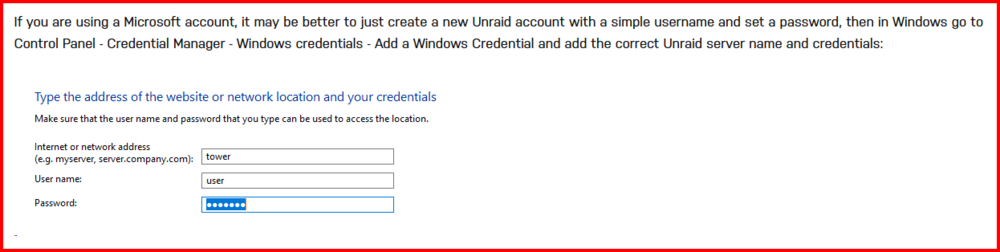
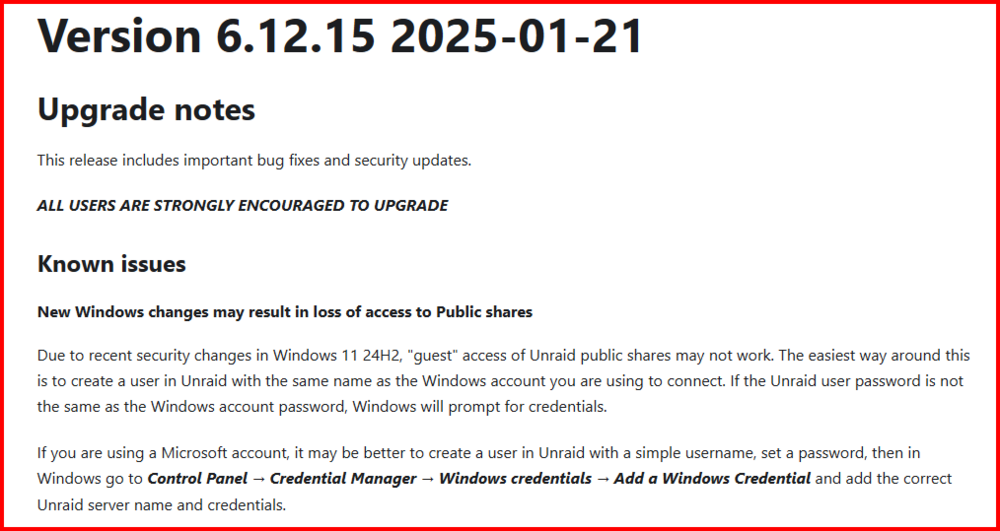
From this post: https://forums.unraid.net/topic/177975-formatted-my-pc-and-installed-fresh-windows-11-now-cant-access-smb-shares/#findComment-1478526 Do this to set up a Share Access user on your Unraid server with a Windows Credential on your Windows 11 computer: Guest access is now more difficult to setup then setting up a secure login using Credentials. If you need more help see here: https://forums.unraid.net/topic/110580-security-is-not-a-dirty-word-unraid-windows-1011-smb-setup/ EDIT: Also from here---- With a fresh install of Unraid, you also lose some 'Grandfathered' settings which make using Guest access much simpler.
-
@jhyler try Googling Linux delay writes and read a few of the posts. I first encountered this back in the mid 1990's when MS introduced it into Windows. (Many of us turned it off initially as Windows was so unstable that lost data was a weekly occurrence due to the frequency of OS crashes. I had MS Word setup to do a complete save of the entire document every 15 minutes! And when those saves happened Word was virtually unusable due to the latency in the display of keystrokes.)
-
I would be looking at how many 'writes' are going to the USB drive. Both of my servers have been up for over two months and one UBS drive has 1510 writes on it and the other has 1902. Writes to a USB flash drives are the real drive killers...





