





Frank1940
Members
-
Joined
-
Last visited
Everything posted by Frank1940
-
There is an option to Automount a share as shown below: Since the other computer is generally off, why not just manually mount after you start that computer...

-
Directory permissions in Linux are often misunderstood as most the time folks are usually more concerned about file permissions. Try reading this and see if that helps: https://www.benhansen.io/linux-directory-permissions/ One of the things which I tend to dislike about many of the file managers is that they tend to ignore the 'group'. Unraid, in any type of a secured environment, tends to use the 'group' and its permissions to access things. I do use File Managers (mostly, the built-in Dynamix one) for file Unraid management but I use the standard Linux/Unix ls command for diagnosing problems using these switches: ls -al {/path-from-root-to-resource} This will show everything you need to know...
-
There are some Linux tools to get information and help in troubleshooting Samba problems. smbstatus and testparm What they do and how to use them is explained in the attached PDF file. Linux Samba tools.pdf
-
Try looking at your router settings. The new MB NIC will have a new MAC address. If your router uses the MAC address to set/control the IP address, you have found your problem. Read the router manual if necessary as every router manufacturer does things a bit different.
-
Purchasing refurnished drives carries a risk associated with them. You can never know anything about their past history. Yes, you can purchase them from a reputable reseller but he has to acquire them from another party. You should only buy from a vendor who will provide you with a no-question-asked replacement warranty for a certain period of time. (I would suggest a minimum of thirty days!) As soon as they arrive, I would start two cycles of the preclear operation to put them under stress. Any drive with a failure return immediately. You can run a SMART test on them but I don't believe that ever does a write to a drive which the preclear procedure does do.
-
If you are wondering how things work on the Unraid side of Samba, I wrote this a while back: https://forums.unraid.net/topic/182037-smb-broken-since-61214-2024-11-26/#findComment-1510345 Now this supposes that you also log into Unraid using the credentials of a 'Share Access' user. If you are using a Docker container, it has to be done using the PUID, GUID of a valid Share Access user (this would include those for 'nobody'--- which many Containers configured for Unraid use) and a UMASK of 000. I am not an expert on Docker containers and there may be some containers that required special settings within them to work properly with Unraid. Hopefully, those Docker containers that have a Support thread on the Unraid Forum are already configured correctly. If you are having problems with a container, you can ask about your issue in that thread.
-
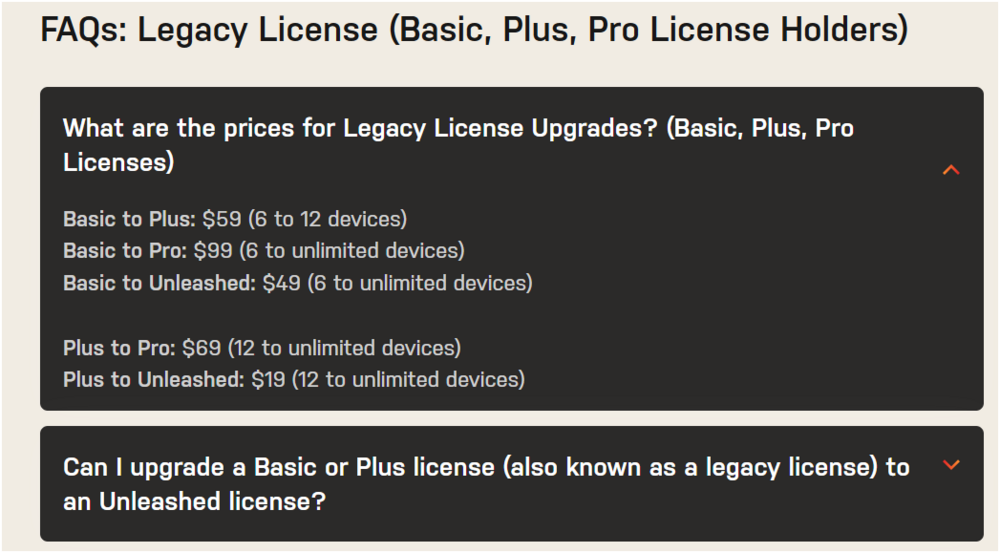
From the FAQ in the 'Pricing' page: EDIT: There is no monthly fee as you are 'Grandfathered-in' by having a Basic, Plus or Pro license.
-
Do a printout of the MAIN tab and you can use that to assign the disks. Unraid uses the serial number of the disk to assign them to the proper location.
-
In the config folder/directory of the flash drive, there is a file with the extension of .key and that is the Unraid license file for that drive. It can also be used for a automated transfer process which will generate a new license for the replacement flash drive. If that should not work for any reason, you can contact Unraid and they will see that you get a new license that will work with your new flash drive. You should also make a backup of your flash drive. You can do so by left-clicking on the 'Flash' drive on the MAIN tab and look for the 'FLASH BACKUP' button under the "Flash Device Settings" section. The license file will (of course) be in the backup.
-
I suspect that the overloaded connector was your real problem. Personally, I avoid using SATA-to-SATA power splitters. I only use the Molex-to-SATA ones. I, personally don't think that the SATA connector design has decent power handling capacity to be used for multiple drives. Regarding whether powering down lengthens drive life, there is no data one way or the other. But it definitely lowers power consumption for most Unraid users. When I watch a movie, there is only one drive spun up. When I not watching a movie, all the drives are spun down 95%+ of the time! And most of that 5% is the time required for the monthly parity check.
-
Quick reply to you. First and most important!!! DON'T panic. Start taking a few deep breaths. Then wait until you get a real Guru to step up. They are all over the world and time differentials may mean it may tomorrow before they see your post. Second thing. I doubt if you have lost any data at this point. Remember that your data disks are formatted with standard Linux formatting schemes and data recovery tools are available for all of them. What ever you do, DON'T format any disk with the thought that that is necessary to recover data. It is not!!!! Third thing. I would just set that new 14TB drive aside for a while. Let's get those disks back in service and see what the damage is. (if any...) After everything is working properly, then do the upgrade. Fourth thing. Put the tape (Kapton is preferred) on the 3.3V pin on the drive! That way, it will always be in the best location to do its job. (I have a drive with tape on it.)
-
Attach your Diagnostics file to your next post. Then get a screenshot of the File Manager and one of the failure notice and post them with the diagnostics file. Paste the screenshots directly into the post rather than attaching them as a file. .
-
And what are the permissions on the parent Directory of this directory? And exactly what program are you using when you have all of these failures and what OS is it running under? (Understand that you have two Docker containers, Unraid Linux OS and possibly a client accessing these files that could be using Windows, MacOS or Linux? we really need to know all of the parameters involved. Not just that you have a problem trying to do something.)
-
First thing, This (title.mkv) is not a directory. It is a file! Second thing. Open the GUI Terminal (The icon on the right side of the GUI toolbar) and enter the following command: ls -al /mnt/user/media/movies/title You should get a listing of files in the 'title' directory on the Unraid file system . If not, your path is not valid. (Linux is case sensitive so capitalization is important!!!)

-
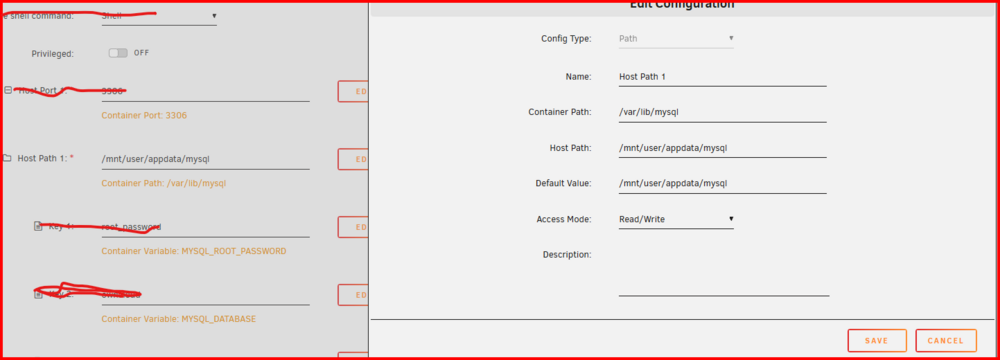
You should realize that all Docker containers are like a VM running in a sandbox. They have no direct access to the Unraid file system until a mapping from the Docker container file system is made to a directory on the Unraid File system. Below is a typical example of such a mapping: The 'Container Path' is the path in the container. The 'Host Path' is the path on the Unraid file system.
-
You should be asking these questions in the Support threads for these two Dockers. (To find the Support thread, go to DOCKER then left-click on the Docker icon and look for the Support in the drop-down list.)
-
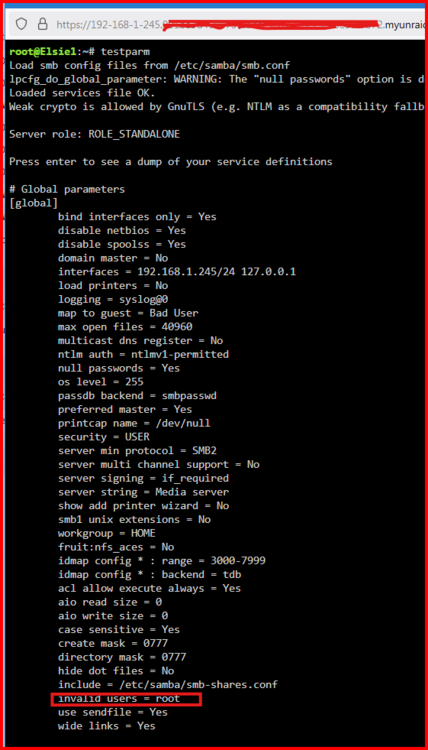
In fact, root is not allowed to access files via SMB: This information is being posted here for any other Unraid user who finds this thread in the future!
-
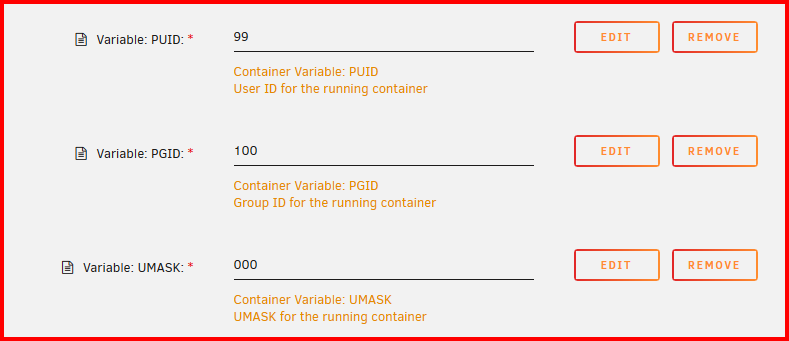
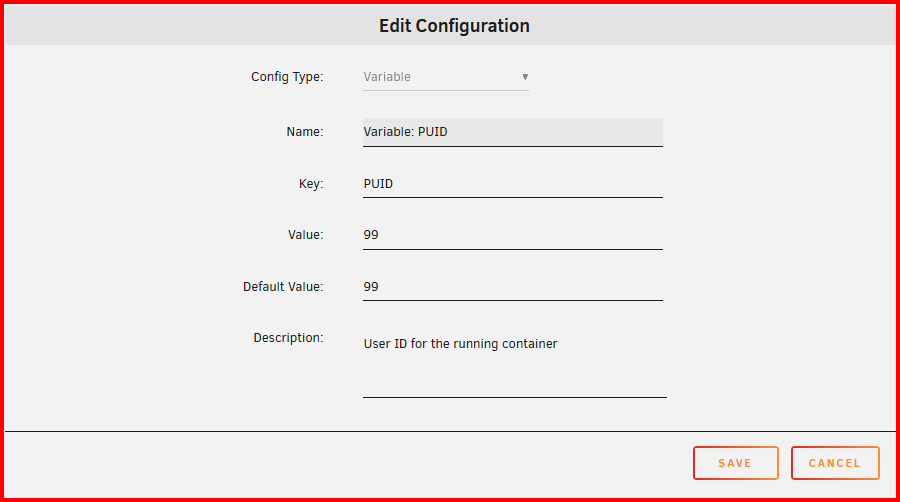
How this problem is addressed (in Unraid) with smb is that every Share Access user is a member of the 'users' group. This can result in the following situation for owners of resources: Notice that there are three 'owners' for the four files shown here. Yet all three can have full access to the files because all three of these Share Access users are also members of the 'users' group! Note that the permissions for 'group' is identical to 'owner'. For a Docker container, this is the recommended setup of the Docker Container to allow full access to files created by the Docker: (PUID 0f 99 = nobody and GUID of 100 = users ) Here is what the Edit function looks like: This should also set up things for NFS to work correctly also. Hope this helps...

-
Make a backup of the flash drive. MAIN >>>> Flash >>>> Flash Device Settings and click on the 'FLASH BACKUP' button. Delete the previous directory and try again. NOTE that doing so will prevent you from going back to the previous version of Unraid from the one you are currently using. IF you would ever need to do this, you have the backup. You will probably have to replace the 2GB drive one of these days as the feature-creep of Unraid is requiring a bigger footprint for flash drive space and RAM. PS---- I have a minimal Unraid install, I am using about 1.44GB of space on the Flash Drive.
-
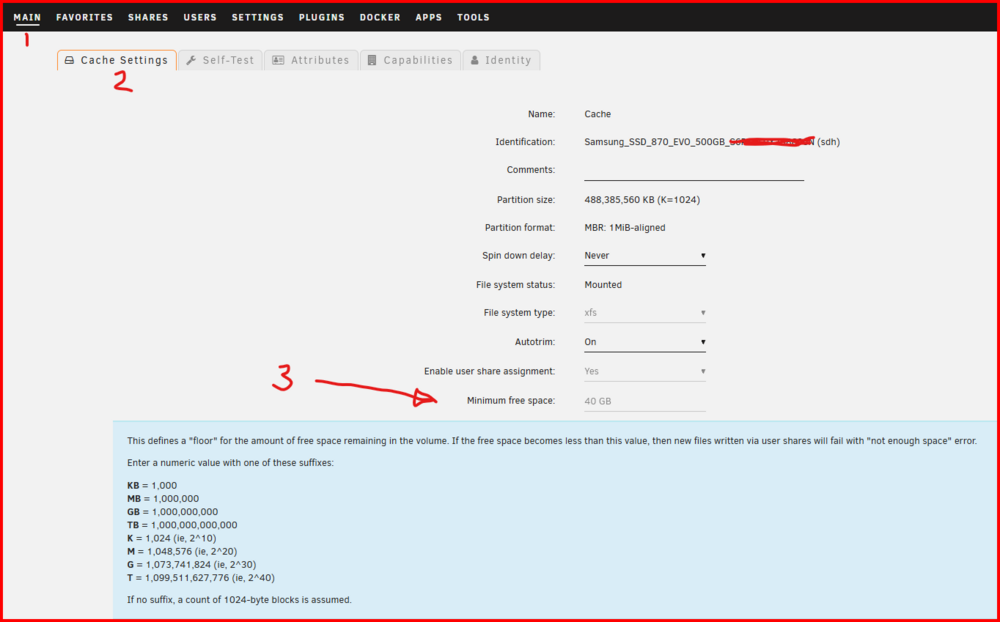
Check this setting: It should larger than the largest file, you expect to wrote to this disk. (If you had secondary storage assigned, Unraid would would bypass the cache drive and write the file directly to that disk.) Sometimes the default setting for this variable is unreasonably large...
-
Try renaming the two files that begin with 'network' by adding a new extension on them of .bak Then reboot your server with a keyboard and monitor attached. When the Unraid boot menu comes select 'safe mode'.
-
Ask in the support thread for Tailscale. There should be a link to the Support thread on the PLUGIN tab...
-
I looked at your diagnostics file. It seems (to me) that you are getting an IPv6 address in addition to an IPv4 address. Do you need an IPv6 address? If not try setting for an IPv4 address only. If you only need IPv6, set it for IPv6 only. SETTINGS >>> Network Settings
-
Try setting all the MTU settings to 1500 and turning off Jumbo frames. (They have caused problems in the past...)
-
Make sure that things like MTU are set to the same value.





