






Hoopster
Members
-
Joined
-
Last visited
Everything posted by Hoopster
-
Since all the true rock stars are out on the unRAID Global Assistance Tour, it must be time to talk about the groupies and roadies. 😁
-
Not necessary if things are working fine. It's just a permissions change on /dev/dri that in some cases is necessary and in others is not.
-
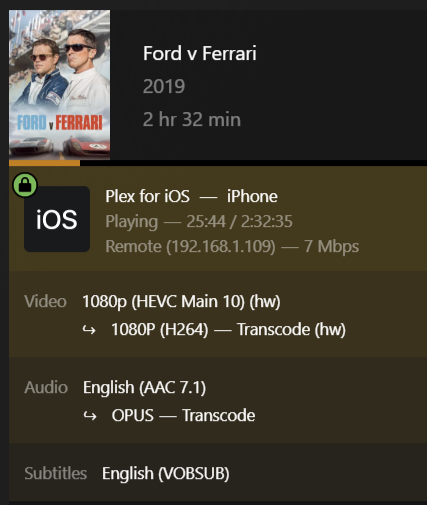
Do you see the (hw) by the source and destination formats when you think it should be transcoding? Also you can look in the Sessions folder under your designated transcoding location and you should see files being created there as bits are transcoded. Audio transcoding in Plex is always in software (CPU) but it should not use much CPU.
-
I had to re-image the Raspberry Pi a few months ago because it was still on Debian Stretch which Pi-Hole no longer supported. In order to update Pi-Hole, I had to reimage with Debian Bullseye (Buster would have also worked) and that is the same RPi where where I also have WireGuard running. However, as mentioned, that instance of WireGuard on the RPi is not a peer to the WG on unRAID. It is a backup access point into my LAN if/when unRAID/WG are down so I can restart my unRAID server via IPMI.
-
Still relevant except the way i915 is handled in recent versions of unRAID eliminates the need to edit the "go" file with modprobe. For versions of unRAID from 6.9.0 and onward see the release notes for how a particular version of unRAID deals with i915. Here are the 6.9.0 release notes for example. I am still using the "touch" method to load i915. Other than that, the same things still apply for using QuickSync transcoding in Plex.
-
Is that "1s" (the number 1)? It should be "ls" (letter l as in lemon)
-
As mentioned, WireGuard is great and is built into unRAID. It is what I use.
-
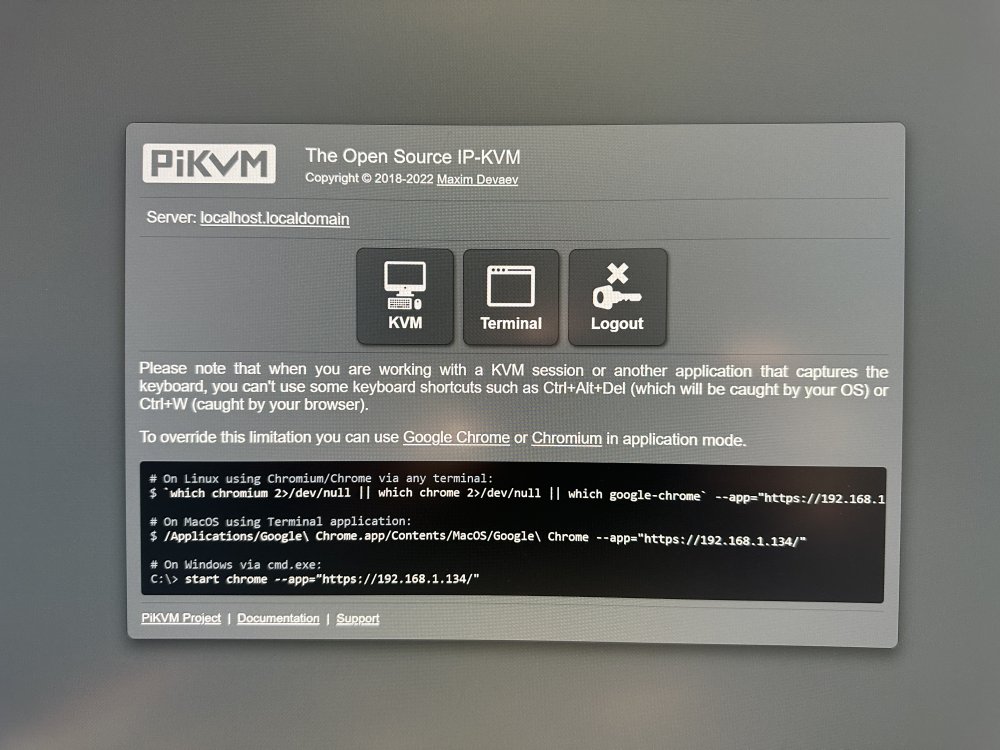
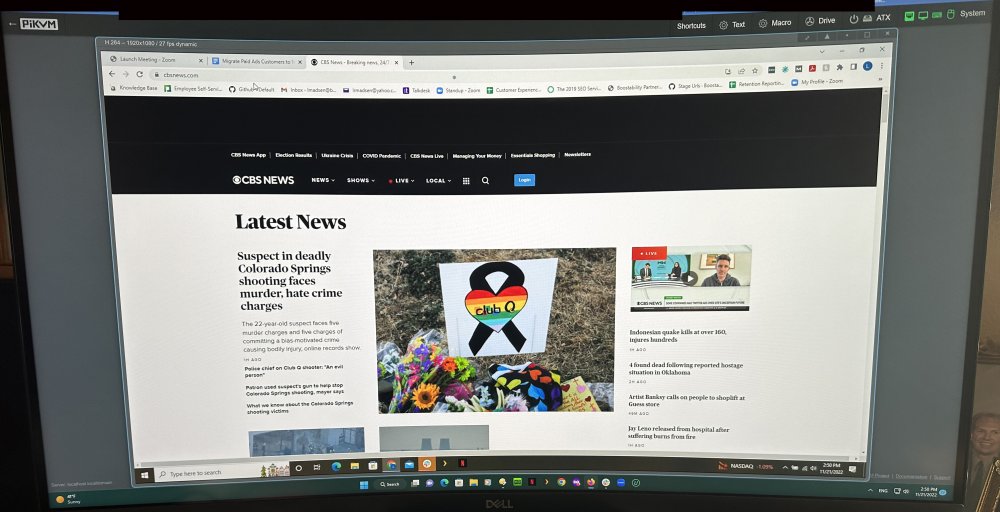
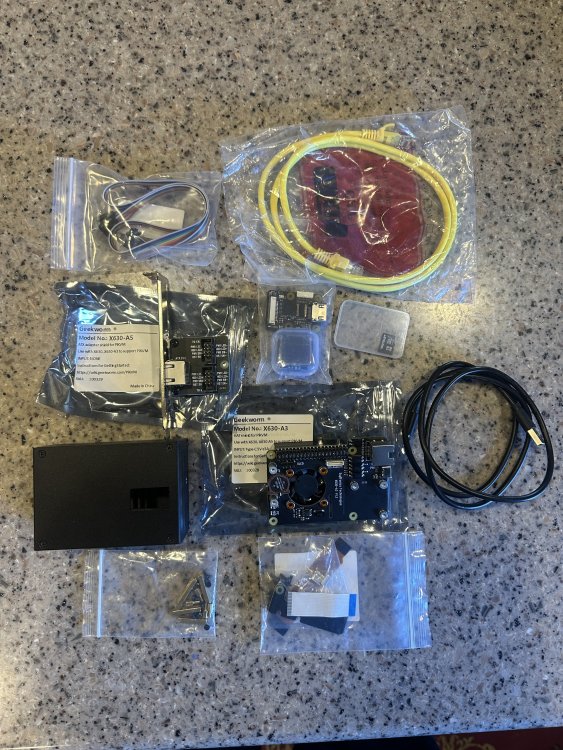
I will ship this free to a Continental U.S. address. If you are outside the Continental U.S. and have interest in the item, contact me for shipping information. I will accept Venmo, Square Cash App or PayPal friends and family payments. This Geekworm PiKVM-A3 Kit contains everything you need to turn a Raspberry Pi 4 Model B into a PiKVM. A fully assembled PiKVM costs $250 to $290 depending on supplier and RAM size of included Raspberry Pi 4 (you only need 2GB). Add this $80 kit to a Raspberry Pi 4 Model B and you have the same thing. This note appears on the Geekworm product page: PiKVM-A3 expansion board kit is also compatible with Raspberry Pi 3B+/ 3B, but since Raspberry Pi 3 is without OTG interface, when PiKVM-A3 is used with Pi3, OTG analog keyboard and mouse cannot be used. If your motherboard does not have IPMI, a PiKVM allows you to locally or remotely access and control a computer via a web interface and even power it on/off and access the BIOS. This is a great addition to a headless unRAID server where it is not practical or desirable to connect a keyboard and monitor and where remote access is desired. This kit is used only to the extent that I installed the parts on an RPi 4 B and booted it up and tested access twice. It has been powered on for a total of 10 minutes. Really, I just tested it for you and it is new. The kit contains the following components: PiKVM-A3 Metal Case for Raspberry Pi 4 X630 HDMI to CSI-2 Module (for video capture) X630-A3 Expansion Board (for Ethernet, cooling, RTC, power in etc.) X630-A5 Adapter Board (it is installed inside the PC case, and it connects the computer motherboard and IO panel cable of PC case) 0.96 inch OLED (for display, Resolution: 128×64 pixel) - shows IP address, CPU temp, power on time. Ethernet Cable (TIA/EIA-568.B connection, and its ATX control signal cable) USB-C to USB-A cable for OTG keyboard/mouse I will include a free 16GB Class 10 MicroSD card with the PiKVM software installed. Also included is a CR1220 battery for the real-time clock. In addition to a Raspberry Pi 4 Model B (yes, I know they are hard to get right now), you need to have the following for a fully functional PiKVM: Raspberry Pi 4 compatible power supply HDMI cable Ethernet cable to connect to your LAN If you don't already have a Raspberry Pi 4 Model B you can use and need to find one, you can check out RPilocator which lists global availability of many Raspberry Pi models. Another option is to purchase a Raspberry Pi 4 Model B in a kit which includes power supply, basic case and cables, etc. These seem to be available more often as retailers want to maximize their profits on the few RPi units they can acquire by selling additional components with them. As an example, I was able to purchase an RPi 4 Model B with 4GB RAM in a kit last month for $125. There is an RPI 4 Model B 2GB kit available right now in the U.S. for ~$110. Even $110 + $80 for the PiKVM kit is substantially less than the $250 for a pre-assembled PiKVM. Attached are some pictures of the Pi-KVM web interface, my laptop screen under the control of the PiKVM and everything I am including in this sale. The laptop was easy to plug into to test although that is not really the ideal use case. Both of my unRAID motherboards currently have IPMI but the idea of the PiKVM was intriguing so I bought the kit to test it for future potential use. I now have another use for my Raspberry Pi 4 so the PiKVM kit will go unused.
-
I recently precleared 3 drives with that plugin with no issues. I did have issues with the Docker preclear so I went back to UD preclear which worked for me. YMMV.
-
On my two unRAID servers I have the following: 1) Kingston MobileLite G2 (USB 2.0) card reader with the license/config on an SD card and the syslog on the Micro SD card - 11 years in use 2) Kingston MobileLite G3 (USB 3.0) card reader with the license/config on an SD card and the syslog on the Micro SD card - 5 years in use Neither is currently available (except maybe on eBay) but since the GUID is associated with the card reader, I can swap cards all I want in the event of card failure, to test configurations, troubleshoot, etc. without the need to relicense.
-
The flash drive method of licensing persists for three main reasons (in my opinion): 1) the ability to tie the unRAID license to the GUID of a flash device (although perhaps an SSD serial number may work as well) 2) the portability of the license and configuration to other hardware without re-licensing. Although doable with an SSD it is not as easy as with a flash drive 3) the ease and cost advantage of replacing/relicensing a new flash drive when needed I have been using the same flash drive for the 11 years I have been using unRAID and have never needed to replace/relicense.
-
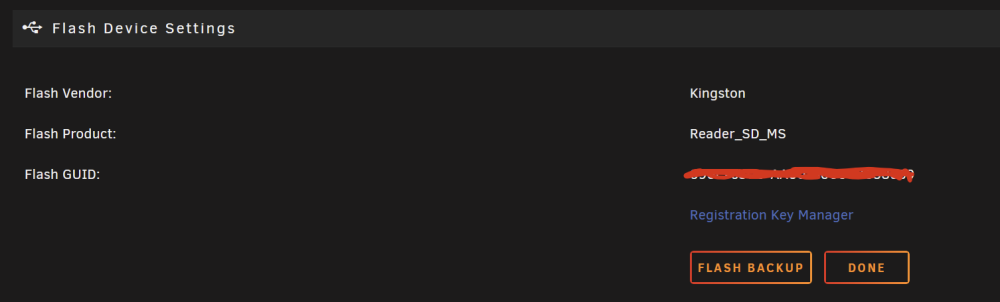
So when you click on the Flash drive from the Main tab in the UnRAID GUI, you do not see the Flash Backup button or do you see it but it is not active?
-
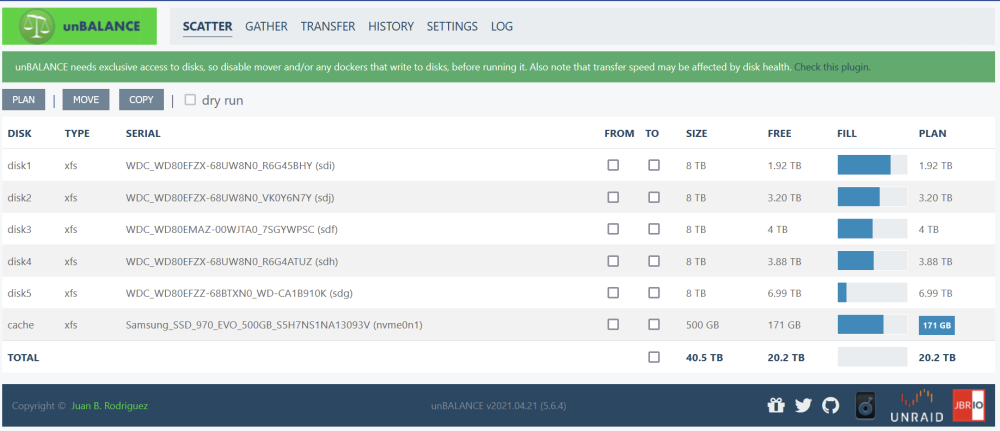
You will get more help if you post that in the unBalance plugin thread where support for the plugin is offered. I have used the plugin a couple of times without issue in some fairly simple scenarios so I am not sure what the issue may be.
-
No. The whole idea of UnBalance is that it ignores share settings and allows you to move data around as you need. You can change share settings to include or exclude certain disks before or after running UnBalance. You can also use UnBlance in "dry run" mode which will show you what the result will be without actually moving anything.
-
You could also use the Unbalance plugin. This will allow you to move folders of the same name from all disks to one target disk.
-
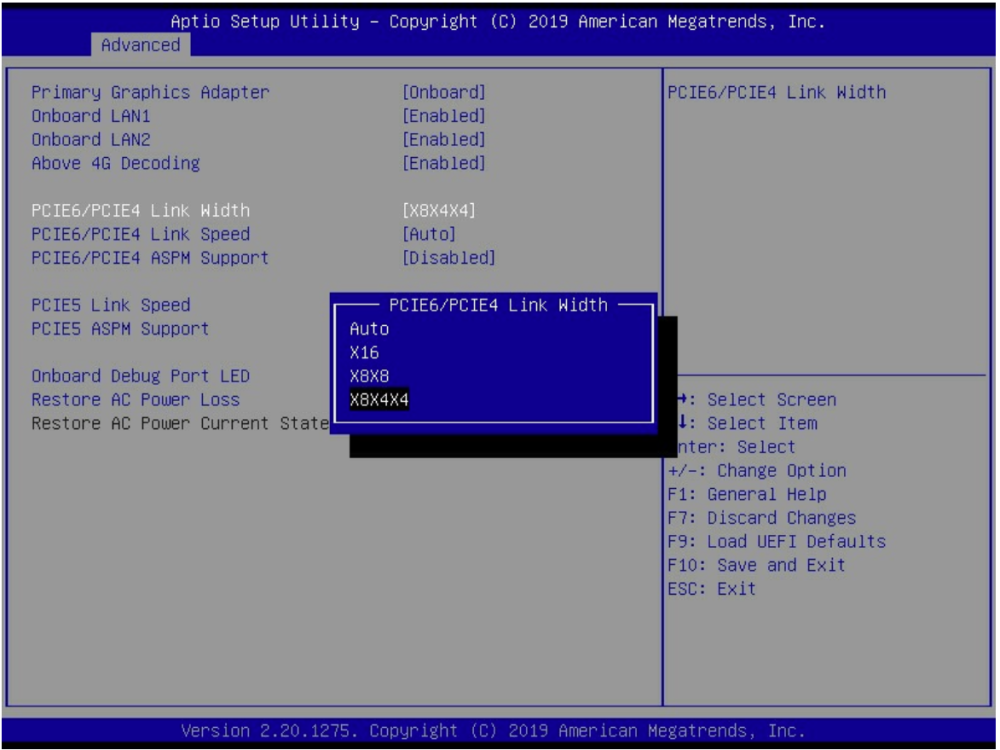
Bifurcation is a way to divide the PCIe lanes assigned to a particular motherboard slot to multiple devices. Ideally, in your case, the motherboard BIOS would allow you to split the x16 PCIe slot into x4x4x4x4 so that each of the M.2 SSDs on the Asus Hyper M.2 would get 4 PCIe lanes. The best my main server motherboard can do with the x16 slot is x8x4x4 so I could only have three M.2 SSDs on that ASUS card plus the one on the motherboard. You will have to check in your BIOS to see if bifurcation of an x16 PCIe slot is supported.
-
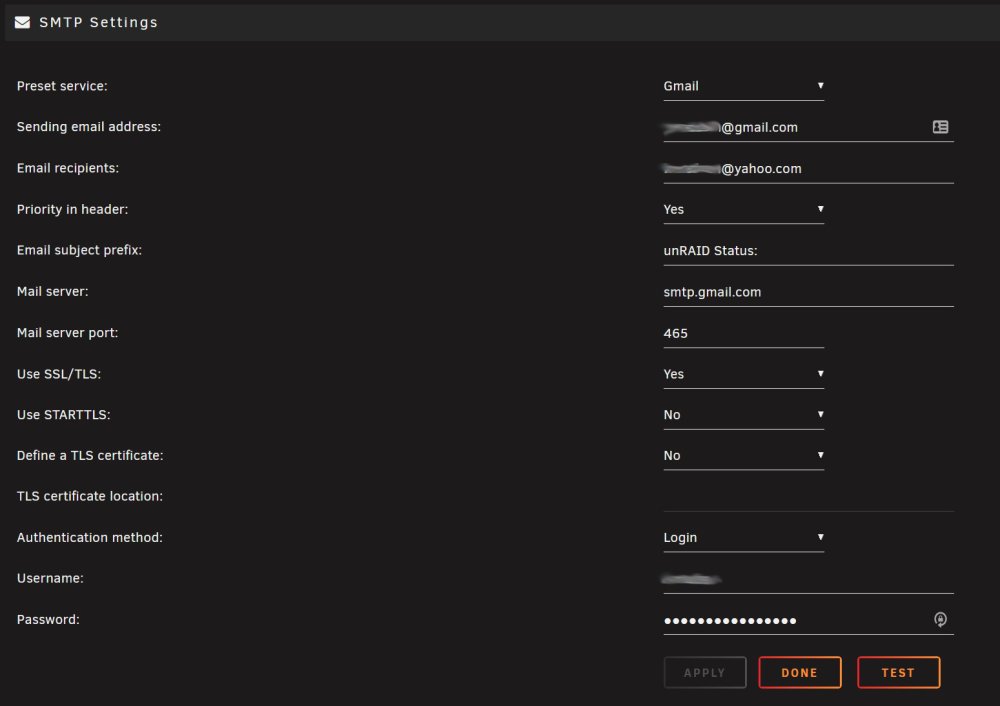
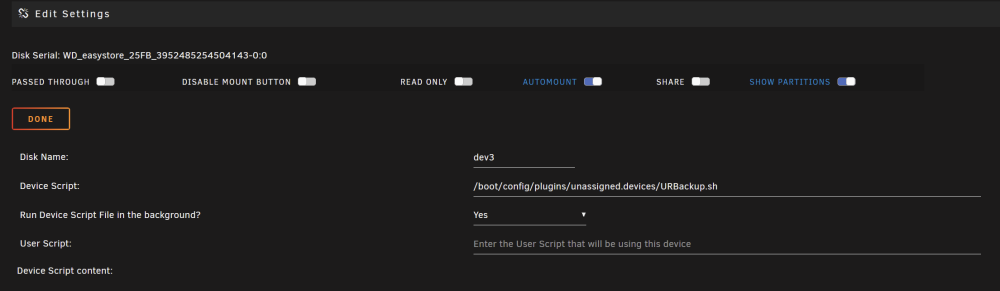
Here is the script with my modifications for backing up four shares: #!/bin/bash PATH=/usr/local/sbin:/usr/sbin:/sbin:/usr/local/bin:/usr/bin:/bin ## Available variables: # AVAIL : available space # USED : used space # SIZE : partition size # SERIAL : disk serial number # ACTION : if mounting, ADD; if unmounting, UNMOUNT; if unmounted, REMOVE; if error, ERROR_MOUNT, ERROR_UNMOUNT # MOUNTPOINT : where the partition is mounted # FSTYPE : partition filesystem # LABEL : partition label # DEVICE : partition device, e.g /dev/sda1 # OWNER : "udev" if executed by UDEV, otherwise "user" # PROG_NAME : program name of this script # LOGFILE : log file for this script case $ACTION in 'ADD' ) # # Beep that the device is plugged in. # beep -l 200 -f 600 -n -l 200 -f 800 sleep 2 if [ -d $MOUNTPOINT ] then if [ $OWNER = "udev" ] then beep -l 100 -f 2000 -n -l 150 -f 3000 beep -l 100 -f 2000 -n -l 150 -f 3000 logger Started -t$PROG_NAME echo "Started: `date`" > $LOGFILE logger Pictures share -t$PROG_NAME rsync -a -v /mnt/user/Pictures $MOUNTPOINT/ 2>&1 >> $LOGFILE logger Videos share -t$PROG_NAME rsync -a -v /mnt/user/Videos $MOUNTPOINT/ 2>&1 >> $LOGFILE logger Movies share -t$PROG_NAME rsync -a -v /mnt/user/Movies $MOUNTPOINT/ 2>&1 >> $LOGFILE logger Family Videos share -t$PROG_NAME rsync -a -v /mnt/user/FamVideos $MOUNTPOINT/ 2>&1 >> $LOGFILE logger Syncing -t$PROG_NAME sync beep -l 100 -f 2000 -n -l 150 -f 3000 beep -l 100 -f 2000 -n -l 150 -f 3000 beep -r 5 -l 100 -f 2000 logger Unmounting Backup -t$PROG_NAME /usr/local/sbin/rc.unassigned umount $DEVICE echo "Completed: `date`" >> $LOGFILE logger Backup drive can be removed -t$PROG_NAME /usr/local/emhttp/webGui/scripts/notify -e "Unraid Server Notice" -s "Server Backup" -d "Backup completed" -i "normal" fi else logger Backup Drive Not Mounted -t$PROG_NAME fi ;; 'REMOVE' ) # # Beep that the device is unmounted. # beep -l 200 -f 800 -n -l 200 -f 600 ;; 'ERROR_MOUNT' ) /usr/local/emhttp/webGui/scripts/notify -e "Unraid Server Notice" -s "Server Backup" -d "Could not mount Backup" -i "normal" ;; 'ERROR_UNMOUNT' ) /usr/local/emhttp/webGui/scripts/notify -e "Unraid Server Notice" -s "Server Backup" -d "Could not unmount Backup" -i "normal" ;; esac I just added these lines for each share I wanted to backup to the Unassigned Devices USB drive: logger {name of share} share -t$PROG_NAME rsync -a -v /mnt/user/{name of share} $MOUNTPOINT/ 2>&1 >> $LOGFILE You just make the script the device script that is run when the USB drive is connected and mounted by Unassigned Devices. Email notifications are not controlled by the script. This is just part of the Settings-->Notification Settings configuration in the GUI. Here are my email settings to get unRAID to email notifications to me for the events selected in the Notification Setting section:
-
Since Unassigned Devices are not part of the parity protected array, their size compared to parity is irrelevant. My external USB UD backup drive is 14TB and the parity and array data drives are all 8TB.
-
You are trying to setup a Raspberry Pi as a client (peer) from which to access unRAID server via WireGuard? Perhaps this tutorial will help? I have WireGuard running on a Raspberry Pi from which I generated client (peer) profiles to access my LAN remotely from a phone or laptop if unRAID/WireGuard are down. I also have Pi-Hole running on the same Raspberry Pi. I used this guide and yes, it starts with imaging a Micro SD card for installing WireGuard but I was able to install Pi-Hole after that.
-
It's unmaintained as far as guaranteeing compatibility with unRAID 6.11.x/Slackware and the latest Linux kernels supported by Slackware. Some of the tools in Nerd Pack were incompatible with 6.11.x.
-
AS Kilrah noted, check out the backup script example in the UD plugin thread. I modified the script to backup four of my shares (instead of just Photos in the example). As soon as I plug in the external USB backup drive: The drive mounts automatically via UD The backup script runs automatically, with a GUI and email notification it is running, until complete. The script backs up new/modified files only which makes it faster after the initial backup of everything There is a beep when it completes and you are notified in the unRAID GUI and via email The USB drive is unmounted in UD
-
No. This container is just for the controller software for configuring Unifi devices and networks. It does not replace a router/firewall. I have an all Unifi environment with a Unifi USG Router/Firewall, two Unifi switches and five Unifi access points. All show up in this instance of the controller running as a Docker container. However, if you have no Unifi router, it will just not show up in the controller but you can still manage the UnifI switches and access points if you have them. One of the things I do not like about the Dream Machine is that it must be managed by its built-in controller. It cannot be adopted into another instance of the Controller (including this docker container). You don't. This is not router/firewall software like pfSense. It is just a controller for Unifi devices.
-
Yes, that is crazy and has to be very frustrating. Google search results on that error all point to issues with one of the LSI cards. Perhaps in the BIOS of the card. When I flashed my Dell H310 with 9211-8i IT firmware I chose not to flash the BIOS to the card. I have no idea if that makes any difference. "MPT bios fault 10h encountered at adapter pci" Here's a similar report in TrueNAS forums: https://www.truenas.com/community/threads/solved-mpt-bios-fault-when-using-cross-flashed-lsi-9240-8i-on-x10sl7-f.86193/
-
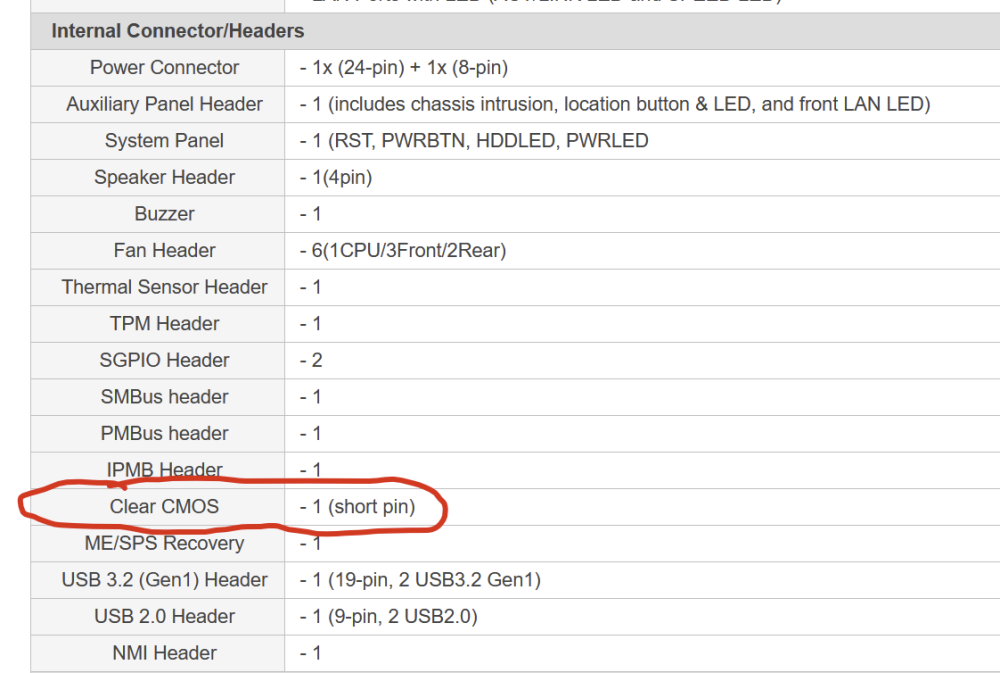
According to the specs online the E3C246D4U has a Clear CMOS pin which can be shorted. However, the manual, which is for several related versions of C246 boards, does not show any clear CMOS jumper. Very confusing and an indication that you are not going blind. 😁 You may have to resort to removing the battery for a period of time to clear the CMOS.
-
I eventually did the same thing as I realized I could have the unRAID instance be the fallback if the RPi instance is down and unRAID is still up. I now have DNS in this order: RPi, unRAID docker, Cloudflare, Google.








