





ConnerVT
Members
-
Joined
-
Last visited
Everything posted by ConnerVT
-
Pascal based cards are supported by 580.xxx drivers. Not any higher, as no longer supported by Nvidia. I did a quick check, and looks as this is true for the Tesla P4 as well (580.126.20 listed as the driver on Nvidia driver page). If that doesn't work, best to ask in the Nvidia Driver Plugin forum thread.
-
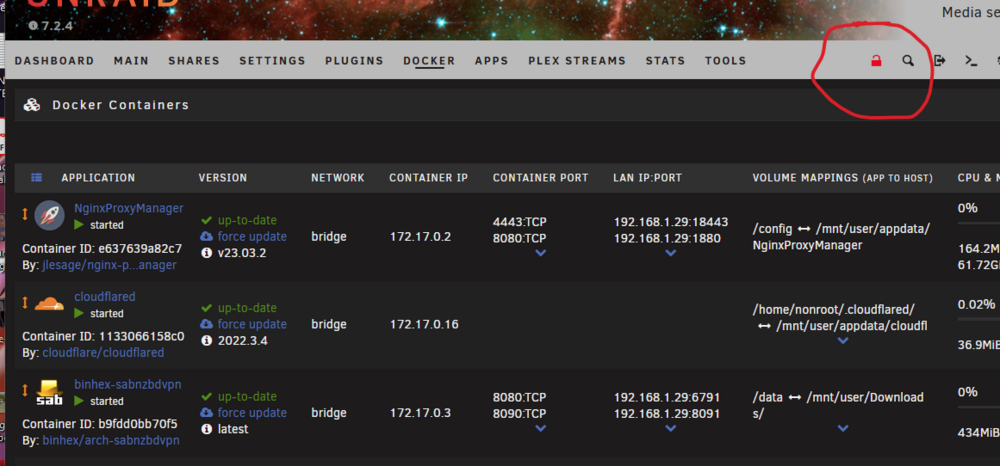
Just like rearranging Dashboard tiles. Click the Lock icon.
-
Sounds like a pin3 / 3.3V issue - Some SATA drives use pin 3 to power down the drive. Fixes include using Kapton tape to cover pin 3 on the drive, or using a SATA to Molex adapter. Search "3.3v pin issue" with Google to get the full story.
-
Discussion when I did a similar project 3 years ago:
-
How much free space is there on your flash drive?
-
Yep. That's the fix. EasyAudioEncoder is the common issue for many of the transcoding issues.
-
If I remember correctly, Krusader can get bloated and increase in size, especially if it has things like trash recovery or custom locations configured. As it is only a basic utility, nothing valuable would be lost by deleting its appdata, removing the container, then reinstalling it fresh.
-
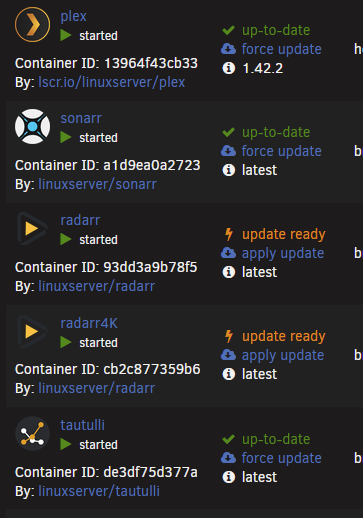
In the Docker tab, set to Advanced View. Then you can click Force Update / Apply Update.
-
I would copy the Trial.key file somewhere before deleting it. Just in case....
-
Click on the link that is the word "diagnostics" for full instructions
-
Both diagnostic files were taken right after rebooting. Set up syslog server to save your data, and post this after the next crash. You should change your memory clock speed from 3600 to 3200, as that is what AMD supports for the 5800X with 2 sticks of DDR4 installed. Refer to this FAQ for Ryzen processors:
-
I believe that version 1.41.2 was the minimum version required, which contains the patch due to the CVE-2025-69417 in Plex Media Server. That update was back in August 2025.
-
Good video. Gives an accurate overview of Unraid. The points he covers makes it seem he spent some time reading the forums. I bookmarked the video. Pretty sure I will be adding it to a forum thread or two, when appropriate.
-
The 5800XT will run 4 sticks of DRAM at 2600 with no problems. My main server is configured this way. First generation Ryzen was most problematic with regard to DRAM speed. The new Infinity Fabric memory controller was new to both DRAM and Motherboard manufacturers. Combine that with everyone's focus on Windows operability, Linux was a bit ignored and with much fewer users to report issues took some time to iron things out
-
So... How long does it take to back up 200TB to cassette? 😜
-
This is pretty much how it has worked for me for years.
-
I would skip the P620. The card is Pascal based. and Nvidia has made it End Of Life. The card still is functional at this time, but its days are numbered. The drivers are no longer supporting Pascal cards, so you must stick with v580.x drivers. Support for Docker runtime packages will undoubtedly reach a point where they need something from a newer version of the NVidia driver to function correctly. If you have a p620 on hand, use it, and start looking for an alternative. A Quadro T400 can be had used for about $50-60 USD. A more recent RTX A400 is about $180 new if you shop around. Both have low idle power, are powered exclusively by the PCIe slot, and max out around 30W (T400) and 50W (A400)
-
For an array without Parity, most of what you asked is of no concern. All that is needed to do is add a drive, assign it to the array, then start the array. It doesn't even matter if the drive is larger or smaller than any drive, as this is only a function to how Parity works (you cannot parity protect a drive that is bigger than your Parity drive). If you have a third USB interface for the new drive, you could do a direct copy the old 2TB to the new 3TB. Or just now have 3 drives for 7TB in the array.
-
After replacing the battery in an APC UPS, you need to connect it to a Windows PC, run the APC software (PowerChute) and reset the battery install date. This is assuming the battery is functional and was installed correctly. The UPS will reset the battery health parameters it has stored.
-
Not really. Consider that during a Parity Check, all 5 HDD are spun up and continuously accessing as well as the CPU performing the parity calculations. Add what is likely a cheaply made power brick (vs an actual PC power supply) and power routed through traces on the system's PC board. Not a recipe for success.
-
Agree with you here. It is not like Limetech has a campus full of developers cranking out and testing code. They punch pretty hard, given their size, but need focus on things which add value, not replicate solutions that already exist which can be used with Unraid. A good example is "Integrated Backups". There are dozens of applications/methods for doing this. If Unraid were to include one, would people be happy? My guess is no, as there would be constant whining to add this feature or that feature. The bloat and support would be a drain of resources with no additional value gained.
-
Correct. Nvidia dropped support for the Pascal based cards after v580 drivers (such as the GTX 1060), as Pascal has been EOL for some time now. I would choose the v580.126.18 selection in the Available Version section of the Nvida Driver plugin, to avoid inadvertently getting updated to a later, non-compatible version.
-
This is an interesting problem. I looked through your syslogs, and didn't have anything out of the ordinary related to nvidia jump out at me. I will offer some things to try with troubleshooting which may help. -- When troubleshooting, I recommend that you only test with dedicated Plex players, and never with the browser Plex web. The browser based Plex player is known to do wonky things when attempting to force transcoding. -- Do not turn on subtitles in your testing. Plex cannot hardware transcode subtitles, and (in most cases) will not hardware transcode video if subtitles are turned on as well. -- I see you are using the older v575.64.05 nvidia driver. I would try upgrading to v580.126.18, which is the last version of the v580 driver. Click the selection in Available Versions, not the Latest Production Version. This is the most recent version that works for Pascal based cards. The v590/v595 versions dropped support for Pascal (such as your P2000). I'm recommending this as Plex may have made a change which is looking for functionality that may not be in the version you are currently using. -- I have seen a number of cases where wonky transcoding or playback issues are due to a corrupted codec file. You can safely delete the Codecs folder from your Plex appdata. Stop Plex, delete the folder, and restart Plex. It will create and repopulate the folder with fresh codec files. I have had several folks post feedback they have done this and it resolved their issues. -- You didn't say which Plex container you are using or which version of Plex the container is running. Sometimes strange things happen when Plex updates to a new version. They add new things, but break other existing stuff. But since you have been troubleshooting for months, this is not a likely cause. But I have needed to specify an earlier version of Plex in the past to "fix" things that Plex broke. Good luck tracking down and resolving your issue.

-
Two questions to confirm: Do you have Plex Pass, and the server is claimed/recognizing this? Hardware only works with Plex Pass. Do you have NVIDIA_VISIBLE_DEVICES as a Variable in your Docker template? If so, make sure the GPUUUID is correct, and doesn't have any trailing/leading space char.
-
Correct. It states that it did not find a USB based TV tuner. Unless you have one of these, you may ignore it.




