





ConnerVT
Members
-
Joined
-
Last visited
Everything posted by ConnerVT
-
I'm not 100% sure what I'm going to write is correct, so I'm going to tag a few experts to confirm I'm not just blowing smoke: @JorgeB @itimpi @ChatNoir This should be possible. Once you have all of the data copied from the existing array to one of the new drives, you would first recreate your array (using the New Config utility in the Tools tab). Add ONLY the new data drive at this time, and remove all of the current drives from your array (including your current Parity drive). You will not need to clear or format the new drive (and obviously should not, as it now has all of your data which you copied on it). At this point, you should be able to start your array and see the one new drive in it. All of your data should be accessible. Now shut down your system, remove the drives you no longer need, and add the second 12TB drive you will use for parity. When you start the server back up, you should now be able to add the drive as Parity from the Main tab (array need be stopped). When you restart the array, parity rebuild will start.
-
Do you have a backup of the data currently on your array? If not, I would suggest adding one of the 12TB drives as an Unassigned Device and back up everything. After you have everything safely backed up, you can then reconfigure your array as you would like.
-
Yep. Pretty disappointing.
-
That would require some dev to code and publish. Not a simple undertaking, so I wouldn't expect we would ever see it.
-
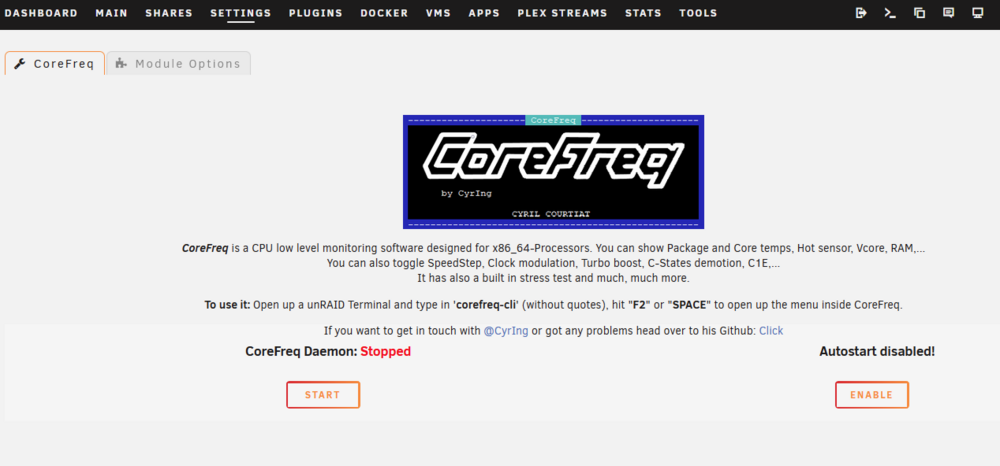
Did you start the CoreFreq Daemon? The plugin is in the Settings menu.
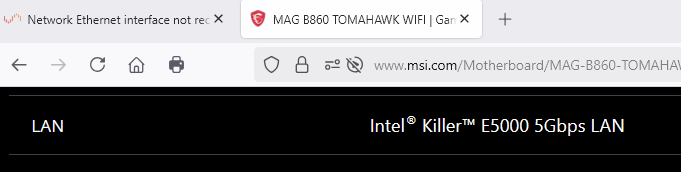
 The Realtek drivers won't help, it has an Intel E5000.
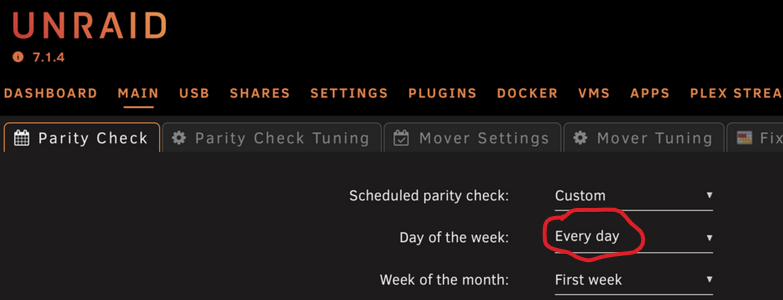
 I doubt a 24/7 test would be required to make a determination.Then try it both ways, and see which is more energy efficient. If they are basically the same, then it doesn't matter which you use.This one.Correct. Without knowing your network, can't give exact instructions. But looking at the IP leases in your router you should easily find the newest one for the server (once you give it time to boot fully). Alternatively you should be able to access the server by entering tower.local (or more correctly, <your_server_name>.local if you have renamed your server) instead of the IP address.Does the server have a simple network setup? Such as a single NIC vs multiple NICs/VLAN/etc? If a simple setup, you can take your flash drive to another machine, then rename the network.cfg file to network.old (file is in flash > config folder). When you boot up the Unraid server the first time, it will create a new network.cfg file with default settings, including using DHCP.You could contact @hotio and ask him to fix the image link (it is 404). Or you can update your docker template (in Advance View) to use this icon link: https://raw.githubusercontent.com/linuxserver/docker-templates/master/linuxserver.io/img/sonarr-icon.pngUSB-C is a style of connector. USB 2.0, USB 3.0 are data transfer protocols. That said, typically all USC-C connectors are used for USB 3.x data transfers. So no different than running USB 3.0 with a USB-A (the common skinny rectangular connector).It is 2025. Nobody should be booting a computer with legacy BIOS. Developers pretty much expect the features of UEFI to be available for them to use in their code. If someone is using 20 year old hardware, they need to realize that it needs to be kept sealed in a frozen in time state, and expect issues whenever something modern (hardware or software) is introduced to the equation.Glad you got this sorted. There are currently 3 Nginx Proxy Manager containers in CA, and who knows how many out in the wilds of the Internet. The ones in CA each have a different spin on how they are configured, so your question was definitely one to ask in the container's support thread.You will likely get a better/faster response if you post in the appropriate support thread in the Applications Support > Docker Containers sub-forum.Just tried it. Started the container, then launched the GUI. Both started in seconds.It is selected to do Parity Checks every day:
 If you are using default configurations (and if you weren't, you would already know where these files are) - The Docker application code is in the docker.img file, default location is in the system share (system/docker/docker.img) The Docker appdata is wherever you specified in the Docker template when you created the docker container (usually in the appdata share) Docker templates are stored on your flash drive. Most people put their system and appdata shares on a pool, ideally a NVMe or SSD for faster access speed. Now that Unraid allows multiple pools, there are less reasons to have permanent storage (storage that will not be removed from the system) on an Unassigned Device. It is still useful for drives that will be added/removed. I use it for a pair of USB enclosures used for off-site backup and a "SneakerNet" flash drive to physically copy files to/from my server. UD is also useful for connecting remote shares.It is usually best if you post in the support thread for the particular container you are using. Especially in this case, as your troubleshooting is pointing to a disconnect somewhere inside the container. You didn't indicate which of the many Plex containers you are using, so I can't direct you where to go for answers. I do know with Plex there are several times where something gets broken when they add something new to the application. You may want to try going back a version or two and see if this resolves your issue. Or even try a different container. I use the Linixserverio. Binhex has many people using his container as well. I am not 100% sure (as I don't own a nice GPU like you) but I believe you need to use the open source version of the Nvidia Driver for RTX3xxx GPU.I'm right about 5 years since building my first Unraid server. Today, it is much like the Ship of Theseus, except for the case, the flash drive and perhaps a few cables, none of the server's original parts remain. A second server was built about 2 years ago to keep this first one company. Many here have the same problem. I suggested starting a support group in the thread I have in my siggy, but it probably wouldn't work out. We would all just spend our time recommending new Docker containers to try... 😮 OSD - I Need Help - Lounge - UnraidThis is pretty harsh. Many of the enhancements available for Unraid come from users who develop and support these with no compensation for their time or effort. If you wish for a better plugin, you are free to develop it yourself, and then either share it or keep it to use on only your system. Your choice. I've used this plugin for several years without issue. Plex is set up with the most basic, standard configuration: linuxserver container, Host Network Type, and only the standard 32400 port forwarded from WAN on my firewall. Pop in the Plex token and select the local server address (mine displays both the local and remote server addresses as choices). It just works.Better way is to replace one disk at a time. Remove current disk and replace with new, bigger disk. Let Unraid rebuild the data onto the new disk. Doing it this way, if any issue arises, all of your data is backed up on the disk you removed. https://docs.unraid.net/unraid-os/manual/storage-management/#replacing-a-disk-to-increase-capacityIs the EFI folder on your flash drive "EFI" or "EFI-"? If it is EFI- remove the trailing dash. That is for booting non-UEFI/legacy BIOS.




