





i-B4se
Members
-
Joined
Everything posted by i-B4se
-
Ich habe mich mittlerweile gegen ein Upgrade meines aktuellen Servers und für komplett neue Hardware entschieden. Man muss die Wirtschaft ja irgendwie ankurbeln. :d Ist im Endeffekt also ziemlich genau meine ursprüngliche Auswahl geworden. Leider haben mir sowohl ASRock als auch ein B2B-Händler bestätigt, dass das W880D4U-2L2Q wohl noch ca. 3–4 Monate auf sich warten lässt. Also wurde jetzt Folgendes bestellt: - ASRock Rack W880D4U - Intel Core Ultra 7 270K Plus - Crucial 64 GB DDR5 - Noctua NH-D12L - Intel X710-DA2 - 2 m SFP+ DAC Ich werde den Zusammenbau und Verbrauch hier dokumentieren.
-
Moinsen Leude, lang ist es her TL;DR: Mein aktueller Server mit Ryzen 5 PRO 4650G kommt langsam an seine Grenzen, vor allem was die verfügbaren Kerne und die Single-Thread-Leistung der Gameserver angeht. Geplant wäre der Wechsel auf ein ASRock Rack W880D4U mit einem Ultra 7 265K bzw. 270K PLUS. Dabei müsste ich allerdings auf ECC verzichten und zusätzlich eine 10-Gbit-Netzwerkkarte verbauen. Daher die Frage: Gibt es ein alternatives Board mit 8x SATA, 10 Gbit und IPMI? Oder würdet ihr aktuell gar nicht groß umbauen, sondern einfach einen Ryzen 7 PRO 5750G in das vorhandene System stecken und die aktuelle Marktsituation aussitzen? Hier ein bisschen ausführlicher: Ich plane ein Upgrade für meinen Server und wie wir alle wissen, ist es natürlich gerade nicht die beste Zeit dafür. Leider muss aber langsam etwas passieren. Aktuell habe ich folgende Hardware verbaut: ASRock Rack X570D4U-2L2T AMD Ryzen 5 PRO 4650G 64 GiB DDR4 ECC 6x HDD 2x NVMe M.2 als Cache 1x SSD für Surveillance Dual Edge TPU für Surveillance komplett 10 Gbit Docker und VMs, die dauerhaft laufen: Docker, insgesamt rund 30 Stück: CrowdSec mit etlichen eigenen Szenarien NPM Frigate mit 8 Kameras, dafür auch die TPU Nextcloud mit ca. 10 Nutzern Paperless Plex etliche Datenbanken Redis Passwortmanager und noch einiges mehr VMs: Home Assistant, mittlerweile ziemlich groß geworden AMP Gameserver, einige Server laufen dauerhaft und sind gut besucht, andere werden nur bei Bedarf gestartet 2x Windows Die sechs physischen Kerne sind für die beiden Haupt-VMs, die Container und den Host mittlerweile einfach etwas knapp bemessen. Die Windows-VMs lasse ich dabei mal außen vor, dafür kann ich mir notfalls etwas anderes überlegen. Allein die Gameserver-VM belegt drei Kerne und Home Assistant weitere zwei. Damit bleibt im Grunde nur noch ein Kern für den Host und sämtliche Container übrig. Aus diesem Grund sind die Container aktuell auch nicht auf bestimmte Kerne gepinnt und können somit auf die Kerne zugreifen, die eigentlich von den VMs genutzt werden. Dadurch beeinflussen sich die einzelnen Dienste natürlich teilweise gegenseitig. Dazu kommt bei den Gameservern noch das Single-Thread-Limit. Der Simulationsthread enfMain liegt bereits bei mehreren Spielern bei rund 85 % Auslastung. Meine geplante Umstellung: ASRock Rack W880D4U Das W880D4U-2L2T ist ja gefühlt seit Ewigkeiten nicht lieferbar. Intel Core Ultra 7 265K oder Ultra 7 270K PLUS 64 GB DDR5 Jetzt gibt es dabei allerdings zwei Dinge, die mich ziemlich stören 😧 Non-ECC, da ECC aktuell einfach abartig teuer ist. Normaler RAM ist preislich schon grenzwertig, aber ECC schießt komplett den Vogel ab. Kein 10 Gbit auf dem Board, sprich ich brauche zusätzlich noch eine Netzwerkkarte. Ich bin deshalb ziemlich hin- und hergerissen, ob ich das Upgrade wirklich machen soll. Die Preise und die Verfügbarkeit sind momentan einfach abenteuerlich. Zum einen stört mich der Verzicht auf ECC und zum anderen, dass ich bei dem Board noch eine zusätzliche Netzwerkkarte brauche. Ein alternatives Board, das meine Anforderungen erfüllt, habe ich bisher aber auch nicht gefunden: 8x SATA 10 Gbit IPMI Was würdet ihr machen? Komplett auf die neue Plattform umbauen? Oder einfach einen Ryzen 7 PRO 5750G in das vorhandene Board stecken und erst einmal warten? Wobei sich natürlich die Frage stellt, ob Preise und Verfügbarkeit in absehbarer Zeit überhaupt wieder besser werden, gerade beim RAM. Besten Dank vorab :)
-
Hello, I've installed AMP and set it up. My required instances are running, and I can connect to the servers. But now I'd like to change the IP addresses of the individual instances and give each game server its own IP address. Is this even possible? Thanks in advance.
-
Keiner eine Idee?
-
Moinsen, ich hätte eine Frage bezüglich Nextcloud und MariaDB. Bei Nextcloud bekomme ich folgende Hinweise angezeigt: Ich nutze MariaDB und mit der Doku komme ich irgendwie nicht weiter. Könnt ihr mir evtl. kurz erklären, wie ich die Datenbanken anpasse? Muss ich dafür phpmyadmin installieren, um die Datenbank zu verwalten oder geht das auch anders? Besten Dank vorab.
-
So, es läuft wieder alles. Ich weiß nicht, was es genau war. Ich habe eine noch älter Version vom Bios installiert und anschließend auf die aktuellste gewechselt. Das hat erstmal nicht geholfen und auch nach mehrmaligen zurücksetzen vom Bios gab es keinen Erfolg. Hab den Server vom Strom getrennt, Batterie entfernt und die ganze Nacht stehen lassen. Gerade wieder alles angemacht und Frigate läuft wieder. Keine Ahnung, welche Einstellung da festhingen.
-
Bildschirm ist jetzt angeschlossen und es wird auch ein Bild erzeugt, also die Console vom Server. Bei Frigate bleibt es bei den Fehlermeldungen.
-
Nein, bisher noch nicht. Bin aktuell noch auf der Arbeit. Ich frage mich nur, warum dies auf einmal benötigt wird. An den Einstellungen/Config wurde nichts geändert.
-
Danke für deine Rückmeldung. Aber wie kann diese Datei aus dem Ordner verschwinden? Der Stick war beim Update gar nicht eingesteckt. Ich bin wieder auf die alte, vorher laufende, Bios-Version zurück. Also da ist quasi jetzt alles beim Alten.
-
Ok, Homeassistant hat sich quasi erledigt. Der Stick hat einen weg. Keine Ahnung wie das gekommen ist, aber ich hab aktuell den Conbee 2 drin und es läuft. Aber nochmal zu Frigate: Sollte unter "ls -l /dev/dri" nicht auch "renderd128" enthalten sein? root@NAS:~# ls -l /dev/dri total 0 drwxrwxrwx 2 root root 60 Oct 20 18:29 by-path/ crwxrwxrwx 1 root video 226, 0 Oct 20 18:29 card0
-
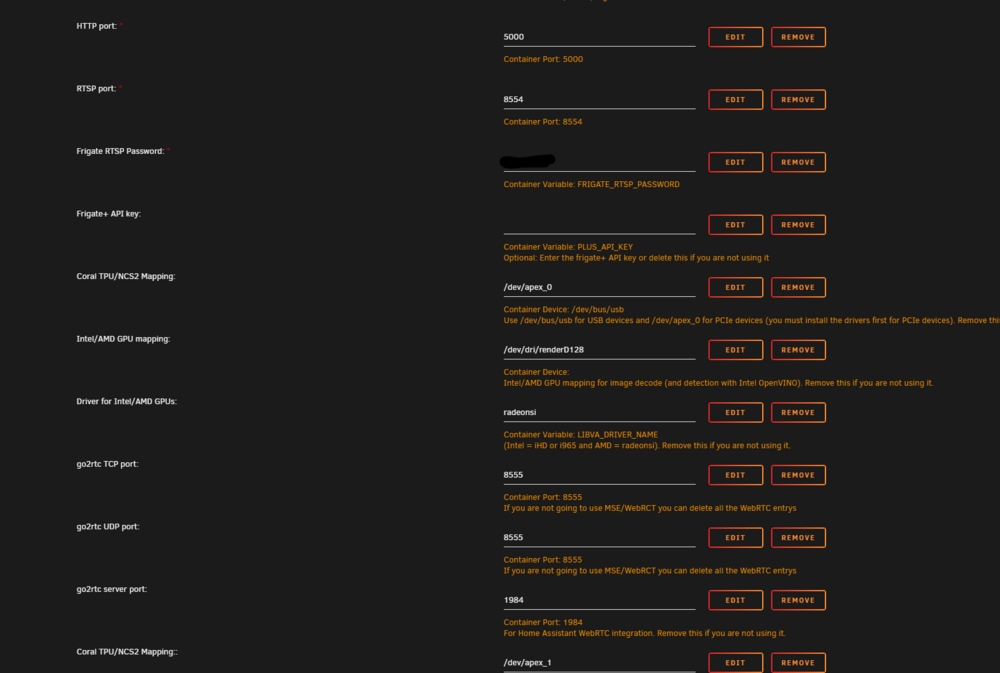
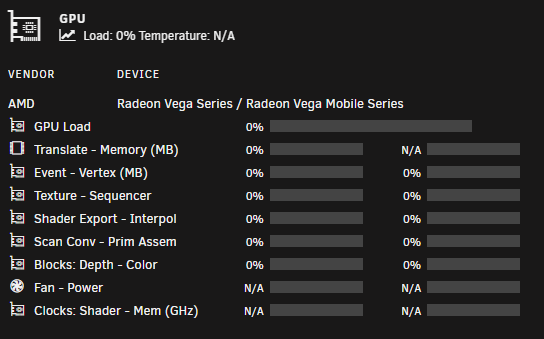
Moin Leute, war schon länger nicht mehr hier, aber bisher lief auch alles, aber jetzt hat es mich erwischt und ich finde gerade keine Lösung. Ich habe eine update vom Bios durchgeführt und diverse Neustarts gemacht, aber ich habe jetzt massive Probleme mit Frigate und Homeassistant/Deconz. An irgendwelchen Configs/Einstellungen oder ähnliches wurde nichts geändert. Frigate: Die Kameras werden nicht mehr angezeigt. Ich bekomme folgende Fehlermeldungen: 2024-10-20 16:47:11.005026831 [2024-10-20 16:47:11] frigate.app INFO : Camera processor started for Eingang_rechts: 447 2024-10-20 16:47:11.017192089 [2024-10-20 16:47:11] frigate.app INFO : Camera processor started for Eingang_links: 451 2024-10-20 16:47:11.031832388 [2024-10-20 16:47:11] frigate.app INFO : Camera processor started for Hinten_rechts: 463 2024-10-20 16:47:11.043015466 [2024-10-20 16:47:11] frigate.app INFO : Camera processor started for Hinten_links: 471 2024-10-20 16:47:11.058826167 [2024-10-20 16:47:11] frigate.app INFO : Capture process started for Eingang_rechts: 490 2024-10-20 16:47:11.070855235 [2024-10-20 16:47:11] frigate.app INFO : Capture process started for Eingang_links: 497 2024-10-20 16:47:11.082749439 [2024-10-20 16:47:11] frigate.app INFO : Capture process started for Hinten_rechts: 501 2024-10-20 16:47:11.097691452 [2024-10-20 16:47:11] frigate.app INFO : Capture process started for Hinten_links: 508 2024-10-20 16:47:12.254980097 [2024-10-20 16:47:12] frigate.video ERROR : Eingang_links: Unable to read frames from ffmpeg process. 2024-10-20 16:47:12.255477856 [2024-10-20 16:47:12] frigate.video ERROR : Eingang_links: ffmpeg process is not running. exiting capture thread... 2024-10-20 16:47:12.920709652 [2024-10-20 16:47:12] frigate.video ERROR : Hinten_links: Unable to read frames from ffmpeg process. 2024-10-20 16:47:12.921016675 [2024-10-20 16:47:12] frigate.video ERROR : Hinten_links: ffmpeg process is not running. exiting capture thread... 2024-10-20 16:47:12.955871386 [2024-10-20 16:47:12] frigate.video ERROR : Eingang_rechts: Unable to read frames from ffmpeg process. 2024-10-20 16:47:12.956119742 [2024-10-20 16:47:12] frigate.video ERROR : Eingang_rechts: ffmpeg process is not running. exiting capture thread... 2024-10-20 16:47:13.978998074 [2024-10-20 16:47:13] frigate.video ERROR : Hinten_rechts: Unable to read frames from ffmpeg process. 2024-10-20 16:47:13.979203408 [2024-10-20 16:47:13] frigate.video ERROR : Hinten_rechts: ffmpeg process is not running. exiting capture thread... 2024-10-20 16:47:19.631730504 [INFO] Starting go2rtc healthcheck service... 2024-10-20 16:47:31.106633438 [2024-10-20 16:47:31] watchdog.Eingang_rechts ERROR : Ffmpeg process crashed unexpectedly for Eingang_rechts. 2024-10-20 16:47:31.106722346 [2024-10-20 16:47:31] watchdog.Eingang_rechts ERROR : The following ffmpeg logs include the last 100 lines prior to exit. 2024-10-20 16:47:31.106814118 [2024-10-20 16:47:31] ffmpeg.Eingang_rechts.detect ERROR : [AVHWDeviceContext @ 0x5648ee369e00] No VA display found for device /dev/dri/renderD128. 2024-10-20 16:47:31.106843940 [2024-10-20 16:47:31] ffmpeg.Eingang_rechts.detect ERROR : Device creation failed: -22. 2024-10-20 16:47:31.106914969 [2024-10-20 16:47:31] ffmpeg.Eingang_rechts.detect ERROR : [hevc @ 0x5648ee4310c0] No device available for decoder: device type vaapi needed for codec hevc. 2024-10-20 16:47:31.106967000 [2024-10-20 16:47:31] ffmpeg.Eingang_rechts.detect ERROR : Device setup failed for decoder on input stream #0:0 : Invalid argument 2024-10-20 16:47:31.108161638 [2024-10-20 16:47:31] watchdog.Eingang_links ERROR : Ffmpeg process crashed unexpectedly for Eingang_links. 2024-10-20 16:47:31.108216952 [2024-10-20 16:47:31] watchdog.Eingang_links ERROR : The following ffmpeg logs include the last 100 lines prior to exit. 2024-10-20 16:47:31.108268565 [2024-10-20 16:47:31] ffmpeg.Eingang_links.detect ERROR : [AVHWDeviceContext @ 0x56242f811e40] No VA display found for device /dev/dri/renderD128. 2024-10-20 16:47:31.108392953 [2024-10-20 16:47:31] ffmpeg.Eingang_links.detect ERROR : Device creation failed: -22. 2024-10-20 16:47:31.108396724 [2024-10-20 16:47:31] ffmpeg.Eingang_links.detect ERROR : [hevc @ 0x56242f82a200] No device available for decoder: device type vaapi needed for codec hevc. 2024-10-20 16:47:31.108402870 [2024-10-20 16:47:31] ffmpeg.Eingang_links.detect ERROR : Device setup failed for decoder on input stream #0:0 : Invalid argument 2024-10-20 16:47:31.121837146 [2024-10-20 16:47:31] watchdog.Hinten_rechts ERROR : Ffmpeg process crashed unexpectedly for Hinten_rechts. 2024-10-20 16:47:31.121920397 [2024-10-20 16:47:31] watchdog.Hinten_rechts ERROR : The following ffmpeg logs include the last 100 lines prior to exit. 2024-10-20 16:47:31.122013147 [2024-10-20 16:47:31] ffmpeg.Hinten_rechts.detect ERROR : [AVHWDeviceContext @ 0x5625d1e7b740] No VA display found for device /dev/dri/renderD128. 2024-10-20 16:47:31.122079845 [2024-10-20 16:47:31] ffmpeg.Hinten_rechts.detect ERROR : Device creation failed: -22. 2024-10-20 16:47:31.122135649 [2024-10-20 16:47:31] ffmpeg.Hinten_rechts.detect ERROR : [hevc @ 0x5625d1e84840] No device available for decoder: device type vaapi needed for codec hevc. 2024-10-20 16:47:31.122200461 [2024-10-20 16:47:31] ffmpeg.Hinten_rechts.detect ERROR : Device setup failed for decoder on input stream #0:0 : Invalid argument 2024-10-20 16:47:31.134651580 [2024-10-20 16:47:31] watchdog.Hinten_links ERROR : Ffmpeg process crashed unexpectedly for Hinten_links. 2024-10-20 16:47:31.134738602 [2024-10-20 16:47:31] watchdog.Hinten_links ERROR : The following ffmpeg logs include the last 100 lines prior to exit. 2024-10-20 16:47:31.134788260 [2024-10-20 16:47:31] ffmpeg.Hinten_links.detect ERROR : [AVHWDeviceContext @ 0x56042dfa5e40] No VA display found for device /dev/dri/renderD128. 2024-10-20 16:47:31.144298007 [2024-10-20 16:47:31] ffmpeg.Hinten_links.detect ERROR : Device creation failed: -22. 2024-10-20 16:47:31.144367010 [2024-10-20 16:47:31] ffmpeg.Hinten_links.detect ERROR : [hevc @ 0x56042dfbd8c0] No device available for decoder: device type vaapi needed for codec hevc. 2024-10-20 16:47:31.144451798 [2024-10-20 16:47:31] ffmpeg.Hinten_links.detect ERROR : Device setup failed for decoder on input stream #0:0 : Invalid argument 2024-10-20 16:47:32.282730867 [2024-10-20 16:47:32] frigate.video ERROR : Eingang_links: Unable to read frames from ffmpeg process. 2024-10-20 16:47:32.282991096 [2024-10-20 16:47:32] frigate.video ERROR : Eingang_links: ffmpeg process is not running. exiting capture thread... 2024-10-20 16:47:32.914639816 [2024-10-20 16:47:32] frigate.video ERROR : Hinten_links: Unable to read frames from ffmpeg process. 2024-10-20 16:47:32.914958712 [2024-10-20 16:47:32] frigate.video ERROR : Hinten_links: ffmpeg process is not running. exiting capture thread... 2024-10-20 16:47:32.939559513 [2024-10-20 16:47:32] frigate.video ERROR : Eingang_rechts: Unable to read frames from ffmpeg process. 2024-10-20 16:47:32.939957400 [2024-10-20 16:47:32] frigate.video ERROR : Eingang_rechts: ffmpeg process is not running. exiting capture thread... 2024-10-20 16:47:34.020048016 [2024-10-20 16:47:34] frigate.video ERROR : Hinten_rechts: Unable to read frames from ffmpeg process. 2024-10-20 16:47:34.020283172 [2024-10-20 16:47:34] frigate.video ERROR : Hinten_rechts: ffmpeg process is not running. exiting capture thread... 2024-10-20 16:47:41.131369564 [2024-10-20 16:47:41] watchdog.Eingang_rechts ERROR : Ffmpeg process crashed unexpectedly for Eingang_rechts. 2024-10-20 16:47:41.131452326 [2024-10-20 16:47:41] watchdog.Eingang_rechts ERROR : The following ffmpeg logs include the last 100 lines prior to exit. 2024-10-20 16:47:41.131539837 [2024-10-20 16:47:41] ffmpeg.Eingang_rechts.detect ERROR : [AVHWDeviceContext @ 0x55c8b3117a80] No VA display found for device /dev/dri/renderD128. 2024-10-20 16:47:41.131569241 [2024-10-20 16:47:41] ffmpeg.Eingang_rechts.detect ERROR : Device creation failed: -22. 2024-10-20 16:47:41.131625952 [2024-10-20 16:47:41] ffmpeg.Eingang_rechts.detect ERROR : [hevc @ 0x55c8b3117200] No device available for decoder: device type vaapi needed for codec hevc. 2024-10-20 16:47:41.131666669 [2024-10-20 16:47:41] ffmpeg.Eingang_rechts.detect ERROR : Device setup failed for decoder on input stream #0:0 : Invalid argument 2024-10-20 16:47:41.142514787 [2024-10-20 16:47:41] watchdog.Eingang_links ERROR : Ffmpeg process crashed unexpectedly for Eingang_links. 2024-10-20 16:47:41.142588121 [2024-10-20 16:47:41] watchdog.Eingang_links ERROR : The following ffmpeg logs include the last 100 lines prior to exit. 2024-10-20 16:47:41.142618921 [2024-10-20 16:47:41] ffmpeg.Eingang_links.detect ERROR : [AVHWDeviceContext @ 0x5574b5166ec0] No VA display found for device /dev/dri/renderD128. 2024-10-20 16:47:41.142668089 [2024-10-20 16:47:41] ffmpeg.Eingang_links.detect ERROR : Device creation failed: -22. 2024-10-20 16:47:41.142754204 [2024-10-20 16:47:41] ffmpeg.Eingang_links.detect ERROR : [hevc @ 0x5574b5162f00] No device available for decoder: device type vaapi needed for codec hevc. 2024-10-20 16:47:41.142758045 [2024-10-20 16:47:41] ffmpeg.Eingang_links.detect ERROR : Device setup failed for decoder on input stream #0:0 : Invalid argument 2024-10-20 16:47:41.146349430 [2024-10-20 16:47:41] watchdog.Hinten_rechts ERROR : Ffmpeg process crashed unexpectedly for Hinten_rechts. 2024-10-20 16:47:41.146396294 [2024-10-20 16:47:41] watchdog.Hinten_rechts ERROR : The following ffmpeg logs include the last 100 lines prior to exit. 2024-10-20 16:47:41.146451678 [2024-10-20 16:47:41] ffmpeg.Hinten_rechts.detect ERROR : [AVHWDeviceContext @ 0x55e145417e40] No VA display found for device /dev/dri/renderD128. 2024-10-20 16:47:41.146514116 [2024-10-20 16:47:41] ffmpeg.Hinten_rechts.detect ERROR : Device creation failed: -22. 2024-10-20 16:47:41.146545825 [2024-10-20 16:47:41] ffmpeg.Hinten_rechts.detect ERROR : [hevc @ 0x55e145430200] No device available for decoder: device type vaapi needed for codec hevc. 2024-10-20 16:47:41.146595971 [2024-10-20 16:47:41] ffmpeg.Hinten_rechts.detect ERROR : Device setup failed for d Diese Fehler wiederholen sich andauernd. Hier sind meine Einstellungen, aber wie erwähnt, habe ich daran nichts geändert Radeon TOP und GPU Statistics habe ich bereits neu installiert. Ich finde es merkwürdig, dass keine Auslastung der Radeon-Grafikkarte vorhanden ist: Homeassistant: Hier habe ich ein Problem mit Deconz. Der Conbee3 Stick baut keinerlei Verbindungen mehr auf. Ich habe den bereits in einem anderen Gerät getestet und dort funktioniert er ohne Probleme. Ich glaube, der Stick hat nun auch einen anderen Namen. Ich meine, da stand vorher irgendwas mit Conbee 3: In Deconz hat er bisher mit keinem Gerät eine Verbindung aufgebaut, obwohl er es anzeigt. Die Verbindung ist definitiv nicht vorhanden Ich bin auch wieder auf die alte Bios-Version runter, aber die Fehler bleiben vorhanden. Unraid: 6.12.13 - aber diese Version habe ich schon einige Tage am Laufen. Ich weiß gerade nicht mehr weiter bzw. woran es liegt. Evtl. könnt ihr mir auf die Sprünge helfen. Besten Dank vorab.


-
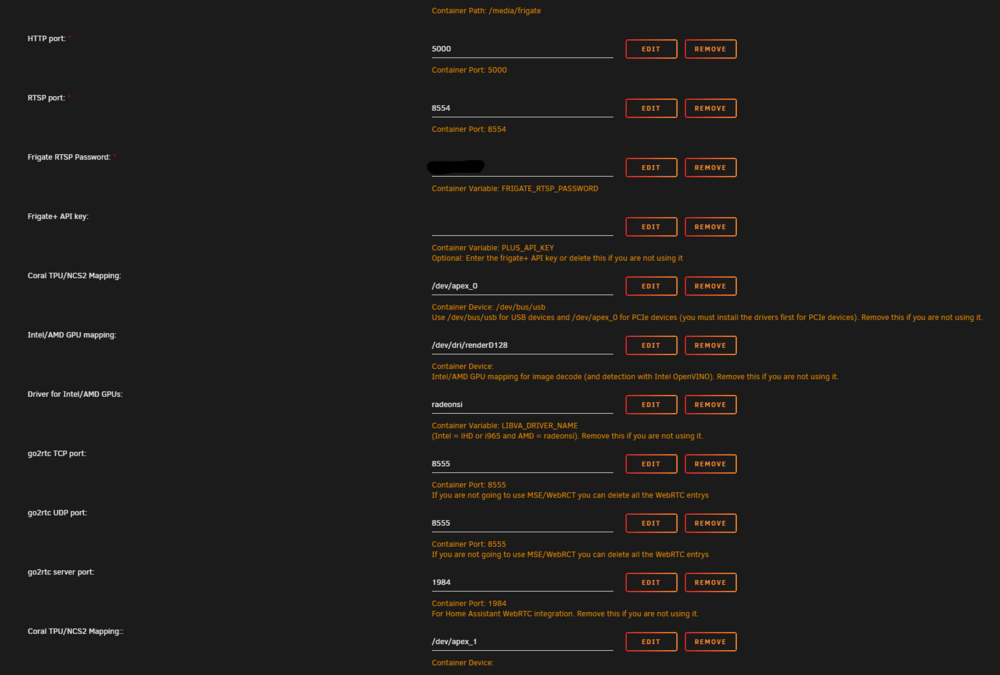
Hello, I have a new Problem with Frigate 😔 I had to restart the server several times after performing a BIOS update. Then I checked the individual dockers to see if everything was working, and I noticed that there were a few problems with Frigate. The following errors are displayed: 2024-10-20 15:30:57.383331920 [2024-10-20 15:30:57] frigate.app INFO : Starting Frigate (0.14.1-f4f3cfa) 2024-10-20 15:30:57.383354450 [2024-10-20 15:30:57] frigate.util.config INFO : Checking if frigate config needs migration... 2024-10-20 15:30:57.424972116 [2024-10-20 15:30:57] frigate.util.config INFO : frigate config does not need migration... 2024-10-20 15:30:57.492744878 [2024-10-20 15:30:57] peewee_migrate.logs INFO : Starting migrations 2024-10-20 15:30:57.492808978 [2024-10-20 15:30:57] peewee_migrate.logs INFO : There is nothing to migrate 2024-10-20 15:30:57.536346596 [2024-10-20 15:30:57] frigate.app INFO : Recording process started: 365 2024-10-20 15:30:57.537280988 [2024-10-20 15:30:57] frigate.app INFO : Recording process started: 374 2024-10-20 15:30:57.539880141 [2024-10-20 15:30:57] frigate.app INFO : go2rtc process pid: 98 2024-10-20 15:30:57.576308580 [2024-10-20 15:30:57] detector.coral1 INFO : Starting detection process: 394 2024-10-20 15:30:57.586639104 [2024-10-20 15:30:57] detector.coral2 INFO : Starting detection process: 400 2024-10-20 15:30:57.596977808 [2024-10-20 15:30:57] frigate.detectors.plugins.edgetpu_tfl INFO : Attempting to load TPU as pci:0 2024-10-20 15:30:57.597486929 [2024-10-20 15:30:57] frigate.app INFO : Output process started: 416 2024-10-20 15:30:57.601464874 [2024-10-20 15:30:57] frigate.detectors.plugins.edgetpu_tfl INFO : Attempting to load TPU as pci:1 2024-10-20 15:30:57.601764565 [2024-10-20 15:30:57] frigate.detectors.plugins.edgetpu_tfl INFO : TPU found 2024-10-20 15:30:57.601882605 [2024-10-20 15:30:57] frigate.detectors.plugins.edgetpu_tfl INFO : TPU found 2024-10-20 15:30:57.636500592 [2024-10-20 15:30:57] frigate.app INFO : Camera processor started for Eingang_rechts: 448 2024-10-20 15:30:57.646912616 [2024-10-20 15:30:57] frigate.app INFO : Camera processor started for Eingang_links: 453 2024-10-20 15:30:57.658714762 [2024-10-20 15:30:57] frigate.app INFO : Camera processor started for Hinten_rechts: 459 2024-10-20 15:30:57.673977162 [2024-10-20 15:30:57] frigate.app INFO : Camera processor started for Hinten_links: 472 2024-10-20 15:30:57.689051572 [2024-10-20 15:30:57] frigate.app INFO : Capture process started for Eingang_rechts: 490 2024-10-20 15:30:57.703237412 [2024-10-20 15:30:57] frigate.app INFO : Capture process started for Eingang_links: 498 2024-10-20 15:30:57.717409961 [2024-10-20 15:30:57] frigate.app INFO : Capture process started for Hinten_rechts: 503 2024-10-20 15:30:57.730972779 [2024-10-20 15:30:57] frigate.app INFO : Capture process started for Hinten_links: 508 2024-10-20 15:30:58.906570836 [2024-10-20 15:30:58] frigate.video ERROR : Hinten_rechts: Unable to read frames from ffmpeg process. 2024-10-20 15:30:58.906869107 [2024-10-20 15:30:58] frigate.video ERROR : Hinten_rechts: ffmpeg process is not running. exiting capture thread... 2024-10-20 15:30:59.193160553 [2024-10-20 15:30:59] frigate.video ERROR : Eingang_links: Unable to read frames from ffmpeg process. 2024-10-20 15:30:59.193403033 [2024-10-20 15:30:59] frigate.video ERROR : Eingang_links: ffmpeg process is not running. exiting capture thread... 2024-10-20 15:30:59.811290457 [2024-10-20 15:30:59] frigate.video ERROR : Hinten_links: Unable to read frames from ffmpeg process. 2024-10-20 15:30:59.811671587 [2024-10-20 15:30:59] frigate.video ERROR : Hinten_links: ffmpeg process is not running. exiting capture thread... 2024-10-20 15:31:00.166152494 [2024-10-20 15:31:00] frigate.video ERROR : Eingang_rechts: Unable to read frames from ffmpeg process. 2024-10-20 15:31:00.166331425 [2024-10-20 15:31:00] frigate.video ERROR : Eingang_rechts: ffmpeg process is not running. exiting capture thread... I didn't change anything in the config and everything worked before. I also checked the BIOS settings, but everything is fine there and the old settings were completely adopted. The cameras are running and I can access them normally. It's just that nothing is displayed in Frigate.
-
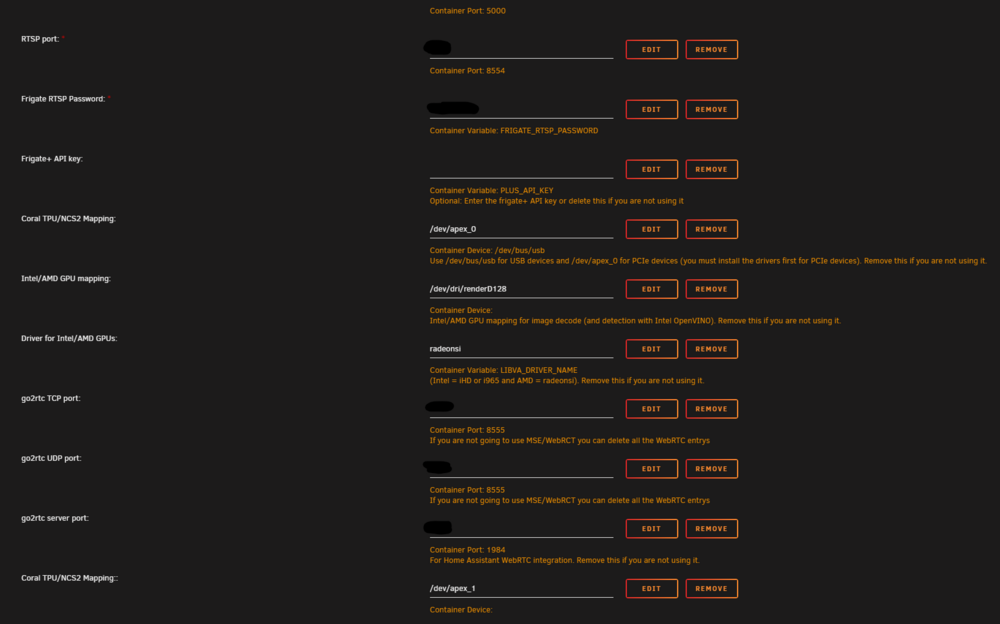
Hello, maybe someone can help me. My frigate docker no longer starts properly after I updated unraid and frigate. Frigate Version: last stable Unraid version: 6.12.13 If i hit "start" it will go to an reboot loop 2024-09-11 20:21:20.604014796 [INFO] Preparing Frigate... 2024-09-11 20:21:20.605006474 [INFO] Starting NGINX... 2024-09-11 20:21:20.610554256 [INFO] Preparing new go2rtc config... 2024-09-11 20:21:20.620547933 [INFO] Starting Frigate... 2024-09-11 20:21:20.900755159 [INFO] Starting go2rtc... 2024-09-11 20:21:20.989145189 20:21:20.989 INF go2rtc platform=linux/amd64 revision=b2399f3 version=1.9.2 2024-09-11 20:21:20.989152243 20:21:20.989 INF config path=/dev/shm/go2rtc.yaml 2024-09-11 20:21:20.989462688 20:21:20.989 INF [rtsp] listen addr=:XXXX 2024-09-11 20:21:20.989801419 20:21:20.989 INF [api] listen addr=:XXXX 2024-09-11 20:21:20.989888442 20:21:20.989 INF [webrtc] listen addr=:XXXX/tcp s6-rc: info: service nginx successfully started s6-rc: info: service certsync: starting s6-rc: info: service certsync successfully started s6-rc: info: service legacy-services: starting 2024-09-11 20:21:21.701488661 [INFO] Starting certsync... s6-rc: info: service legacy-services successfully started 2024-09-11 20:21:21.731178802 [2024-09-11 20:21:21] frigate.app INFO : Starting Frigate (0.14.1-f4f3cfa) 2024-09-11 20:21:21.731242149 [2024-09-11 20:21:21] frigate.util.config INFO : Checking if frigate config needs migration... 2024-09-11 20:21:21.769712403 127.0.0.1 - - [11/Sep/2024:20:21:21 +0200] "" 400 0 "-" "-" "-" 2024-09-11 20:21:21.775685101 [2024-09-11 20:21:21] frigate.util.config INFO : frigate config does not need migration... 2024-09-11 20:21:21.799919651 ************************************************************* 2024-09-11 20:21:21.799925797 ************************************************************* 2024-09-11 20:21:21.799933409 *** Your config file is not valid! *** 2024-09-11 20:21:21.799938578 *** Please check the docs at *** 2024-09-11 20:21:21.799942419 *** https://docs.frigate.video/configuration/index *** 2024-09-11 20:21:21.799976013 ************************************************************* 2024-09-11 20:21:21.799980203 ************************************************************* 2024-09-11 20:21:21.799985022 *** Config Validation Errors *** 2024-09-11 20:21:21.799989213 ************************************************************* 2024-09-11 20:21:21.800019035 ui.use_experimental: Extra inputs are not permitted 2024-09-11 20:21:21.800022806 record.events.required_zones: Extra inputs are not permitted 2024-09-11 20:21:21.800027067 ************************************************************* 2024-09-11 20:21:21.800031327 *** End Config Validation Errors *** 2024-09-11 20:21:21.800035587 ************************************************************* 2024-09-11 20:21:23.065697133 [INFO] Service Frigate exited with code 1 (by signal 0) s6-rc: info: service legacy-services: stopping s6-rc: info: service legacy-services successfully stopped s6-rc: info: service go2rtc-healthcheck: stopping s6-rc: info: service certsync: stopping 2024-09-11 20:21:23.078514918 [INFO] The go2rtc-healthcheck service exited with code 256 (by signal 15) s6-rc: info: service go2rtc-healthcheck successfully stopped 2024-09-11 20:21:23.080638725 [INFO] Service CERTSYNC exited with code 256 (by signal 15) s6-rc: info: service certsync successfully stopped s6-rc: info: service nginx: stopping s6-rc: info: service certsync-log: stopping s6-rc: info: service certsync-log successfully stopped 2024-09-11 20:21:23.130114240 [INFO] Service NGINX exited with code 0 (by signal 0) s6-rc: info: service nginx successfully stopped s6-rc: info: service nginx-log: stopping s6-rc: info: service frigate: stopping s6-rc: info: service frigate successfully stopped s6-rc: info: service go2rtc: stopping s6-rc: info: service frigate-log: stopping s6-rc: info: service nginx-log successfully stopped 2024-09-11 20:21:23.134485823 exit with signal: terminated s6-rc: info: service frigate-log successfully stopped 2024-09-11 20:21:23.140425346 [INFO] The go2rtc service exited with code 0 (by signal 0) s6-rc: info: service go2rtc successfully stopped s6-rc: info: service go2rtc-log: stopping s6-rc: info: service go2rtc-log successfully stopped s6-rc: info: service log-prepare: stopping s6-rc: info: service s6rc-fdholder: stopping s6-rc: info: service log-prepare successfully stopped s6-rc: info: service legacy-cont-init: stopping s6-rc: info: service s6rc-fdholder successfully stopped s6-rc: info: service legacy-cont-init successfully stopped s6-rc: info: service fix-attrs: stopping s6-rc: info: service fix-attrs successfully stopped s6-rc: info: service s6rc-oneshot-runner: stopping s6-rc: info: service s6rc-oneshot-runner successfully stopped I haven't changed anything except updating Unraid and frigate. Thank you
-
Ja, RocketChat läuft bei mir. Ich habe aber den RC-Server vor ca. 2 Jahren aufgesetzt. Ich schaue mir das morgen nochmal genauer an.
-
Ich hab mir das bisher nie angeschaut, aber mein Ordner ist ebenfalls komplett leer.
-
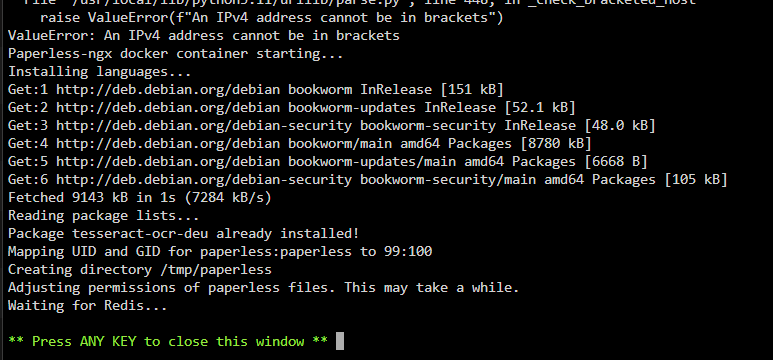
Hello, I have the same problem. I updated the Docker and now paperless no longer starts. Does anyone know a solution? Thank you in advance EDIT: I went back to version 1.17.4 and now it works again.

-
I found the problem. I updated the Opnsense firewall also and the dyndns didnt work anymore. Now everything is working fine, thanks
-
Hey, I have some problems with my Nextcloud-Docker. I updated to the last version and now I get the following message: AH00558: apache2: Could not reliably determine the server's fully qualified domain name, using 192.168.178.28. Set the 'ServerName' directive globally to suppress this message [Sat Nov 25 23:09:25.066482 2023] [mpm_prefork:notice] [pid 1] AH00163: Apache/2.4.57 (Debian) PHP/8.2.12 configured -- resuming normal operations [Sat Nov 25 23:09:25.066527 2023] [core:notice] [pid 1] AH00094: Command line: 'apache2 -D FOREGROUND' => Searching for scripts (*.sh) to run, located in the folder: /docker-entrypoint-hooks.d/before-starting ==> but the hook folder "before-starting" is empty, so nothing to do My MariaDB-Docker is running normaly and without any error message.
-
Wieso sollte man das gleiche Passwort und User für Nextcloud und Die Datenbank nehmen? Bezüglich Sicherheit ist das auch nicht gerade förderlich. @Tebald Ist die IP korrekt?
-
Den Maintenance Mode mache ich einfach zur Sicherheit > Kopfsache Ich hab den Umzug eben abgeschlossen und hat alles funktioniert. Ich hab es einfach nach meiner Liste gemacht. Backups wären zur Not in mehrfacher Ausführung vorhanden gewesen.
-
Hallo zusammen, ich würde gerne meine kompletten Daten (Fotos/Videos/Dokumente/etc.) auf einen anderen Datenträger verschieben. Bevor ich das mache, wollte ich nochmal kurz nachfragen ob dies so korrekt ist 😅 1. Nextcloud in Maintenance mode versetzen 2. Docker stoppen 3. Ordner "data" von der alten Festplatte (/mnt/disk1/Nextcloud/) auf neue die Festplatte (mnt/nextcloud/) verschieben 4. Neuen "data" Pfad (mnt/nextcloud/) im Docker anpassen 5. Docker starten 6. Mit der Console nach Daten scannen "docker exec --user 33 Nextcloud php occ files:scan --all" 7. Nach dem Scan den Maintenance mode beenden und nun sollte wieder alles laufen Habe ich da etwas grundlegendes vergessen? Backups sind vorhanden, aber ich wollte eine Neuinstallation vermeiden. Besten Dank
-
Ich fühle mich einfach wohler wenn ich die mit einem Angebot kaufe 😅😁
-
Kann es sein, dass die Angebote für HDDs weniger werden? Ich warte schon seit etlichen Tagen auf ein gutes Angebot für 14 oder 16 TB.
-
Hab ich versucht, aber ohne erfolgt. Selbst wenn ich den Docker komplett neu installiere, dann kommt diese Fehlermeldung. Ich hab bei Github mal ein Beitrag eröffnet. Mal schauen ob es eine Lösung gibt.
-
Does no one have an idea what this could be? 😅


