





btTeddy
Members
-
Joined
-
Last visited
Everything posted by btTeddy
-
It does have some option but not so much really. Usb stick doesn't seems to be properly recognised in legacy mode as there is no brand/name displayed as usual. This must be something to do with usb sticks themselves as the other ones work just fine. I've checked every single setting but nothing helped to start it in Legacy mode. Booting in UEFI works just fine
-
Nope, nothing changed. System refuses to boot from this stick in Legacy mode. UEFI works just fine
-
Found one of the drives. What options what you suggest to use in rufus? Boot selection? Syslinux? 4.07 or 6.04?
-
Good tip but unluckily for me this doesn't seems to be documented anywhere There is two multi switches on the mobo, one not documented at all, the other only briefly. Considered experimenting with undocumented switches but this will most likely lead to a disaster. S1Off Off = iLO security is enabled. On = iLO security is disabled. S2Off Off = System configuration can be changed. On = System configuration is locked. S3OffReserved S4OffReserved S5Off Off = Power-on password is enabled. On = Power-on password is disabled. S6Off Off = No function On = ROM reads system configuration as invalid. S7Off Off = Set default boot mode to UEFI. On = Set default boot mode to legacy. S8—Reserved S9—Reserved S10—Reserved S11—Reserved S12—Reserved
-
Did you get anywhere with this? I'm having exactly the same problem with ml30 gen9 and e3-1275 v6 and no solution.
-
Disabled ILO but this didn't help. Struggling to find anything to disable iGPU BTW. Do I need to reinstall the plugin after any changes to detect them?
-
HP Proliant ML30 gen9, CPU Xenon E3-1275 v6 which is mentioned as supported. I've spent a few hours checking BIOS for any related settings but can't find anything at all. Any help investigating the problem would be much appreciated Apparently those boxes have additional ancient `GPU` built in for ILO and this causes the problem. Googled like crazy but I have not found any solution for this. Attached diagnostics and hoping that someone can help solve the problem. Strangely it works just fine on my other HP - Proliant ML10 gen9 with Xenon E3-1225 v5 diagnostics-20231022-1415.zip

-
I could but... Bit of a problem. Two of them ended in a bin, last remaining stick that does not work in Legacy mode is my old unraid stick which is blacklisted, so can't install unraid on it any longer.
-
I'm not entirely sure how to answer this question. Mentioned box is HP Proliant ML30 gen9 with HP ILO4. Apparently those boxes have additional ancient `GPU` built in for ILO and this causes the problem. Googled like crazy but I have not found any solution for this problem. Attached diagnostics. Please have a look if you have a spare minute or two diagnostics-20231022-1415.zip
-
Since this is a top search result I'll give an answer in here. So I spend a lot of time trying to boot in Legacy mode. Issue is very simple. Some flash drives will not be seen as bootable in Legacy mode no matter what. Tried 4 different drives. Only one of them booted in legacy mode, the other 3 only in UEFI. Experimented with those 3, deleted partitions, formatted them, reinstalled unraid from creator, run the `make_bootable` script, nothing helped. Just totally nothing. The one that worked in Legacy was (no surprise) the oldest one I have. Probably 7-10 years old
-
Did you ever get it sorted? I'm having the same problem. Unraid refuses to see iGPU from my xenon E3-1275 V6
-
Will it be possible to add option to hide container status "started" "stopped" but to leave green triangle/red square as indicator? Something like custom css can achieve

-
No idea. Installed step by step from here. Added hundreds of albums to webui. tidal-dl downloads them one by one untill webui is still open once the tab with webui is closed it will finish downloading album that is in progress but will not start another one from the list. Tried many times. Always the same result.
-
I'm using the docker above with the settings exactly as described. Need to have a look how -g can be useful in here.
-
I've noticed very annoying bug. Closing webgui will cause the script to finish current download but will not continue with the rest of the list.txt
-
Thanks for making this up. It actually works. `Gui` is just perfect. Simple one button. done. Needed to restart couple of time cause it just refused to create .json files. Possibly tidal was active somewhere else. The only downside is that the files downloaded are created with some very weird permissions: -rw-r--r-- 1 sshd sshd 23M May 18 01:24 vs typical one for unraid -rw-rw-rw- 1 nobody users 2.5K May 18 01:26 ../ Any suggestions how to change this?
-
Plus one for all those request. Not being able to access unraid from mobile/tablet in 2023 is a bit of shame for limetech
-
Will this command let the mover to finish safely, or it just kills the process?
-
This is really usefully script. I'm wondering if there is any chance to add an option to move the folder only if the files inside (inc subfolders are NOT hard linked. Basically, to move unique files only, as moving hardlinks in between the drives makes a copy of the file. In result even more space is taken. I'm using this to find not hardlinked media files find /mnt/user/data/media* -type f -not -path "*/Scenes/*" -not -path "*/Behind The Scenes/*" -not -path "*/Trailers/*" -not -path "*/Featurettes/*" -not -path "*/Other/*" \( -iname \*.mp4 -o -iname \*.mkv ! -iname "*gag*" ! -iname "*sample*" ! -iname "*blooper*" ! -iname "*Outtake*" \) -links 1 -print | sort
-
It was a weird one. Affected files and folder where in all sort of folders. appdata, disk1, disk2, shares for arr's as well as in the shares that absolutely no one have any access
-
screenshot fixed appdata is exactly where I had a lot of problems suddenly. Not entirely sure why. Updated to the latest unraid over a month while problems started just a day ago without any reason. Anyway. New permission solved the problems that really shouldn't happen in a first place There must be ongoing bug in the unraid cause internet is absolutely full of posts describing exactly the same problem as mine was.... since 2015
-
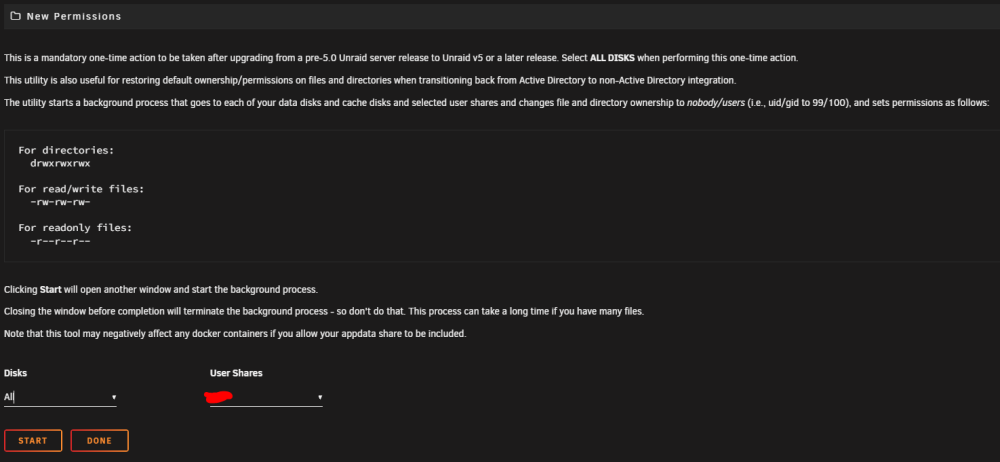
This was my first result from google so I'll write solution: If you can't delete a folder or file but you can rename it (my case) most likely it's a permissions problem. Just run 'New Permission tool' Tools -> New Permission http://tower.local/Tools/NewPerms
-
epicgames-freegames Tried to set it up but I just can't get it to work Any suggestions what am I doing wrong in here? Just used default settings, added login details to config.json but I;m seeing this in a log file /usr/app/node_modules/json5/lib/parse.js:1083 const err = new SyntaxError(message) ^ SyntaxError: JSON5: invalid character ',' at 17:4 at syntaxError (/usr/app/node_modules/json5/lib/parse.js:1083:17) at invalidChar (/usr/app/node_modules/json5/lib/parse.js:1028:12) at Object.end (/usr/app/node_modules/json5/lib/parse.js:682:15) at Object.default (/usr/app/node_modules/json5/lib/parse.js:146:37) at lex (/usr/app/node_modules/json5/lib/parse.js:78:42) at Object.parse (/usr/app/node_modules/json5/lib/parse.js:25:17) at Object.<anonymous> (/usr/app/src/common/config/setup.ts:62:30) at Module._compile (node:internal/modules/cjs/loader:1159:14) at Object.Module._extensions..js (node:internal/modules/cjs/loader:1213:10) at Module.load (node:internal/modules/cjs/loader:1037:32) /usr/app/node_modules/json5/lib/parse.js:1083 const err = new SyntaxError(message) ^ SyntaxError: JSON5: invalid character ',' at 17:4 at syntaxError (/usr/app/node_modules/json5/lib/parse.js:1083:17) at invalidChar (/usr/app/node_modules/json5/lib/parse.js:1028:12) at Object.end (/usr/app/node_modules/json5/lib/parse.js:682:15) at Object.default (/usr/app/node_modules/json5/lib/parse.js:146:37) at lex (/usr/app/node_modules/json5/lib/parse.js:78:42) at Object.parse (/usr/app/node_modules/json5/lib/parse.js:25:17) at Object.<anonymous> (/usr/app/src/common/config/setup.ts:62:30) at Module._compile (node:internal/modules/cjs/loader:1159:14) at Object.Module._extensions..js (node:internal/modules/cjs/loader:1213:10) at Module.load (node:internal/modules/cjs/loader:1037:32) /usr/app/node_modules/json5/lib/parse.js:1083 const err = new SyntaxError(message) ^ SyntaxError: JSON5: invalid character ',' at 17:4 at syntaxError (/usr/app/node_modules/json5/lib/parse.js:1083:17) at invalidChar (/usr/app/node_modules/json5/lib/parse.js:1028:12) at Object.end (/usr/app/node_modules/json5/lib/parse.js:682:15) at Object.default (/usr/app/node_modules/json5/lib/parse.js:146:37) at lex (/usr/app/node_modules/json5/lib/parse.js:78:42) at Object.parse (/usr/app/node_modules/json5/lib/parse.js:25:17) at Object.<anonymous> (/usr/app/src/common/config/setup.ts:62:30) at Module._compile (node:internal/modules/cjs/loader:1159:14) at Object.Module._extensions..js (node:internal/modules/cjs/loader:1213:10) at Module.load (node:internal/modules/cjs/loader:1037:32) > [email protected] entrypoint-config > node dist/src/entrypoint-config.js > [email protected] entrypoint-config > node dist/src/entrypoint-config.js > [email protected] entrypoint-config > node dist/src/entrypoint-config.js Config.json file below (account don't have 2FA) { "cronSchedule": "0 12 * * *", "searchStrategy": "all", "runOnStartup": true, "testNotifiers": true, "runOnce": false, "timezone": "Europe/London", "intervalTime": 60, "logLevel": "info", "notificationTimeoutHours": 24, "testNotifiers": false, "skipVersionCheck": false, "noHumanErrorHelp": false, "browserLaunchTimeout": 15, "browserLaunchRetryAttempts": 5, "browserNavigationTimeout": 30000 }, "accounts": [ { "email": "[email protected]", "password": "ZZZZZZZZZZZZZZZ", }, ], "notifiers": [ { "type": "telegram", "apiUrl": "https://api.telegram.org", "token": "YYYYYYYYYYYYYYYYYYYYYYYYYYY", "chatId": "WWWWWWWWWWWWWWWWWWWW", }, ], }
-
Progress window in file manager reports completely random numbers It reports 99% completed, ETA of a few minutes, and then when moving subfolder goes down to much lower number (56% here), ETA goes up by a lot. It feels like ETA and completion progress is not calculated for over main folder size but only for each subfolder How to repeat: Move a large (hundreds of GB) folder with a few subfolders containing a lot of small files (photos) and some big ones (videos). Just before taking this screenshot UNRAID reported 99% progress and 7s seconds, which obviously was incorrect as it just started moving huge folder.
-
Not really. Don't have a monitor attached to it. As far as I remember: Latest bios + factory reset. Can't remember changing any settings. Even if it would be only the obvious ones.


