btTeddy
Members
-
Joined
-
Last visited
Everything posted by btTeddy
-
It's fixed. After the restart massive logo returned, but once plugin updated to the current version as of now, it's permanently gone. Sorted
-
This fixed it right away. Strange that I got the issue on a fresh install.
-
ASPM Helper Unraid 6.12.14 Chrome and FF I think something is not quite right with that massive logo. http://tower.local/Apps/Settings/aspm-helper

-
When a container icon address can't be reached, then http://tower.local/docker page loading time will increase from a second to almost half a minute. http://tower.local/dashboard will not show any docker containers running. Log will only display:
-
Clear install of win11 also couldn't map unraid shares. Deleting everything in Credential Manager in windows worked again but if you have root share set per spaceinvader video you need to use username set there, not just a root. This solution is still relevant

-
I'm having identical problem. GUI log is empty, Dozzle shows empty logs as well, while logs in do exists /var/lib/docker/containers/<container_id>/<container_id>-json.log
-
Be very careful playing with SCEWIN. Some settings once changed doesn't seems to be possible to revert. Flashing new BIOS, clearing cmos doesn't change this one back Now all of my discs starting one after the other which takes abosulety forever to boot. This the settings responsible for it Setup Question = PUIS Enable Help String = Enable/Disable Power-Up In Standby (PUIS) feature set allows devices to be powered-up into the Standby power management state to minimize inrush current at power-up and to allow the host to sequence the spin-up of devices. Token =10A // Do NOT change this line Offset =86E Width =01 BIOS Default =[00]Disabled Options =[01]Enabled // Move "*" to the desired Option *[00]Disabled
-
Something is not right in here. Plugin tried to backup external volume while is configured not to do so. I'm glad it didn't tried to this for radarr [27.11.2023 02:01:37][ℹ️][plex-image-cleanup] No stopping needed for plex-image-cleanup: Not started! [27.11.2023 02:01:37][⚠️][plex-image-cleanup] '/mnt/user/appdata/plex-image-cleanup' does NOT exist! Please check your mappings! Skipping it for now. [27.11.2023 02:01:37][ℹ️][plex-image-cleanup] Should NOT backup external volumes, sanitizing them... [27.11.2023 02:01:37][ℹ️][plex-image-cleanup] Calculated volumes to back up: /mnt/user/appdata/plex [27.11.2023 02:01:37][ℹ️][plex-image-cleanup] Backing up plex-image-cleanup... [27.11.2023 02:02:12][❌][plex-image-cleanup] tar creation failed! Tar said: tar: /mnt/user/appdata/plex/Library/Application Support/Plex Media Server/Cache: file changed as we read it [27.11.2023 02:02:12][ℹ️][plex-image-cleanup] plex-image-cleanup is being ignored, because it was not started before (or should not be started).

-
This app does not longer work Replace /frontend with /config while installing Tried every single solution in here - no luck, just refuses to connect to plex
-
Had the same problem. Just couldn't delete a share from unraid./shares Tried MC - no luck as well Solution was dead simple in my case - Rename the share in unraid/shares (don't forget to apply) - Tick `delete` then apply. It worked straight away in my case
-
I was afraid you gonna come back with such info. I've read somewhere that is possible to change SPS firmware to ME, although I haven't seen any information about how to actually do it. Also I've found this guide below, which shows something that might help us. Strangelly I do not see such options when accessing RCBU, but currently can't even check as ILO4 refuses my default login. https://lukas.dzunko.sk/index.php/Hardware:_HP_Microserver_-_How_to_fix_ILO4_after_adding_second_graphics_card I'm so disappointed in proliants
-
It does have some option but not so much really. Usb stick doesn't seems to be properly recognised in legacy mode as there is no brand/name displayed as usual. This must be something to do with usb sticks themselves as the other ones work just fine. I've checked every single setting but nothing helped to start it in Legacy mode. Booting in UEFI works just fine
-
Nope, nothing changed. System refuses to boot from this stick in Legacy mode. UEFI works just fine
-
Found one of the drives. What options what you suggest to use in rufus? Boot selection? Syslinux? 4.07 or 6.04?
-
Good tip but unluckily for me this doesn't seems to be documented anywhere There is two multi switches on the mobo, one not documented at all, the other only briefly. Considered experimenting with undocumented switches but this will most likely lead to a disaster. S1Off Off = iLO security is enabled. On = iLO security is disabled. S2Off Off = System configuration can be changed. On = System configuration is locked. S3OffReserved S4OffReserved S5Off Off = Power-on password is enabled. On = Power-on password is disabled. S6Off Off = No function On = ROM reads system configuration as invalid. S7Off Off = Set default boot mode to UEFI. On = Set default boot mode to legacy. S8—Reserved S9—Reserved S10—Reserved S11—Reserved S12—Reserved
-
Did you get anywhere with this? I'm having exactly the same problem with ml30 gen9 and e3-1275 v6 and no solution.
-
Disabled ILO but this didn't help. Struggling to find anything to disable iGPU BTW. Do I need to reinstall the plugin after any changes to detect them?
-
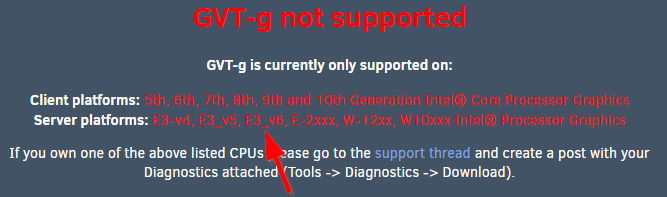
HP Proliant ML30 gen9, CPU Xenon E3-1275 v6 which is mentioned as supported. I've spent a few hours checking BIOS for any related settings but can't find anything at all. Any help investigating the problem would be much appreciated Apparently those boxes have additional ancient `GPU` built in for ILO and this causes the problem. Googled like crazy but I have not found any solution for this. Attached diagnostics and hoping that someone can help solve the problem. Strangely it works just fine on my other HP - Proliant ML10 gen9 with Xenon E3-1225 v5 diagnostics-20231022-1415.zip
-
I could but... Bit of a problem. Two of them ended in a bin, last remaining stick that does not work in Legacy mode is my old unraid stick which is blacklisted, so can't install unraid on it any longer.
-
I'm not entirely sure how to answer this question. Mentioned box is HP Proliant ML30 gen9 with HP ILO4. Apparently those boxes have additional ancient `GPU` built in for ILO and this causes the problem. Googled like crazy but I have not found any solution for this problem. Attached diagnostics. Please have a look if you have a spare minute or two diagnostics-20231022-1415.zip
-
Since this is a top search result I'll give an answer in here. So I spend a lot of time trying to boot in Legacy mode. Issue is very simple. Some flash drives will not be seen as bootable in Legacy mode no matter what. Tried 4 different drives. Only one of them booted in legacy mode, the other 3 only in UEFI. Experimented with those 3, deleted partitions, formatted them, reinstalled unraid from creator, run the `make_bootable` script, nothing helped. Just totally nothing. The one that worked in Legacy was (no surprise) the oldest one I have. Probably 7-10 years old
-
Did you ever get it sorted? I'm having the same problem. Unraid refuses to see iGPU from my xenon E3-1275 V6
-
Will it be possible to add option to hide container status "started" "stopped" but to leave green triangle/red square as indicator? Something like custom css can achieve

-
No idea. Installed step by step from here. Added hundreds of albums to webui. tidal-dl downloads them one by one untill webui is still open once the tab with webui is closed it will finish downloading album that is in progress but will not start another one from the list. Tried many times. Always the same result.
-
I'm using the docker above with the settings exactly as described. Need to have a look how -g can be useful in here.