





Everything posted by Kilrah
-
BEFORE adding it to the array, correct. Same. But if you format AFTER adding to the array then you DO erase your data since at that point you're formatting the emulated array drive, not the physical drive.
-
What actual hardware? probably too new/rare.
-
Restarting the server container is what I meant.
-
It just means that somehow it's not seeing the server on the LAN, so check your networking and test reachability. Or restart the server, maybe it crashed and stopped sending broadcasts.
-
I think what i would do is Remove Parity 2 Start, now running array in normal state with 1 parity Remove failing drive, start, now array degraded with the failing drive emulated Assign the 3TB that was parity 2 as replacement for the failed drive, let it rebuild Once you have your new 8TB assign it to parity 2.
-
You DO NOT do a New config when you have a drive to rebuild, the whole point of it is to make Unraid forget the current layout and start fresh, discarding the information that would be needed to rebuild. You can just pull it out and run emulated until a new drive is available to rebuild onto.
-
Yes. You should be using /dev/shm instead of /tmp, that way if it gets filled it won't crash your system (unless that also makes you actually run out of RAM). It also defaults to 50%. You can resize either of them with mount -o remount,size=<whatever> <mountpoint> but 32G isn't really enough to go past the default 50%. 16GB tmpfs + whatever RAM the system and services use, and not exceeding 80% total RAM use doesn't leave much room.
-
What an extended SMART test is reading the whole surface to see if everything can be read correctly, it's functionally the same, just done internally by the drive.
-
In this case the parity check turns into a read check. Has the same effect.
-
Extended (and short) SMART tests are redundant as long as you have scheduled parity checks. No point running an extended test unless there's already an issue.
-
That's literally how it was before, nothing new but the ability for the disk to be ntfs-formatted (or ext4,..) in addition to the previously supported formats. Not something a beginner would do anyway.
-
If you want to mount on Windows the best choices would be NTFS or ExFAT, but they'll have the disadvantage of not supporting linux file permissions depending on what you want to put on there.
-
There is no need/point for preclearing for an unassigned device, it's only relevant for a drive that you will add to the array. So yeah click the X then format.
-
No, if it's an offline backup it should stay unassigned. Pools are not meant to be removed. What are the drives and enclosure, and what does unraid see? If it is a RAID box and is configured correctly Unraid should only see one single drive as unassigned device.
-
For some enclosure bridge chips you can find factory tools that'd allow you to give them different serials, but no idea for this one.
-
Yes, same for reboot.
-
There are containers you can set up as just being a frontend for a cloud service but yeah usually the whole point is to run them locally with all the hardware requirements that entails.
-
Yep, same one. Looks like you're trying to load models that are too big in that litellm thing for the RAM you have considering the other stuff you run.
-
You ran out of RAM and litellm was killed. Did you reboot since? FCP will keep warning an out of memory event happened until a reboot.
-
Impossible to tell without knowing your whole setup. There are many ways you could have set up your server to depend on itself to be accessible.
-
IMO, if it works it works. It's just known that these can cause issues, so IF you get issues then they might be a prime target for the cause.
-
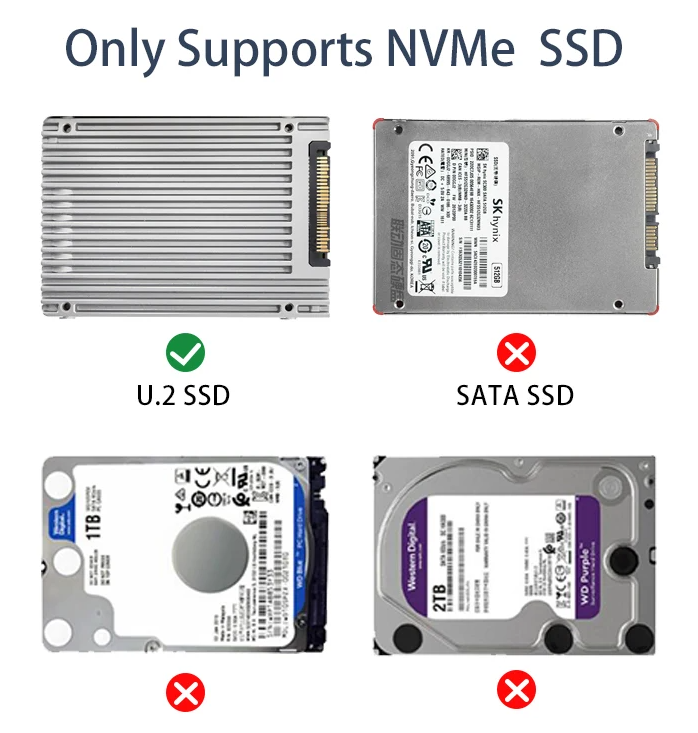
I mean the listing is pretty clear...
-
Oops, it actually does show the PCIe switch that's on that board. But yes it's just that, a PCIe switch to connect other native PCIe devices to. It's not a SAS/SATA controller. I got fooled by your "almost everything was working before the upgrade" which would suggest that card was part of it so didn't look into the details of its function. You also didn't say what the drives were. What for? Gonna have to list all your hardware and what you want in detail.
-
That controller does not appear to be listed in lspci, so it'll be hardware or BIOS level. Maybe start by trying a different PCIe slot.
-
You're supposed to adapt the compose file for your environment, e.g in this case you'd change that to be - /mnt/user/appdata/containername:/data

