





Kilrah
Members
-
Joined
-
Last visited
Everything posted by Kilrah
-
That's nice, but likely doesn't include anything of actual use for troubleshooting, from what I've seen problems tend to come from unusual setups. You say you have 2 NICs but not how they are configured, what your Docker networking settings are, how specific containers are set up,... and that's where things break. Posting "it worked for me, here's my hardware" is essentially useless since it's likely fine for 90%+ of set ups, it's the few that don't work where information is needed, and that's much more detailed information than this. I.e. how it's being done now by asking detailed info about non-working setups when someone reports a problem. I agree about more internal testing on various setups,making RCs even for changes that seem innocuous and giving people resources for testing, but... realistically the number of people wiling to put the effort will as always like be tiny and not end up including those who have the problematic setups. Just how things are.
-
Seems to be a proprietary filesystem, i.e. you probably won't be able to use it un unraid or any other OS than theirs without wiping all drives.
-
Tools-> Preclear. Not a fan of the main page status being removed either, but it's how it is.
-
This does seem to work for me

-
https://forums.unraid.net/profile/70845-alturismo/content/ ?
-
Default is Image and you said you had a 100GB image so that seems like what you're using, but IF you were in Folder mode then usage would reflect the usage of the storage location it's in so could be misleading. Check in Docker settings with array stopped.
-
If you can catch it while it's happening it might be useful to hit the "container size" button on the Docker page and comparing with the same in steady state. You're really in Docker Image mode and not folder, right?
-
Sounds like 2 different problems. For the usage, do you have some huge containers like AI stuff?`Or misconfigured the appdata backup plugin to store backups in the wrong place? For the backup, are you correctly stopping the plex container and any other that might share amount during the backup?
-
Well what you can do is in the 2nd step instead of copying only the config folder you basically delete everything on the new drive and copy everything from the old onto it (then remove old .key files and put the one for that drive). Then everything will be identical, just the license key is replaced with the one for the new drive.
-
Set up the new flash drive as a fresh install, log in to it, activate your license, then shut it down, back up the .key file in the config folder of the flash drive. Then replace the config folder with the one from the old, remove any .key files from it, then put the one you backed up in.
-
Docker when using the native zfs driver internally uses datasets for lots of things e.g. each individual image layers, so that's normal. When storing the Docker filesystem on ZFS storage it's recommended to either use a Docker image, or use the overlay driver if you want folder mode.
-
No. Nextcloud cannot take any configuration from more than one version back, hence requiring you to go through 27-28-29-30-31 in steps. You could start fresh and point it to the the data files but you'd lose anything else (history, versions, settings, what's stored in apps like contacts / calendar etc).
-
Well appdata and DB are the ones that matter for the migration... but to me any data should always have at least one backup unless it's competely disposable and unimportant.
-
The update method that was used by this container wasn't great, that was fixed a year-ish ago but since you're so far back it will be a pain. Basically need to find the latest 27 container version, move your tag to that, update NC, then find the latest 28 version, update NC, repeat until current. The last couple will update NC themselves instead of needing you to do it from the webui/CLI for the older ones. Make a full backup of data/db/appdata of course.
-
Just don't proxy? If you want proxy enabled for other things create another subdomain that's not proxied and thus will return your wan ip, that you said works.
-
Is the cache pool full though? If not, filesystem corruption is usually caused by bad RAM/overall system instability. Run a memtest for a good 24h unless errors are found earlier.
-
You've been using snapshots. Once you take a snapshot the base image won't be touched anymore, only the overlaid file will. This plugin was made way before snapshots were supported in unraid and hasn't been updated since, but at least here it seems to operate "safely" and retaining the desired number of base images, even though at some point anything but the latest is identical and redundant.
-
Been automatically installed by the plugin for quite a while, don't need to care about it.
-
Probably not. LUKS will mount just fine on any linux distro, Windows there are workarounds using WSL. If you like Veracrypt that's probably still the more appropriate solution for you, just you have to make an image file instead of whole disk encryption. I doubt it'd have much impact on perf.
-
Run that command in unraid's terminal. Actions-Reinstall brings you to the edit page, only ticking the checkbox then install at the bottom does it directly since it's meant for multi-selection.
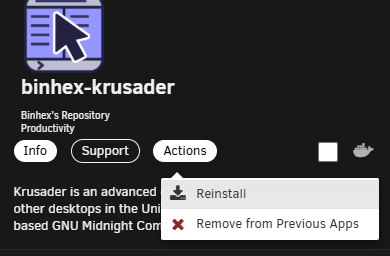
-
Do a "docker image ls", find the version tag for the orphaned image and change to that when you reinstall from previous apps.
-
Sounds like you're supposed to not encrypt the whole drive because otherwise unraid won't be able to mount it, but just store a veracrypt image on it. https://hub.docker.com/r/dcflachs/veracrypt-gui Why not just use the standard and built-in LUKS encryption?
-
Either the built-in UPS support or the NUT plugin.
-
I also once moved a VM vdisk to a spinner and yes since then every time i loaded the dashboard or VM page it would enumerate or such and spin it up. Interestingly I changed that and there's no more vdisk there but it still spins up, i should investigate that once. Wonder if there's some remnant of a reference in libvirt. EDIT: Maybe the isos share It's on that drive too here?
-
Click Compute All on the shares page to see what's using what. Also, more details needed. What filesystems etc, what settings for each share, what usage on each disk? Ideally post diagnostics



