





Kilrah
Members
-
Joined
-
Last visited
Everything posted by Kilrah
-
Are you or your browser refreshing the dashboard or VM pages?
-
Check filesystem Your logs are nothing but a container continuously restarting twice a minute so the cause is not visible. Might want to fix that first.
-
On Unraid 7 you should be able to select the container directly in the dropdown, but no idea if it'll help.
-
It would be moved from the incomplete share to the data share, since the data share is primary cache then that will remain on cache, and only go to array when the mover runs. Hardlinks wouldn't work indeed. I believe most people solve this by running the mover infrequently, or by using the mover tuning plugin set to only move files that are older than a few days/weeks or based on cache fill state. When it works that is, that plugin often has issues these days
-
My guess would be that it's largely irrelevant by now. Spinners won't saturate even SAS3 anytime soon, SSDs are connected via native NVMe/PCIe over U.2/U.3, shelves use cheap fiber rather than expensive copper...
-
If you want incompletes to always be on cache then the solution would be to have another share for those that is set to only reside on cache.
-
You say you moved last night, your data share is set to be moved to your array so all of its contents are now on the array, since incomplete downloads are also in the data share that'll include them.
-
Once files have been moved to the array then obviously when they're accessed that will be from the array drive they're on.
-
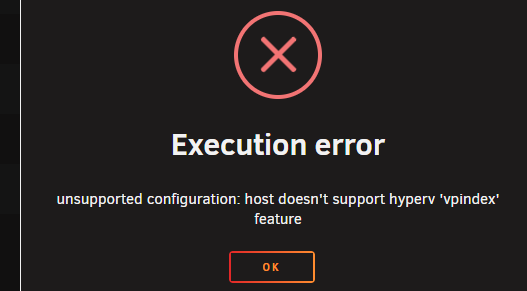
Yup Unrelated but I just did an edit to the template (just remove the OS install iso) and it wouldn't start anymore with Had to set Hyper-V to No. Was OK with it on Yes before.
-
Win11, Q35-7.1 is what i have and it's working, old 7700K with no passthroughs (actually iGPU part through gvt-g, had forgotten about that). I tried updating the virtio drivers in case it was an issue with the newer ones since I haven't since install, but it's still working.
-
Yes but it was made quite a while ago probably on 6.11 or 6.12, maybe defaults changed...
-
Using container names only works if those containers AND the NPM container are in the same custom network, so you probably forgot to put the new NPM container in it.
-
Mine does, haven't done anything special. And it works fine too.
-
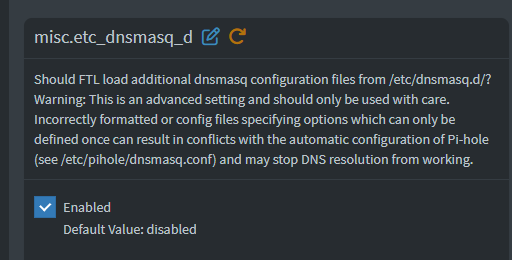
Settings->All Settings->Misc, then Gotta make sure your folder containing it is still mapped of course
-
Nowhere, it comes when it comes.
-
Been announced as a work in progress already.
-
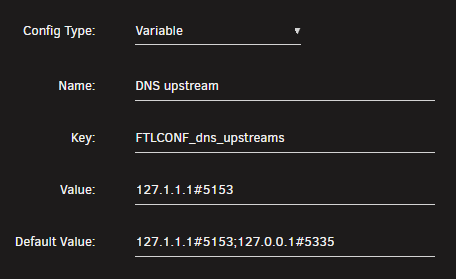
I mean I needed to move to v6 at some point... I've managed to fix it, it appears 04-pihole-static-dhcp.conf gets imported into a database or something on v6 instead of remaining a file, but on v5 i used to just edit the file manually and had commented out lines and entries for documentation/separation, the import is crap and just grabbed anything in there without respecting the commented out stuff so i ended up with invalid/duplicate entries that prevented it from starting. Had to restore backup, modify the file to remove what it doesn't like and run the import again. I had 2 custom dnsmasq conf files i don't know how to replicate the functionality of in v6, but i found the setting to make it load them so I'm good. 2 possible issues in the v6 template: but the default doesn't match and the variable has an assigned value so it's just 127.1.1.1#5153 by default. 2nd is there's a TZ variable, but unraid automatically adds the one it's set to (so if the template adds one it's defined twice).
-
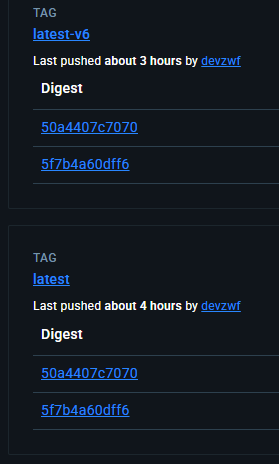
Did you push to the wrong tag? my v5 container got updated to v6 and broke. EDIT: Looks like it
-
That wasn't the problem.
-
Dashboard includes iowait, htop doesn't, that's not new.
-
Sure, but if you get filesystem corruption, a file deleted by mistake or a failure of the whole system that won't help. Separate backups are always essential.
-
Increasing size seems reasonable. Folder can cause issues of its own.
-
Python3 plugin.
-
You attach the zip to the thread. Do not set both inclusions and exclusions. Use only the one that's the easiest to set.
-
What troubles exactly? It's not recommended to increase image size without looking into the reason for it being full, but these days some containers are huge especially with the AI stuff so that might be the right thing to do.

