





Kilrah
Members
-
Joined
-
Last visited
Everything posted by Kilrah
-
Why?`There is no need to do any of this, selecting br0 as the container network already gives it its own IP with all ports available.
-
/tmp/appdata.backup/ They'll be gone if you rebooted though, so copy straight away if you have an error again.
-
If that was really the case then you'll be fine, just need to be certain it was to assume no parity errors.
-
I'd rather see a question mark than more AI slop, but that's gonna be personal preference
-
In this case the ?'s are specifically defined by the template author, but then if you check the relevant app they don't have a logo of their own. Can't exactly expect template authors to design a logo for 3rd party apps that don't have one. IMO for any new additions the support link should be restricted to being a link to forums.unraid.net or the template gets rejected though. Ideally a standalone thread and not "the same for all of a maintainer's templates".
-
Did you try uninstalling/reinstalling the plugin yet?
-
A few issues i see: DoT DoH config path defaults to /mnt/cache, should be /mnt/user TZ shouldn't be there, unraid adds it on its own Web API Password isn't set as password type
-
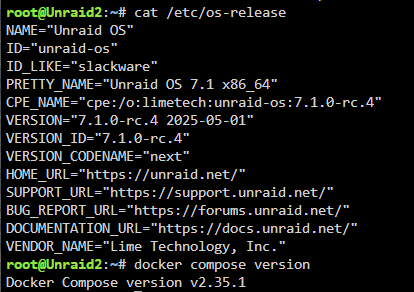
No problem on rc4 here
-
You have 2 containers using the same appdata folders. Group them so they're both stopped, and maybe add some exclusions so the same folders don't get backed up twice like they are now.
-
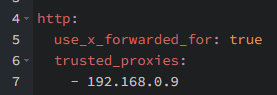
You need to specifically allow any reverse proxy used to access HA in its config, e.g.
-
If a drive is failing then replacing that is the most important and should be done individually before anything else. If you do a new config to shrink the array then you lose the ability to rebuild the failing drive.
-
Unraid has all it needs to manage multiple drive configs, a RAID card just adds unnecessary complexity/risks. Don't know about the one you have but some are not "transparent" even in single drive mode which causes the OS to not see the drives as they are, you can run into issues like if that card dies you wouldn't be able to access the drive contents when plugged to another system etc...
-
No, the container version doesn't have the torrent creator
-
Probably something wrong in your stack.
-
Could maybe help you if you actually posted that error message...
-
It is not NVMe, it's a SATA m.2 SSD. The spec sheets for that AOOSTAR box i can find are absolute garbage so it's not clear whether the slot supports both NVMe and SATA or only NVMe.
-
Not clear what the question is. PCIe gen is irrelevant to anything, unraid will take either... obviously if you're not transferring the data that was on the old drive to the new then anything that was on it is lost.
-
Logs are useless because they're just full of "share full" and don't include boot. Reboot and post diags again. Do you have a Mover Tuning plugin installed? If so that can be set to fill the cache to a certain level which if set wrong could be going against what you want.
-
1) Doesn't seem like you needed a new license in the first place? You had one, it was perpetual. 2) You need to contact support for license matters, forum can't deal with those, and you shouldn't post personal information in a public forum. 3) Don't trust LLMs.
-
AIO stores data in docker volumes so if you delete the docker image those will be lost and it'll be completely broken unlike everything else usually done on unraid. Posting this as a template without emphasis on that is IMO very poor practice, so id not providing a support thread. That said the template does say you probably shouldn't use it.
-
Post share settings.
-
Enable Websockets on the host in NPM.
-
Try docker exec -u 99 Nextcloud php occ upgrade This template by default runs NC as 99:100.
-
Yes it'll show the name of the selected network
-
Replying to that topic is how you ask a question about one of the things in that topic if you haven't already found the answer in it. The point is that the author will (hopefully) be watching this specific topic for support issues.


