





Kilrah
Members
-
Joined
-
Last visited
Everything posted by Kilrah
-
I've been able to reproduce it with the move operation between 2 shares on the same drive, destination is exclusive source is not, did not further test whether that matters.
-
Filesystem corruption is often a sign of hardware issues like bad RAM.
-
Nope, Wireguard is its own thing, not linked to OpenVPN.
-
What's the script? Does it unmount at the end? If the drive is disconnected without unmounting you'll get the "reboot" next time you connect it.
-
Add ":30" the the repository line, run it to upgrade to 30, then remove to go to 31.
-
Need to install the "Dynamix Schedules" plugin to see/edit those.
-
Assuming you're talking of the template system, the default value just becomes the set value on a fresh template install if nothing else is specified and isn't used again afterwards.
-
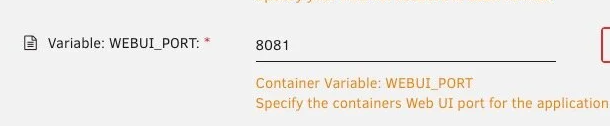
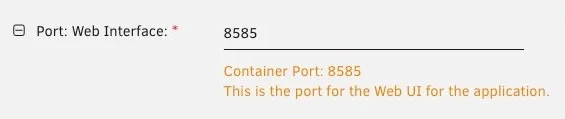
You probably reinstalled from Previous Apps, carrying over your bad config instead of starting with a fresh template. You've changed WEBUI_PORT, there should be no reason to change it from the default 8080. You've changed both sides of the webui port map, only the editable one should be changed, the container port must match the WEBUI_PORT.
-
The plugin simply toggles the reconstruct write setting based on its config.
-
With that CPU you should be able to use gvt-g
-
You didn't give diagnostics but an incomplete syslog, so the initial point isn't shown. But usually it's filesystem corruption rather than an issue with the drive itself, btrfs corruption is usually due to RAM problems so running a memtest would be a good idea.
-
You have to either delete the recovery partition or use 3rd party tools to move it to the end so the free space is contiguous.
-
You have to expand the partition within the VM, Windows Disk management. That's the same for any VM.
-
The toggle right in the header?

-
With a few containers it's easy to fill the default 20GB these days. I would increase it by 20GB, not more at a time as too much is just wasted space on your precious SSDs. Also would warn a bit earlier if the image filling up is due to a configuration error.
-
Required appdata permissions vary by container so the only "best practice" is to never touch them or access appdata via SMB. Check that file's perms looks right compared to others in that container's appdata. But it could also mean the file is corrupted.
-
Wouldn't get stuck in the middle of the unraid boot process if it wasn't booting from the unraid drive.
-
How many disks? Connected how? What unraid version? Could be this if you're on 7.0.0 or have more than 16 drives that appear as sdX.
-
Yeah you can docker volume prune -a Or select/delete in portainer.
-
No reason it wouldn't work, now as to performance/reliability you'll need to experiment.
-
Only put the highest tier, looks like you upgraded at some point so get rid of that Basic.key, it's no longer needed. But if the drive won't mount it's probably failing and needing replacement.
-
Files may change in the middle of the backup and result in an inconsistent/useless backup. If they don't start it sounds like there may be dependencies on others so you should probably use the group feature. Or handle stopping in your scripts.
-
Multiple reasons to change ports like wanting to run a reverse proxy on Host so it can access all containers without needing Host Access to Custom Networks enabled, and no issues changing it whatsoever.
-
Can be anything really, doesn't matter.
-
Yes, this kind of variable is typically "what should be used in generated links".


