





Mainfrezzer
Members
-
Joined
-
Last visited
Everything posted by Mainfrezzer
-
I've been using a modified version of it, which is almost at the state to be as the SE ones of yours, since I run both servers with the same management. Proton is impressive and just wanted to mention it here in case the windoof version is all we get as server files. Who knows what we could do if we had access to the Linux files, we might just host more than 1 server, spooky.
-
Somebody did spend the time and put in work to get it working with proton. The new update(the manager addition) to the repo is a bit funky, because of the build requirement and overall behaviour but modifying the Dockerfile and some of the scripts works fine and does work well unraids docker. (should work well with compose but im not using it so i have no clue) https://github.com/azixus/ARK_Ascended_Docker/ Overall the older version from October 30th works better with how you would expect a container to run.
-
First off all, update to 6.12.4 and apply changes according to the release notes https://docs.unraid.net/unraid-os/release-notes/6.12.4/#fix-for-macvlan-call-traces or dont use macvlan secondly, your pcie ssd is the culprit. The cause for it could be multiple things, but the outcome is the same, it drops offline.
-
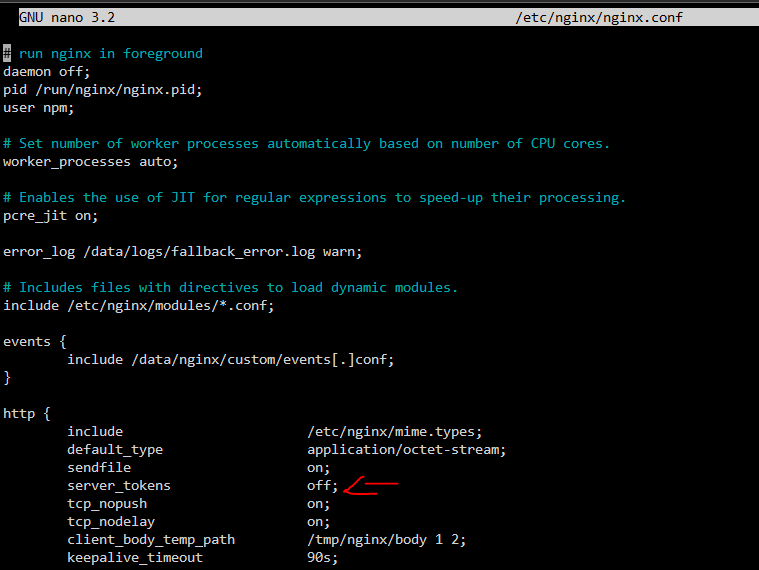
server_tokens off works as it should because its off by default. with it enabled The version on the "web admin" page is the version of the container and has nothing to do with nginx. Dont expose the "web admin interface", thats the real security risk.


-
youre using the wrong container. Privoxy is a http proxy not a socks proxy.
-
the mismatch lets you know that the file was modified, got a new checksum but you have no current export of that new checksum(thats expected with .nfo files, there is no point in checksumming them). the pink box is intriguing, no clue tho
-
Via the GUI you just simply edit the container and add a new path with container path as where its available inside the container and host path where it is on the host machine. indepth information about docker and bind mounts can be found here https://docs.docker.com/storage/bind-mounts/
-
7zip vom Nerdtools Plugin oder Krusader Docker Container von Binhex.
-
you do need to mount /mnt/user/NextCloud/nextcloud.log in the swag container. The docker container has no access to the files on the hostsystem.
-
Mhmm, that does seem odd and i couldnt find anything to indicate that something is "wrong". The only reason i could find is that it tried to attach to a network that didnt exist, still weird it started over cli But another question: Thats your only issue? Im surprised your server hasnt crashed yet since youre running a bridge with macvlan and have call traces. https://docs.unraid.net/unraid-os/release-notes/6.12.4/#fix-for-macvlan-call-traces
-
you would have to use macvlan.
-
Puh also den Container von Linuxserver hab ich irgendwie nicht ans laufen bekommen auf die "Schnelle" Mit den Container von FrankM77 bzw der "Forkursprung", der funktioniert so wunderbar, das ich mich gerade von meinen Servern ausgeschlossen habe. Zum Glück nur via ipv6. War eigentlich recht schmerzfrei. Fail2ban und nginx laufen via HOST. jail.d/nginx.local [nginx] enabled = true port = 80,443 filter = nginx #banaction = %(banaction_allports)s action = iptables-allports[name=nginx, chain=INPUT] #Path to logfile......."inside the container"!!!!! logpath = /var/nginx/proxy-host-*_access.log /var/nginx/proxy-host-*_error.log maxretry = 5 bantime = 300 findtime = 300 bantime.increment = true (Die Port angabe ist anscheindend irrelevant, es bannt einfach alle ports, was man als positiv ansehen kann, war aber scheiße ssh zu verlieren xD) filter.d/nginx.local [INCLUDES] [Definition] failregex = ^.* (405|404|403|401|\-) (405|404|403|401) - .* \[Client <HOST>\] \[Length .*\] .* \[Sent-to <F-CONTAINER>.$ ignoreregex = ^.* (404|\-) (404) - .*".*(\.png|\.txt|\.jpg|\.ico|\.js|\.css|\.ttf|\.woff|\.woff2)(/)*?" \[Client <HOST>$ (genommen von diesem "Tutorial" Configuring Fail2ban with Nginx Proxy Manager (NPM) (lrvt.de)" action.d/iptables-common.local [Init] blocktype = DROP [Init?family=inet6] blocktype = DROP Damit hat das wunderbar funktioniert. Gut, bei mir ist das nen bisschen anders aufgebaut. Ich habe 2 Reverse-Proxy-Server hintereinander im Einsatz. Ich musste diese Modifikatione an dem im Internet ausführen. Damit werde ich definitiv und absolut nicht mehr durchgeleitet zu irgendwelchen Seiten die durch den Proxy bzw den ganzen Server laufen. Ich hab's nicht hinbekommen das über den Lokalen zu regeln. Ich hab aber auch noch nie mit fail2ban vorher "gearbeitet" oder crowdsec. Aber im Endeffekt sollte das reichen. So wie ich es aber gesehen habe gibts das ganze auch als Gesamtpaket mit "SWAG" aber damit hab ich auch noch nix gemacht.
-
Wenn die auf BR0 laufen muss es INPUT sein und die Container selbst müssen IPTables ausführen. Das ganze ist wesentlich einfacher über nen Reverse Proxy zu regeln.
-
Was auch immer ihr da an Container, die über die Brücke laufen, freigegeben habt und mit fail2ban sichern wollt muss in der Datei von fail2ban mit FORWARD anstelle von INPUT, wie in diesem Beispiel [sshd] # configuration inherits from jail.conf enabled = true chain = INPUT action = %(known/action)s geblockt werden. Immer wert sich die Beispiele anzugucken https://github.com/linuxserver/fail2ban-confs/tree/master#jaillocal-examples Edit: Der andere verfügbare Container hat auch sowas, nur nicht detailiert. https://github.com/FrankM77/docker-fail2ban Dort wird bei dem Vaultwarden Beispiel nur "chain=DOCKER-USER" genannt, sollte aber auch mit FORWARD gehen
-
yes, CSGO got nuked and is now CS2
-
there wasnt anything "out of the ordinary" logged. it just behaved like theres no file to move. Im gonna check on it later to see if its doing the same again or if got its grip together.
-
Im pretty sure there is some bug with the zfs and mover implementation. I wanted to test something earlier and mover was able to move array -> zfs cache but absolutely unable to move zfs cache -> array. No apparent reason for it. Everything just worked fine apart from mover just simply refusing to move on that single disk in the array.
-
mhmm, from the logs and what i can see it looks right Sep 29 14:11:21 server rc.inet1: ip link set eth0 master bond0 up type bond_slave Sep 29 14:11:21 server kernel: eth0: 0xffffc90000149000, 9e:b0:39:a4:e8:d2, IRQ 49 Sep 29 14:11:21 server kernel: bond0: (slave eth0): Enslaving as a backup interface with a down link Sep 29 14:11:21 server rc.inet1: ip link set eth1 down Sep 29 14:11:21 server rc.inet1: ip link set eth1 master bond0 up type bond_slave Sep 29 14:11:21 server kernel: bond0: (slave eth1): Enslaving as a backup interface with a down link Sep 29 14:11:21 server rc.inet1: ip link set eth2 down Sep 29 14:11:21 server rc.inet1: ip link set eth2 master bond0 up type bond_slave Sep 29 14:11:21 server kernel: bond0: (slave eth2): Enslaving as a backup interface with a down link Sep 29 14:11:21 server rc.inet1: ip link set eth3 down Sep 29 14:11:21 server rc.inet1: ip link set eth3 master bond0 up type bond_slave Sep 29 14:11:21 server kernel: bond0: (slave eth3): Enslaving as a backup interface with a down link Sep 29 14:11:21 server rc.inet1: ip link set eth4 down Sep 29 14:11:21 server rc.inet1: ip link set eth4 master bond0 up type bond_slave Sep 29 14:11:21 server kernel: bond0: (slave eth4): Enslaving as a backup interface with a down link Sep 29 14:11:21 server rc.inet1: ip link set name bond0 type bond primary eth0 br0: received packet on bond0 with own address as source address (addr:9e:b0:39:a4:e8:d2, vlan:0) If that MAC isnt stable, i can only guess that its still randomly generated because the driver is loaded later, in that case, you would have to change the master of the bond to be eth1 or eth2 and let eth0 be a slave.
-
"r8169 0000:05:00.0: can't read MAC address, setting random one" thats your issue most likely. If i remember correctly its based on the sysnic, which in your case is the r8169. (which should probably be r8168) you should probably get the driver from the app section and blacklist that driver and see if that fixes the random mac story
-
https://docs.docker.com/engine/reference/commandline/network_connect/#usage and https://docs.docker.com/engine/reference/commandline/network_connect/#connect-a-container-to-a-network-when-it-starts
-
the issue isnt the iso image, really. The issue is that you passed your one and only gpu to a virtual machine. while doable, its a pain in the ass to troubleshoot the host system, in this case Unraid.
-
It amazes me how one can break stuff and be surprised all of the sudden. Turn off the server, plug the unraid usb into a pc and edit the config files so that the vm service(domain.cfg) doesnt start anymore and any other files you edited before. who know what those are. maybe the syslinux config, any modprobes, etc etc.
-
woher kommt denn diese ominöse Annahme das Powertop nicht läuft? Das einzige was ich hier vermuten kann ist dass das Fenster von Powertop sich nicht öffnen will, das könnt jetzt an 6.12 liegen und der Steinzeit-Version von Powertop. Glaub dazu müsst man "export TERM=xterm" im Terminal ausführen, dann öffnet sich das Powertopfenster auch selbst.
-
Pretty simple your issue. you mount /temporary from the container to /mnt/cache/appdata/psitransfer/public on unraid. (make sure that public folder has write from everyone) Start the container inside the container cp -r /app/public/* /temporary stop the container edit the template and change the mount from /temporary to /app/public/ and youre done. You can edit the .css files in /appdata/psitransfer/public/assets and the pug files for your header issue in /appdata/psitransfer/public/pug/ and /appdata/psitransfer/public/pug/partials (after youre done you can remove the allow write from everyone again)
-
it does work very well. Without Plugin With Plugin Same applies with the dashboard, etc, works on every page. And of course, this 6.12.4






