





MowMdown
Members
-
Joined
-
Last visited
Everything posted by MowMdown
-
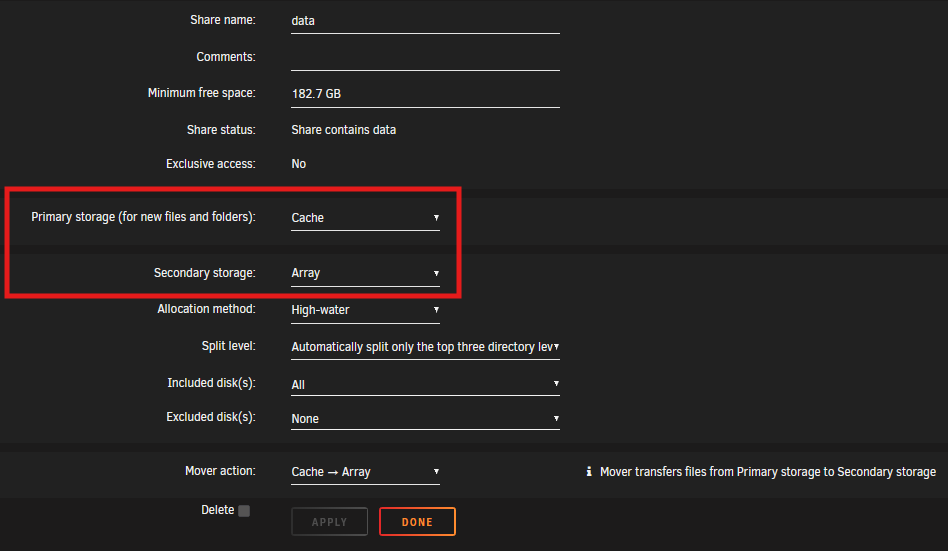
This is how you do it.
-
So you’re rebuilding parity and you’re wondering if you put the old disk back in if parity would be valid again? If that’s what you’re asking then the answer is no. if you’re asking if the data is still on the old disk then the answer is yes the old data that was on the disk is still there.
-
Start by pruning any docker template XML files for dockers you no longer have installed. You can do this deleting them directly from the USB, or, you can go through the GUI. Go to the docker tab, click "add container" at the bottom, then on the blank templating page, select a template from the drop-down menu, and click the little [X] icon to remove that template. To easily restore all your docker containers after a docker.img wipe, you just go down the list of templates until you've got them all reinstalled.

-
Make sure the USB is still the first boot priority. you can also try a different USB port.
-
I suggest mirroring the NVME drives as well as keeping a backup of the data on your HDDs Definitely keep the appdata and dockers on the NVME mirror. i personally have two mirror vdevs instead of a raidz2 as I found doing 4x 1TB SSDs in a raidz2 too slow. Same capacity but much faster IOPS i keep all my dockers and appdata on there as well as using it for sabnzbd and VMs
-
In a mirror, you have two identical copies of data. You lose the data on the dead disk, you still have a redundant copy on the good disk. If both disks die, your data is permanently lost. however if the data on the mirror is altered in any way that data is no good without a backup to restore it from. For example if you delete all your data, it gets deleted from the mirrored disk as well.
-
Only using up 1.08GB here. I've got like 20+ plugins installed. I however deleted my "previous" data since I have backups of each version of my installs.

-
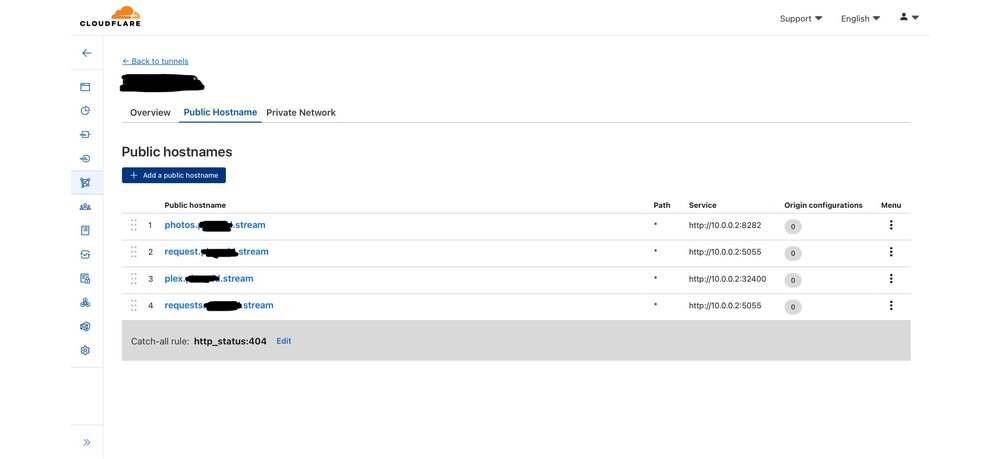
Cloudflared tunnel is still subject to the 100MB limit. IIRC this is a per file limit. Yes this is a pretty popular alternative to using a reverse proxy. It basically is a reverse proxy using cloudflare except you manage it from the cloudflare zero trust dashboard.
-
The “cpu locking up” was likely due to IOWAIT which is because you were probably moving a volume of data from cache to your array. IOWAIT is basically the CPU waiting on the disk activity to stop so I can resume its other processes. Something to look out for is if you ever notice the CPU load on the dashboard maxing out but the temps stay near idle cpu levels. It’s probably IOWAIT. The CPU logs IOWAIT as load but really it’s just “waiting” or you might just be running out of RAM
-
Click on the cache drive and see what the minimum free space is set to.
-
No the disk image goes into a separate directory along side the dataset. IIRC Two folders get created or the vdisk.img went to a different location. Either way the dataset named after the VM never contained any data. Another thing is I never use capital letters for directories/datasets, this specific dataset had capitalized W.
-
Let me preface this by saying Im not the OP. Just someone who "figured out" why an empty "folder" exists named after the VM. Correct, this I understand. (It would be nice if the GUI's built in file navigation/browser (not zfs master) could differentiate normal directories from datasets) It never contained any visible data. It's just an empty dataset created when the VM is created. For example, If I create a VM called "Windows 11" (true story) VM Manager creates a dataset in my domain share named "Windows 11" just like the VM. Nothing ever appears in this dataset. I assume this dataset is supposed to house any VM Snapshots I take of this VM. I cannot take VM snapshots because I use a physical disk instead of a virtualdisk.img. I will say if you stop the VM Manager from the settings and do a zfs destroy on the dataset, the VM Manager gets really angry. If you would like me to create a bug thread, I can post this over there so we can separate it from here.
-
Just wanted to add something to the conversation a lot of people assume incorrectly and that mirrors and parity are not, and cannot be, considered a "backup." It does nothing to prevent data loss. It only limits your downtime. Losing a single disk does not mean the data is lost as it can be rebuilt from parity. HOWEVER... If a file is corrupted, deleted, overwritten, parity is immediately updated to reflect the current state of the entire array including the corruption, deletion, and the overwrite. There will be nothing to go back to or to recover from. Parity does not have a memory of previous files. Only a calculation of the very current state.
-
@SimonF Not sure if it's intended or not but creating a VM, when the domain share is located in a ZFS pool, creates a dataset which I assume is part of the VM Snapshotting feature where VM snapshots are supposed to end up when a user takes a snapshot. However this dataset is created upon VM creation. I, like others, probably assume it's a bug when an empty "folder" is found in the domain share with the name of the VM on it.
-
Have you considered bypassing your cache pool and just writing data directly to the array? You're not going to find a simple solution to this issue if you don't compromise either by running mover at a time of least plex use or bypassing the cache and downloading/unpacking to a single disk.
-
next time it occurs, SSH in and run the "top" command. see what shows up at the top of the list. otherwise start by turning off/disable plex during those hours and see if the issue still persists. There is no magic solution to your issue.
-
Plex most likely doing it's nightly scheduled tasks like generating thumbnails/detecting credits/etc. I would start there.
-
PSA for people with HBA's... Attach a Noctua 40mm fan directly to the heatsink.
-
If you have 1 parity drive you can only lose 1 data disk. If you lose 2 data disks and only have a single parity drive, you can’t rebuild either of them and will lose the data that was on those two disks. if you have 2 party drives you can lose up to 2 data disks and still recover the data.
-
https://www.linuxatemyram.com
-
I don’t think this works if you’ve already created the array. I couldn’t do this with my cache pool as I couldn’t reduce the number of disks below the amount in the pool.
-
Keep in mind the test is only definitive IF it finds errors in the memory.
-
MegaRAID cards are not recommended, see quote from the linked post:
-
What is that client on your network and why is it requesting something that doesn't exist? At least to me that seems to be what's happening.
-
It appears your attachment is incomplete/corrupted. Also something you can do is run a MemTest from the boot menu for 24 hours or until the test fails to rule out bad memory. If the test passes after 24 hours the chances of bad memory are slim to none. Alternatively you can run the live memory test plugin instead. This runs much slower and you should run it much longer. (I suggest memtest from the boot menu if you can afford the downtime)





