





erdius
Members
-
Joined
-
Last visited
Everything posted by erdius
-
I ran the tool new permissions, which should give 777 on directories, but instead i get 666? This is on a single btrfs pool drive. It seems to work on every other share except for this one and another. I can fix permissions from the command line, but why is the tool not working? mars-diagnostics-20260326-1801.zip

-
not sure if it's just me, but using the beta version from CA, I don't see any compose option (I enabled in header), in either the header or the docker tab. EDIT: ignore me, I didn't see the apply button all the way on the bottom of the plugin screen. All is working
-
Instead of as card could I use this for my old iPod via usb?
-
what is the min capacity of the boot drive? I have a 16GB optane nvme that I would like to use, is that too small?
-
seems to be failing on containers that have tailscale. archiving volume /usr/local/share/docker/tailscale_container_hook: opening source root: open /usr/local/share/docker/tailscale_container_hook: not a directory
-
It's the continue button after reading the changelog that is required to click to complete upgrade. Maybe someone else can post a screen as i went through other means as a workaround to upgrade, but basically continue is "bright" until I hover my mouse over it, then it dims and does nothing when I click it. If i take mouse off of continue button, the button undims. I then try to click it again and it dims and does nothing.
-
The continue button dims out everytime i try to click on it. This happened in safari, brave and firefox on mac
-
thanks, i just scanned and added a few items. I then went to remove the ones i didn't need and they seemed to stick and came back on page refresh. SHould also add I'm on the new beta
-
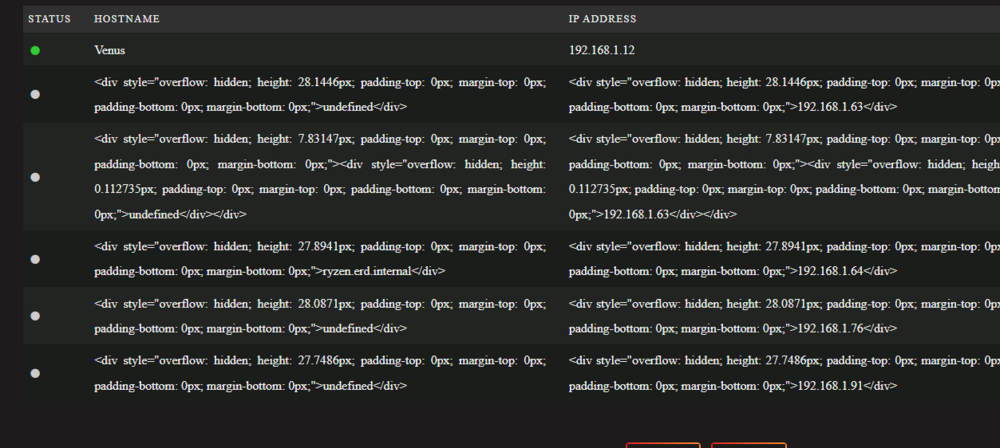
H thanks for this. For some reason I always get the stuff as seen below. I delete those entries but they always seem to come back.
-
No NFS. I took the cowards way out and formatted the cache and restored a backup, all is working as expected now.
-
To add to this, docker is acting weird, i tried to add a docker app and get this error message mkdir /mnt/user/appdata/watchstate: no space left on device. there is obviously space on that device
-
o ok thanks, so no reason to believe the doom messages? Any reason why my appdata is not showing as exclusive?
-
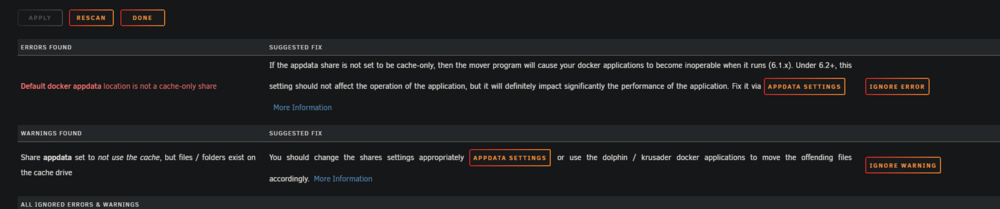
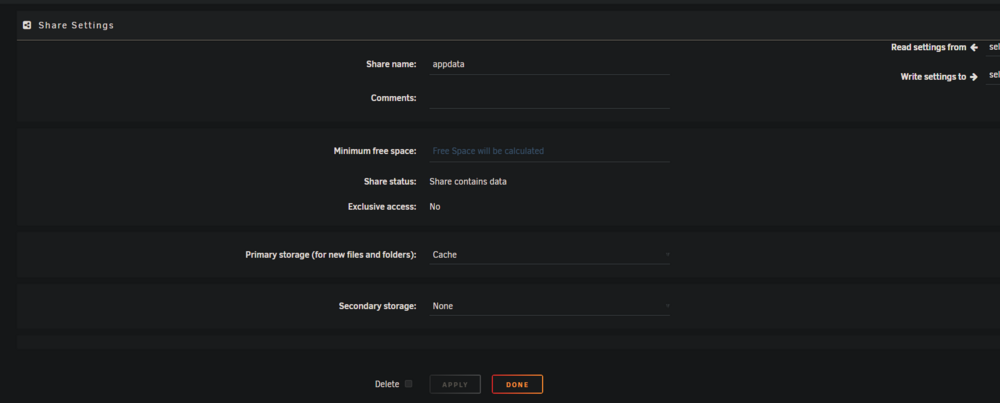
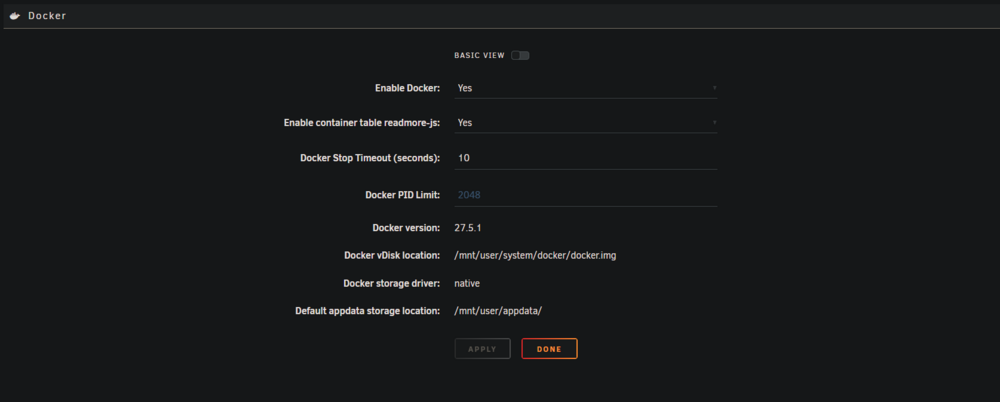
I have 2 pools, no array. A cache zfs pool (2nvme) that I'm getting errors on in fix common problems. I'd also like to get this appdata share to use exclusive access. All files appear to be on cache but it still says no. Can someone maybe see why i'm getting the errors below? I've tried to search but the solutions don't seem applicable from what i saw. thanks to anyone who can assist ps, i'm also on the new beta, not sure if that is causing any issues or not mars-diagnostics-20250804-0828.zip

-
I am still on a 10th gen intel and run mainly plex and the arrs. The 10th gen is running like a champ, but i would like some of the benefits of the newer chipsets and don't really want to run a 13 or 14th gen. I'm not sure which way to go, obviously the intel ultra would cost a bit more, but i would be set for the next 8-10 years with it, so spend an extra 300 and future proof, or just go with an ARC GPU card on the cheaper side and ride the 10th gen for another 5 years Any thoughts from anyone in a similar situation?
-
having this exact same issue
-
Same issue here as well, worked yesterday morning no issues, but then in the afternoon to present, I'm getting the same dns errors as you. I have 2 unraid servers, 1 with tailscale and 1 without. The one without works fine. mars-diagnostics-20250220-0709.zip
-
Ah, yeah the host (master) FS is ZFS. On the backup it's btrfs. Docker replication works great. mars-diagnostics-20240630-1354.zip
-
Working great! However, I installed LXC after installing this plugin and can't get the replication plugin to recognize i now have LXCs for replication. I tried uninstalling this plugin and reinstalling but it is still only detecting dockers.
-
same here
-
Yeah, sorry, deleted the post because i thought it was working but it is not. so i see what it's doing but i'm not sure why it's doing it. I have not touched the script at all outside of source and destination I'm rsyncing a test folder "ftp" from the main "xfs" array to destination "ftp_back" which is in a zfs pool. backup_jobs=( # source # destination "/mnt/user/ftp" "/mnt/z8fs/ftp_backup" For some reason, it is copying the dated folder to both spots, that is the "ftp" source directory on the array and also to the destination "ftp_backup" on the zfs pool. It is then including and nesting the new dated folders from the source into subsequent backups at the destination as seen below. root@Mars:/mnt/user/ftp# ls -la total 88 drwxrwxrwx 1 nobody users 79 May 3 12:03 ./ drwxrwxrwx 1 nobody users 218 May 3 12:04 ../ -rw-rw-rw- 1 nobody users 46183 May 3 12:00 testfile.txt drwxrwxrwx 1 nobody users 5 May 3 12:03 20240503_120313/ drwxrwxrwx 1 nobody users 6 May 3 12:03 20240503_120323/ -rw-rw-rw- 1 nobody users 9068 May 3 12:00 testfile2.txt root@Mars:/mnt/z8fs/ftp_backup# ls -la total 57 drwxrwxrwx 5 nobody users 5 May 3 12:12 ./ drwxrwxrwx 12 nobody users 12 May 3 12:04 ../ drwxrwxrwx 4 nobody users 7 May 3 12:04 20240503_120414/ drwxrwxrwx 4 nobody users 7 May 3 12:04 20240503_120427/ drwxrwxrwx 4 nobody users 7 May 3 12:12 20240503_121227/ root@Mars:/mnt/z8fs/ftp_backup# cd 20240503_121227/ root@Mars:/mnt/z8fs/ftp_backup/20240503_121227# ls -la total 117 drwxrwxrwx 4 nobody users 7 May 3 12:12 ./ drwxrwxrwx 5 nobody users 5 May 3 12:12 ../ -rw-rw-rw- 3 nobody users 46183 May 3 12:00 testfile.txt drwxrwxrwx 2 nobody users 5 May 3 12:03 20240503_120313/ drwxrwxrwx 3 nobody users 6 May 3 12:03 20240503_120323/ -rw------- 1 root root 1125 May 3 12:12 20240503_121227.log -rw-rw-rw- 3 nobody users 9068 May 3 12:00 testfile2.txt root@Mars:/mnt/z8fs/ftp_backup/20240503_121227# root@Mars:/mnt/z8fs# du -d1 -h ftp_backup/ | sort -k2 478K ftp_backup/ 64K ftp_backup/20240503_120414 350K ftp_backup/20240503_120427 64K ftp_backup/20240503_121227 root@Mars:/mnt/z8fs# Hope that makes sense EDIT: ok, seems like even though I specified the zfs pool in the destination of the script UNRAID still put that directory on the main array and not the zfs pool. When I clicked into the new "share" and changed from array to pool, it now seems to work. I have no idea why unraid would do that
-
wow thanks, same card same issue
-
the font on this is making my eyes bleed, i wish we could make it larger text
-
wow just looked and having the same problem
-
I use an app called photosync, it will sync via smb and other protocols and you can have it do it automatically. I use sftp to my unraid butI believe it can do all you ask.
-
Still getting this warning even though i updated default.conf and .htacces and restarting container on 25.0.5 Here's default.conf # The settings allows you to optimize the HTTP2 bandwitdth. # See https://blog.cloudflare.com/delivering-http-2-upload-speed-improvements/ # for tunning hints client_body_buffer_size 512k; # HTTP response headers borrowed from Nextcloud `.htaccess` add_header Referrer-Policy "no-referrer" always; add_header X-Content-Type-Options "nosniff" always; add_header X-Download-Options "noopen" always; add_header X-Frame-Options "SAMEORIGIN" always; add_header X-Permitted-Cross-Domain-Policies "none" always; add_header X-Robots-Tag "noindex, nofollow" always; add_header X-XSS-Protection "1; mode=block" always; # Remove X-Powered-By, which is an information leak fastcgi_hide_header X-Powered-By; here's .htaccess <IfModule mod_env.c> # Add security and privacy related headers # Avoid doubled headers by unsetting headers in "onsuccess" table, # then add headers to "always" table: https://github.com/nextcloud/server/pull/19002 Header onsuccess unset Referrer-Policy Header always set Referrer-Policy "no-referrer" Header onsuccess unset X-Content-Type-Options Header always set X-Content-Type-Options "nosniff" Header onsuccess unset X-Frame-Options Header always set X-Frame-Options "SAMEORIGIN" Header onsuccess unset X-Permitted-Cross-Domain-Policies Header always set X-Permitted-Cross-Domain-Policies "none" Header onsuccess unset X-Robots-Tag Header always set X-Robots-Tag "noindex, nofollow" Header onsuccess unset X-XSS-Protection Header always set X-XSS-Protection "1; mode=block" SetEnv modHeadersAvailable true </IfModule>





