





greenflash24
Members
-
Joined
-
Last visited
Everything posted by greenflash24
-
For me it is also still not working when trying to creating a new backup on a new share. It also fails with the message that it can't create the disk image (Also on macOS 26.2 and Unraid 7.2.3, Backup to a btrfs formatted SSD pool, without array mover). For the sake of curiosity I wanted to narrow down the issue to either the Unraid side, or the Mac side. Therefore, as a test, I used my raspberry pi as a backup target with the following docker container which contains Samba 4.22.6 already configured for the use with TimeMachine: mbentley/timemachine:smb In this case the backup worked just fine without any issues. So the issue must be either on Samba's side with the newer versions, or on Unraid's side. @JorgeB Did you also test a new backup from scratch (e.g. with a new TM share), or did you only try incremental backups to a previous existing share?
-
Samba 4.23.4 was released on December 12, 2025. This patch release should include the final fix for the TimeMachine issues. Now we need an update procedure for upgrading Samba in Unraid 7.2.2 or we need to wait for a version upgrade from @limetech .
-
I am also affected by this bug on macOS Tahoe 26.1 with Unraid 7.2.2. @limetech Is there a way to manually upgrade Samba to the 4.23.3 version in Unraid, so that the issue is resolved, or must we wait for a upcoming release?
-
Would you be able to share a source on this? I would imagine that the use of `aes-256-gcm` is pretty safe to use.
-
Definitely native zfs encryption support, so I can migrate my encrypted zfs pools from truenas to unraid.
-
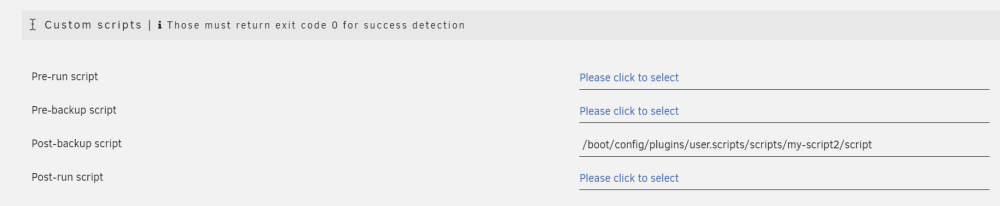
Hi, i am trying to run a Post-backup script (from the User-Scripts plugin), but the backup failed, because the script does not exists, which is not true, see: [01.01.2024 03:29:34][❌][Main] /boot/config/plugins/user.scripts/scripts/my-script2/script is not existing! Skipping! root@server:~# file /boot/config/plugins/user.scripts/scripts/my-script2/script /boot/config/plugins/user.scripts/scripts/my-script2/script: Bourne-Again shell script, ASCII text executable root@Home-Server:~# ls -la /boot/config/plugins/user.scripts/scripts/my-script2/script -rw------- 1 root root 229 Dec 30 18:32 /boot/config/plugins/user.scripts/scripts/my-script2/script Am I doing anything wrong with my configuration?
-
That's very unfortunate.
-
Is there currently any way for using an existing zfs pool with native zfs encryption as an Unraid pool, or does it have to be formatted? If not, is Unraid planning to add support for native zfs encryption?
-
For me the Send Notifications On Update? option is still not respected in the latest version. I have set this option to NO, as a don't want to receive notifications on each container update, but i still get these notifications.
-
Thanks for your reply! Now I wonder, how it is encrypted... 🤔 With the password of the Unraid root account? Or with the main array password? Hopefully not with some sort of a universal master password...
-
@dlandon If I set the password for my LUKS encrypted device in the unassigned devices settings page, will the password itself be stored unencrypted on the flash drive (where the other unassigned devices config resides) or is it stored on the encrypted main Unraid array? How does this mechanism function? In short: Is it safe to set the password through the unassigned devices settings page? I could not find an answer in this thread already, nor documentation.
-
My Seagate Exos X16 has also such a high Command_Timeout number, see: The Unraid Dashboard shows this as an Error: I am not sure how I have to interpret this data? Should I replace this drive, or is this an false error message?


-
I am getting the following error since a while now, I have reported it already but it wasn't fixed yet. Has anybody looked into this yet? It only appears when using this plugin, if I uninstall it, this warning message goes away. (See screenshot below) Also It is only shown when the array is stopped (and thus the Docker Service is also stopped). Then I see the following warning message at the bottom edege of the Unraid Dashboard: Warning: stream_socket_client(): unable to connect to unix:///var/run/docker.sock (No such file or directory) in /usr/local/emhttp/plugins/dynamix.docker.manager/include/DockerClient.php on line 712 Couldn't create socket: [2] No such file or directory Warning: Invalid argument supplied for foreach() in /usr/local/emhttp/plugins/dynamix.docker.manager/include/DockerClient.php on line 898 After the array is started the warining message goes away. Do i have to worry about this warning? I would think this is a false positive, as the docker service is not started yet, as the array is also not started at this moment. So can i ignore it? I have first noticed this warning in 6.9.2 (with the original Docker-Folders-Plugin), but it is still persistent in 6.11.5 with latest Docker-Folders-Plugin. See also:
.thumb.png.de5a9f873000eb9979e0e38d9ba0d608.png)
-
Can we get the zfs built-in encryption for zfs-only pools, or will these disks still be encrypted via LUKS? As far as I know the currently available btrfs-pools are using LUKS. But the zfs built-in encryption would allow for different encryption settings for each dataset.
-
This could be potentially related to the issue i have described in the following post: (maybe this thread is related to your issue.)
-
I have noticed, that the following issue is still present in the latest version of the new Docker-Folders-Plugin: May I ask for a fix for this issue please ⬆️?
-
Hey @Squid, Just one quick question: As i noticed the following issue was caused by the OLD DockerFolders-Plugin: May you or somebody else with the NEW DockerFolders-Plugin installed test if you are also getting the same warning message before the array is started with the new version. If this issue is still present in the new version, may I ask for a fix?
-
The same issue was also present in -rc3, -rc4 and -rc5. As the title says I am unable to schedule btrfs scrubs. I can choose for example "weekly" then hit "apply" but this change is not gettinge saved / applied. I can reproduce this issue with all of my three btrfs cache pools (single device, raid1 and raid10). I have recorded a short video to show this behavior I am experiencing: demo-scrub.mp4
-
@SidM richtig, ich denke auch dass das so passt und an dieser Stelle kein Problem vorliegt. Ich vermute @FordPrefect ist wohl im Post verrutscht und hat deine Screenshots mit denen aus meinem Post verwechselt, ich habe nämlich eine statische IP vergeben.
-
I am experiencing similar kind of issues after switching from macvlan to ipvlan, which i have mentioned here: @blaine07 May I ask you how you have resolved those issues?
-
I am experiencing exactly the same kind of issues after switching from macvlan to ipvlan. I can confirm, that unraid is not able to ping any IPV4 address which is outside of my LAN, but i can ping IPV4 addresses inside of my LAN. Additionally IPV6 addresses can be reached perfectly from unraid (inside LAN and outside). From within docker containers i can ping everythin on LAN and WAN and it doesn't matter if the containers using br0 or host networking (bridge). My guess was that my Gateway/router does not like the fact, that ipvlan uses multiple IP addresses with only one single MAC address. Therefore I replaces my router with a pfsense box, but the issue still persists. @bonienl Are you using any special kind of router, which can deal with one single mac address having multiple IP addresses?
-
Ja, stimmt kann gut sein, dass es nicht mit allen Routern funktioniert, aber bei einem Business-Grade-Router/Firewall wie pfsense kann ich mir absolut nicht vorstellen, dass es damit nicht funktioniert, bzw. an der pfsense liegen soll. Ich vermute ganz klar dass zusätzlich noch ein Problem bei Unraid, oder in der Konfiguration von den Netzwerkeinstellungen vorliegt. Jetzt wäre es auch mal interessant, was für Router andere Leute einsetzten, bei denen ipvlan funktioniert.
-
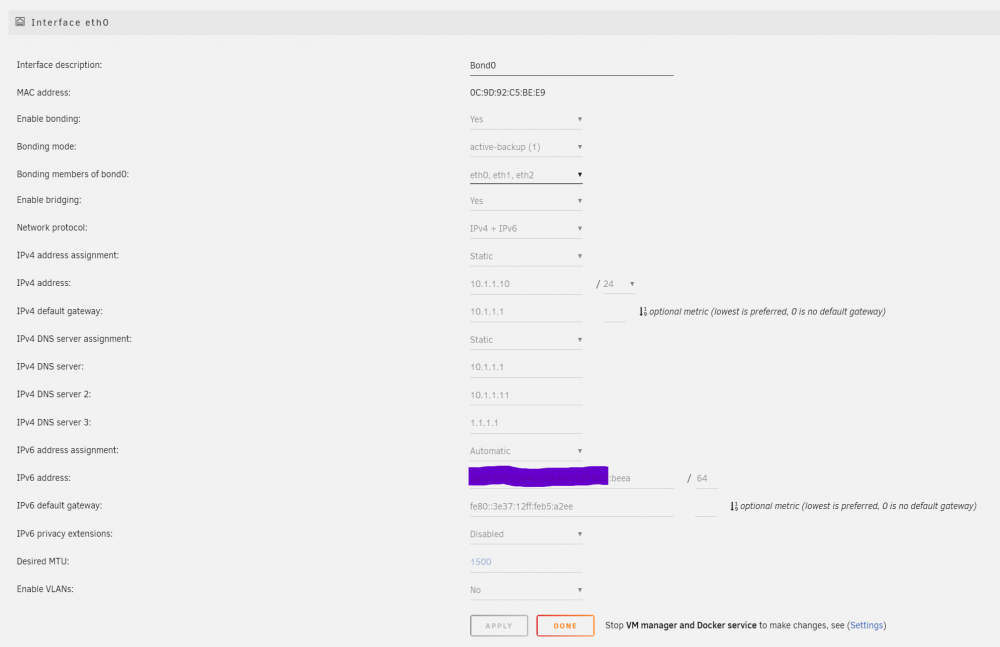
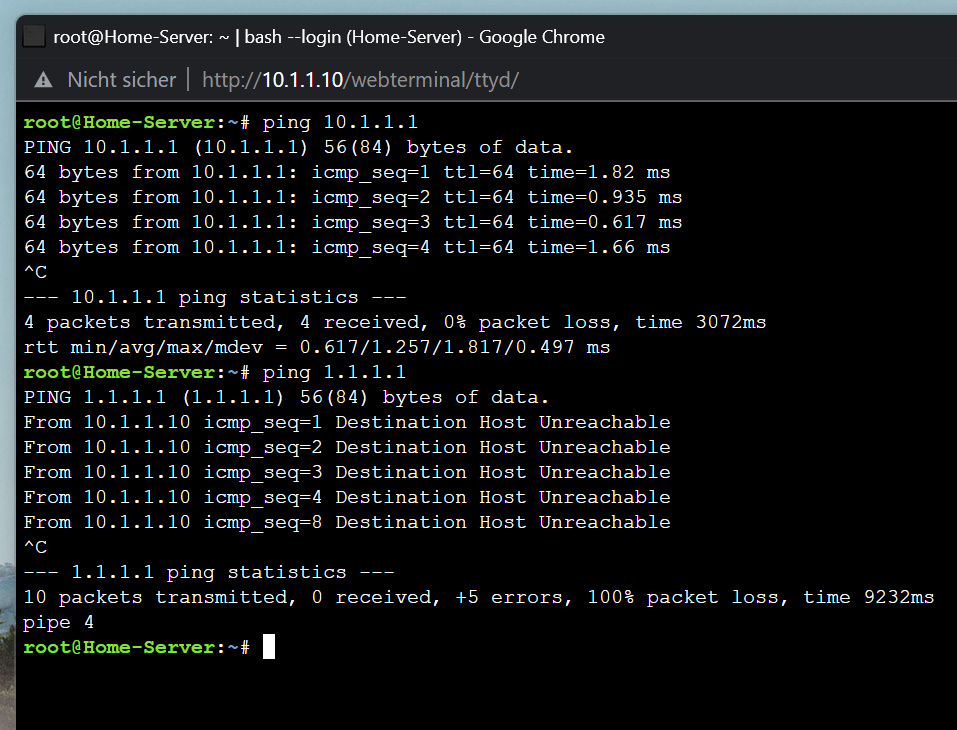
Ich kann mich hier mit einem sehr ähnlichen Problem anschließen und weis bisher noch nicht wie ich dieses gelöst bekomme. @SidM Ich vermute, dass dein Problem stark mit dem von mir beschriebenen Problem zusammenhängt. Ich nutze in Unraid Bridging und Bonding um für VMs jeweils eine eigene IP zu haben und ich verwende auch mehrere Docker-Container, bei die ich gerne über eine eigene statische IP-Adresse nutzen möchte. In der Vergangenheit hatte ich in den Docker Einstellungen immer den macvlan Netzwerktyp verwendet. Ich kann bestätigen, dass dies bei mir (wie von @alturismo beschrieben) auch dazu geführt hat, dass in meiner FritzBox mein Unraid Server doppelt und jeweils mit der selben IP Adresse aufgeführt war. Ich konnte in dieser Konfiguration jedoch keine negativen Konsequenzen feststellen. Ich bin jedoch auch von den netfilter Kernel Panics, die mit macvlan in Verbindung stehen, betroffen, welche bei mir bisher nur sporadisch und höchstens alle 3-4 Monate aufgetreten sind. Das war für mich noch in Ordnung, daher bin ich erstmal bei macvlan geblieben. Seitdem ich jedoch auf die neuen 6.10-RC3 und -RC4 Versionen upgegraded habe, treten die Kernel Panics bei mir sehr häufig (alle 2-4 Tage) auf und führen jedes Mal zu einem vollen Systemcrash. Da dies nicht akzeptabel ist habe ich den Netzwerktyp für Docker nun auf IPVLAN umgestellt. Und ab diesem Punkt sind meine Verbindungsprobleme mit Unraid aufgetreten. Effektiv führte mich dies zu folgenden zwei Problemen: ich konnte keine Plugins in Unraid mehr aktualisieren ich kann keine Docker-Container mehr aktualisieren Diese Probleme treten ab dem Moment auf, wo man den Docker-Service aktiviert und den ersten Container mit einer fixen IP (über ipvlan) startet. Werden diese Container wieder gestoppt und der Docker-Service deaktiviert, funktioniert alles wieder problemlos. Folgende Infos habe ich bereits rausgefunden, die evtl. zur Lösung des Problems beitragen können: Ich konnte feststellen, dass während das Problem besteht, Unraid keine IPV4 Verbindungen nach außen (außerhalb des LANs) aufbauen kann. IPV4 Verbindungen innerhalb des LANs funktionieren Problemlos. --> Dies lies mich schlussfolgern dass das Problem erstmal nicht bei Unraid/ipvlan an sich liegt, sondern eher am Gateway/Router/Firewall, welches in meinem Fall eine Fritzbox 6690 ist. Wie von @alturismo bereits beschrieben kann man in der Oberfläche der Fritzbox auch sehen, dass diese irgendwie mit ipvlan nicht klar kommt, da beim Hostname des Unraidservers ständig die IP-Adressen der Docker-Containern hin- und her hüpfen. Auch dies ließ mich schlussfolgern, dass dieses Problem nur in Verbindung mit einer Fritzbox besteht und diese einfach vermutlich nicht damit klar kommt, dass im Falle von IPVLAN eine MAC-Adresse mehrere IP-Adressen hat. Daher habe ich mir am Wochenende Zeit genommen und auf einem alten Rechner pfsense installiert und eingerichtet, in der Hoffnung, dass pfsense damit klar kommt, dass eine MAC-Adresse mehrere IP-Adressen hat. Leider konnte ich das gleiche Problem wie mit der Fritzbox feststellen und Unraid kann selbst unter pfsense keine IPV4 Verbindungen nach außen aufbauen, sobald ein Container mit IPVLAN läuft. Um noch kurz auf das Thema DNS zu sprechen zu kommen: Ursprünglich hatte ich schon mehrere verschiedene DNS-Server in Unraid als DNS1,2,3 durchprobiert. Irgendwann habe ich dann eben festgestellt, dass Unraid unter ipvlan gar keine IPV4 Verbindungen nach außen aufbauen kann, daher bin ich von externen DNS (wie 1.1.1.1 oder 8.8.8.8) als DNS1 wieder weggewechselt und habe nur das Gateway (fritzbox bzw. pfsense) unter der IP 10.1.1.1 als DNS1 stehen. DNS2 ist aktuell mein PIHOLE mit 10.1.1.11 Ich bin inzwischen völlig überfragt woran das Problem liegen kann, und ich hoffe das mit hiermit evtl. auch weitergeholfen werden kann. Zu guter Letzt noch kurz ein Screenshot meiner Unraid Netzwerk-Config, falls das hilft:
-
Yes, with telegraf 1.20.2 i am also using these post arguments, but starting from telegraf 1.20.3 the container does not run with the root-user anymore (for security reasons), so the installation of additional packages is no longer possible. At least i don't know a soloution for this problem. Thats why i currently have to pin the image to the 1.20.2 tag and i am not able to install smartmontools while using the latest tag.
-
Are there any news in how to install smartmontools in the latest telegraf container (without creating a Dockerfile and building a seperate image)?



.png.016c376c7ea485456b824e7a84362635.png)


