






Everything posted by Hoopster
-
That was a no go. The prior BIOS version (two years older than current version) would not even successfully load. It kept hitting 55 percent or so and then dropped down to 20% loaded, got up to 50 something percent again, dropped back down, etc. It would never finish loading so it could be flashed. Fortunately, I was able to bail out of that without negative consequences as it never got the the BIOS flashing process. The server still boots albeit with the same problems as BIOS version has not changed (if that is the issue). I may try it again by flashing from a USB drive instead of via the IPMI Maintenance page.
-
Yeah, I misunderstood. I will try the previous version but the current version is the same version I had on the prior board when all was working (except the BMC).
-
BIOS is the latest version available for the board and the same version I had on the board I had to RMA. Actually, I have reflashed the BIOS on this board three times already just to make sure.
-
Yes. Kingston MobileLite G2 USB 2.0 with SD and Micro SD card slots. No. Have tried three different USB drives in rear USB 2.0 and USB 3.x ports all with Unraid 6.11.5 installed. Very old 8GB Kingston Data Traveler 2.0 - Not even recognized in BIOS 16 GB Lexar USB 3.0 - "waiting up to 30 seconds..." message 32 GB PNY USB 3.0 - "waiting up to 30 seconds..." message Yes, SD and Micro SD with UNRAID labeled SD card and SYSLOG labeled MicroSD card. It makes no difference if the second slot is empty and only the UNRAID SD card is inserted in the reader. The same model Kingston MobileLite G2 boots Unraid 6.11.5 just fine in my other Unraid server. It is from the same Manufacturer (ASRock) and has the same chipset (C246) as the problematic system on which I am unable to boot anything greater than version 6.9.2 of Unraid. Prior to returning the E3C246D2I motherboard for RMA due to a BMC chip failure, I was booting into Unraid 6.11.5 on this system with a Kingston MobileLite G3 (USB 3.0) card reader with the same two cards installed.
-
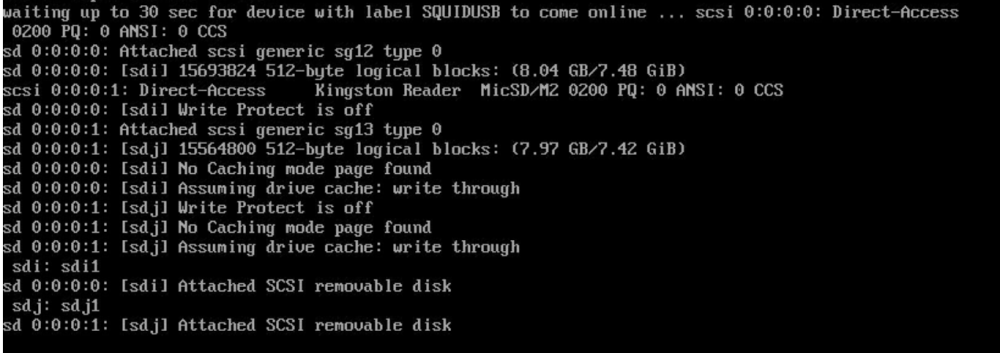
Well, shots in the dark are all I have left now. Reformatted flash USB with the label SQUIDUSB Could not make bootable as it was looking for a USB label UNRAID Edited make_bootable.bat and set the tag to SQUIDUSB Ran make_bootable.bat successfully Edited syslinux.cfg append line and added unraidlabel=SQUIDUSB Booted up Unraid 6.11.5 from the SQUIDUSB Result: Same problem with a different name. Booted up Unraid 6.9.2 successfully again.

-
The best way to think about this is that the source, a.k.a the host (Unraid) and the target, a.k a. the container (Plex) both have their own filesystems and that the target/container cannot use the filesystem of the host directly. Basically, the volume mapping examples I used in my first post are translation tables that tell the Plex container how to get to the source media by mapping a source/host path to a target/container path. So, /mnt/user/Movies (my Movies share on Unraid) becomes just /movies to Plex. If you just have a parent Media share on Unraid and sub-folders for content, /mnt/user/Media on Unraid becomes /media in Plex. However, in Plex you would then have to specify the media type sub-folder for each Library. In this example, you need more than just /media in Plex or it will look in all sub-folders so, for movies the folder would be /media/Movies for the Plex Movies Library.
-
There are a couple of ways to do this but it is all about volume mappings in the Plex docker. You can either just create a top-level folder called "Media" or something like that and then have sub-folders for each media type (movies, photos, music, etc.) or you can have a top-level folder for each media type and map those to libraries in Plex I do the latter, a share (top-level folder for each media type). Here are examples of some my docker volume mappings: The host path is the Unraid path to the media; /mnt/user/Movies, mnt/user/Music, etc. The container path is the path you will use in Plex to tell it to find the media on the host (Unraid shares), /movies, /music, /tv, etc. If you just have a top-level media folder, you will have only one volume mapping, e.g /mnt/Media to /media and in Plex, you would specify /media/Movies, /media/Music, etc. depending on what media type sub-folders you have. In Plex, it looks like this the way I do it: For Movies Library, the folder is /movies (container path mapped in Plex docker) If you just had a Media top-level folder but a Movies sub-folder, it would be /media/Movies


-
Se refiere al mantenaer los discos en los mismo "slots" (paridad, disco 1, disco 2, disco 3) en el array de Unraid si es necessario hacer una configuración nueva. Generalmente una configuración nueva no es necesario al cambiar placa/procesador/RAM. Si existen máquinas virtuales, es probable que algunos cambios sean necesarios. Unraid rastrea los discos por su numero de serie asi que no es necesario que se conecten a los mismos puertos de SATA. Si su configuración tiene dos discos de paridad, el orden de conexión es más importante.
-
Third-party seller. Just clicked on link in OP and did not take note of the seller. Since Kingston no longer makes this USB drive, Amazon probably just linked to another seller.
-
I am booting UEFI. I tried Legacy a while ago, only with 6.11.5, and it made no difference but it has been a few days since I tried it (not that time should make any difference).
-
Just tried 6.12. Same problem, "waiting up to 30 seconds for device with label UNRAID to come online..." and it never does. Looks like I am stuck with Unraid 6.9.2 on this board or I convince ASRock to RMA the RMA board.
-
I have not yet tried 6.12 RC but it is worth a shot. I have changed several things in BIOS settings. Using the onboard video as default, enabling iGPU, some IPMI settings changes and, of course, boot from the Unraid flash drive. Same changes existing in same BIOS version on prior board.
-
In reading through the threads discussing this issue when it first surfaced (with 6.10.0) it was apparent that 6.9.2 seemed to work just fine and that something had changed in 6.10.0 (Limetech confirmed as much) with the way the UNRAID flash device was identified and mounted at /boot. I have been fighting this issue for a couple of weeks with a "new" motherboard (ASRock E3C246D2I) that I got as an RMA replacement for one on which the BMC chip had failed. Since I have another Unraid server (with a different model ASRock server MB), I test booted four flash drives on it and all came up fine without the "waiting up to 30 seconds for device with label UNRAID to come online..." They even worked on a couple of laptops I had laying around. Must be totally a hardware problem with the E3C246D2I, right? Not so fast! I took one of the flash drives that will not boot up on the E3C246D2I with Unraid 6.11.5, reformatted it and installed a clean version of 6.9.2. Boots right up in Unraid with no problems. I then did the same with a clean Unraid 6.10.3 which supposedly has a fix for this problem when it was discovered in 6.10.0. Fail with "waiting up to 30 seconds for device with label UNRAID to come online..." message appearing and the boot process eventually failing to complete. I tried Unraid 6.11.5 again. Same waiting... message. I then went back to 6.9.2. Again, success and it boots up with no problems. Next I upgraded the OS to 6.11.5 from within the GUI of 6.9.2 and rebooted and it again failed to boot with the "waiting..." mesage My conclusion is that there is some combination of Linux kernel version in anything after 6.9.2 and some unknown hardware issue (the board has the latest available BIOS) that simply will not let Unraid boot successfully on the E3C246D2I. The frustrating thing is that 6.11.5 worked without issue on the same model of board and with the same BIOS for months before I had to RMA it because of the BMC chip failure. At one point, I got it to boot successfully several times in a row with Unraid 6.11.5 and even transferred the license to that flash drive. Once I moved the server back down to the basement, it has never again booted up successfully with Unraid 6.11.5. To say this is frustrating is a huge understatement.
-
Reading the section from the manual (bottom right corner of GUI) on removing disks from the array might be a good place to start. 😀
-
Just a note on the Kingston Data Traveler SE9 G2 (#2 recommended flash drive in OP). I was having flash drive issues and purchased the DTSE9 G2 from the Amazon link in the OP. It was identified as "SMI USB disk" in Windows and had no GUID so I contacted Kingston. They asked for pictures and informed me it was a counterfeit flash drive. Packaging looked real, but the flash drive is fake. According to Kingston, the DTSE9 G2 was discontinued some time ago so anyone selling it today is likely selling counterfeits.
-
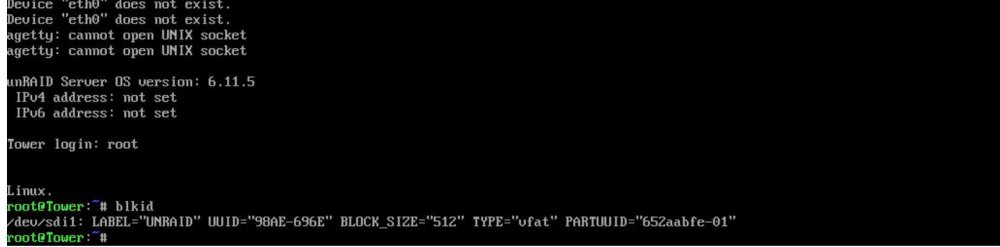
So, is this totally hardware related? Despite some success indicated above, I put the board back in the server, connected everything to it and it was working fine. I then disconnected the LAN and power cables and moved the server back where it belongs. Now the same old problem is back and I cannot successfully get into Unraid with any of four USB flash drives as they are all waiting to be found. The Unraid flash drive is recognized as the boot device, I see the menu and it goes through loading the bz* files. Eventually, the error above appears about waiting for a device with the label UNRAID which it never finds. Looking back on past threads where this was reported, it was recommended to make sure the boot flash had only one partition (it does) and that it in fact was labelled UNRAID; it is. Limetech asked some users to press CTRL-C when the reboot message appeared, the enter root at the login and run 'blkid'. Yep, only /dev/sdi1 appears and it is lableled correctly as seen below. It seems to me that this is a problem with Unraid enumerating the devices and finding the UNRAID USB flash drive to mount at /boot. Or is the problem that the motherboard does not let Unraid see it? I suppose there must be some sort of hardware issue if the flash drives boot fine on my other Unraid server. What little hair I have left is coming out fast.
-
After the recent change in forum authentication and setting a new password, I can also no longer log into the Unraid forums via Tapatalk. I thought maybe it was because of 2FA so I turned that off temporarily and it made no difference. Every attempt to login to forums via Tapatalk results in a "Login In Failed" message. I even logged out and logged back in via unraid.net to make sure I am using the right password. I am.
-
I doubt it is an issue of choosing one over the other. Limetech is not going to deliberately sacrifice stability for convenience. USB for the most part is fairly stable and the issues that do exist are a function of hardware problems (usually, as I believe it is in my case) and not Unraid/Linux kernel. The USB flash drive is really just a repository for files that load into RAM on boot and for storing configuration and a flash drive as small as 2GB is more than sufficient. Seems like a waste to dedicate an SSD to this task as Unraid does not have the concept of a boot/OS drive like Windows, MAC, etc. Unless there could be a small partition on an SSD for Unraid files and config and the rest utilized for cache/storage, it seems like a waste. I have been using Unraid for 12 years and swapped out motherboards/CPU/RAM on my two servers at least five times total and have never had a USB issue until now and I believe it is the fault of the motherboard in my backup server.
-
This has been brought up several times over the years. It is true that USB implementations vary from motherboard to motherboard and chipset to chipset. Unfortunately, some are not very reliable. USB2.0 seems to be much more stable than USB 3.x, thus the recommendation every time these USB boot issues come up to use a USB 2.0 flash drive in a USB 2.0 port on the motherboard. I doubt Limetech will ever consider moving away from USB flash drives for the following reasons: Ease of tying license to flash drive GUID Portability of OS/system files and Unraid configuration to another machine or ability to change hardware without effecting license Ease of replacing/re-licensing another flash drive if original fails Ease of running an Unraid trial with a USB flash drive There have been requests to license via SSD in the same way but they have never received any traction. I am currently struggling with USB-related issues on one of my Unraid servers (ASRock motherboard) where some USB flash drives will boot properly and and some will not yet they all boot on my other Unraid server. It varies between flash drive not recognized at all to start to boot Unraid just fine and then fails to find a USB with the Unraid label (even though they all have that label). Just changing USB ports makes no difference.
-
UPDATE 2: I took the motherboard out of the case and set it up as a breadboard system on my desk with a couple of disk drives connected. I created a new USB flash with an Unraid trial and it boots just fine from the rear USB ports. The Unraid flash drive that belongs to this system also boots (although the config shows a bunch of missing disks). A DOS boot disk also works from the rear ports. Outside the case, things work as they should. The only things not connected to the breadboard setup that were connected in the case are the case fans, six disk drives (via SATA and OCuLink cables) and the front panel power switch and LED. I'll keep experimenting for a couple of days and then put it back in the case and see what happens. Can't see anything that would cause an MB short while in the case and it would be odd it that only affected the ability to boot from rear panel USB.
-
I do not. The motherboard came with IPMI LAN and LAN2 bonded together and I have not attempted to break that to bond LAN1 and LAN2.
-
Here is a link to the Nvidia encode decode matrices. Click one to see what various Nvidia GPUs are capable of doing with hardware encode or decode.
-
Unlike some other NAS OSes, Unraid does not require or even recommend ECC RAM; however, since I tend to use server/workstation motherboards which support ECC RAM and I use entry-level Xeons on these motherboards, I often go with ECC RAM on my 24x7 uptime systems. I currently have ECC RAM in my main server and non-ECC in the backup server which is not powered on all the time. Too my knowledge, I have never experienced RAM-related issues on either system.
-
That's my conclusion. Interestingly, I connected to the motherboard USB 3.x header a cable with two USB 3.0 ports on the other end and the flash drive successfully boots Unraid from that. It just will not boot from any of the 6 USB ports (4 USB 3.x and 2 USB 2.0) on the rear panel. The "front" panel (cable) ports work fine. According to the motherboard block diagram, all USB ports (rear and front) are controlled by the C246 PCH. They must have different controllers internally. Once booted into Unraid from the front panel cable, I can attach USB flash drives, USB HDDs, etc, to the rear USB ports and they are all recognized as unassigned devices. It is just booting from USB that appears to be the problem. UPDATE: and it now refuses to boot from the front panel cable as well.
-
Correct. This is a Plex Pass feature not supported by the free version.




