





Kilrah
Members
-
Joined
-
Last visited
Everything posted by Kilrah
-
I understand it as "if those modules were included then the community could make plugins around their functionality"
-
Well it's maybe a bit less clear but it doesn't matter since the ports are irrelevant there for anything on br0.
-
What exactly are you showing? What Unraid version? Containers on br0 have all ports on their IP, no point listing them. br0 should only be used for things that absolutely require their own IP because they need to use ports that conflict with the host system.

-
How are the files being copied?
-
Done
-
There. Basically the progress doesn't "stream", it just shows once finished. The longer the operation is the more obvious it is of course. Enregistrement 2026-03-01 105320.mp4
-
It does (and I didn't read correctly), but then you wouldn't have the error that 22 is already in use... The opposite, on Host network you cannot remap ports.
-
Grr, 2nd time he changes the name and repo...
-
You're telling it to both start and disable ssh? If you want to prevent it from conflicting it you don't really need either, but need to remove the port map for port 22 from the template. As long as this is there it'll conflict with unraid's ssh service if it's enabled.
-
This thread is half a decade old, see below for current info:
-
IMAGE AND TEMPLATE REPLACED WITH V2 - please uninstall and install the new V2 template from CA, see first post. V2 updates the environment that was years old, has working logging, adds a taskbar, supports choosing PUID/PGID and optionally running as root. Paths were changed to allow the user stuff, the v2 image MUST NOT be used with the old template that puts the sync paths within the /home/freefilesync appdata folder as it gets chown'd to the selected user. Appdata folder can remain.
-
You'd want to use /mnt/user, and the appdata share should always stay on an SSD pool and not be moved/stored on the array. Ideally you enable exclusive shares so that the appdata share is exclusive for performance reasons, that requires it to only live on the SSD pool.
-
Still common and exactly the kind of thing people are going to buy as recerts now because of the crazy prices of newer models... anyway OP never mentioned the actual model of their drives so it's just an example.
-
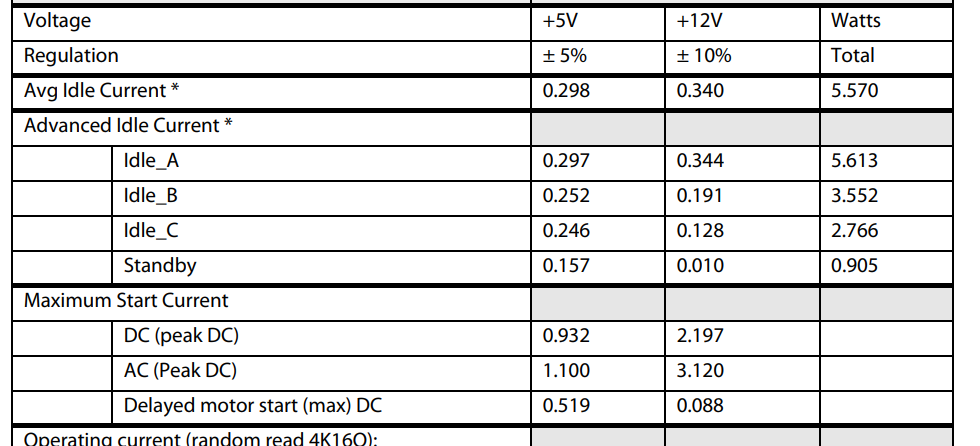
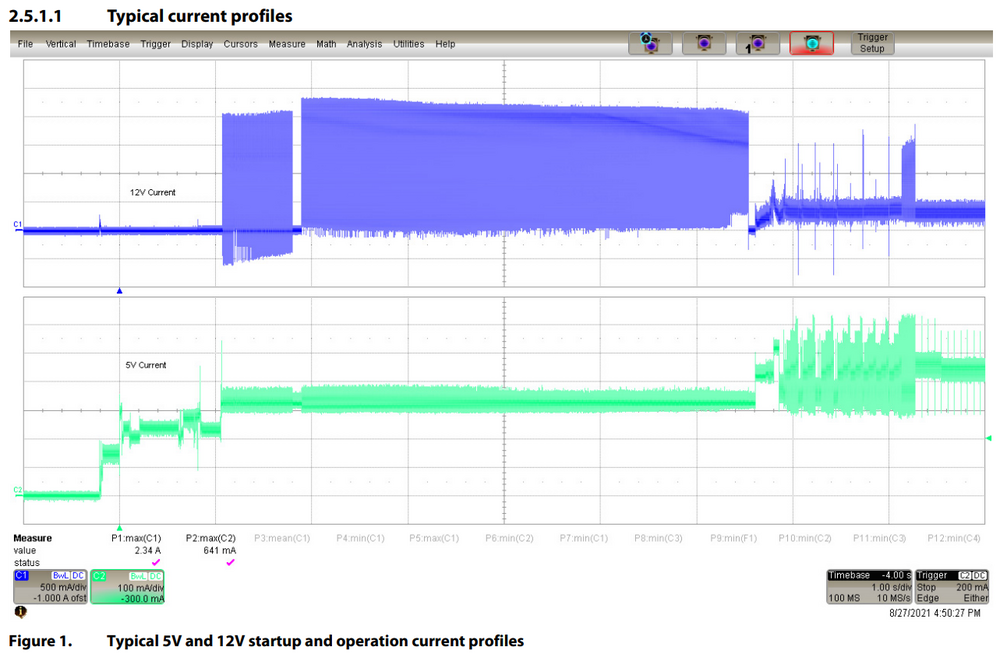
See datasheet above.
-
Unraid's perfectly fine with them, samba maybe not so much. Shouldn't cause any actual issues other than having to check for space on the server itself.
-
Full datasheet has it. https://www.mouser.com/datasheet/3/47/1/96HD20T-ST-SG7KE_datasheet20230308183452.pdf?srsltid=AfmBOoqGB8-fDhFlNpufHzNxngKCPyYokATutRDfNKTAoscWDC0wOanv
-
Use the USB creator to install unraid to the new flash drive Copy the config folder from your existing one onto it, replacing any existing files Boot with the new drive Follow the license transfer wizard
-
Then you're probably gonna have to dig into linux kernel workings to see if there's something that can be changed to help with that. Doesn't seem there is from a cursory look but reducing cache size or shortening the flush intervals could potentially help. https://github.com/firmianay/Life-long-Learner/blob/master/linux-kernel-development/chapter-16.md
-
You can use them, the error is about the name starting with one Cause you can at any time after creating the shares add either a new array drive or pool that you decide to format as ZFS
-
If you install the "tips and tweaks" plugin you can adjust some RAM caching settings.
-
Done
-
Had it happen a few times lately, seems to be mostly when changing the repo/tag from the dashboard page.
-
See this
-
Tools -> System drivers, bottom And no, it's in bytes. Not like you're changing the amount of RAM every day and need it to auto-adjust.



