Zonediver
Members
-
Joined
-
Last visited
Everything posted by Zonediver
-
Dazu muß mal ein zweites Medium (SSD/HDD) in den Server. Dann kann man mit dem Mover alles auf das neu eingebaute Medium übertragen, sodaß die ürsprüngliche SSD komplett leer ist. Anschließend kann man die alte SSD entfernen. Das neue Medium sollte ins Array eingebungen werden - also nicht als Cach oder Pool. Dann unter shares, appdata, Primary storage (for new files and folders) umstellen von Cache auf Array. Dann den Mover starten und anschließend, wenn alles fertig ist prüfen, ob die alte SSD auch wirklich leer ist. Anschließend kann man dann weitere Laufwerke hinzufügen (ins Array). Hier noch eine detailierte Beschreibung (auf Englisch)
-
Schau dir mal das an Probier das mal unter Win 11 und schau, obs besser wird. Das ist zwar ein 10GBit-Link, gilt aber auch für alle anderen Netzwerk-Typen mit 1GBit, 2.5GBit und 5GBit.
-
Von "welcher" Übertragungsgeschwindigkeit ist da die Rede? LAN? Oben ist die Rede von 80MB/sek, weiter unten von 80MBit - was isses jetzt? Welches OS?
-
Updated and all went fine - thanks 😉👍
-
When i use FireFox and put in "unraid/Main", Google comes up - so its not working for me too. I use always the IP of my server. So whats the purpose of using names, if the IP is working? Also at my explorer - i use only the IP of my server - but i have two NICs, so i have to use the IP and nothing else...
-
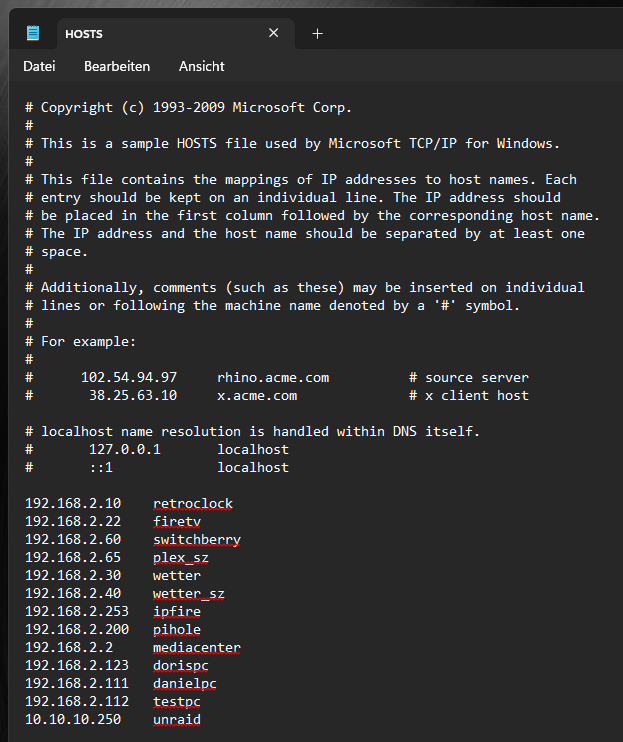
Have you set an entry to the File "HOSTS" under Windows? This is necessary to reach unraid over the name...
-
An "Inplace Upgrade" is faster and do the job as well...
-
Thats the Windows Firewall - deactivate it or implement a propper rule. Strange: On your screenshot, smbstatus shows under Username the term "shares"... In my case, i get the "username" i use under Win 11 and unraid (same user, same password) - Is the user really called "shares"?
-
Try the plex docker from linuxserver - i use this docker for years without issues...
-
Sounds like a "hanging" Reset- or Power-Button maybe?
-
The Realtek-NICs are known as "tricky" under Linux - personaly, i avoid Realtek and use only Intel or Aquantia. You can try a "non Realtek" NIC (if you have a spare PCIe-Slot) and see if it gets better. If 2,5GBit are ok for you, i recommend an Intel I226-T1 PCIe-Card. For 10GBit, since 2019, i use an ASUS XG-C100C with an Aquantia AQC107 (v1) / AQC113 (v3) Chip.
-
Use Settings, CPU pinning. All "not selected cores" are used by unraid exclusive (as far as i know)
-
Das SMB-Protokoll arbeitet auf allen Ebenen gleich - von daher, nein
-
Guckst du hier:
-
I never had problems to connect from windows to unraid... the firewall must be off or at least some rules implemented. Thats it. And all shares should be done over folders with network adresses under windows - so you dont need the Network environment view under windows... And unraid should have a user which is identical to the windows-user (same name, same password).
-
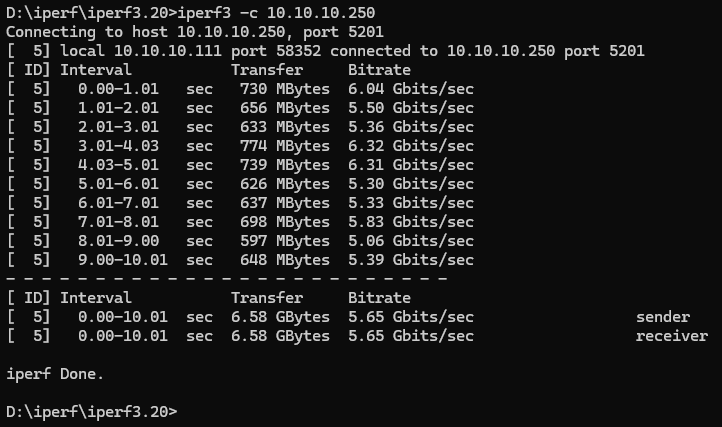
Thats true - when i test over iperf, i got still only 650M/sek... But when you use "-P 2" parameter, iperf uses two channels for testing and then you see the full speed of the NIC-Link 👍
-
Hatte das Problem gerade unter Win 11 PRO - da ist das SMB-Multichanneling - genau wie bei OSX - standardmäßig aktiviert. Max. Transferrate über einen 10GBit-Link lediglich 420MB/sek. Das Feature macht nur dann Sinn, wenn mindestens zwei oder mehr Netzwerkkarten mit dem unRAID verbunden sind. Dreh das mal ab und schau, wie sich das auf den Tranfer auswirkt. Wie man das macht, findest du hier https://support.apple.com/de-de/102010
-
After testing and reading tonns of websites, i found the solution! The culprit is the SMB-Setting in Windows 11! On WIn 11, SMB-MultiChannel is activatet by default... This "devides" the max. bandwith in segements of 3-4. Switching this OFF gives back the full speed of a single transfer between Windows 11 and unRAID. Deactivating under Windows 11 (and 10 too): .) Open the Power Shell as Admin (important!) .) Type the following: Set-SmbClientConfiguration -EnableMultiChannel $false.) Reboot Windows Now, when you copy a large file from Windows to unraid, the full bandwith is used and the file is trasfered with over 1200MB/sek again 😉
-
I think so too - but thats tricky - my unraid is a live-sys and in use 18h per day... Its possible that the ASUS-NICs are faulty - they are six years in use now... I will change the NICs in january and test how it is working after.
-
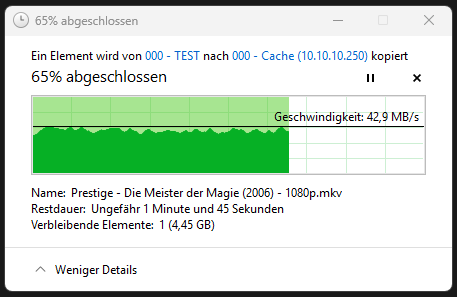
As i said: Its slow... Thats not the full speed of a 10GBIt-NIC Is there a new driver implemented on 7.2.2 ? Is it possible to "tweak" the NIC-settings? And after testing with iperf3, i got this... Transfer drops to ~40MB/sek...
-
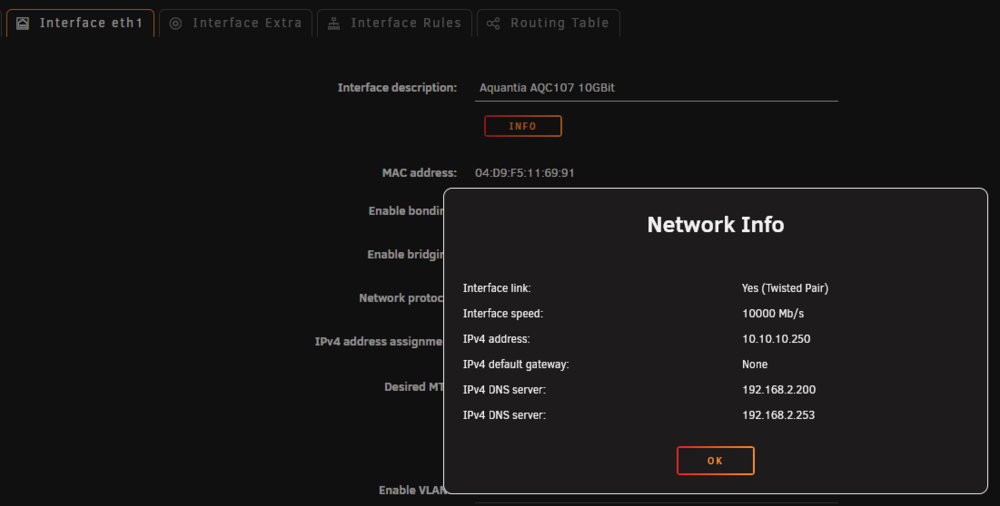
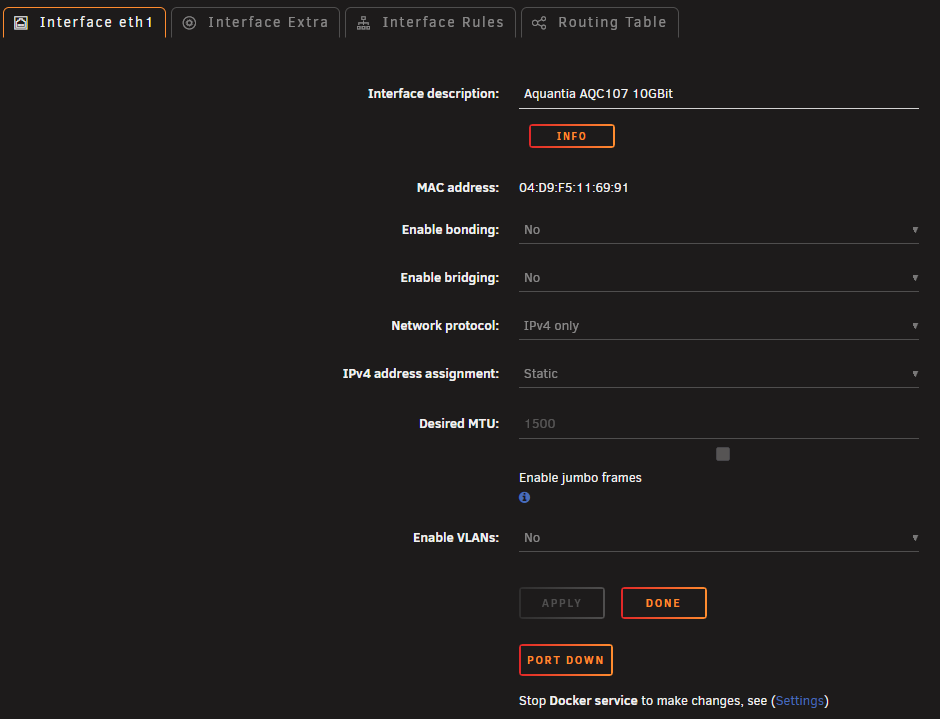
I have an unusual problem since i updated from 7.1.3 to 7.2.2: The max. tranfer rate over my 10GBit-LAN reaches only 450MB/sek. On the older version i reached over 1200MB/sek... Strange: I did not change the SMB-Settings (i use SMB 3.0) - but it doesnt matter what i try... i get only this value. Second thing: At the network settings, i cant see the IP of the 10GBit-LAN any more, but my network.cfg did not change... Also the network Info for eth1 (10GBit) is strange It has two DNS server entries (with a wrong IP-range), but the network.cfg does not because this is a direct link between my PC and unraid... Does someone know, what this could be? Thanks a lot
-
Dieser Platten-Typ sollte eigentlich nicht in einen unRAID-Server... Soweit ich das herausfinden konnte, stammt die Platte aus einem externen Gehäuse (WD Elements Desktop). Mit der wirst vermutlich noch Ärger bekommen, denn dort werden ausschließlich billige OEM-HDDs verbaut... Ich verwende nicht um sonst Purple-PROs, da ich selbst mit den REDs schon "wilde" Erfahrungen gemacht habe.
-
Hier die Anleitung (auf Englisch) https://docs.unraid.net/unraid-os/using-unraid-to/manage-storage/array/overview/#backing-up-the-pool-to-the-array
-
The ASRock Z-Series Boards are known for excessive power consumption... it might be possible, thats a "Board-Factor" and can (maybe) not be fixed... but this is only a "guess". I use an ASRock Z690 Extreme at my PC and this board is a nightmare regarding power consumption...
-
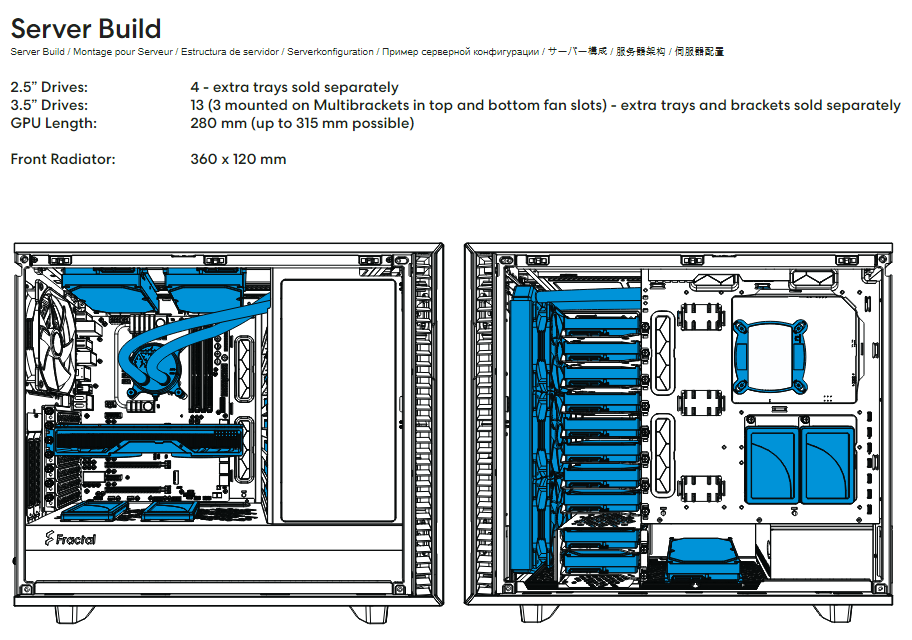
Ich hab das Fractal Define 7 (Black, Solid) im Einsatz - da passen bis zu 13x 3,5" HDDs rein - kann ich empfehlen 👍 Das Gehäuse ist schallgedämmt - im "normalen" Betrieb also lautlos. In der Front als intake sind 3x Noctua NF-A12 verbaut, die bei Bedarf ordentlich Luft in das Gehäuse schieben. Aber selbst wenn die Lüfter auf vollen Touren laufen, ist nur ein leises Rauchen zu hören.