





MowMdown
Members
-
Joined
-
Last visited
Everything posted by MowMdown
-
GluetunVPN docker All other dockers you chose can proxy though it. One single connection.
-
Yeah I for SSD cache drives I typically set it to 20% free space (200GB for a 1TB drive) More important for Copy-on-write filesystems like BTRFS and ZFS
-
I see you've included the ability to restore from a local backup, nice!
-
How is the drive connected to the system? How are the other drives connected to the system?
-
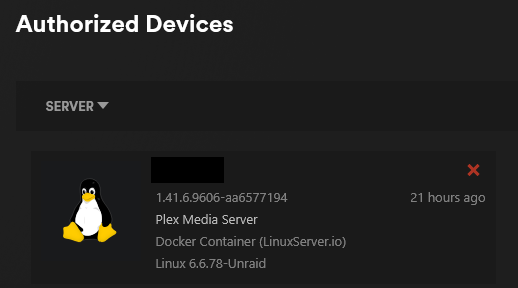
For anyone reading this, you have to disassociate your old plex server from your account. Open plex webgui, click on settings, click on Authorized Devivces, sort by "servers" and click the red X to remove
-
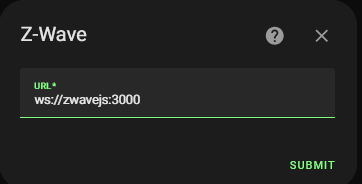
That's why the docker hub exists. You click this --> HA Add-ons are literally docker containers installed inside HAOS. There is nothing you can't install yourself from unraid or dockerhub if an unraid template doesn't already exist. It's as seamless as putting your dockers all to the same docker network so they can commuincate by their docker names: To connect to my z-wave service you just replace the word "localhost" with "zwavejs" or whatever you named your zwave docker. Your assumption is incorrect, I know why people are using this "HA In a box". It's because they didn't know better and that a much more simplified method exists. There isn't anything you can't do with the docker install that HAOS does. You see, if you scroll through this entire post/thread, people dealing with VM issues simply do not exist for a docker install. The sole fact that if for whatever reason HAOS goes down, bugs out, or breaks because of an update or a misconfiguration, not having your entire smart home ecosystem rendered inoperable is not a compelling enough argument why running your "HA Add-ons" outside of HAOS is not a "single universal and concrete" advantage to you... Then I don't what more to tell you. You simply cannot do this with HAOS and Supervisor. Sure HAOS can update in the background but if it goes wrong, the entire thing is toast. Been there, done that, got the T-shirt. Another massive benefit is that you have more granular control over your add-ons, they're not dependent on a specific HAOS version to function. I ran HAOS for a little while before switching to docker install. The fact that either an HAOS update or a add-on update caused friction drove me insane. Now I don't have those kinds of issues. I can update either one all day long and they still work, both in tandem and independently. You do you.

-
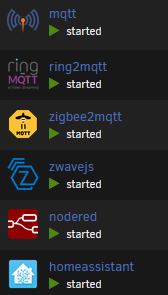
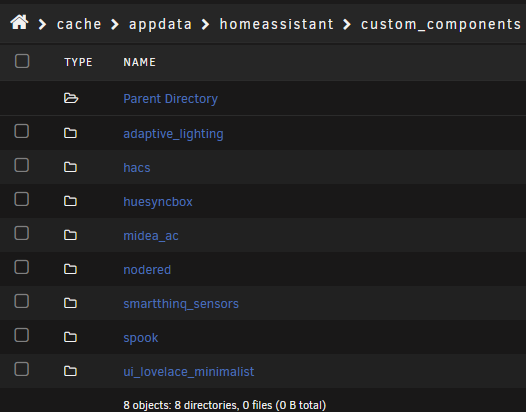
I think you're living in the past man. Every add-on to HA you need is just a docker container you can spin up right on unraid which will then be able to run independently in the event HA is non-responsive like when there's an Unraid update that breaks VMs like I see above. HACS is just a dockermod you add courtesy of LSIO, or you can just install it manually through the appdata. Oh and if you need to access any of the underlying config YAML files, fully accessbile via HA's appdata without having to mess with stuff inside a VM. Oh and backups, being able to take snapshots AND backups of HA is a godsend when you fudge something. Can't really do that with VMs as easily. Oh and no VM XML template BS to figure out. I guarantee you I can spin up all of these services below faster than you can install and get HA in a VM running. Passing through a USB device is stupid easy.
-
I get Ed does great work for the unraid community but what I don't understand is why not just use the HA docker container and not mess with VMs at all.
-
Do you have any open connections to the server from say another PC on your network that's polling the NAS?
-
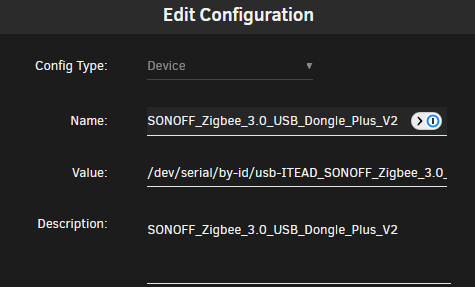
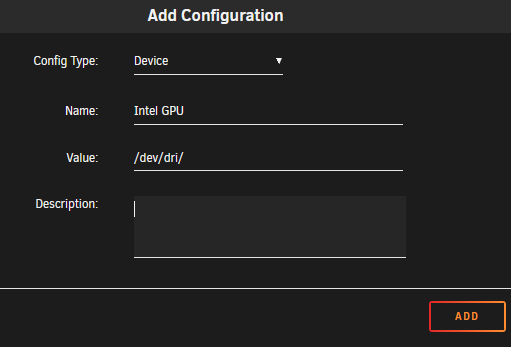
You should have added a device instead of a path. There are two easy ways of doing it. Option 1: Option 2:

-
Personally, I prefer the PWM Fan plugin as it's a whole lot more straightforward to use.
-
disable nginx proxy manager to stop anybody from accessing your dockers externally, and start by checking logs in sonarr/radarr/tdarr/jellyfin to see if any of those deleted files.
-
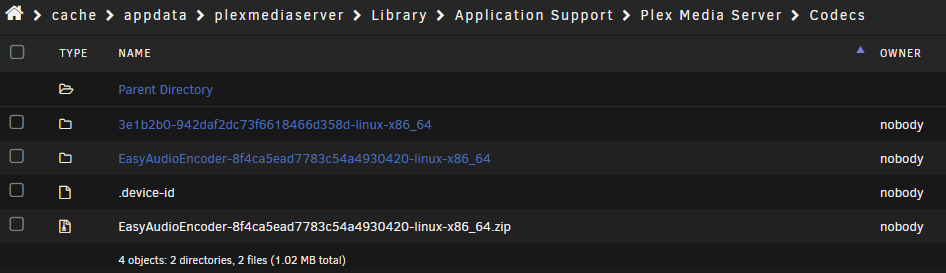
You need to delete the codec folder and restart plex
-
@ImSkully Have you tried to get the AESCrypt working? I downloaded the linux binary it seems to be missing some dependencies when ran from within the docker. I can run it on the host(unraid) no problem. Edit: I got OnlyOffice Document Server working with FileRun. It only works if you access it via reverse proxy. So you have to set up another domain in NPM/Swag that points to the onlyoffice-ds and you put the URL for that into filerun for the URL. Won't work if you use the local ip.
-
If I leave it at the default I get UNKNOWN user for my files/directories it also creates issues with creating new files and such
-
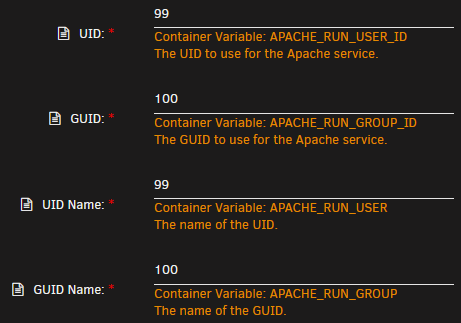
This: If you leave it as the default names as "nobody:users" it doesn't work.
-
That last topic you linked is my own, I posted in their forum hoping the dev could help but it seems pretty dead over there and I don't have high hopes it gets answered. With that said, I did attempt to map the internal php location but it does not populate with the php files and causes filerun to bug out. I did not attempt it as a fresh install yet which might work but I don't have high hopes for that either. I also found that you have to set the apache user and group to 99 and 100 just like @asynic did as this is the only way to fix permissions.
-
Basically you have something accessing the array and it can’t unmount it. A lot of times I find myself have a terminal window open browsing my shares.
-
A good place to start is by using the "File Activity" plugin to see what specific files are being accessed on the drives. Another thing to check is to see if any of your plex "appdata" is somehow on the disk because that itself could keep the disk active. Plex might also just be doing it's tasks like intro detection, file analysis, etc... Stop plex entirely and see if the disk stays spun down.
-
Any idea how to configure the php options like this one? The documentation doesn't help. Uploading files temporarily fills up the docker.img without this path being set. I can't map it to a host path because there's no internal path to map to without first setting the PHP configuration for this. Edit: I figured out a temporary work around, I mapped "/tmp" -> "/mnt/user/appdata/filerun/tmp" which seems to have worked for now. I still would like to be able to alter the php settings though.

-
If you use GluetunVPN docker you do not need the qbittorrent-vpn. You would just use the standard qbittorrent docker. You essentially are going to route qbit through gluetun
-
IMO I, like many others, use the GluetunVPN docker to act as a VPN gateway for other dockers instead of the VPN manager. I supposed you can use the VPN manager if you prefer other than it doesn't have all the bells and whistles the other solution has. VPN manager is just the wireguard plugin with a new name. which either can be used to either self-hose a VPN or connect to a commercial VPN service.
-
The idea that it's "less secure" is highly subjective which entirely depends on what you're exposing. I'm not someone who considers opening up port 32400 for plex a "security vulnerability." I tend not to take absolutionistic viewpoints. Sure one day, someone might have their plex instance broken into but until there's a widespread vulnerability with the plex server, I wouldn't worry about it being an attack vector.
-
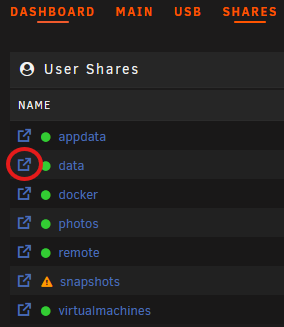
Use the Unraid File Manager to browse your shares from the webgui, if you can't see them on the physical disks then you might be storing the files inside the docker container itself. Depending on which version of unraid you're running it might already be included, in which case you click the "shares" tab at the top and click the little icon to the left of the share's name to browse it.
-
If you're expanding the array by swapping a smaller disk for a larger disk, assuming the larger disk is no larger than your parity disk(s), you would simply rebuild the data onto the new disk, this would keep parity valid during the process. If this new disk fails, you should be able to do the steps again but adding the old disk back in and you should be up and running again. The most important step will be to ensuring you check the box that says "parity already valid" otherwise parity info gets wiped out. All of that is detailed here: https://docs.unraid.net/unraid-os/manual/storage-management/#replacing-a-disk-to-increase-capacity But I will say this, do not proceed with doing the reverse without consulting the forums first in case some other steps need to occur.




