





Lolight
Members
-
Joined
Everything posted by Lolight
-
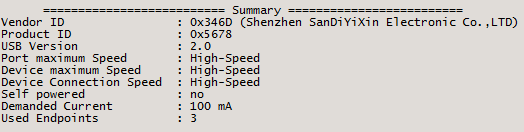
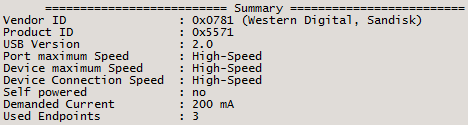
I've used a utility named UsbTreeView to compare my Kingston DataTraveler (by Shenzhen ...) against Sandisk Cruiser Fit. https://github.com/MarkoMarjamaa/UsbTreeView To my surprise I've found a big difference in the Demanded Current metric. Have no idea what that means. I've also noticed a big performance difference: Kingston is about twice as fast at writing. P.S. found a site talking about demanded current: "The first category is a USB device which draws 100 mA or less. This sort of device needs no switching because every device is allowed 100 mA as soon as it is plugged in. There used to be a rule that when the USB device was put to sleep, it would have to reduce its current below 100 mA, but so many devices failed to implement this correctly that USB 2 relaxed the rules significantly." http://dangerousprototypes.com/docs/Designing_USB_Devices_for_proper_current_and_MaxPower Makes me wonder... If the drive's elevated current consumption (by design), combined with a failure to switch into the sleep mode is what makes USB drives fail prematurely.
-
It seems at the time of the review, spaceinvader wasn't quite aware of the USB 2 vs 3 situation as related to Unraid. Sadly the test hasn't been updated since then.
-
Possibly related to this?
-
Only the case with Western Digital white label drives
-
Check out the comments! 😀
-
It's not a quality model (low end). EVGA is a reputable brand, but it has its share of marginal low-cost PSU models which is the case with other reputable brands as well. This list should help: https://cultists.network/140/psu-tier-list/
-
https://forums.unraid.net/topic/94250-ups-bluewalkerpowerwalker-cyberpower-apc/
-
If you're asking about plugins... Here's a limited list of the commonly recommended ones, that I find to be the most useful in my setup: Community Applications (CA): the plugin you will need because it allows you to search for and install other plugins, docker templates (might already be included in newer versions). CA Backup / Restore Appdata: Docker templates and the running containers store their configuration in the Appdata folder, you need to back this up or any failure to the drive that stores them will let you start from scratch with docker containers. This can also backup your Flash drive. CA Auto Update. CA Tips and Tweaks: Allows you to adjust some NIC parameters, disk caching, and other tweaks. CA Cleanup Appdata: Cleans up Appdata for Containers you no longer have. CA Mover Tuning: Let's you customize mover. CA Auto Turbo Write Mode: Lets unraid change the write mode, can help with performance. Disklocation: You can add your drives in an easier representation and visualization of where the drives are located. Pretty handy on finding where you need to pull the drive (especially for hot-swap). Fix Common Problems: Self-explanatory. CoreFreq: Gives some useful stats and info for x86_64 processors. Intel GPU Top: Nice if you have intel igpu and use it for transcoding. Open Files: Shows files that are open, useful for troubleshooting why the array may not be stopping. Preclear Disks: Not really necessary because Unraid does this itself but can identify dead drives before you add them to the array. Dynamix File Integrity: Find files that have changed since the last scan that could be corrupted. This could come in handy to identify what files could be affected when you have parity errors. Dynamix Active Streams: Shows real-time open SMB, NFS or Plex Connections. Dynamix Date Time: Adds interactive map to the date time settings. Dynamix File Integrity: Find files that have changed since the last scan that could be corrupted. This could come in handy to identify what files could be affected when you have parity errors. Dynamix File Manager: New for 6.10, adds a webui file manager. Dynamix System Info: Shows additional information about your system hardware in the Dashboard.
-
The reegularly updated PSU tier list: https://cultists.network/140/psu-tier-list/
-
The PSU market is an absolute mess from a consumer's point of view. There are hardware junkies out there that like to keep track of all the shenanigans going on in the segment - outsourcing, subsourcing, same model/different year OEM/components substitution, etc. I didn't want to spend any considerable time researching PSU's a few years back when I was shopping for NAS components, therefore decided to go with what I've found to be the only PSU brand that was manufacturing all of its PSU's in house - Super Flower. You can get a glimpse of the topic in this discussion: https://linustechtips.com/topic/1226030-seasonic-vs-corsair-psu/ https://cultists.network/140/psu-tier-list/
-
-
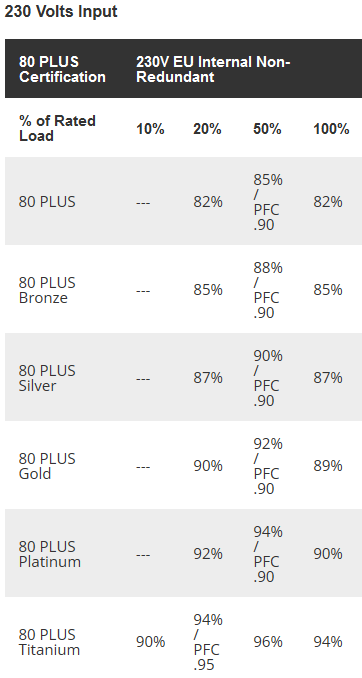
The Node 804 is also designed to hold 8 drives placed in a separate from the motherboard chamber with a better HDD cooling arrangement. The Define R5 has better cable management but it looks to be of a more restrictive HDD cooling design . Single DIMM - single memory channel, two DIMMs - dual channel (better performance). There are many highly rated PSU brands - it's a very competitive market with multiple players. I have a PSU by Super Flower - the manufacturer behind the much better known EVGA Supernova line. Any of the reputable brands will do just fine. If you can afford, get the one with the highest 80 Plus rating - Titanium, or the next down, Platinum. The Titanium rated PSU must be at least 90% efficient at 10% load, which would make it the most efficient one at idle where media servers normally spend the vast majority of their time.
-
My understanding is that only AMD Pro APUs support ECC. If you're absolutely set on ECC memory then that would be your only option. If not then then Intel would be the best option.
-
OK, you're all good then. I'd be genuinely interested in the amount of time your current system setup lasts without experiencing hardware related setbacks. Please post if (when) you experience any hardware failures.
-
Welcome! In general I don't have anything against older/outdated hardware that is still fully capable of performing new tasks. Except those two categories referenced above. 1. An old, lower quality PSU is a ticking time bomb. It might decide to go with a boom (flash) - bad news to everything electrically connected to it. 2. Every HDD is a potential failure point. You got a very vulnerable system with not much of useful space, considering the risk of a drive(s) failure.
-
Sure thing, buddy...
-
I don't run Plex but have seen others experience something similar. Here's a possible solution: For those running plex in a docker container (probably also applicable for other hosting) and who just reset their password: Do this: Remove the preferences entries described in this article: https://support.plex.tv/articles/204281528-why-am-i-locked-out-of-server-settings-and-how-do-i-get-in/ After restart, go to https://www.plex.tv/claim/ and generate a new claim key run this command in a terminal (adapt to your ip and claim) curl -X POST 'http://127.0.0.1:32400/myplex/claim?token=claim-xxxxxxx' 3.1) Alternatively, run your docker container (or docker-compose) with the environment variable "PLEX_CLAIM=claim-xxxx" After that, your server will be available again (you might have to configure it for online availability again. Go to "http://127.0.0.1:32400/web", log in, configure remote access in the settings)
-
Just saw this posted on reddit. Full email from Plex: Dear Plex User, We want you to be aware of an incident involving your Plex account information yesterday. While we believe the actual impact of this incident is limited, we want to ensure you have the right information and tools to keep your account secure. What happened Yesterday, we discovered suspicious activity on one of our databases. We immediately began an investigation and it does appear that a third-party was able to access a limited subset of data that includes emails, usernames, and encrypted passwords. Even though all account passwords that could have been accessed were hashed and secured in accordance with best practices, out of an abundance of caution we are requiring all Plex accounts to have their password reset. Rest assured that credit card and other payment data are not stored on our servers at all and were not vulnerable in this incident. What we're doing We've already addressed the method that this third-party employed to gain access to the system, and we're doing additional reviews to ensure that the security of all of our systems is further hardened to prevent future incursions. While the account passwords were secured in accordance with best practices, we're requiring all Plex users to reset their password. What you can do Long story short, we kindly request that you reset your Plex account password immediately. When doing so, there's a checkbox to "Sign out connected devices after password change." This will additionally sign out all of your devices (including any Plex Media Server you own) and require you to sign back in with your new password. This is a headache, but we recommend doing so for increased security. We have created a support article with step-by-step instructions on how to reset your password here. We'd also like to remind you that no one at Plex will ever reach out to you to ask for a password or credit card number over email. For further account protection, we also recommend enabling two-factor authentication on your Plex account if you haven't already done so. Lastly, we sincerely apologize to you for any inconvenience this situation may cause. We take pride in our security system and want to assure you that we are doing everything we can to swiftly remedy this incident and prevent future incidents from occurring. We are all too aware that third-parties will continue to attempt to infiltrate IT infrastructures around the world, and rest assured we at Plex will never be complacent in hardening our security and defenses. For step-by-step instructions on how to reset your password, visit: https://support.plex.tv/articles/account-requires-password-reset Thank you, The Plex Security Team
-
Why do you assume that everyone plays 4K movies encoded with 40-80 Mbitps total bitrate? If they have been obtained via ISO sharing sites then it's more likely than not they are 7-10 Mbitps H.265 files.
-
Welcome! Your usage case is very basic and Unraid is very light on resources. As long as your parts are generally compatible with each other (pcpartpicker makes sure they are) you're good to go. P.S. You might want to consider a more durable SSD, just in case.
-
I guess Zonedriver has made that comment without realizing that you have a server PSU.
-
I would like that also
-
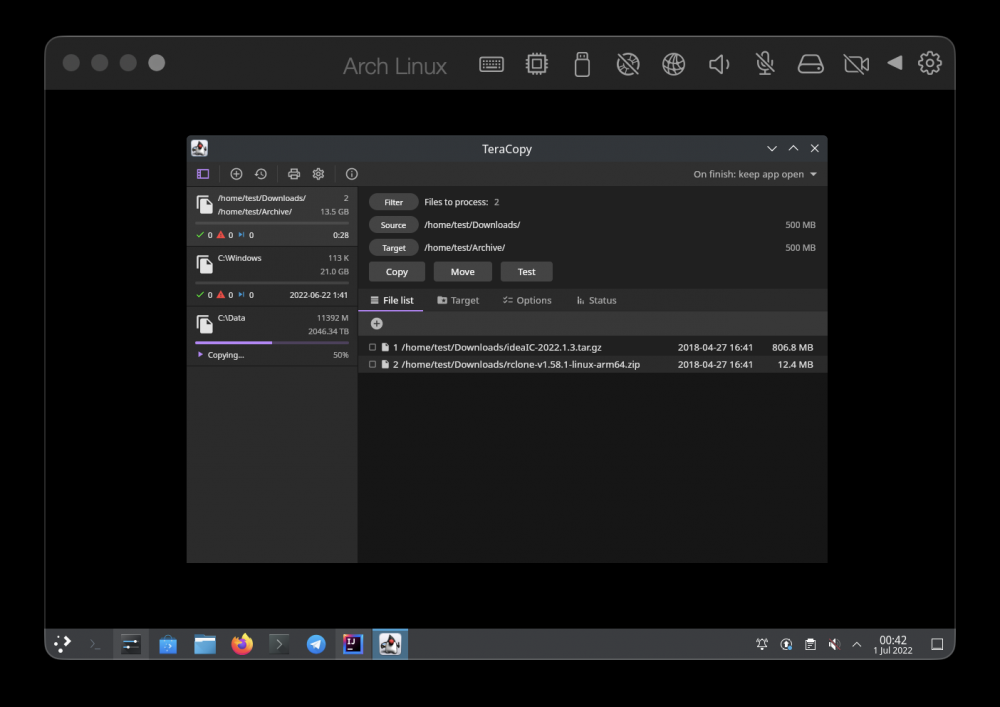
The TeraCopy team has made an announcement of active work on TeraCopy Multiplatform. https://help.codesector.com/en/communities/1/topics/2035-teracopy-multiplatform Any chance that the Unraid developers would consider some kind of a licensing deal for adapting the finished code for the built-in solution?
-
What is your criteria? Are you looking for the smallest footprint possible?
-





