





Mainfrezzer
Members
-
Joined
-
Last visited
Everything posted by Mainfrezzer
-
Auch direkt an den CPU Lanes oder vom Chipset? Ich bin mir nämlich sicher dass die Firmware auf meinem Ding neuer ist als die Silverstone Version
-
Ich hab gestern auch noch fix jmb582 pcie Karte getestet, mit dem selben Ergebnis. (die läuft im anderen Board wunderbar). Scheint wirklich erzürnt wenn man was an die CPU Lanes anschließt. 😆 Hab gestern noch das Internet abgesucht, weil die Preise, die die fürn son popeliges Kabel haben wollen sind echt frech. Bin dann auf nen Produkt mit der Bezeichnung "PH417A-30,PH417B-30" gestoßen (https://pcdetail.taobao.com/d0785f90640ace84971595856ad43145.html Denke mal dass das der Ursprung ist) und hab die über Amazon für 11,75 in der b variante bestellt(Abwarten bis Mitte November). Wäre echt was wenns klappt. Besonders wenn man bedenkt dass das ding pcie 4.0 können soll. Wesentlich angenehmer als 60€ für 3.0
-
Hab ich schon auf Nativ umgestellt gehabt. Ich Depp hatte zwar am Anfang direkt mit der Karte getestet, als das Board noch ausgebaut war, hab allerdings nicht geguckt welchen C-State es erreicht. Jetzt darf ich da rum wühlen. Wird entweder die Karte oder die Wifikarte sein. Wobei ich mir das, bei der Wifikarte, eigentlich nicht vorstellen könnte. Edit: yep, es ist die ASM1166 im CPU Slot. Werde mir mal son m.2 Verlängerungskabel kaufen damit ich die ASM1166 über den Chipsatz von hinten anschließen kann.
-
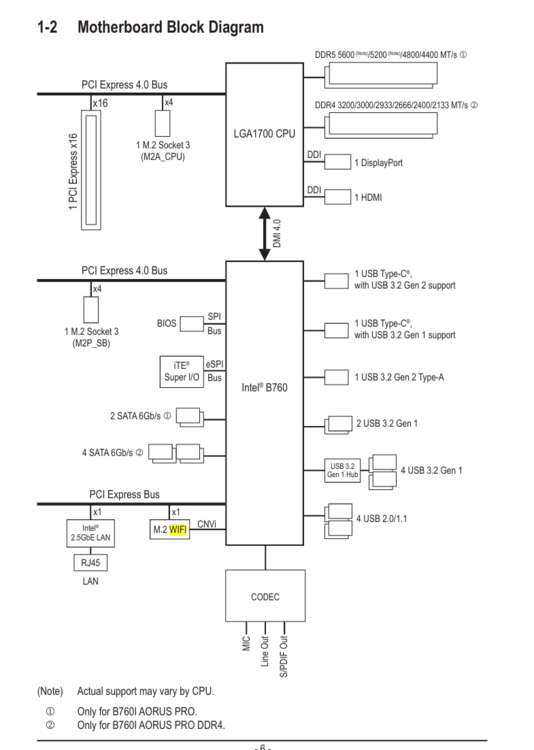
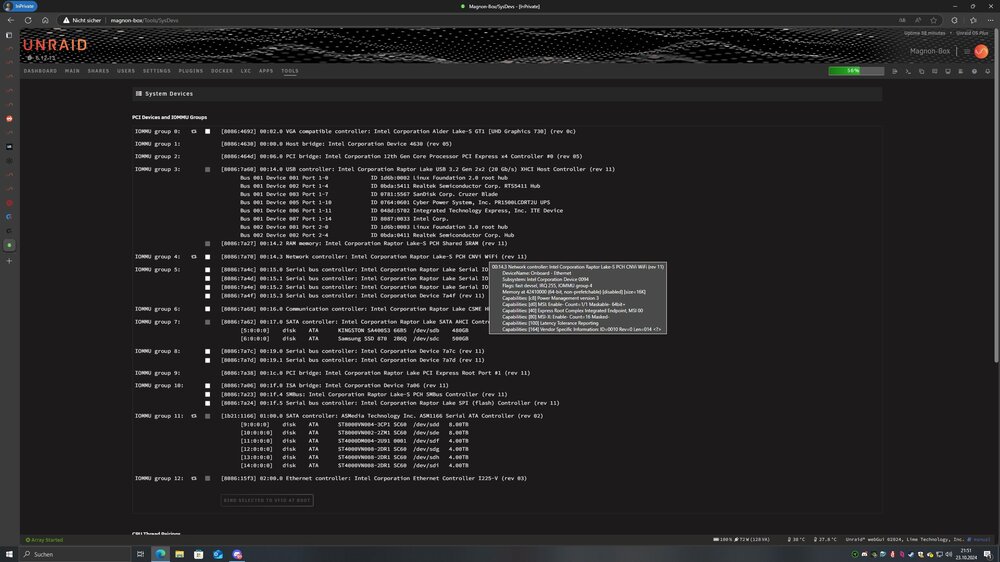
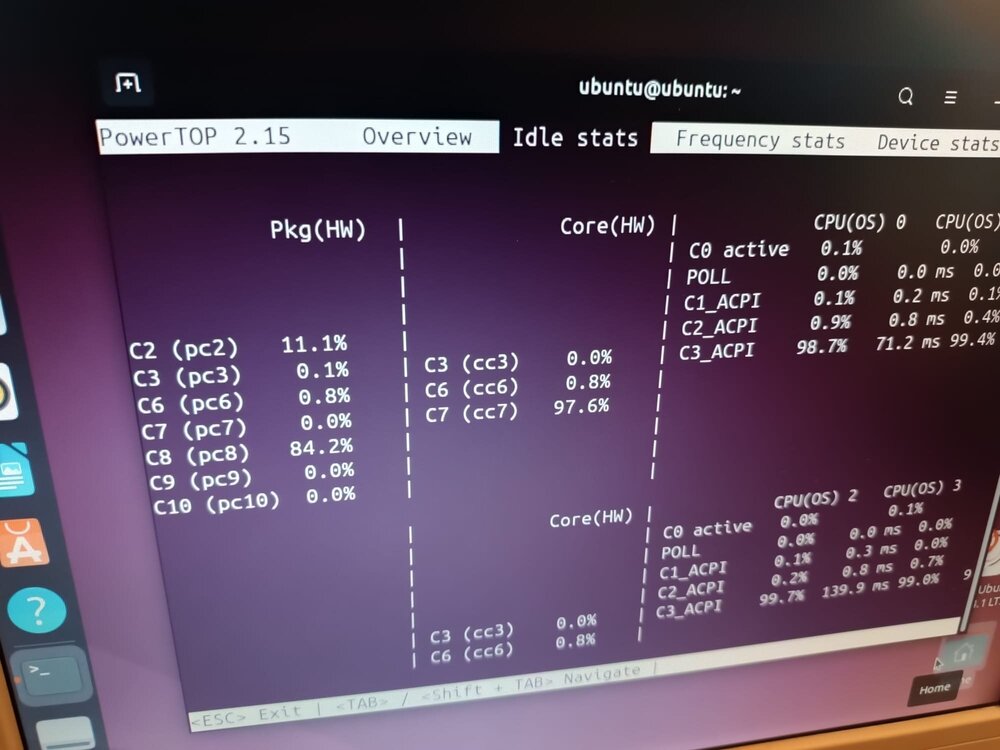
Hab hier nen 14100 auf nem Gigabyte B760i Board sitzen mit ner ASM1166 auf dem CPU m.2 (Chipset m.2 ist unterm Board) und komm nicht über c2 hinweg, wobei ich keinerlei C-States mehr erreiche wenn irgendwas läuft auf. Ich weiß dass die ASM1166 Karte an sich c6 mindestens schafft, da ich die mal auf nem z97 Board getestet hatte. Hab das Gefühl es liegt wohl an daran dass die direkt am CPU angeschlossen ist. 00:06.0 PCI bridge: Intel Corporation 12th Gen Core Processor PCI Express x4 Controller #0 (rev 05) (prog-if 00 [Normal decode]) LnkCap: Port #5, Speed 16GT/s, Width x4, ASPM L1, Exit Latency L1 <16us LnkCtl: ASPM L1 Enabled; RCB 64 bytes, LnkDisable- CommClk+ 00:1c.0 PCI bridge: Intel Corporation Raptor Lake PCI Express Root Port #1 (rev 11) (prog-if 00 [Normal decode]) LnkCap: Port #1, Speed 8GT/s, Width x1, ASPM L1, Exit Latency L1 <64us LnkCtl: ASPM L1 Enabled; RCB 64 bytes, LnkDisable- CommClk+ 01:00.0 SATA controller: ASMedia Technology Inc. ASM1166 Serial ATA Controller (rev 02) (prog-if 01 [AHCI 1.0]) LnkCap: Port #0, Speed 8GT/s, Width x2, ASPM L0s L1, Exit Latency L0s <4us, L1 <64us LnkCtl: ASPM L1 Enabled; RCB 64 bytes, LnkDisable- CommClk+ 02:00.0 Ethernet controller: Intel Corporation Ethernet Controller I225-V (rev 03) LnkCap: Port #0, Speed 5GT/s, Width x1, ASPM L1, Exit Latency L1 <4us LnkCtl: ASPM L1 Enabled; RCB 64 bytes, LnkDisable- CommClk+ Allerdings schon sehr verwirrend mit der Ausgabe. Ich muss mal gucken wann ich die Zeit hab die Karte testweise auszubauen um sicher zu gehen dass es wirklich an der 1166 liegt, Problem bleibt dann, wie zum Teufel bekomme ich Sata Ports^^
-
https://forums.unraid.net/bug-reports/prereleases/unraid-os-version-700-beta3-available-r3269/page/2/?tab=comments#comment-30214
-
I suspect the torrent client. Loads of segfaults from it (although that could just be a byproduct) but given that even binhex container got xmrig or whats its called. I suspect those first^^ But the client did have some upnp related issue, depending what version youre running 😬 But as mentioned above. Really depends on what got encrypted. Everything? Just a part? Everything else is just a guess from the magic 8 ball.
-
Mhmm, ive no clue about first gen ryzen and linux but this looks "not normal", could certainly have a hand in the issue i would assume. Oct 16 21:37:01 NAS kernel: [Firmware Bug]: ACPI MWAIT C-state 0x0 not supported by HW (0x0) Oct 16 21:37:01 NAS kernel: ACPI: \_PR_.C000: Found 2 idle states Oct 16 21:37:01 NAS kernel: [Firmware Bug]: ACPI MWAIT C-state 0x0 not supported by HW (0x0) Oct 16 21:37:01 NAS kernel: ACPI: \_PR_.C002: Found 2 idle states Oct 16 21:37:01 NAS kernel: [Firmware Bug]: ACPI MWAIT C-state 0x0 not supported by HW (0x0) Oct 16 21:37:01 NAS kernel: ACPI: \_PR_.C004: Found 2 idle states Oct 16 21:37:01 NAS kernel: [Firmware Bug]: ACPI MWAIT C-state 0x0 not supported by HW (0x0) Oct 16 21:37:01 NAS kernel: mce: [Hardware Error]: Machine check events logged Oct 16 21:37:01 NAS kernel: mce: [Hardware Error]: CPU 9: Machine Check: 0 Bank 5: bea0000000000108 Oct 16 21:37:01 NAS kernel: mce: [Hardware Error]: TSC 0 ADDR 1ffff8121de60 MISC d012000100000000 SYND 4d000000 IPID 500b000000000 Oct 16 21:37:01 NAS kernel: mce: [Hardware Error]: PROCESSOR 2:800f11 TIME 1729128985 SOCKET 0 APIC 9 microcode 8001138 Thats just a guess on my end because the logfiles are basically empty.
-
Thats not a docker thing, thats a Rust thing. Rust states that you need to tell the rust server itself to overwrite the time zone. "wipetimer.wipeTimezone America/Indiana/Indianapolis" for example
-
Der sammelt Nutzerdaten und schickt die zu Nextcloud https://github.com/nextcloud/survey_client/blob/master/README.md
-
So wie's bei Nextcloud aussieht, updaten. Sollte bereits vor Wochen behoben worden sein
-
How it looks on Automatic: How it looks on Fixed How Fixed looks in Unraid 6 Edit for RC-1: Additional screenshots, automatic: fixed:
-
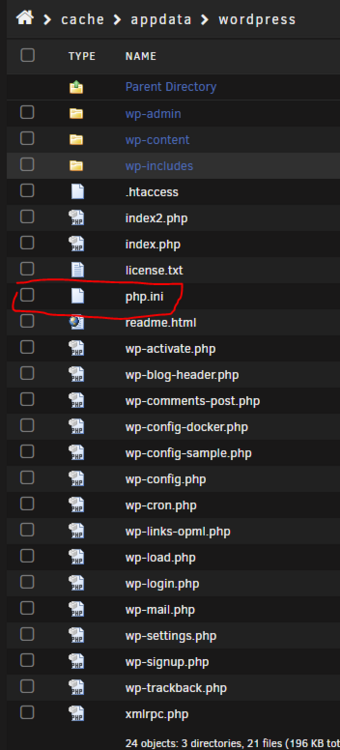
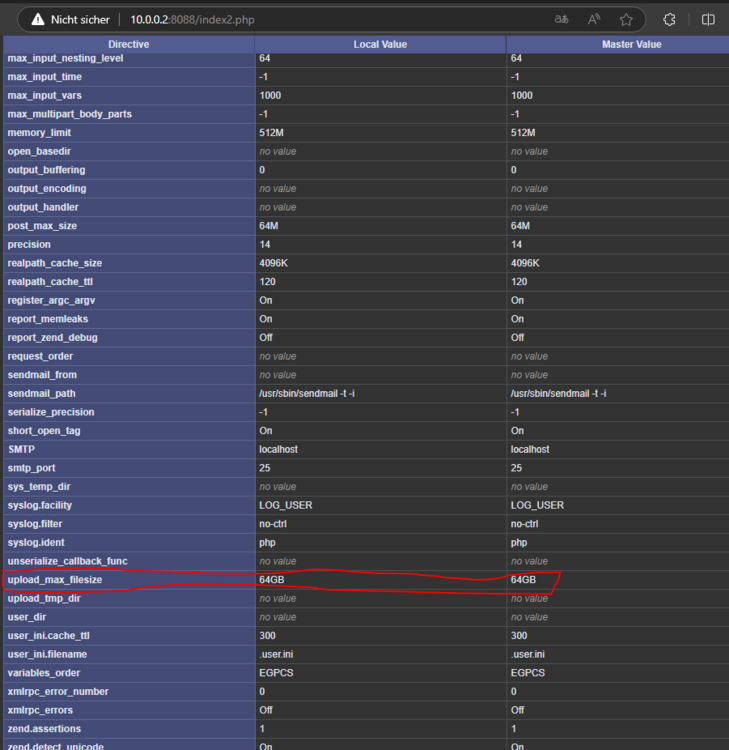
All you need to do is create the php.ini file in /mnt/user/appdata/wordpress/ and then restart your wordpress container. and thats it.
-
Von dem bissel was tatsächlich im log steht (weil zu gespammt von dem I/O Error von Disk 1) sieht es so aus, als müsste man im anschluss definitiv xfs repair durchführen da der Superblock von Disk4 nicht gelesen werden kann. Allerdings muss zuerst das Problem, welches allen Anschein von der LSI Karte herrührt behoben werden.
-
You *cant*. Well you can, you have to change your browser to lightmode for that tho. Complaints can be posted here https://github.com/qbittorrent/qBittorrent/issues/21600
-
Yeah, for Survival Evolved, the only way to get a PS-Server is using a console or renting it from a provider. Survival Ascended is the one where you can allow crossplay between PC and Consoles as "mere mortal"
-
Funky. It seems like it does get logged proper, The question is, if this is just limited on the notification popup or if it applies to more places.

-
I would try passing a device instead of a path 😉
-
Seems about right, "Dell Computer Corp. iDRAC Virtual NIC" is listed under usb. Also interesting is the lack of any pcie network card listed in the diagnostic.
-
Kommt auf die Platte an. Ich hab unterschiedliche Ironwolfs mit 5980 rpm, 5400 rpm und 7200 rpm da geht es von 3-5 Sekunden bis hin zu 8 Sekunden, aus dem "Kaltstart" heraus. Jellyfin selbst, wenn man play drückt, öffnet den Videoplayer und dann bekommt man das "Buffer-übliche" Bild bis es dann anfängt abzuspielen.
-
You seem to be out of luck, a quick google search suggested that you cannot enable the integrated Intel GPU on that Platform. https://www.dell.com/community/en/conversations/poweredge-hardware-general/poweredge-t340-unable-to-access-intel-integrated-uhd-p630-video-gpu-on-xeon-e-2126g/647f80d2f4ccf8a8def83eec
-
Den MTU, vom Wireguard interface, beim 1&1-Server von 1500 auf 1420 runtersetzen und bei Unraid könnte man 1384 angeben.
-
Mit was wurden denn die Konfigurationsdatei auf dem 1&1 Server erstellt? [Interface] Address = 10.8.0.1/24 ListenPort = 51820 PrivateKey = # packet forwarding PreUp = sysctl -w net.ipv4.ip_forward=1 # port forwarding #Plex PreUp = iptables -t nat -A PREROUTING -i ens192 -p tcp --dport 32400 -j DNAT --to-destination 10.8.0.2:32400 PostDown = iptables -t nat -D PREROUTING -i ens192 -p tcp --dport 32400 -j DNAT --to-destination 10.8.0.2:32400 # packet masquerading PreUp = iptables -t nat -A POSTROUTING -o ens192 -j MASQUERADE PostDown = iptables -t nat -D POSTROUTING -o ens192 -j MASQUERADE [Peer] PublicKey = AllowedIPs = 10.8.0.2/32 Sollte so ähnlich aussehen.
-
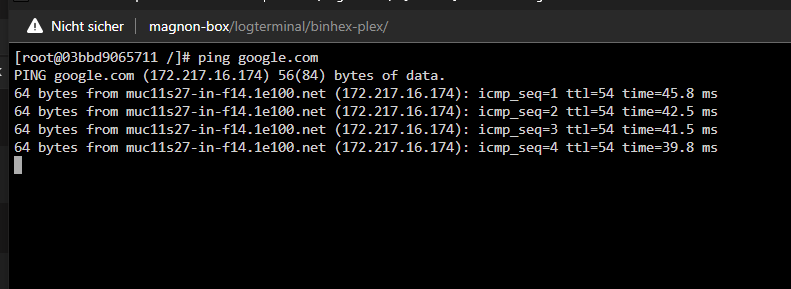
Welches Plex Template wird denn benutzt? Das von Binhex und Linuxserver haben HOST als Standard drin. D.h. der Container muss dann statt auf Host, auf Custom: wg1 laufen. Dazu muss manuell noch ein Portmapping von 32400 auf 32400 angelegt werden (ansonsten muss man nämlich, wie oben erwähnt, die Docker Brücken IP nutzen) Das wars dann schon. Der Tunnel für Docker-Container zum Server Container mit Portmapping und VPN-Tunnel-Netzwerk Test auf Funktion, lokal (10.0.0.2 ist die Lan Adresse vom Unraid-System bei mir): Funktioniert. Container kann das Internet erreichen Nun zur Einstellung am VPN-Server im Internet Endgültiger Test: Tada





-
Kommt alles auf die Konfiguration vom 1&1 Server an. Das Wireguard-Interface dort muss selbstverständlich sämtliche Regeln beinhalten. Was, wie, wo mit welchem Paket passieren soll. Für mich klingt das jetzt stark nach WG-Easy von der Beschreibung her, und das ist erstmal gut um "schell" nen ausgehenden Server bereit zu stellen. Wenn man Anfragen an den 1&1-VPN-Server weiterleiten möchte, zum Unraid-Server (bzw Plex-Container), muss man das ganze schon manuell konfigurieren. Als Beispiel: PreUp = iptables -t nat -A PREROUTING -i ens192 -p tcp --dport 80 -j DNAT --to-destination 10.8.0.2:32400 PostDown= iptables -t nat -D PREROUTING -i ens192 -p tcp --dport 80 -j DNAT --to-destination 10.8.0.2:32400 Wobei ens192 das Interface vom 1&1 Server ist und --to-destination die VPN IP vom Unraid-Interface. Wobei man bei dem Port drauf achten muss, wie der über Unraid weitergeleitet wird, weil sonst müsste man die WG-1-Docker-Bridge IP selbst anfragen um z.b. nativ zu Port, z.b. 172.31.202.2:32400 Man kann das ganze aber auch via Reverse Proxy lösen, was wahrscheinlich sinnvoller wäre in dem Fall hier. Z.b. via NGINX-Container auf dem 1&1 Server laufen lassen, Anfragen von "Was-auch-immer.com" an die, ich nehme mal an, "10.8.0.2:32400" senden und dann hat sich das ganze auch gehabt. Da muss man dann nicht groß mit iptables rumdoktern.
-
seems like it. You can of course, install the docker container manually or, try the unraid template from the repo if you want https://github.com/tquizzle/Docker-xml/blob/master/docker-pufferpanel.xml






