kizer
Moderators
-
Joined
-
Last visited
Everything posted by kizer
-
Ok, copied what you posted earlier and things seem to be working pretty well. Moves and deletes just fine. When it deletes aka attempts to move files back to the array and then deletes. Does it use some kind of logic to what is deleted first? Oldest files first? I'm still running Mover Plugin that I have set to run at 10% Full and only move files that are older than 14days to insure files are protected within parity protected array since I have other shares and mover doesn't like to move files that are duplicates this shouldn't be a problem. I'll know in the future. This script I have it set to run currently at 60%/55% and to only cache the next file and I have it set to run every 15minutes since most of my TV files are either 30min or 60min which will continue to move files only when I need them and watch them.
-
Thanks for the Clarification. Now I feel a little dumb now that I just checked myself when I should of known better. I've moved files before to user0 internally from command line when I wanted to move files around knowing I didn't want them to go to the cache first.
-
Ok, Thanks for the info.
-
Looking for Needles in a Hay Stack here, but................ Fire up Docker and see what happens and then turn on each docker container one at a time and see if one of them is causing an issue. You could either rebuild your docker file if its corrupt or maybe one of your dockers is causing it to crash. You did say Docker so I wonder if it could be related to your SSD unless your not running it off your SSD.
-
Most people Map \\192.168.X.X\ShareName - which obviously copies to your share in windows. however you can map \\192.168.X.X\user0\ShareName - Which Bypasses the Cache drive and writes directly to the array. So in a sense you can pick and choose which files goto the Cache and which does not directly just by pointing them to either mapping of user or user0
-
What exactly does this do? Does it simply put files into the Array vs the Cache? If so isn't there already a simple setting in shares to avoid that. Just curious. Does this basically simply /mnt/cache0/ShareName ?
-
Your very welcome. I'm a true believer of writing out my code with Comments and doing little tweaks so I can come back later and see what I've broken or what works or don't work. I have a couple scripts with so many little routines because I figure I need 10 things to happen and I might as well type out a list and then address each on my list and pray it works. lol Some of the things I do generate errors, but its a lot of the time "I couldn't find a file", but oh well next step and keep on moving.
-
Ok, I kinda get it now. One is a Hard Ceiling and the other is a Soft Ceiling. Meaning No matter what this script will not allow files to go higher than 90% and if so will clear until files are below 85%. I did notice a time or two when I manually click the script it said currently already running. Nothing i could tell was running and no matter how long I waited when I clicked the script it said the same thing. I did a reboot and tried again and it appeared to be running normal. Waited a few hours and did the same thing and got the same message. I'm not scared of background processes, but not knowing what something is doing and not knowing when it will end sometimes is a little unnerving.
-
Ok with your Script and some changes I got it to work. Thank you so much for your efforts and your patience on this. #Plex PLEX_TOKEN="xxxxxxxxxxxxxxxx" PLEX_HOST="192.168.xxx.xxx:32400" PLEX_MAX_CACHED_SESSIONS=10 PLEX_CONTAINER_PATH="TV" #Rsync path STORAGE_PATH="/mnt/user0/TV/Shows/" CACHE_PATH="/mnt/cache/TV/Shows/" CACHE_MIN_FREE_SPACE_PCT="90" CACHE_MAX_FREE_SPACE_PCT="85" I'm running Mover Tuning Script to limit my Mover, and now this script. So I have to come up with a Happy Medium on the Settings to make sure its working smoothly. Can you Please explain a little bit of these. They almost sound like they are backwards in the Amounts and the Naming. CACHE_MIN_FREE_SPACE_PCT="90" CACHE_MAX_FREE_SPACE_PCT="85" I'm trying to understand the clean up. I've adjusted the above numbers up and down and haven't seen any files delete.
-
I personally use this in my User.Scripts #Find Files from Incoming that refuse to move find /mnt/cache/uploads/incoming/* -iname "*.mkv" -type f -mmin +10 -exec mv {} /mnt/cache/uploads/Tv-Incoming/ \; find /mnt/cache/uploads/incoming/* -iname "*.mp4" -type f -mmin +10 -exec mv {} /mnt/cache/uploads/Tv-Incoming/ \; find /mnt/cache/uploads/incoming/* -iname "*.avi" -type f -mmin +10 -exec mv {} /mnt/cache/uploads/Tv-Incoming/ \; Every 15 Minutes I run a script that does a lot more, but I have this nested in the script that look for files that are at least 10minutes old and if they are .mkv, .mp4 or an .avi they are moved. Obviously you can change the time, but I figured 10minutes was plenty which allowed FileBot to uncompress the files and make sure they are not in the middle of being uncompressed and moved half way done. Find /mnt/cache/uploads/incoming/* -mmin +30 -type d -empty -delete After any files are moved from a Directory after it was unpacked I use the above to check the folders and delete them when they are empty. I set it to longer to give files a chance to be moved a few times.
-
Checked my setting now I'm seeing this. Script location: /tmp/user.scripts/tmpScripts/Plex-Caching-Script/script Note that closing this window will abort the execution of this script Welcome to /tmp/user.scripts/tmpScripts/Plex-Caching-Script/script stat: cannot statx '/tmp/user.scripts/tmpScripts/Plex-Caching-Script/log.txt': No such file or directory Info: Log size is ---------------------------- 1 active(s) plex session(s): ---------------------------- - 1/1: Serie: Chuck Season 1 - Episode 13/13: Chuck Versus the Marlin -- Info: File 13/13: /TV/Chuck/Season 1/Chuck.-.S01E13.mkv --- Debug:Rsync_transfer function parameters: ---- Debug: Source file: /mnt/user0/TV/Chuck/Season 1/Chuck.-.S01E13.mkv ---- Debug: Dest. file: /mnt/cache/TV/Chuck/Season 1/Chuck.-.S01E13.mkv ---- Debug: Source path: /mnt/user0 ---- Debug: Dest. path: /mnt/cache ---- Debug: Options : --- Error: Files: /mnt/user0/TV/Chuck/Season 1/Chuck.-.S01E13.mkv /mnt/cache/TV/Chuck/Season 1/Chuck.-.S01E13.mkv does not exist --------------------- Cache disk usage: 35% --------------------- - Info: 35% space used, quota is 90%, nothing to do -- Info: Cleaning empty directories...
-
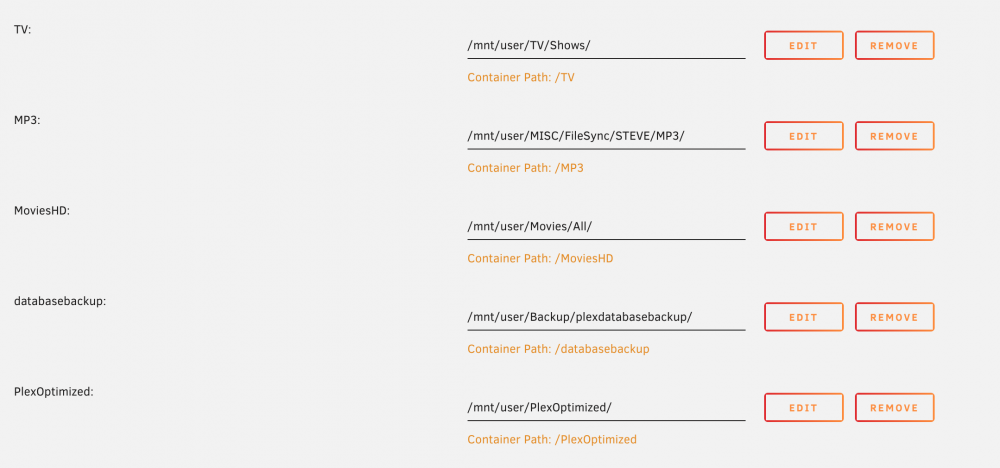
Tv Shows are at /mnt/user/TV/Shows/ Movies are at /mnt/user/Movies/All/ I'm only really concerned about my Tv Shows Plex docker shows TV shows listed at /mnt/user/TV/Shows/
-
Exactly what I did. I have a PC I mainly deal with unraid on and I have a folder sitting burried in everything a folder called FlashBackup and every once in a while I'll update it just incase. I've had to do the OH'Crap recovery a couple times luckily having the files handy. Now that I'm deploying a backup server I'll have a copy of each others Flash Drive stored on each other just in case as well.
-
What until you look through all the Community Apps. Click Click install and your off and running. Just incase you don't have it installed.
-
I personally use the Icy Dock Black Vortex cages. Mine do not have the back plane on them so I have to connect the cables manually, but I also swapped out the front fans with some 120mm Nactua's. They cool very effectively.
-
Any of these shares set to Cache Only? That for sure will not let anything move.
-
Just take your time and always feel free to ask for others opinions. You got this!!!!
-
Also very important. Do not move files via /shares to /disks or /disks to /shares When I did mine I copied files from /disk to /disk If you mix /shares and /disks you might end up in some kind of loop or cause corruption. I think I did mine a long time ago using rsync and Unbalance plugin which took a lot of the guess work out of it. Made me feel really lazy. Lol Also in settings or is it tools I don't remember. Don't forget to set the default disk formatting for future drives. I'm guessing you have it currently set to btfrs you should change it to xfs unless you don't want future drives to be xfs.
-
This Plugin is simply awesome. Saves me so much time now. Before I'd have to remote in and change some files or open up a command prompt and do some typing. Now its simply click on a file and use the rename function and done.
-
I posted my exact settings up above a bit. I also fixed what I posted a couple days ago that you qouted me on. You do not want the top line to be YES, Yes means disable the plugin. The last line setting it to yes means enable TEST mode. You want things to move, you have to use NO on the last line too. On a side note you can enable Logging and click the button to move and watch files move while watching the logs using Test mode. Or you can disable TEST mode and watch the logs as well. I normally enable TEST and Logging so I can see what the script would do and when I'm happy turn off TEST and let it go. I used to keep logging and check things, but I've since disabled Logging and have my files move once a day vs every hour because I have my server setup to move files, do Plex maintenance and other things between the hours of 6AM and 8AM every morning. Otherwise my drives sleep all day.
-
You want to make sure the top one Disabled is set to NO. Setting it to YES tells the script not to run.
-
Used to be Western Digital Greens/Blues. Now I run Exclusively Seagate IronWolfs.
-
Very Odd, On my MacbookPro using 10.6.3 I can connect via Chrome, Safari and Brave browser. Are you running any kind of ad blocker or safe browsing browser extensions?
-
@Darksurf Did you make sure the target drive was completely empty with the exception of a single folder clear-me
-
My system is the following. 4TB Parity 4TB x 6 Data 1TB SSD for Cache 2GB USB for the OS So if I ever want to install larger data drives I have to increase the Parity first. So if I went to 10TB Data Drives my first drive would be swapping out the 4TB for the 10TB. You could honestly think of the Parity as wasted/no space until it saves your butt a few times.