kizer
Moderators
-
Joined
-
Last visited
Everything posted by kizer
-
I used it this morning and I didn't experience any issues. Honestly I don't think I've ever noticed an issue with the search within the Apps section tab. Maybe your having a Chrome Cache issue.
-
did Did you look in your appadata folder for that dazzling_panini on your SSD?
-
@hugenbdd Thanks for the break down. I thought I had it figured out and you more than covered it. So it looks like if you cancel the mover cron you could literally build a script and move individual shares using something as simple as User.Scripts if you need custom shares moved more or less frequently vs using this script to blanket move everything which may or may not work for people based on their needs. Personally Mover.Tuner does exactly what I need and thank you for keeping it going. I know one person asked this very question in another forum topic and now I'm glad I can point them and future people here so they can customize their moves if a need arises.
-
Could I trouble you to break that command down just a bit? I'm looking at share1 and then I see /move -d 1 I'm assuming share1 is just a place holder and could be anything TV Movies?
-
Install and your good. The plugin uses the built in scheduler from the old method. So yes you need to make sure you keep the old schedule so the new method plug-in knows how often to run or in this case how often to run/check for whatever settings you have enabled in the mover tuner. The old version is part of the OS so there isn’t a safe method to remove it unless you command prompt in and delete it. Not recommended because this plugin uses the scheduler and allows for returning back to default mover by simply removing the plugin if you choose to later. For example. I have Plex scheduled to run it’s maintenance at 6am-8am so I have the mover set to check daily at 5:45am. If it moves something it’s often a file or 2 and then it’s a drive or two less than Plex has to spin up. If it moves nothing then Plex does it’s thing anyways. I used to run weekly Sunday at 12:05am, but now I run daily and let the mover script determine if my files are 15days old or not. I might reduce to 7 days just because, but 15 sounded good. Lol
-
Perfect place to post it.
-
Uninstalled and then reinstalled and I don't seem to be seeing any more USB righting or uploads to unraid.net constantly.
-
Ok, I'll check this later when I get home. I honestly haven't used this Plugin a lot so I didn't really spend a lot of time drilling into the settings. More or less I installed it, thought it was kinda neat and thought I'll play with this later.
-
I'm not sure if anybody has noticed, but I was getting constant writes to my USB and then I checked and realized that this plugin was updating or something every minute so I was seeing this is my log. /usr/local/emhttp/plugins/dynamix.unraid.net/include/UpdateFlashBackup.php update So there was several of them so I was constantly sending updates via unraid.net plugin Used find -cmin -5 in my /boot directory and it pointed right at this plugin World ending problem? No, Just was wondering why my log kept showing my USB getting backed up constantly when I know I hadn't made any changes to my settings. Lol
-
With my AsRock Extreme6 Sometimes I've noticed even when I set the correct sensor it takes a reboot to correct the temp. My Mainboard sits around 30C and sometimes it spikes up to 100+ and I have to do a reboot for it to correct its self. No idea why it does it sometimes, but it does.
-
Honestly I see no downside to offering a field to add a call out to a script before starting or ending. I think it would be rather useful honestly. Obviously as long as when it does its check which some of us have to set to Hourly, Daily, Weekly or whatever it doesn't trigger the scripts unless it really does the move. lol
-
I created some User.Scripts that call for different things so I can pin point some without locking/unlocking everything all the time so I can avoid dupes too. Sure you could run Chattr directly on the file and then just delete it, but honestly I get lazy and often forget code so I just make up some scripts and let them do the work. Security.Lock.Media locks TV share and Movies share Security.Unlock.Media unlocks TV share and Movies share Security.Unlock.TV unlocks TV share Security.Unlock.Movies unlocks Movies share on and on
-
Ah I get what your saying. Looks like there was an update to address this right below your reply.
-
This video really helped me understand how to use Time Machine in unraid.
-
Lets say you want all your files to move when your drive is 50%. So the Plugin will move your files when it is 50% Lets say you want all of your files to move when your drive is 50%, but at the end of the month before Parity is ran you want all your files in the array regardless of how full your SSD is. You have that option by using the Move on a Schedule within the Plugin, but you can't move on a schedule with the original unraid mover because the Plugin supersedes it. in all sense the old Mover is not used anymore unless you click the Move button within the plugin settings in the bottom right corner which will trigger the default unraid mover.
-
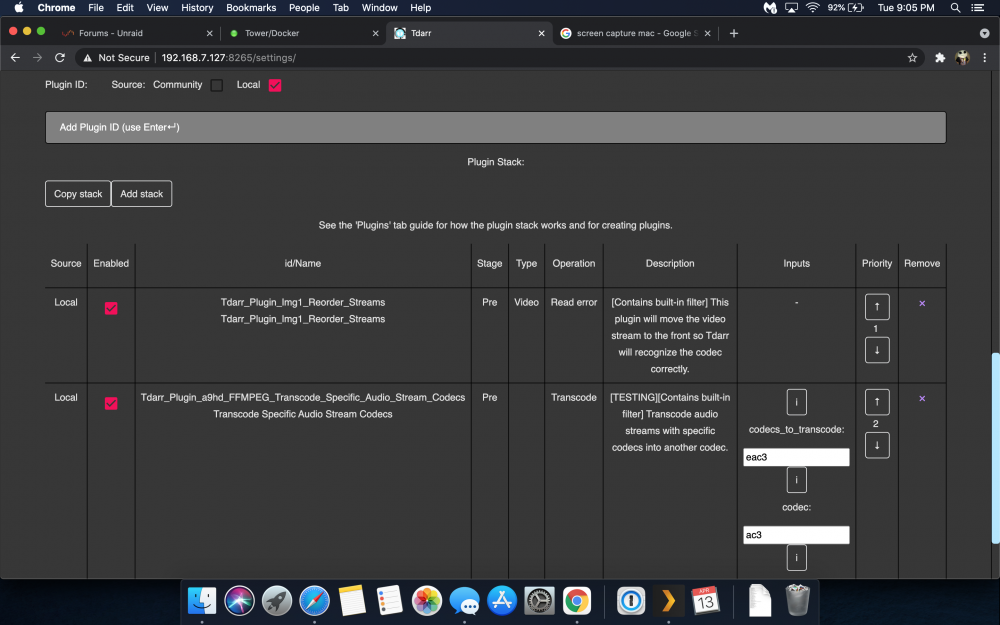
using V1 tdarr_aio I was looking at my plugins via the library under Transcode Options and some of them say "Read error". They are all still in the Local Folder. Should I be worried? So I if I check the Community button vs the Local the error goes away until I return then it says Invalid Plugin in purple under the search field. All my Plugins ID's where copied from the local folder and I made sure the Local folder was selected when I added them the first time. I just don't know what is going on now thou. Everything seemed to be just fine until I clicked the update community Plugins.
-
Ok, I'm not nuts then. Lol Like I said I'm not complaining I just wanted to bring it up unless I'm the only one seeing this. My setup isn't anything special and Im pointing everything at the Cache Pool. I'm running two pools, but this was happening before I added the second SSD pool of 1 drive with 6.9.1 aka ssdBackup SSD. I don't recall this happening at all when I was running 6.8.3, but I noticed it when I installed it on 6.9.1 and I thought it was a bug, but nobody else mentioned it so I uninstalled it thinking it was possibly something new in the OS and just waited to see if anybody else pointed it out.
-
Because I thought its supposed to be looking at the age of the files just on my SSD. Maybe I've gone a little bonkers lol. Unless your telling me its evaluating the files on the share not the files on the SSD which would cause drive spin up. If that is the case then I should set this plugin to check when I know my drives are already spun up say during a Plex Maintenance check. Normally that check is Daily 6AM-8AM. If it is looking at files from the "Share" not the Cache/SSD that would make total since of what is going on. However its spinning up my Parity for no reason if it isn't moving, unless that is just a characteristic of its preparing to move, but it actually doesn't. Either way I'm not complaining. I'm just trying to understand why its doing something. If its doing exactly what its supposed to be and the way its supposed to be I'll adapt. I'll throw some more files on my machine and test the plugin again. If it spins up specific drives based on what I placed on my Cache then I'll know for sure that its checking shares not just the SSD and I'll adjust accordingly.
-
I'm not sure if its just me or what. Running 6.9.1, but I also noticed this at 6.9 too. I set my Mover Schedule to hourly and hourly my drives spin up and nothing happens since my Settings for Mover Tuning are set to 10% at 20Days. Of course my files are not 20days old so they shouldn't be moved, but why spin up some drives? I decided maybe its just a fluke. So I set my mover to move at 21:35. I waited and sure enough my drives spun up and still nothing moved because it shouldn't be moved since my files are not 20days old. This is what is in my Logs at that very moment: Apr 8 21:35:08 Tower emhttpd: read SMART /dev/sdg Apr 8 21:35:30 Tower emhttpd: read SMART /dev/sdf Apr 8 21:35:31 Tower emhttpd: read SMART /dev/sdd Apr 8 21:35:38 Tower emhttpd: read SMART /dev/sdc Odd thing is its only spinning up (4) of the (6) Drives (1) being parity and the other (3) are data drives. The drives that are being spun up very well could be where the data was to be stored "if" they was moved.
-
Keep in mind he's probably sleeping.
-
Is there a command line or can there be to enable/disable remote connection? This is why I ask. If I can schedule remote access while at work and disable while I’m home it would be really nice. it’s a personal feeling, but I’d like to be able to schedule a turn on/off when I’m using remote access vs leaving it on all the time. I could use a cron script via User.Scripts or a built in scheduler via unraid.net Plugin. I have other ways of logging in to enable/disable if this isn’t a possibility or doesn’t make sense. Just a future feature request of sorts.
-
Check this out. You can register a new USB to your account if you loose your old from your backup, by clicking a button.
-
Basically its backing up your USB stick. I see my docker xml's in it along with my Plugin's and Config files. I personally back up my Cache/system/appdata to another smaller SSD in its own pool. Why do I do that? I backup my appdata once a week and I Figure if there is a BIG change to my appadata I could easily restore it from a daily snap shot. I don't run VM's as of now so I couldn't tell you if any of that data would be on the Flash of course if you run User.Scripts those are on their too. Has anybody else tried using it? Backup and Restore? I'd guess this is the place to bring up suggestions and problems if there are any.
-
Just tried the USB Backup portion of MyServer's. I've made several changes over the past few weeks and it looks like the USB Backup has been keeping up just fine. I just grabbed a copy of my USB stick and I'm pretty confident I could restore and start it right up. I even included a txt file of my drive assignment using a script I found in User.Scripts so if I had a problem I could easily figure out which drives are where.
-
You can use the Unassigned Device Plugin to manage your devices, but that's getting kinda sketchy in my opinion to rely on USB for all that. Personally I'd get a case and drop in a LSI controller card and run it in IT Mode. unraid doesn't like RAID cards very much because they can cause problems. https://www.ebay.com/sch/i.html?_from=R40&_trksid=p2334524.m570.l1313&_nkw=LSI+unraid&_sacat=0&LH_TitleDesc=0&_osacat=0&_odkw=LSI