





Amane
Members
-
Joined
-
Last visited
Everything posted by Amane
-
Halllo N0_Headshot Jellyfin ist gratis, Plex kostet glaub monatlich, ich möchte nicht monatliche Zahlungen für meine eigenen Daten tätigen. 😄 Ich nutze Emby, da hast du den Kompromiss von einer einmaligen Zahlung und der Performence und Qualität der Anwendung wie bei Plex Eine Datenbank wird verwendet um sehr schnellen Zugriff auf die darin gespeicherten Daten zu erhalten, wenn du bei dem was du machen möchtest diese optional ist, ist es eine Ermessenssache wie viele Daten du hast. Die Power einer Datenbank ist vielseitig, mach dich darüber doch mal im internet schlau. Das letzte bin ich mir nicht sicher, aber sieht nach Optionen aus die mit der Datensuche und Benutzern zu tun hat, den Synch kannst du aber auf false stellen wenn du diesen nicht verwendest.
-
Hallo MaTekki Hast mal alle Anmeldeinformationen durchgeschaut, vielleicht sind da noch alte die Windows verwenden möchte? Diese findest du alle unter Systemsteuerung\Alle Systemsteuerungselemente\Anmeldeinformationsverwaltung Du kannst sie dir auch mit folgendem Befehl in einer Eingabeaufforderung (CMD) anzeigen lassen: cmdkey /list
-
Hast du denn ein Flash Backup? ich würd als aller erstes ein backup vom kompletten "/boot/" Ordner machen (Vorallem der "/boot/config" Ordner ist wichtig.. Wenn du das hast, bist du schon mal save.
-
Auch Sicherheitstechnisch solltest du überlegen wie du es haben möchtest, da du die Daten verschlüsseln möchtest, ist dir das bestimmt wichtig. Wenn du die Daten nur auf deinem Laptop unverschlüsselt haben möchtest, würde ich von dort aus das Ganze steuern. Also auch dort einbinden und nicht den Laptop irgendwo einbinden. Ein immer offener Share vom Laptop aus, wär kein guter Ratschlag, ausser dieser beinhaltet bereits verschlüsselte Daten, die du dann einfach wegsicherst. Im schlimmsten Szenario (Jemand hat auf deine Daten Zugriff) soll er diese nur verschlüsselt erhalten. Heisst aber auch im falle eines Laptopdiebstals, sollte dieser verschlüsselt sein. Und da reicht das aktivieren von Bitlocker nicht aus. ^^
-
Hallo KniggeR Dir stehen da sicher einige Möglichkeiten offen und es gibt viele Wege die zum Ziel führen. Ich frage micht gerade wenn die Daten auf einer externen Festplatte zusätzlich gesichtert werden sollen, hängt die dauernd an? In wie fern möchtest du das automatisiert haben? Folgende Möglichkeiten bezüglich anbinden der Festplatte sehe ich hier: Schliess die Platte an Unraid an, da ich davon aus gehe das Unraid 24/7 läuft. Dann erstelle einen Share dafür, dass kannst du das mit Plugins oder Skript bewerkstelligen. Nutze dann das Windows Backup System oder die Time Maschine bei Apple. (sollten beide verschlüsseln können) Schliess die Platte am Laptop an, nutze dann wieder dein Beackupsystem auf deinem Laptop und mach dein zweites Backup zusätzlich auf einem Share der von Unraid kommt. Erstelle einen Share auf deinem Laptop der die zu sichernden Daten enthält und binde diesen in Unraid ein. (Das kann auch die Externe Platte sein) Sichere dann von Unraid aus mit rclone, Duplicati oder ähnlicher Software die verschlüsseln zulässt.
-
Docker nimmt sich die Rechte respektive überschreibt diese wieder mit root:root, würde ich auch dem root:root geben, mit 600 für Dateien und 711 für Ordner. Dann sollte das so stimmen und die docker die du dann neu erstellen musst, sollten dann ihre Mapping-Ordner wieder mit den richtigen Rechten erstellen. (desswegen dass neu erstellen der Container)
-
Moin _alo_ Ja das hatte ich auch schon offt, die Rechte im system Ordner zu ändern bringt immer Probleme mit sich.. Ich empfehle folgendes Vorgehen: Da du gerade Sachen verschoben hast, prüfe ob alle deine Verzeichnisse nur auf einer Platte liegen. Mit dem Dynamix File Manager siehst du das gut: Der system Ordner wird von Docker benutzt und beschrieben. Ich weiss jetzt nicht weshalb genau, aber wenn du Rechte umstellst, musst du die Container erneut erstellen. Soll heissen Löschen und in APPS unter Zuvor installierte neu installieren. Zumindest wenn du die Rechte richtig gesetzt hast, laufen sie dann wieder.. (müssten) 😄

-
Hallo Sobo Ich würde mal versuchen die Rechte zu überschreiben, also einfach das selbe Passwort für den Benutzer neu zu setzen und anschliessend bei der Freigabe ebenfalls die Rechte des Benutzers neu auf read/write zu stellen.. Ich hatte auch schon Probleme und das half dann, ansonsten kann ich nur Fragen ob die Filesystem-Rechte stimmen (chmod 775).. Wie hast du dein Share eingebunden, manuell oder mit "Unassigned Devices"? Gruss
-
The shared mount "/mnt/user" is no longer mounted. This error has been occurring for some time now (about three updates). Usually it has to do with me doing something in my samba shares (deleting or moving). I'm already looking for it myself, but it's starting to get annoying.. This is what it looks like when the error occurs: root@unraid:~# ls -Alh /mnt/ /bin/ls: cannot access '/mnt/user': Transport endpoint is not connected total 57K drwxrwxrwt 2 nobody users 40 Apr 2 19:16 addons/ drwxrwxrwx 1 nobody users 24 Apr 3 21:47 cache/ drwxrwxr-t 3 nobody users 3 Apr 3 21:47 datapool/ drwxrwxrwx 4 nobody users 46 Apr 3 21:47 disk1/ drwxrwxrwt 2 nobody users 40 Apr 2 19:16 disks/ drwxrwxrwt 2 nobody users 40 Apr 2 19:16 remotes/ drwxrwxrwt 2 nobody users 40 Apr 2 19:16 rootshare/ d????????? ? ? ? ? ? user/ drwxrwxrwx 1 nobody users 46 Apr 3 21:47 user0/ drwxrwxrwx 1 nobody users 80 Apr 3 21:47 vroc/ There used to be an smb panic. But that's no longer the case... Feb 28 20:35:01 unraid smbd[47562]: PANIC: assert failed at ../../source3/smbd/fd_handle.c(39): (fh->fd == -1) || (fh->fd == AT_FDCWD) Feb 28 20:35:01 unraid smbd[47562]: INTERNAL ERROR: assert failed: (fh->fd == -1) || (fh->fd == AT_FDCWD) in pid 47562 (4.17.12) Feb 28 20:35:01 unraid smbd[47562]: PANIC (pid 47562): assert failed: (fh->fd == -1) || (fh->fd == AT_FDCWD) in 4.17.12 I've found about 3 posts for something similar: https://forums.unraid.net/topic/150777-samba-panic-since-6126/ https://forums.unraid.net/topic/146596-log-filling-up-with-smbd-panic-and-internal-errors/ https://forums.unraid.net/topic/134867-samba-error-help/ I'm not sure if all of them have something to do with it, but I still need help to find the reason... Information about the error can be found in the warning messages (logically, it's not mounted anymore..): Some errors I get are these, but if that has anything to do with it.... Here my diagnostics: unraid-diagnostics-20240403-2243.zip
-
Now I restart, then it works again, the question is for how long...
-
The common mount "/mnt/user" unmounts. This error has been occurring for some time now (about three updates). Usually it has to do with me doing something in my samba shares (deleting or moving).. root@unraid:~# ls -Alh /mnt/ /bin/ls: cannot access '/mnt/user': Transport endpoint is not connected total 57K drwxrwxrwt 2 nobody users 40 Apr 2 19:16 addons/ drwxrwxrwx 1 nobody users 24 Apr 3 21:47 cache/ drwxrwxr-t 3 nobody users 3 Apr 3 21:47 datapool/ drwxrwxrwx 4 nobody users 46 Apr 3 21:47 disk1/ drwxrwxrwt 2 nobody users 40 Apr 2 19:16 disks/ drwxrwxrwt 2 nobody users 40 Apr 2 19:16 remotes/ drwxrwxrwt 2 nobody users 40 Apr 2 19:16 rootshare/ d????????? ? ? ? ? ? user/ drwxrwxrwx 1 nobody users 46 Apr 3 21:47 user0/ drwxrwxrwx 1 nobody users 80 Apr 3 21:47 vroc/ There used to be an smb panic. But that is no longer... Feb 28 20:35:01 unraid smbd[47562]: PANIC: assert failed at ../../source3/smbd/fd_handle.c(39): (fh->fd == -1) || (fh->fd == AT_FDCWD) Feb 28 20:35:01 unraid smbd[47562]: INTERNAL ERROR: assert failed: (fh->fd == -1) || (fh->fd == AT_FDCWD) in pid 47562 (4.17.12) Feb 28 20:35:01 unraid smbd[47562]: PANIC (pid 47562): assert failed: (fh->fd == -1) || (fh->fd == AT_FDCWD) in 4.17.12 I'm already looking for it myself but it's starting to get annoying. I found about 3 posts for something similar: https://forums.unraid.net/topic/150777-samba-panic-since-6126/#comment-1379516 https://forums.unraid.net/topic/146596-log-filling-up-with-smbd-panic-and-internal-errors/ https://forums.unraid.net/topic/134867-samba-error-help/ I'm not sure if everyone has something to do with this, but I still need help finding the reason for it.. Information about the error can be found in the warning messages (logically, it is no longer mounted..): Some errors I get are these, but whether that has anything to do with it.. Here are my diagnostics: unraid-diagnostics-20240403-2243.zip
-
Hi Naitor If you still need help? I have a lot of fun to write scripts and therefore offer my help.. However, I would need a larger section like this. But there are some errors here.. ^^ Maybe this will help you orientate yourself: # Sample variables (ensure these variables are correctly) dst_path="/path/to/destination" # Destination directory log_file="/path/to/logfile.log" # Path to the log file new_backup="backup-$(date +%Y-%m-%d)" # New backup folder, e.g., backup-2023-04-01 # Create the new backup directory in the destination directory if it does not exist mkdir -p "$dst_path/$new_backup" # Check if the log file exists, and then move it using rsync if [[ -f "$log_file" ]]; then # Use rsync to move the log file to the new backup directory and then delete the original rsync -av --remove-source-files "$log_file" "$dst_path/$new_backup/" # Check if rsync worked correctly if [ $? -eq 0 ]; then echo "Log file has been moved to: $dst_path/$new_backup/$(basename "$log_file")" else echo "Failed to move the log file." fi else echo "Log file does not exist: $log_file" fi
-
OK, finally got it. I tested a lot and deployed the container with portainer and unraid with the same configs.. The PUID/PGID doesn't work, you need to change this with Extra-Parameters: --user=99:100 --restart=unless-stopped
-
Hi HoigerA Do you have a docker-compose file or can you post the unraid settings from the container? How did you setup/run the container? (Do your use Portainer, creating the container with the compose plugin or something..) Have you compared the rights on the file system with the running system? Greetings
-
Hi zero_neverload Da hast du natürlich grundsätzlich recht. Aber keine Ahnung, was passiert wenn die Verbindung zum NAS, aus welchen Gründen auch immer, abbricht.. Bleibt der Mount bestehen? Wenn man Unraid neustartet und das NAS nicht läuft, wird es natürlich nicht gemountet. Dann ist ein Skript vorteilhaft, wenn man nicht immer darauf achten will..
-
Das Skript ist für Google Bucket (Mit gcsfuse direkt gemountet). 😉 Das Backup ist quasi das Backup vom Backup, für das normale nutze ich auch LuckyBackup..
-
Das ist doch viel zu einfach, da musst du dich ja um gar nichts mehr kümmern. Du benötigst ein Skript dass du stehts beobachten musst und hoffen das alles wie geplant funktioniert. Das dein CPU bis ans Limit bringt und die Daten verschlüsselt ablegt und dennoch inkrementelle Backups zulässt, weil du noch zusätzlich eine Datenbank mit dem Änderungsdatum und Hash Wert befüllst. 🤣 Nimm mich nicht ernst 😉
-
Dann ist LuckyBackup immer bereit wenn das NAS an ist und du bräuchtest nie darauf achten, ob das NAS läuft oder nicht. Du startest ja dann von dort das Update, z.B 10min nach dem Start des NAS.. Tausche einfach dein erwähntes Skript gegen meines aus. Und sehr gern geschehen. 01:55 Uhr -> LuckyBackup wird via Script neugestartet (tauschen)
-
Hi Nils83 Hab gerade ein Skript dafür erstellt, jemand anderes hatte auch Probleme, dass hilft dir bestimmt weiter: Falls du ein ähnliches Skript benötigst, versuche es, oder gib mir bescheid.. Grüsse
-
Hi HGWBLN Ich biete hier gerne Hilfe an. So wie ich das Verstehe wird Automount nichts bringen, da das NAS halt nicht immer online ist.. Natürlich wäre es deswegen sinnvoll LuckBackup auf dem NAS zu installieren (falls möglich) jedoch ist es auch machbar per Skript. Ob LuckyBackup wirklich neu gestartet werden muss, bin ich mir wirklich nicht sicher.. Ich denke eigentlich nicht. (Doch, Luckybackup sollte neu gestartet werden) Dennoch hier mal ein Template (weil ich einfach gern Skripte) 😁 #!/bin/bash #arrayStarted=true # Variablen NAS_IP="192.168.10.52" MOUNT_POINT="//$NAS_IP/backup_unraid" CONTAINER="LuckyBackup" # Überprüfe, ob das NAS erreichbar ist ping -c 1 $NAS_IP &> /dev/null if [ $? -eq 0 ]; then echo "NAS ist erreichbar. Versuche zu mounten.." # Versuche, das NAS zu mounten. mount_test="$(/usr/local/sbin/rc.unassigned mount "$MOUNT_POINT")" if [ $mount_test = "success" ]; then echo "($mount_test) NAS erfolgreich gemountet, starte $CONTAINER neu.." else echo "($mount_test) NAS beriets gemountet? Starte $CONTAINER neu.." fi # Docker-Container neu starten container_test="$(docker restart "$CONTAINER")" if [ "$container_test" = "$CONTAINER" ]; then echo "$container_test wurde neu gestartet." else echo "Fehler beim Neustart von $CONTAINER: $container_test" fi else echo "NAS ist nicht erreichbar, Abbruch.." fi Grüsse
-
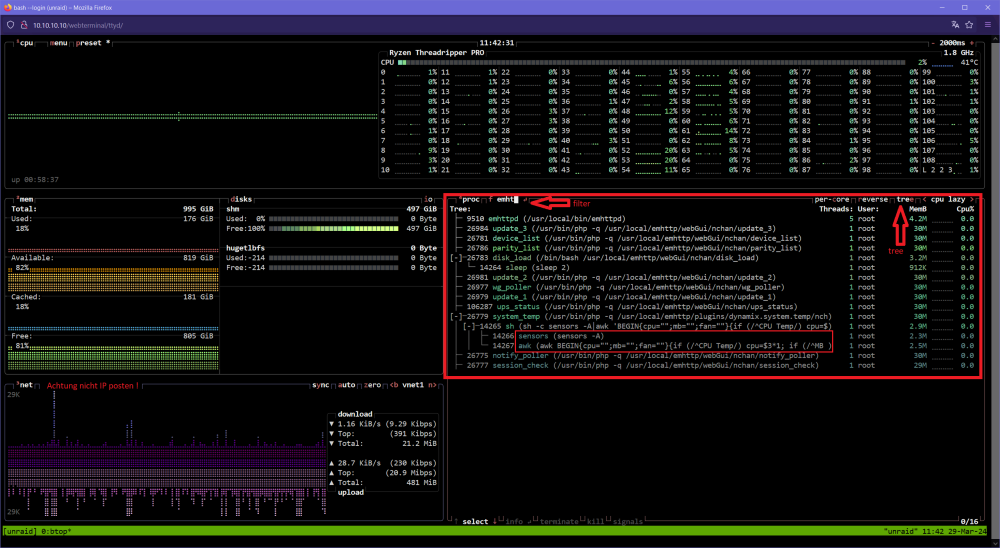
Hi Tremendous Versuchs doch mal mit btop. (Installieren kannst du btop über das NerdTools Plugin) Dort siehst auf einfache Weise den Prozess Tree und kannst nach "emhttp" filtern.. (Klicken) Bei htop kannst du zwar auch den Tree einschalten, aber ich hab beobachtet das wenn du den Filter einschaltest und es kommen neue Prozesse hinzu die du auch filtern würdest, werden diese durch die langsame Aktualisierungsrate mal und mal nicht angezeigt, da der Subprozess bereits wieder fort ist.. Grüsse
-
Hi bisk I've seen you use a lot of disks with ZFS, this is just a guess, but I've seen bug reports with problems with ZFS after update to [6.12.9] *But there seem to be problems with a controller.. Have you tried a save boot? Greetings
-
Hello I started the update process (6.12.8 -> 6.12.9) about 8 hours ago, unfortunately I still see “Updating 3rd party drivers”. What exactly is being done here? I don't think this process will continue.. Maybe there is a process running that I should close? How can I debug this? Diagnostics: unraid-diagnostics-20240327-1211.zip *I rebooted and unraid was corrupted, so I had to save the config folder and reinstall unraid manually.. 🙄
-
First, thanks for this grate job! I want a working process move to tmux session but i need "reptyr" for do this. Is it possible to add this? Greetings * Its ok, i start new any ssh session in a tmux session.. my three day runing prozess is the last in a no-tmux session.. ^^ export TERM=xterm-256color # Automatic start with tmux if [ -z "$TMUX" ]; then tmux attach-session -t unraid || tmux new-session -s unraid fi
-
Hi PhantomICEMAN Up to 10Gbit is possible locally if all the entire hardware supports 10Gbit, on the Internet (router) only 2.5Gbit is possible. Basically all speeds are compatible. You just have to make sure that there are no bottlenecks anywhere.. 10Gbit cards can get very hot, I always have bad experiences with temperatures. (If you have problems, keep this in mind, when debugging.) Greetings





