





MowMdown
Members
-
Joined
-
Last visited
Everything posted by MowMdown
-
BTRFS corruption is often due to bad RAM, suggest running an extended (24h minimum) memtest from the unraid boot menu to rule out bad ram.
-
Well with a paid license you just restore a backup to a fresh boot drive, boot, and run the license transfer. Trials complicate this due to the fact you can’t reuse an already setup configuration.
-
I would think if it was overheating the server wouldn’t reboot but shut off and stay off.
-
You can try and reimport the pool as a whole. Click the pool name, click “remove” button (not erase) then click add pool, assign the exact same name, assign both disks and start array. Or You can balance it back to SINGLE profile from RAID1 and have a single driven pool to which you can then expand to two disks and rebalance to RAID1
-
Yes to replace a disk in a RAID1 btrfs pool you should follow the steps here in the unraid docs: https://docs.unraid.net/unraid-os/using-unraid-to/manage-storage/cache-pools/#replace-a-disk-in-a-pool
-
please post your current system diagnostics
-
Something very odd is going on with your pool storage size, we need the diagnostics to confirm

-
I didn't pickup on this before, this is one of those aliexpress/alibaba "specials" This issue is likely related the board or bios. What you should do is try to boot another linux os OR windows and see if you get video output.
-
You need to open a support ticket, this isn't something that can be resolved in the forums.
-
I can say Ive never had this happen but I use FireFox for my web browser. It's more than likely a web browser bug as you're just streaming NGINX from the server.
-
You will need to sign into https://account.unraid.net and retrieve the keyfile. This file should be placed under /boot/config/ if one does not already exist in this location. Format a new in FAT32 USB that you will use for GUID license purposes, and assign a drive label of UNRAID in all caps. With the USB inserted into the machine and booted, unraid will complain about a mismatched license, simply click on the prompt and follow the license transfer steps. If it does not allow this, you will need to open a support ticket.
-
I wasn't a sharp brush off. This is a DIY-centric hobby. Most people here are self-taught. This hobby requires self-help and self-learning. I'd wager most of us already have spent more than enough time setting up and maintaining our own servers and services that doing a full setup and essentially being the maintenance person for someone else, when their services require updates and troubleshooting, isn't something anyone wants to do. I have no problem helping and answering questions, but OP didn't ask the type of question I can give an answer to such as "Hey I don't understand what a user share is?" or "Hey I tried to install this container, it gave me a error message, what does this mean?" OP is asking for a commitment and requires the level of help that is unrealistic in the DIY/Self-hosting space. There is a reason "paid services" exist. As I said I didn't mean any disrespect and I gave OP the opportunity to ask more specific questions. Some people have to realize their limits and capabilities.
-
I mean no disrespect but I don’t think self-hosting is for you. Self-hosting is DIY and that requires you to work through problems on your own, read documentation, watch tutorial videos and apply the knowledge you gain from those to your own setup. You’re essentially looking for someone else to setup and maintain it for you, that’s just not realistic in the self-hosting space. How about making a detailed post about what you’ve tried (exact steps, things you’ve tried, what you’re stuck on, etc) and someone can maybe point you in the right direction. You have to help us help you.
-
Simply reboot and chmod 444 /usr/local/emhttp/plugins/dynamix.docker.manager/images/question.png to fix it until the next reboot
-
with a monitor connected and keyboard you need to log in and generate diagnostics then post the zip file
-
You can with the exception that you cannot carry over an existing configuration to a trial. Booting from a trial really is only good for testing hardware failures as you would have to re-assing your disks in the proper slots which requires you to know ahead of time which disks are data and which are parity because if you guess wrong, you can lose data. Honestly having a backup of your boot drive and then restoring said backup to a new boot USB is the best way to recover from a boot drive failure.
-
If you have a unify network device/router/firewall make sure ca.unraid.net is not being blocked/filtered.
-
In the future, when requesting help, it’s highly encouraged to post your diagnostics. This file provides useful information for those of us who try to assist.
-
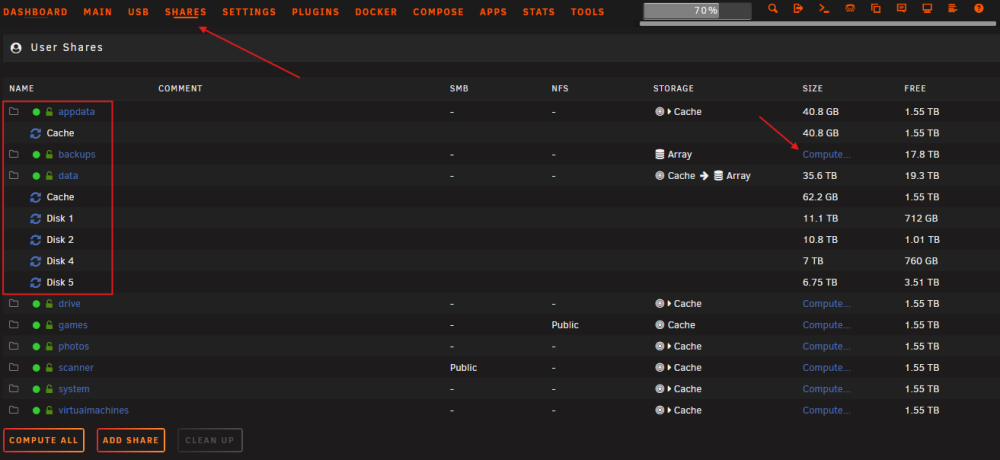
These three shares exist on your array disk5 which I can pretty much say with certainty is why your disk wont spin down, you either misconfigured your paths OR you never moved your data off the array to the cache pool before resuming the use of docker containers. appdata shareUseCache="yes" # Share exists on cache, disk5 system shareUseCache="yes" # Share exists on cache, disk5 Anytime you are unsure where data might be you can click on the shares tab and click on calculate next to the share and it will tell you where that data is. As for why your system reboots, that is almost always a hardware problem and typically nothing is logged but you can enable the remote syslog server and where it asks for an IP address just type in 127.0.0.1 and it will save it to the system itself.
-
It appears whatever host 192.168.1.100 is, seems to be hitting some kind of authroization limit due to spamming nginx with login requests [error] 8435#8435: *311 limiting requests, excess: 20.010 by zone "authlimit", client: 192.168.1.100, server: , request: "GET /login HTTP/2.0", host: "192.168.1.15", referrer: "https://192.168.1.15/Docker" this line is logged over thousands of times. you need to find out what that device is and stop it from just hammering the server
-
I would change 192.168.1.15 to localhost or 127.0.0.1 which will always make sure it's writing to the server itself regardless if the IP address changes. can you post the logs from the syslog folder as I didnt notice any in the diagnostics
-
My best guess is that Malwarebytes has a record of that IP address serving malware at some point. How it determined that, not sure. But now content is being served by that IP via digitalOcean who is just a CDN (content delivery network) and I doubt CA Apps is serving malware.
-
Yeah, you should ideally never powersplit between more than 2 drives especially on SATA connections. Molex can often do up to 3 but keeping it to two is advised.
-
What kind of pool filesystem? Also clicking on the pool name and posting a screenshot of the pool status/information would be helpful.
-
Just sounds like a false positive based on an IP owned by DigitalOcean


