





MowMdown
Members
-
Joined
-
Last visited
Everything posted by MowMdown
-
I didnt see any obvious issues with disk health in the SMART report (no reallocated/pending sectors or offline uncorrectable errors) so what I suggest doing is: Tools, New config, preserve ALL slots, then check "parity is valid" and start the array then run a correcting parity check. This will update parity2 bits that are out of alignment with the rest of the array however before running this, maybe wait for @JorgeB to confirm this is the proper way forward.
-
potentially, depends on what they are doing.
-
The emulated disk is mounting which is a good sign the fix worked, browse the contents and ensure the data looks correct. You would then need to rebuild onto either the same disk OR a new disk. The SMART report for the disabled disk looks ok to me.
-
Common causes are: You left a terminal window open browsing the disk (you typed in cd /mnt/cache and forgot to exit) SMB access, you were browsing an exported share on windows explorer and it has a file open/in use that happened to be on the cache pool. you can try and run lsof /mnt/cache to see if it reports any files in use next time this happens and if shows something it should also show a process which you can work backwards from to see what ran that process.
-
Appears disk3 has successfully been mounted, go ahead and browse the contents of the disk to make sure everything looks ok. If the contents look correct it would be safe to assume you can rebuild it. The only thing I noted about disk3 from the previous diagnostics is it has a non-zero UDMA CRC error count which could indicate a potential cabling issue, I didn't see any on the random sample of other disks I looked at in the smart reports. Might want to consider making sure this disk SATA cable is fully seated on both ends and if you notice this count increasing maybe replace the cable.
-
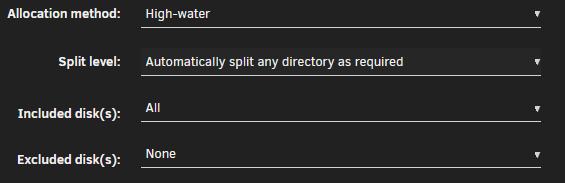
Looking at your screenshot your "media" share is set to cache only. Your download share is setup to move from cache to array but that share is likely transient and doesn't hold files long term since those files likely get moved into media shortly after. For your media share set: Primary: Cache Secondary: Array Mover: Cache -> ArrayThat is the maximum you can physically install on this platform. "Up to 16GB Installable" is what it means. If you tried to put in 32GB it wouldn't work.I wouldnt expect it to be. It has yet to be seen how much freedom the user will have over the underlying distro.You would want to use manual split level yes.Right now you have limited this share only to disk5 per your screenshot. While you can manually create them on other disks, you should just remove the disk5 selection from the "Included disks" and let unraid handle creating new files/folders on your other array disks. It should look like:
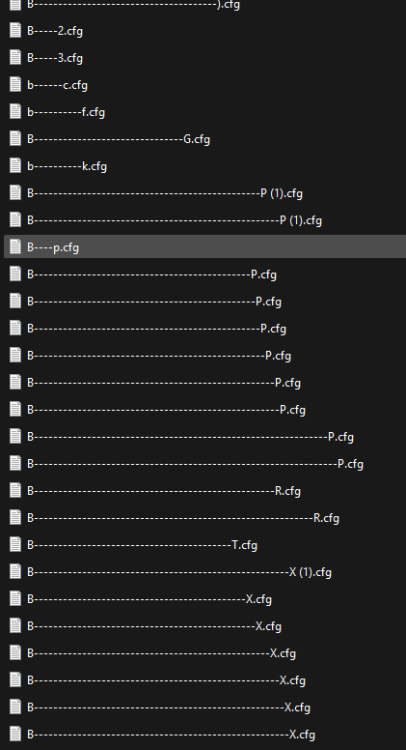
 You also seem to have severe USB connection dropping repeatedly. You should not be connecting drives via USB. Tower kernel: usb 1-5: reset high-speed USB device number 4 using ehci-pciCan you confirm that you created a lot of shares all with similar starting letters? This doesnt look right
 please post diagnosticsAll you need to do is boot from USB, remove existing boot pool, create new boot pool from disks, and reboot. The disks should be empty so that no data is lost since they will be fully wiped during the process. To be fair, it is not advisable to deviate from the GUI's method of creating boot pools.You simply have to add /sbin/ethtool -s eth0 wol g to your /boot/config/go file at the bottom Making sure to substitute your interface (mine uses eth0) This then gets applied at boot each bootReboot first and see if that clears things upJellyfin can be ram heavy so you’ll need to monitor your ram use. 8GB is kinda tight for Jellyfin + whatever else you’re runningI would say this is highly likely the culprit and it has to do with how the software is interacting with this specific piece of hardware either there is a bug in the software or driver modules. Ive had similar kernel panics (no hard crashes/lockups) when a video transcoder was using the GPU incorrectly. These were resolved by plex fixing their transcoder.An honest example of something you wouldnt want to do is run a VM from the array. any writes to the vdisk would also trigger parity to update, this would in turn make running the VM extremely slow (same for docker containers) Keeping your VMs (docker) on a pool avoids this as SSDs as way fasterArray is slow Pools are fastIf you can determine disk2 is healthy and contains your data, then yes you can add it back to its slot and then add the new disk as parity, just understand that you will no longer have any parity protection during the parity-sync that would follow. If any other disks die, the data on the then dead disk would need to be recovered with data recovery tools or from a backupYes it's by design. Its the same file in the same location (on your pool disk) that you can look at through different paths. (looking at the same physical object through two different windows) It's not a copy it's not a duplicate. Nope no reason to change it, and honestly, you should only ever use /mnt/user/... when dealing with paths in unraid. Makes things a lot easier just letting unraid handle the stuff underneath.In that case I would just re-create the docker.img and reinstall the containers.Disk4 is still having issues maybe? Aug 20 14:29:48 Vostro kernel: XFS (md4p1): Metadata CRC error detected at xfs_dir3_data_read_verify+0x81/0x100, xfs_dir3_data block 0x14daaf70 Aug 20 14:29:48 Vostro kernel: XFS (md4p1): Unmount and run xfs_repair Aug 20 14:29:48 Vostro kernel: XFS (md4p1): First 128 bytes of corrupted metadata buffer: Aug 20 14:29:48 Vostro kernel: 00000000: 49 4e 81 b4 03 02 00 00 00 00 00 63 00 00 00 64 IN.........c...d Aug 20 14:29:48 Vostro kernel: 00000010: 00 00 00 01 00 00 00 00 00 00 00 00 00 00 00 00 ................ Aug 20 14:29:48 Vostro kernel: 00000020: 36 4d 8a 71 61 5a 11 ed 36 4d 87 b6 ed e7 86 00 6M.qaZ..6M...... Aug 20 14:29:48 Vostro kernel: 00000030: 36 4d 8a 71 61 69 54 1d 00 00 00 00 00 3c ac 16 6M.qaiT......<.. Aug 20 14:29:48 Vostro kernel: 00000040: 00 00 00 00 00 00 03 cb 00 00 00 00 00 00 00 01 ................ Aug 20 14:29:48 Vostro kernel: 00000050: 00 00 00 02 00 00 00 00 00 00 00 00 ab ed ae 53 ...............S Aug 20 14:29:48 Vostro kernel: 00000060: ff ff ff ff ce f9 03 cd 00 00 00 00 00 00 00 08 ................ Aug 20 14:29:48 Vostro kernel: 00000070: 00 00 00 2f 00 0a 29 22 00 00 00 00 00 00 00 0a .../..)"........ Aug 20 14:29:48 Vostro kernel: XFS (md4p1): metadata I/O error in "xfs_da_read_buf+0xbb/0x150" at daddr 0x14daaf70 len 8 error 74Was this before or after you repaired the disk?



