






Hoopster
Members
-
Joined
-
Last visited
Everything posted by Hoopster
-
If the USB stick is not recognized it has likely gone bad. If you have no backup (as you indicated earlier), you have no choice other than to replace the flash drive and reconfigure the system. You will need to transfer your license to the new USB stick. Here is a link from the manual (bottom right corner of GUI) on replacing the flash drive. When doing a New Config to reconfigure the array, follow the link I posted previously if you do not know which drive(s) are parity drive(s).
-
You may also find this information from the manual useful if you do not know which drive(s) are parity.
-
The most important files on your flash drive are the Unraid license key and the server configuration files. These are located in the /config folder. Assuming you have no backup of the USB stick (you need to correct that once you are up and running again), can you insert the flash drive in a Windows PC or Mac and get a copy of the /folder? If so, you can download Unraid and install it on another flash drive and then copy over the backed up /config folder. You will have to transfer the license to the new USB flash drive but that can be done from the GUI if the new USB flash drive works. If you cannot get a copy of the /config folder backed up, it will be a little more involved. Hopefully, you know which of your disks is the parity disk (more complicated with dual parity). If so, you can use the New Config tool and reassign your drives to the array (making sure not to assign the parity drive as an array/pool disk. It does not matter which array drive is assigned to which slot as the disks are tracked by serial number. The rest of the config you will have to rebuild manually.
-
In this case why not just use the Windows version of MakeMKV and set the output to an Unraid location? I use the MakeMKV docker container for Unraid directly on my server with an optical disk drive installed there but I also use MakeMKV on a Windows PC with an optical disk drive which outputs to an Unraid share. Both output to the same location and I can be ripping from both at the same time.
-
A UDMA CRC error is a problem with the transfer of data between host and disk. It often comes down to poor or loose disk cables. If the system detects a transfer problem it retries sending the data which often works just fine. UDMA CRC errors become a concern when they grow rapidly in quantity or occur frequently on the same disk. Usually, the first thing to check is the cabling to the disk. Is it a secure connection? Does swapping out the SATA/SAS cable eliminate the errors? I once "replaced" a disk that accumulated 1109 UDMA CRC errors very rapidly. I say replaced in quote marks because I rebuilt the disk back onto itself. It was not a new disk. The UDMA CRC errors disappeared on that disk and have not returned. It may have just been the act of removing the disk from the hot-swap cage and reinserting it that fixed the problem as there could have been a bad connection. I rebuilt it just to be safe. UDMA CRC errors can technically result in data corruption if multiple data resend tries do not fix the issue, but, that is rare.
-
@TODDLT This is a true statement. I initially used older parts when I upgraded to build a backup server. It was initially just put to sleep and then woken up when the script wanted to run a backup. I eventually replaced the motherboard with a Mini-ITX board with IPMI so it could be powered on and off automatically by the script. I run my backups weekly. Originally I had the script backing up by share because the number and size of drives in the target server was not the same as the source server. Now they are the same size and number so I modified the script to backup from disk to disk. Very easy to pop in a replacement from the backup server if a disk in the source server dies. I have been doing this now for about 5 years and it works great. Totally unattended and I don't even think about it. The script emails me a summary of what happened so I know it worked. See my signature for current backup server specs.
-
Only if you really want to do 4K transcoding and I recommend against that. it is better to have a 4K/UHD library for local play and 1080P library for remote streaming if you have a lot of 4K content. The iGPU in the 9th generation CPUs is plenty powerful enough for multiple 1080p transcoding streams (and most will just direct play locally) and it will save you a lot of power, money and heat vs. a 3070 or 3080 GPU . The only time I really see Plex transcoding is when a remote user is streaming or I am streaming to a phone. Most of the time it is just direct play (often even remotely because I and remote users have plenty of Internet bandwidth).
-
Is there some reason you want to use a discrete GPU rather than going with the non-F version of the CPU and using the iGPU/Quicksync for transcoding? I have the Xeon equivalent of the i9-9900K (Xeon E-2288G) and the iGPU/Quicksync is more than enough for 4-5 simultaneous 1080P transcodes.
-
And this should only happen with the Unraid flash USB if the syslog is set to mirror to the flash drive. Otherwise, the only writes should be an occassional configuration update. Mostly, the Unraid flash gets read on boot and is not accessed a lot after that.
-
Doubt you will get a response from testdasi. It's been almost four years since that user visited these forums.
-
I did the same a couple of months ago. I did not mind running the controller as a docker container on Unraid, but, yes, it is nice that it is built in to the Cloud Gateway Ultra. You have no choice but to run it there and the extra four Ethernet switch ports are nice. Still needed the docker-based controller when I briefly tried the UXG-Lite. Same price as the Cloud Gateway Ultra so the latter was a no-brainer.
-
I turned an old PC into an Unraid 6.12.10 server at my sister's house last week. Over the weekend, the server and GUI became inaccessible. No ping to server, no SSH/telnet to server, no GUI load at all. Even restarting the server and booting Unraid again did not fix it. Unraid appeared to load fine but was not reachable by any method I tried. Since it was a relatively new and vanilla installation anyway, I ended up reformatting the USB flash drive, reinstalling Unraid and starting over with the configuration. This worked and everything is again functioning normally for now. Something must have got jacked up in the initial configuration. I've never seen anything like this on any of the many Unraid servers I have setup so I have no idea what went wrong. She really just wants the server to run Plex, so, nothing too complicated. I got Wireguard setup on it so I can remote into the server (assuming it does not all go belly up again) without the need for a 2-hour trip to figure out what is going on. Wish I had more to add other than "rebuilding the Unraid flash drive and starting over with the config fixed the problem" but I have no idea what the root of the initial problem was. Starting over solved it.
-
This is a question only Limetech can answer. However, keep in mind that Unraid is not a full Linux distribution. It does not use everything available even in Slackware. Unraid is more like an appliance OS that includes only the pieces of Slackware Linux necessary for it to deliver the file storage, disk management, parity, VM, Docker, etc. functionality of Unraid. Since Unraid loads into and runs completely in RAM every time the server is booted, Limetech tries to keep that footprint as small as possible and does not include anything not absolutely necessary. Again, It is not a full Linux OS and does not want to be. Also, due to the extensive testing Limetech does before release of a new version of Unraid to the public, it is rarely using the latest available version of many key Linux kernel modules. Security patch or feature focused minor updates may include newer modules.
-
If you are interested in a powerful and flexible firewall/router for your LAN, the Mini PC would make a good OPNSense or pfSense box. I have OPNSense running on an N100-based mini PC. Of course, mine does have four NICs.
-
Unfortunately, no. Mini PCs have very limited connectivity options. They are obviously not large enough for any significant internal storage and the only external connectivity option is USB. Frankly, I have never used a Mini PC or external storage of any type for Unraid. The smallest I have gone is a Mini-ITX motherboard. Perhaps there are others in these forums who can point you to something that might work for external storage, but, USB is really not recommended for several reasons. Most working external storage options I have seen in these forums are eSATA/SATA/SAS-based but that is not available (AFAIK) with Mini PCs.
-
Unraid tracks disks in the array by serial number. Sometimes these multi-disk external enclosures do not report individual serial numbers to Unraid, therefore, all it can "see" is one disk (the only serial number the enclosure reports). As trurl mentioned, USB attached drives for array/pool disks is not recommended for this and other reasons. USB is prone to random disconnects/reconnects and this wreaks havoc wtih Unraid. USB attached drives are fine as unassigned devices that are not a permanent part of an array/pool in Unraid.
-
Anyone interested in doing a small server build should buy this case. It is no longer available for sale. This is an excellent case. My current backup server is in this same case and I have done three builds in the PC-Q25B. I don't have a need for another small case build or I might be interested.
-
Interesting. Try
-
It is best to ask these questions in the support forum for the docker container you are using. In this case, it looks like you are using the Binhex Plex container. Click on the container icon and select the Support option to get to the support forum for the container.
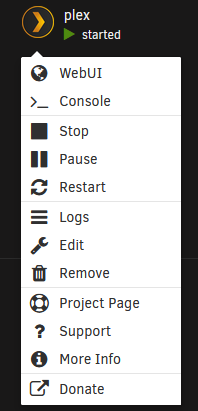
-
There is not really a list of mainboards that are supported or not supported by Unraid. Unraid works with almost any hardware and you should not find any problems with virtually any mainboard from a well-known manufacturer that supports LGA1700 CPUs and their supporting chipsets. Every once in a while a certain setting in the BIOS/UEFI may be needed to work better with Unraid. I would suggest you research which mainboards might be of interest to you and then search the forums for references to those mainboard models to see what other users of the board with Unraid have to say.
-
The license being tied to the USB stick GUID does not affect access to your data at all. No data is stored on the USB stick and the license does not control access to data. The only things there are the Unraid server configuration, the license key and the files needed to unpack Unraid OS into RAM each time the server boots. If you have to create a new USB stick because of the failure of the previous stick, you need to have a copy of prior USB stick for the server configuration. You could then run in trial mode until you can get the license transferred to the new USB stick. You can do this one time per year automatically through the GUI. If you need to do it more than once a year, contact Support directly and they will help you with the transfer if you explain the situation to them.
-
In Unraid release notes for a version released quite a while ago, the difference between UEFI boot and legacy boot was mentioned and how it was controlled by the name of the EFI/EFI- folder. When a BIOS/UEFI shows the Unraid flash drive with only the UEFI prefix, that means it wants to boot that way and legacy mode (no UEFI prefix) is not an option. If it can do both, the flash drive will show up both ways. On the Unraid side, you just have to make sure the EFI/EFI- folder corresponds with how you (or the motherboard BIOS) wants to boot.
-
A reformat with XFS will wipe out anything on the drive. You then copy back the data from drive to which it was copied and move on to the next drive. To be safe, a parity check is a good idea at the end even if the contents of each drive have not changed. As far as the shares are concerned nothing should change as you specified which disks contain share data for each share and if you are using the same disks (just with a different format) the shares will be as they were before.
-
See the Converting to a New File System Type section of the online manual which is accessible via the Manual link in the bottom right corner of the GUI,
-
That ship has sailed. The time to buy the old basic, plus or pro lifetime licenses at previous prices was before the pricing change at the end of March. Limetech offered a grace period for purchasing new licenses or upgrades at the prior prices but that ended when the new pricing went into effect officially. Limetech has mentioned they usually offer sales sometime in the Summer and for Black Friday but I doubt the lifetime license will be discounted to the prior pricing levels. Certainly Limetech could respond differently, but, that is how I understand things.



