Mainfrezzer
Members
-
Joined
-
Last visited
Everything posted by Mainfrezzer
-
Ich würd ja mal gerne wissen wo ihr das herhabt, aus dem Store kommt das nämlich nicht.
-
"Basic" dns server run on port 53 tcp/udp. A ping works over icmp. Those are 2 different shoes. If youre so eager to use that particular server as dns server, i would advise you to actually setup a working dns server on there
-
I cant say for certain but for me its been a source of a few annoyances and it certainly meddles with nginx in some weird way. Had it runing for a long time on 6.11.5 before too.
-
just from my self experience point of view. try to remove the unraid connect plugin in see if the issue still persists.
-
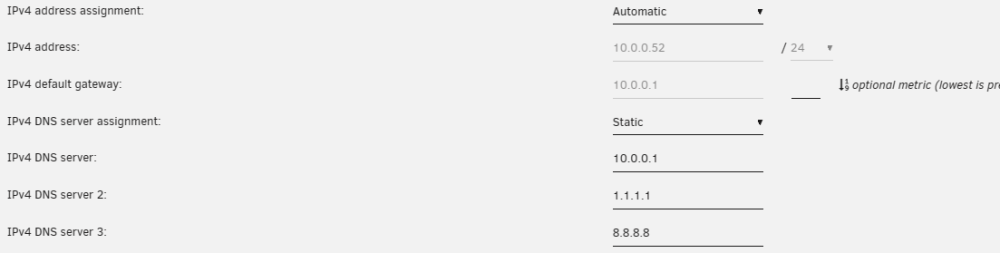
you have to set it to static Or change the DHCP Server settings to not hand out the 5.x.xxx.112 server as dns server.
-
Try adding 1.1.1.1 or 8.8.8.8 as dns in unraids networksettings and see if that fixes it. The Server under 5.X.XXX.112 doesnt seem to have a dns server running
-
Did you enter the same static dns server again? Duh, stupid me, its probably DHCP doing it. Anyway the dns server on 5.X.XXX.112 is dead
-
Das Problem ist schon ein anderes. 4tb und 8tb Parität möchte ne 3 TB Datenplatte gegen die 8TB austauschen. Mehr als 4TB sind da nicht drin solange da noch ne 4TB Parität drin hängt.
-
https://docs.unraid.net/unraid-os/release-notes/6.12.4/#fix-for-macvlan-call-traces
-
That seems to be the normal modus operandi for the unraid-api docker, if its the same were talking about. It seems to scrape the webui and you do have to enter your credentials.
-
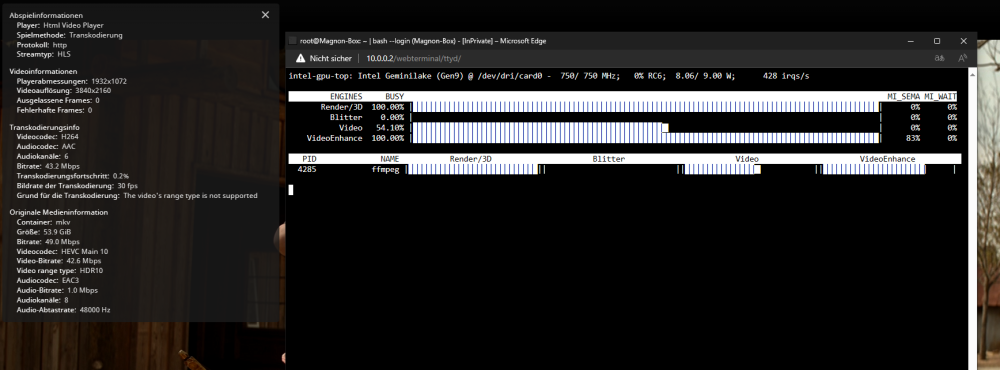
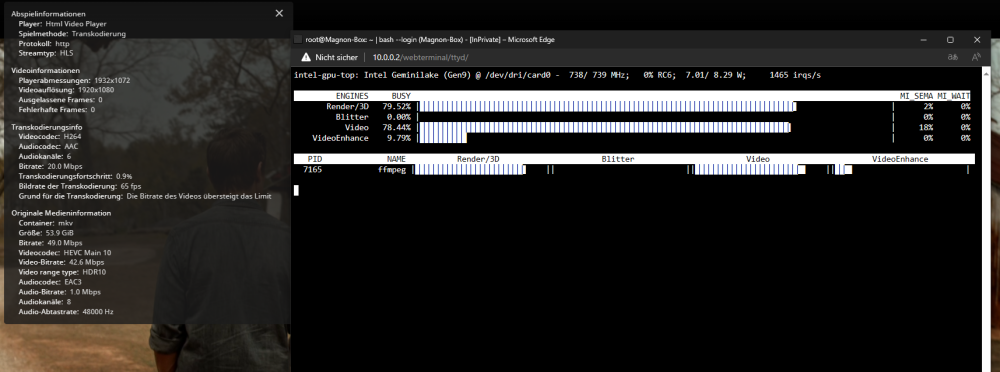
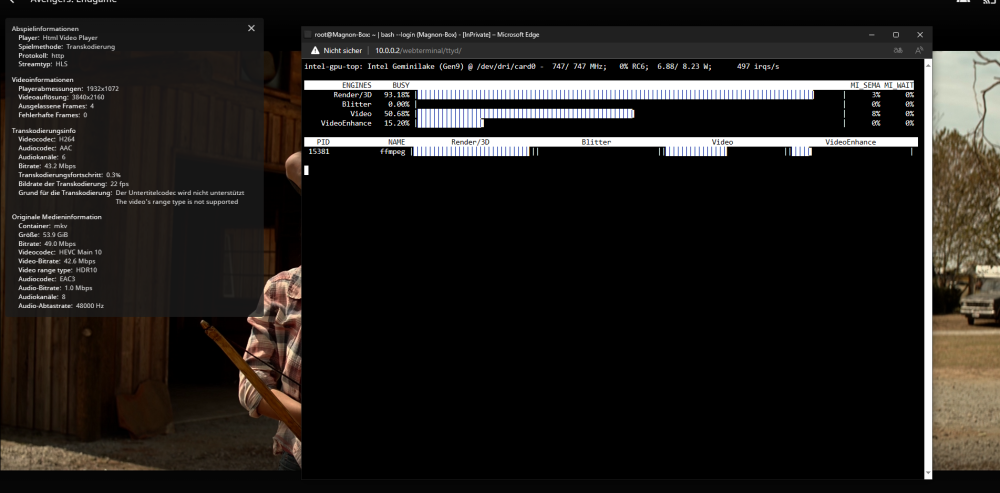
Hab zwar kein Plex und auch nicht den n5105 dafür nen älteren j4125. Der kriegt 1 4k Stream auf jeden Fall hin (wobei ich intern keinerlei Transcodierung benötige und extern Bandbreitenlimit greift) Auto - 4k höchste Bitrate 1080 20 Mbit Hier noch nen 4k Video mit PGS Untertitel (Davon hab ich eigentlich sehr wenig)
-
Unassigned Devices plugin (UD) spuckt das aus. Solange die Platten keinen Plätzen im Array zugewiesen sind werden die da aufgelistet inkl welches Dateisystem drauf ist.
-
Sometimes simple things are the solution. The wireguard issue can be "fixed" by this PostUp=logger -t wireguard 'Tunnel WireGuard-wg4 started';/usr/local/emhttp/webGui/scripts/update_services PostUp=iptables -t nat -A POSTROUTING -s 10.253.4.0/24 -o eth0 -j MASQUERADE;ip6tables -t nat -A POSTROUTING -s fc00:253:4:0::/64 -o eth0 -j MASQUERADE PostUp=iptables -t nat -A POSTROUTING -s 10.253.4.0/24 -o vhost0 -j MASQUERADE;ip6tables -t nat -A POSTROUTING -s fc00:253:4:0::/64 -o vhost0 -j MASQUERADE PostDown=logger -t wireguard 'Tunnel WireGuard-wg4 stopped';/usr/local/emhttp/webGui/scripts/update_services PostDown=iptables -t nat -D POSTROUTING -s 10.253.4.0/24 -o eth0 -j MASQUERADE;ip6tables -t nat -D POSTROUTING -s fc00:253:4:0::/64 -o eth0 -j MASQUERADE PostDown=iptables -t nat -D POSTROUTING -s 10.253.4.0/24 -o vhost0 -j MASQUERADE;ip6tables -t nat -D POSTROUTING -s fc00:253:4:0::/64 -o vhost0 -j MASQUERADE Gives access to everything. Thought would be a bit more complicated but well, here we are. EDIT: IMPORTANT I did notice a while ago while i tested it that theres an issue with vhost0 as interface, Wireguard starts but before docker and when docker starts, docker kills the tunnel. You need to add ( sleep 60 ; wg-quick up wg4) & to the GO file so that the Tunnel gets started after docker starts. Although it does seem like since the first line is eth0 and that interface exists, wireguard doesnt fart itself anymore and sets it up correctly without throwing a fuzz and needing to be restarted.
-
Yep, it did work previously and probababy still does with the bridge enabled instead of macvtap but getting the call traces isnt worth it. Theres a little dirty trick but that would limit you to internal ipv4 only and ipv6 externally. If i find the time im gonna dig into it and try to make it work again.
-
Its currently impossible (theres probably a work around but i have not spend the time or efford into figuring that out yet) to have Internet and Lan Access while Host Access is enabled and youre running the Macvtap. You would need two tunnel for that. One where its possible to reach unraid and the internet and one where you can only reach unraid, the lan and the docker container. Cant comment on your normal networking issue.
-
Ist das einfachste Konstrukt um den externen Unraid Server zu dem hiesigen zu verbinden um sich gegenseitig Backupdaten zuzuschieben und Medien für Jellyfin jeweils zur Verfügung zu stellen. Ob ichs jetzt mit Wireguard mache oder die (aktuell) kaputte Tailscale variante ist am Ende egal^^ Selbstverständlich hab ich natürlich den Zugriff zum Unraid Webinterface untersagt, IPTables ist einfach wunderbar. Wobei das eigentlich nicht nötig gewesen wäre, ich vertraue der anderen Person doch schon sehr. (Anmerkend und nachträglich, ist ja nur Server zu Server, kein Nat, kein LAN zu LAN, einfach nur ne simple Verbindung. Ich denke das ist noch sehr verkraftbar in der Hinsicht auf den Sinn und Zweck der Verbindung. Für etliche TB an Daten die über meine externen Server geschaufelt werden möchte ich dann doch nicht den Traffic bezahlen^^) Edit: Ich möchte, falls jemand etwas ähnliches sucht, natürlich nicht vorenthalten wie das ganze funktioniert Folgendes Beispiel blockiert alles bis auf das Unraid Gui, bzw was auch immer auf tcp 80 läuft. Das TCP 80 kann man sich ja anpassen wie man lustig ist, z.b. 445 für SMB mit UD Plugin. Die FORWARD Regel(n) sind für Dockercontainer da. (Lustige Anmerkung, selbst im Tunnel benötigt man icmp, lol. Man kann es zwar deaktivieren muss aber manuell vom Server zum Client pingen um ne Verbindung aufzubauen) PostUp=logger -t wireguard 'Tunnel WireGuard-wgX started' PreUp=iptables -I INPUT -s 10.12.12.2 -j DROP;iptables -I FORWARD -s 10.12.12.2 -j DROP;iptables -I INPUT -p icmp -s 10.12.12.2 -j ACCEPT;iptables -I INPUT -p tcp --dport 80 -s 10.12.12.2 -j ACCEPT PreUp=ip6tables -I INPUT -s fc00:12:12:0::2 -j DROP;ip6tables -I FORWARD -s fc00:12:12:0::2 -j DROP;ip6tables -I INPUT -p icmpv6 -s fc00:12:12:0::2 -j ACCEPT;ip6tables -I INPUT -p tcp --dport 80 -s fc00:12:12:0::2 -j ACCEPT PostDown=logger -t wireguard 'Tunnel WireGuard-wgX stopped' PostDown=iptables -D INPUT -s 10.12.12.2 -j DROP;iptables -D FORWARD -s 10.12.12.2 -j DROP;iptables -D INPUT -p icmp -s 10.12.12.2 -j ACCEPT;iptables -D INPUT -p tcp --dport 80 -s 10.12.12.2 -j ACCEPT PostDown=ip6tables -D INPUT -s fc00:12:12:0::2 -j DROP;ip6tables -D FORWARD -s fc00:12:12:0::2 -j DROP;ip6tables -D INPUT -p icmpv6 -s fc00:12:12:0::2 -j ACCEPT;ip6tables -D INPUT -p tcp --dport 80 -s fc00:12:12:0::2 -j ACCEPT 10.12.12.2 und fc00:12:12:0::2 ist die Wireguard-Netz-Client IP
-
Ja das ist ja das, was mich auch verwundert hat. Die ganzen VPN-Docker, Telefone und PCs hier im Netz haben sich wunderbar verbunden, nur Unraid nicht. Ich hab gestern deswegen noch nen Bugreport aufgemacht. Habs ja dann hier getestet. Server 2 zu 1 ging wunderbar. Modifizier ich meine Fritzbox damit die icmp blockiert funktioniert Server 2 zu 1 nicht mehr. Kann nur daran liegen. Weil sonst funktioniert ja alles
-
Die ganze Konfiguration war schon richtig. Das Problem ist der Speedport bzw Unraids implementierung von Wireguard. Das ausbleiben von "Ping" antworten, ich hab nicht genau geguckt welche spezifische icmp Abfrage da gestartet wird, macht Unraids Wireguardclient unnutzbar. Wundert mich dass das nicht schon vorher bemerkt wurde. Die ollen Telekomrouter sind ja doch sehr verbreitet. Aber ich denke mal dass die Leute die sowas hier aufsetzen ne Fritzbox haben und die hat, solange man nicht die Box manipuliert, keine möglichkeit ipv4 icmp anfragen zu blocken. Achja: Ich habs jetzt einfach so gelassen dass sich Server 2 zu Server 1 verbindet. Ist ja im Endeffekt egal und wahrscheinlich auch besser weil so Server 1 nicht warten muss dass die öffentliche IP von Server 2 geupdated wird.
-
Delete the offending wg2 files on the usb in /config/wireguard. (If there's a remenant in the peer subfolder, that too). Then try again. If that doesn't work again I would try another browser.
-
Yes, indeed. https://docs.unraid.net/unraid-os/release-notes/6.12.4/#fix-for-macvlan-call-traces
-
You can fix your issue simply by changing the "Repository:" entry from from "oznu/homebridge:ubuntu" to "homebridge/homebridge:latest" I reckon the settings should be the same since they moved the repository. That would be all.
-
Ive discovered that the wireguard Implementation of Unraid wont connect as a client to any server that doesnt repond with icmp. Every other device ive tested, also software, just works. Android Phones with the wireguard app, various vpn docker container, wireguard software on windows. Just Unraid strictly refuses to connect to servers that do not repond. I encountered this when trying to connect to a Server thats behind a Speedport Smart 3. Unraid was the "black sheep". Now ive modified my Fritzbox to block any icmp requests and now the second Unraid server refuses to connect to the server thats behind the Fritzbox. I certainly see this as a bug within Unraids way of connecting to wireguard servers.
-
Ich habe hier ein sehr komisches Phänomen welches mich so langsam den Verstand kostet. Ich versuche, ich verrate nicht wie lange schon, Server 2 Server access via Wireguard aufzusetzen. Gut, in der Theorie sollte das ja recht simpel sein. Ich habe nen Tunnled Access auf Server 2 erstellt. Ich kann auf den Server 2 zugreifen via mein Telefon, via Laptop und Wireguard Software, via VPN-Dockercontainer. Das funktioniert alles wunderbar. Unraid auf Server 1 will ums verrecken sich nicht sich mit den Server verbinden. Wenn ich das Spiel umdrehe, Server 1 wie Server 2 einrichte, dann verbindet sich Server 2 zu 1 ohne Probleme. Ich hab das ganze auch mal versucht mit einem 3. Server und dort Verbindet sich Server 1 hin. Selbst zu meinen ganzen Servern bei externen Hostern funktioniert das ganze. Server 2 steht hinter nem Speedport "Smart" 3 und ich denke das Stück macht Unraid aus irgendeinem Grund Probleme, ich hab nur keine Ahnung wieso. Hat da jemand ne Idee woran das liegen könnte? Ich hatte kurzeitig Server 2 Server ans laufen bekommen, allerdings wollte das nur funktionieren wenn ich auf Server 2 den Server 1 via Wireguard-Netz-IP anpinge, sonst baute sich die Verbindung nicht auf. Edit: Ich hab ja ganz ganz ganz stark die Vermutung dass die fehlende icmp response das Problem bei Unraid verursacht. Hab jetzt keine Lust zu gucken ob das so nun bei Unraid integriert ist, was anderes kann ich mir allerdings nicht erklären. Edit #2: Hab gerade meine Fritzbox modifiziert und jap. Ohne icmp reponse funktioniert Unraids Wireguard nicht. FUCK
-
you can link multiple nics together so that a vm on eth0 can talk to a container on eth1 but you can also just run 1 nic as bridge so they, docker and vms, can talk with each other. Glad i could help
-
your nic, which i assume is in this case eth1 should show up there and then youll have this option there that turns eth1 into br1 this is how its looking for me right now