






Zonediver
Members
-
Joined
-
Last visited
Everything posted by Zonediver
-
Didn't you see the signature? If not, then turn on the signature display
-
Whatever you say... 👍
-
I am using this driver since Dec 2020 with HW-transcoding and Plex. There are no issues at all - so it can't be a driver bug... In my opinion, its the iGPU on your processor or an other hardware related problem because "no application" is working without a freeze...
-
Plex for one month is only 4,99 - maybe worth it to find the problem... But it seems (in your case) there is maybe a hardware issue.
-
Use Plex (for testing)? On my server, nothing is crashing - but i dont use jellywhatever...
-
My ASRock Board can handle 6x SATA + 2x NVMe simultaneously...
-
The i9 setup is a good choice - the 10th series of intel cpus needs more power at idle then the 9th gen and i am not sure, if it is already fully supported by unraid... So it depends...
-
Yep - i had a large binary number in it... gone... not nice 👎
-
If its a AQC107, it works fine 👍 And i would prefer the TP-Link TL-SX100 Desktop 10G Switch with 5x RJ-45 10GBit. https://skinflint.co.uk/tp-link-tl-sx100-desktop-10g-switch-tl-sx105-a2519258.html
-
Is there a "special reason", why you like to use this old Ryzen 1600?
-
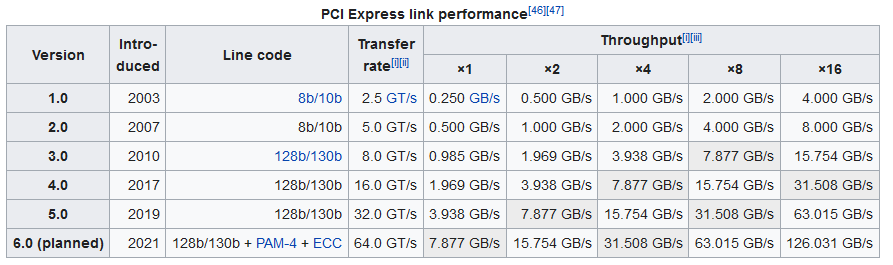
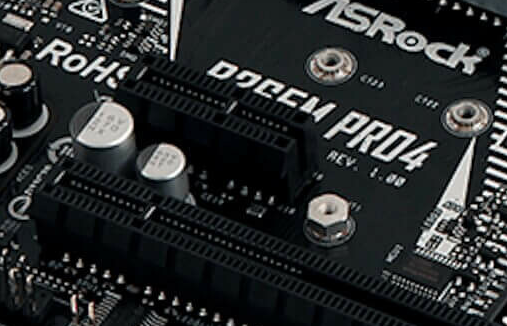
Its possible with an open x1 slot (like on my ASRock board) because the cards have all PCIe 3.0 x4 interfaces - but with speed reduction. See this link for the speeds https://en.wikipedia.org/wiki/PCI_Express You can see that a PCIe 3.0 x1 can handle 985MB/s - not really less compared with max. 1250MB/s a 10GBit-NIC can handle. When i move data to my server over the Asus 10GBit NIC, i reach between 950MB/s and 1100MB/s.
-
4 sticks... but "not" 8... Thats the point...
-
Dont do that - @ 3200, most RAMs are overclocked and this must be avoided - use 2666 instead if stable... And read the manual first! See what it says about full populated RAM-Slots!
-
...unraid 6.10? ...soon... ...i see...
-
Avoid Crucial SSDs - some of them have problems with Linux - use the Samsung. And take a proper size - min. 500GB or bigger. I am using Samsung SSDs since a long time and never had problems with - see my Signature.
-
Nice Graphs - what exactly is this or how do you measure these values?
-
I tested my HBA on various ASRock-Boards and they worked all well - but its an original LSI-Controller... So (maybe) try this brand and Boards... But... it might be tricky to find (a working) one for this old CPU...
-
...using unraid since 2010 without ECC-RAM and never had problems... So for me, it's useless... but it comes "for all" with DDR5 👍
-
500GB min. See my Signature - using a SSD 970 Pro with 512GB. And avoid Kingston SSDs - some of them have problems with Linux (the A2000 for example).
-
A Cache-SSD is "mandatory" in my opinion. .) It holds all Dockers .) It caches Plex-trancoded data (if not transcoded to RAM) .) It holds all stuff what you move from your PC to unraid, and then the Mover can move it to the array - so it "speeds up" your File-Transfer. So its one of the most important drives for unraid.
-
Buy it and try it
-
Yep - Parity-disk must be in the "Parity-Slot" - rest doesn't matter 👍 In other words: Be careful to asign the "right Disk" to the Parity-Slot! This has nothing to do with the SATA-Connector - unraid identifies the disks by their serial numbers. So check the SN from the Parity-Disk and asign it to the Parity-Slot 👍
-
You are right... i didn't see the "TrueNAS" and was thinking about "unraid-to-unraid"
-
Yes - just "switchover" your disk and done - Beware the position of the Parity-Drive!
-
If you are an "expert", you can use AMD-hardware - when you know what to expect... I stay away from AMD since 11(!) years because there are a lot of restrictions and other strange things... Regarding Plex: If you plan to use HW-transcoding, go for Intel and a iGPU - at least a system with a Gen 7 CPU (with Intel HD630 Graphic) or newer.


