






Zonediver
Members
-
Joined
-
Last visited
Everything posted by Zonediver
-
Its always on cause it doesn't need much RAM. Next time (if it fails again) i make a screenshot and restart the docker again 😉
-
Will do that but this was the first time i saw this error since i use your docker. The sys has 24GB RAM and 2-4GB used - rest is cache.
-
Thanks for your reply - i did what you said but there was something wrong - i got a Java-Error... I restarted the docker and now its working again 👍
-
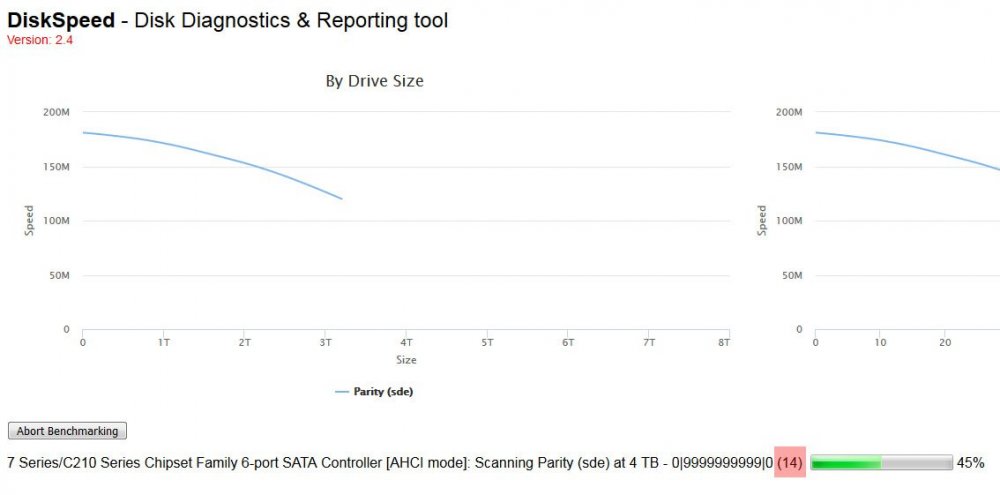
I have also a weird problem here... Using unraid v6.8.0-rc6 and got this (see picture) when i check my 8TB-Parity drive... The red marked number increases slowly but nothing else happens...
-
24GB - 2x8GB and 2x4GB DDR3-1600 9-9-9-24
-
Same problem here... there is def. something wrong with the mover... The whole sys is lagging around when mover is running.
-
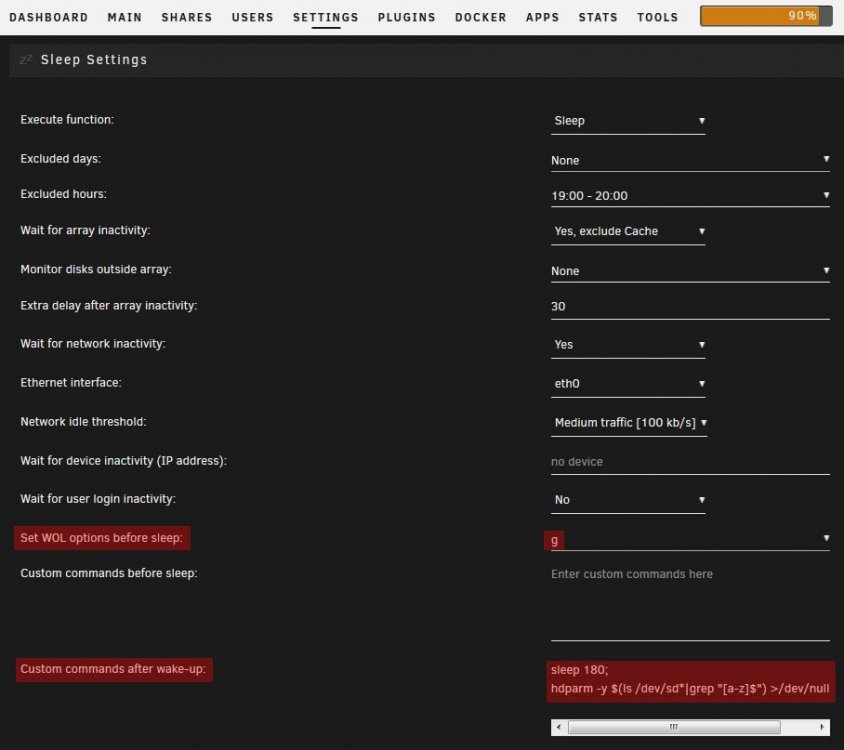
What you need are "proper" sleep settings. I mentioned it, that the HDDs are not always go into the standby-state - they are often in active/idle-state that prevents the server going to sleep. What you have to do is this: This ensures that the disks go into standby after waking up the server so the server can go to sleep properly next time. The time delay of 180 seconds prevents errormous messages in the log if the initialization of a controller is aborted - in my case the SAS 9207-8i. To check if every disk is at standby-state, open a terminal and put in: hdparm -C /dev/sd[a-z]
-
It depends, what you exactly want: idle or standby. If you set the disk to spindown automaticly, they normaly go into active/idle state, but "not" into standby. I dont know, if you want to sleep your server but if yes, then you need the standby-state - if the disks are in idle-state, the server will never go to sleep. You can put all your disks directly to standby-state with this command: hdparm -y $(ls /dev/sd*|grep "[a-z]$") >/dev/null 2>&1
-
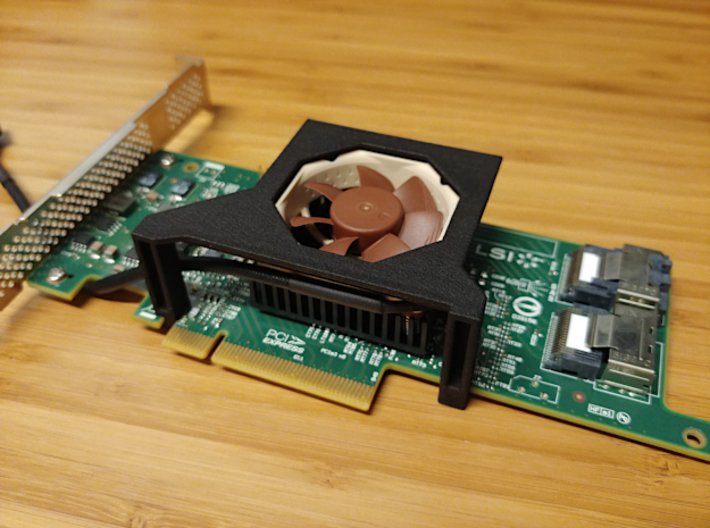
I also recommend the 9207-8i - bought mine for only € 109.- A very good price for an 8-port controller and fully compatible with unraid 😉 But be carefull: In a normal PC-Case this controller needs active cooling because its designed for a server-case with strong airflow. The minimum airflow must be 200lfm (max. operating Temp 55° / Power consumption ~9,8W). I am using this 3D-printed braket for the Noctua NF-A4x10 FLX from ShapeWays: https://www.shapeways.com/product/NET3LH5QP/fan-bracket-for-lsi-9207-8i?productConfiguration=104311341&etId=192375185&utm_source=automated-contact&utm_medium=email&utm_campaign=order-shipped&utm_content=5
-
Stupid??? Wow... this is rude...
-
You didn't tell us, "what you want" - so what do you want? And if you dont like my comment, just ignore it... 😉 And besides, I think you do not have enough experience. Therefore also the forum that should show you alternatives.
-
Thats not rude - it's a fact - QuickSync transcoding needs "extra money" (PlexPass) - thats useless. Investing in a stronger CPU makes more sense. But his Xeon is fast enough - so he dont need QuickSync transcoding and can safe money too.
-
You said, you use a Xeon... which Xeon? Normaly this CPUs are more the strong enough for transcoding. My i7-3770 can transcode 5x 720p/4Mbit "on the fly parallel" - with only 3 cores + HT - the 4th core (+ HT) is reserved for unraid and all dockers...
-
For "what reason" do you need a Graphics card for transcoding??? The "CPU" will do this out of the Box - you dont need a graphics card...
-
Why?
-
Why do people use this crapy sh.. of QuickSync transcoding? The quality is terrible and i dont pay for a PlexPass only for this - a useless feature (for me)... 😉
-
There is something wrong with your port forward - check the router manual "how to set a port forwarding" and try it again.
-
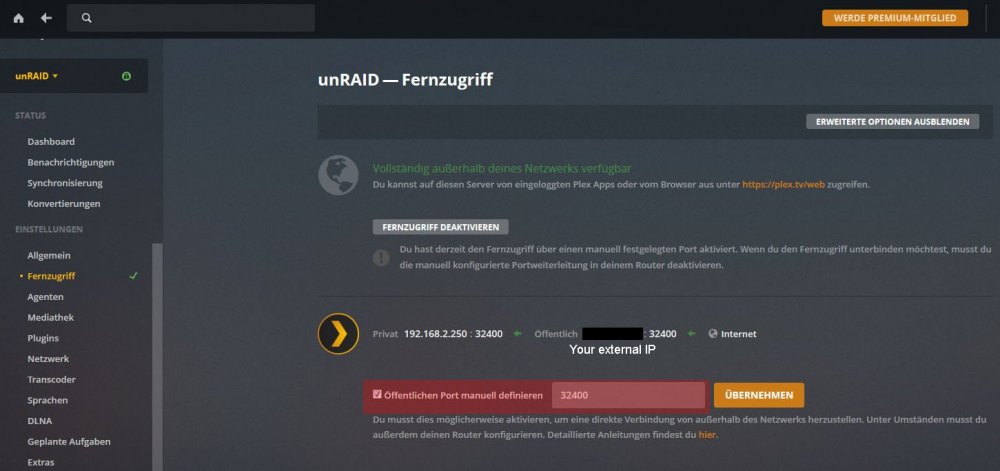
What is IP 10.0.0.4? Your unRAID-Server? Protocol you need is TCP - you dont need UDP. At my Router, i must forward the port from my WAN-Interface to the unraid-IP - so i need to specify "two" IPs. But i dont know how your router handle this. Did you enter the port also in the Plex interface? This does not work without this (red marked) entry. (The word "Fernzugriff" means remote access)
-
Is your router configured for Plex? Maybe not - Port 32400 must be forwarded in your Router/Firewall to your Plex-Server.
-
Just a short question: Is the S3-Sleep Plugin still under support? The last update was on 4. Feb 2018 - a long time... 😉
-
Upgraded from 6.7.0 to 6.7.2 - looks good so far...
-
8GB is too little for the Server and 2 VMs. Update your RAM to at least 16GB - i dont use VMs (only Plex is running) and with 8GB, i had some troubles when people accessed the server...
-
...your Sig says v6.1.9??? 😉
-
Upgraded from 6.6.7 and no problems so far - thanks for the good work 😉
-
44TB - 39,8TB in use with Movies and TV-shows - so fairly full...




