





alturismo
Moderators
-
Joined
-
Last visited
Everything posted by alturismo
-
good point, thanks for this info, i note it on todo to extend the field ;) may as note, you have 2 hdd sections, so you could setup 2 x 8 now (16 drives), and use same pwm settings ;) 1st comment i see about this here, but thats easy to extend, i just limited the input field, no function limitation as you already figured by adding it manually. a sd* function would be more complex as the plugin would need to build the table, read out, and so on ... and i prefer my plugins to keep as minimized as possible. will come in next release. current workaround, a few posts upper yours ;) but yes, will also come, keep min even when drives return 0. thanks for the feedback.
-
so läuft das normal mit Dockers ... (auch auf Prox 😬) in Prox wirst du wohl LXC oder ne VM genutzt haben, das ist was anderes ... es gibt (ganz wenig) Ausnahmen wo die app an sich nicht innerhalb des Dockers liegt und tatsächlich manuell updated wird, ist aber eigentlich falsch und daher auch sehe selten ...i
-
grundsätzlich, ja 1/ plugins, docker start Parameter liegen auf dem Stick 2/ Dockers persistent Daten liegen unter /appdata 3/ Docker Images liegen unter /system/docker/... die installiert man aber einfach neu, was persistent notwendig ist, siehe 1/ + 2/ 4/ VM Grunddaten liegen unter /system/libvirt 5/ VM Images liegen "normal" unter /domains also, wenn du sauber backup erstellst /system/docker siehe 3/) ... wieder einspielst, ggf. Pfade anpasst ... war es das ;)
-
actually media players (clients) are irrelevant ;) its 1 media Server (either Plex, Emby, Jelly) and / or open file/s on disk ... filtered by rules (media extension, path, ...) so, depending now what your real question is, multiple Media Server like Plex + Emby as sample ?
-
meines Wissens nach nicht, daher auch "software" TPM für VM's und Hardware Wechsel wäre dann gleich Data Verlust ... normal, Nein, aber ... mal abgesehen von "never change a running ..." ;) @JorgeB you may can answer this better, LUKS exncryption, BIOS update, TPM ... any relationship between LUKS and Hardware (TPM) ? not that im aware of, would also end in data loss on hardware change ...
-
bitte dann xfs verwenden ... du wirst es nicht bereuen ;) ahja ... auch das sollte so oder so nicht sein da die VM effektiv ja nicht angesprochen wird, aber ... wer weiß ;) wäre ja einfach zu testen, VM Dienst aus, warten bis spindown (bei dir 30 min), dann Dashboard aufrufen. welche ich mal ex setzen würde zum Test
-
true ... same here, i gave up as this "update" has broken some things here, so my assumption was its also just "gone" ;)
-
it sure is, but i never experienced something like this. also to mention, VM's are showing directly on dashboard, dockers not (waiting until hdd spindown)
-
yep, man sieht dass die Platten kurz vorher angefahren sind und Nein, das ist nicht normal ;) Jun 26 17:52:22 Skynet emhttpd: read SMART /dev/sdf Jun 26 17:53:33 Skynet emhttpd: read SMART /dev/sdd Jun 26 17:53:46 Skynet emhttpd: read SMART /dev/sdc Jun 26 17:53:57 Skynet emhttpd: read SMART /dev/sde Jun 26 17:54:08 Skynet emhttpd: read SMART /dev/sdb was man sieht, btrfs Fehler, scrub und co ... wobei dies ja den cache betrifft, aber solltest du auch nicht schleifen lassen ... Jun 23 12:45:21 Skynet kernel: BTRFS error (device nvme0n1p1): parent transid verify failed on logical 2178840543232 mirror 1 wanted 2004374 found 1989522 Jun 23 12:45:22 Skynet kernel: BTRFS error (device nvme0n1p1): parent transid verify failed on logical 5287908966400 mirror 1 wanted 2003852 found 1989721 Jun 23 12:45:22 Skynet kernel: BTRFS error (device nvme0n1p1): parent transid verify failed on logical 2178933751808 mirror 1 wanted 2004375 found 1905801 Jun 23 12:45:22 Skynet kernel: BTRFS error (device nvme0n1p1): parent transid verify failed on logical 2178946023424 mirror 1 wanted 2000716 found 1989534 Jun 23 12:45:22 Skynet kernel: BTRFS error (device nvme0n1p1): level verify failed on logical 5288226062336 mirror 1 wanted 0 found 1 Jun 23 12:45:22 Skynet kernel: BTRFS error (device nvme0n1p1): level verify failed on logical 5287604502528 mirror 1 wanted 0 found 1 Jun 23 12:45:23 Skynet kernel: BTRFS error (device nvme0n1p1): level verify failed on logical 2178934390784 mirror 1 wanted 0 found 1 Jun 23 12:45:23 Skynet kernel: BTRFS error (device nvme0n1p1): level verify failed on logical 5287352221696 mirror 1 wanted 0 found 1 Jun 23 12:45:23 Skynet kernel: BTRFS error (device nvme0n1p1): level verify failed on logical 2178934915072 mirror 1 wanted 0 found 1 das docker Thema sieht an sich nicht gesund aus ... auch sehr sehr viele ... Dinge wo da normal nicht rein gehören meiner Meinung nach. unexpected fault address 0x1492990d5000 fatal error: fault [signal SIGBUS: bus error code=0x2 addr=0x1492990d5000 pc=0xbc126a] goroutine 10 gp=0xc000423180 m=3 mp=0xc00007f008 [running]: runtime.throw({0x193aa46?, 0x0?}) /usr/local/go/src/runtime/panic.go:1023 +0x5c fp=0xc00057ce78 sp=0xc00057ce48 pc=0x43dfbc runtime.sigpanic() /usr/local/go/src/runtime/signal_unix.go:878 +0x116 fp=0xc00057ced8 sp=0xc00057ce78 pc=0x456b36 github.com/containerd/containerd/vendor/go.etcd.io/bbolt.(*page).fastCheck(0x1492990d5000, 0x85) /go/src/github.com/containerd/containerd/vendor/go.etcd.io/bbolt/page.go:57 +0x2a fp=0xc00057cfa0 sp=0xc00057ced8 pc=0xbc126a github.com/containerd/containerd/vendor/go.etcd.io/bbolt.(*Tx).page(0x1492dff6f108?, 0x50?) /go/src/github.com/containerd/containerd/vendor/go.etcd.io/bbolt/tx.go:534 +0x7b fp=0xc00057cfd8 sp=0xc00057cfa0 pc=0xbc3c9b ... .. . und selbst libvirt ... 2025-06-23 09:05:01.110+0000: 14683: info : libvirt version: 11.2.0 2025-06-23 09:05:01.110+0000: 14683: info : hostname: Skynet 2025-06-23 09:05:01.110+0000: 14683: error : qemuRdpNewForHelper:103 : 'qemu-rdp' is not a suitable qemu-rdp helper name: No such file or directory 2025-06-23 09:05:01.242+0000: 14683: warning : qemuDomainObjTaintMsg:5481 : Domain id=1 name='Home Assistant OS' uuid=0f9df069-ede8-8d96-9c45-23fd11daa12e is tainted: high-privileges 2025-06-23 09:21:19.431+0000: 14667: error : virNetSocketReadWire:1782 : End of file while reading data: Input/output error 2025-06-23 10:18:29.046+0000: 14667: error : virNetSocketReadWire:1782 : End of file while reading data: Input/output error 2025-06-23 13:16:36.283+0000: 14667: error : virNetSocketReadWire:1782 : End of file while reading data: Input/output error 2025-06-23 17:25:43.921+0000: 14667: error : virNetSocketReadWire:1782 : End of file while reading data: Input/output error 2025-06-24 18:32:29.989+0000: 14667: error : virNetSocketReadWire:1782 : End of file while reading data: Input/output error wobei ich in Summe schätze da hängt viel mit den btrfs Fehlern zusammen, das wie oben erwähnt mal angehen. ansonsten, sehe ich (leider) nicht wirklich was das auslösen könnte ... Ich kenne das Verhalten nur wenn man manuell die hdd's in den sleep schickt (beispielsweise hdparm per script, cmd, ..) und dann ins GUI geht, da ist das normal da emhttp "denkt" ... egal, das wirst du wohl hoffentlich nicht machen ;) sorry, mir fällt da nichts weiter auf. Mein Vorgehensweise wäre da, mal die plugins prüfen was ich davon noch nutze und ggf. da einschreiten könnte ... docker compose, theme engine, was auch immer ... einfach nach Ausschlussverfahren da ... "normal ist das nicht" @JorgeB may an idea why hdd's spinup when accessing dashboard (dockers loading "something" and appearing after spinup), so access dashboard, NOT a docker or so ...
-
1st approach, exclude issue with pcie1 ... about performance hit, well, you are using your GPU on the host for some dockers, lxc, whatever ... you wont see any real difference anyway, in a Gaming VM it would, but therefore we dont need this driver plugin ;) so, to exclude some issue with your pcie slot and rbar reservation, give it a try ...
-
then just dont use this plugin ... main purpose is to keep files on cache with "rules" and move only if ..., standard (without plugin) will just move files away ...
-
what you see is Jun 25 20:38:20 WHALE kernel: nvidia-nvlink: Nvlink Core is being initialized, major device number 239 Jun 25 20:38:20 WHALE kernel: NVRM: This PCI I/O region assigned to your NVIDIA device is invalid: Jun 25 20:38:20 WHALE kernel: NVRM: BAR1 is 0M @ 0x0 (PCI:0000:0a:00.0) Jun 25 20:38:20 WHALE kernel: NVRM: This PCI I/O region assigned to your NVIDIA device is invalid: Jun 25 20:38:20 WHALE kernel: NVRM: BAR2 is 0M @ 0x0 (PCI:0000:0a:00.0) assuming PSU is fine, may try a different pcie slot
-
you can use any Version, may read changelogs if there was something hitting you Version 6.12.9 2024-03-26 | Unra...Version 6.12.9 2024-03-26 | Unraid DocsUpgrade notes
-
ich sehe mal (leider) nichts direktes außer shutdown Versuch. stell mal in den docker settings um von ipvlan auf macvlan, du bist Fritz User und nutzt anscheinend ipvlan, wenn dein Docker jetzt noch custom (eigene IP) haben sollte, würde es das gegebenenfalls erklären.
-
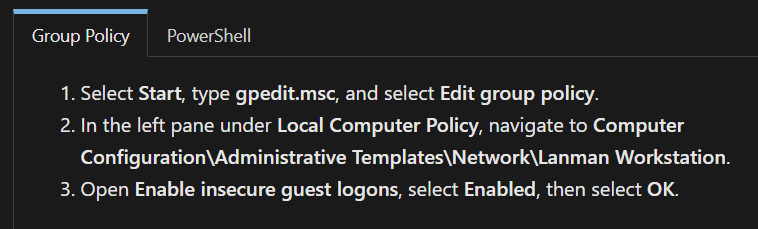
if you can ping your Unraid Server from the VM (to ensure its accessable), may also, can you open the webui from Unraid inside your VM ... since a few month windows changed access to insecure smb shares, needs some mods in group policy (win 11 pro as sample) Enable insecure guest logons in...Enable insecure guest logons in SMB2 and SMB3 for Windows...This article describes how to enable guest logons policy in SMB2 and SMB3 for Windows client and Windows Server devices using Group Policy and PowerShell.sample Uploading Attachment... just to make sure its not related to this ... public Share access
-
i am using the docker way like described for my personal encodings. in terms you simple remux your srt files into your containers using ffmpeg /// edit, may dependencies missing, rather take the docker way 1/ get as sample un-get https://github.com/ich777/un-get 2/ install ffmpeg root@AlsServerII:~# un-get search ffmpeg Please wait, performing search... Found the following package(s) for your search 'ffmpeg' in repositories: ffmpegthumbs-23.08.5 ffmpeg-7.1.1 ffmpegthumbnailer-2.2.3 root@AlsServerII:~#
-
im syslog sieht man aktuell auch nichts was darauf hindeutet ... aktiviere mal syslog to flash und erstelle dann nach einem crash (noch besser während wenn machbar) eine diag ...
-
yep, but as the Server is also a Backup Server ... ;) had this idea already but that would always wakeup the VM (also for replicate / backup jobs). thanks for looking, but this will be more complex so lets live with HA click to wakeup ;)
-
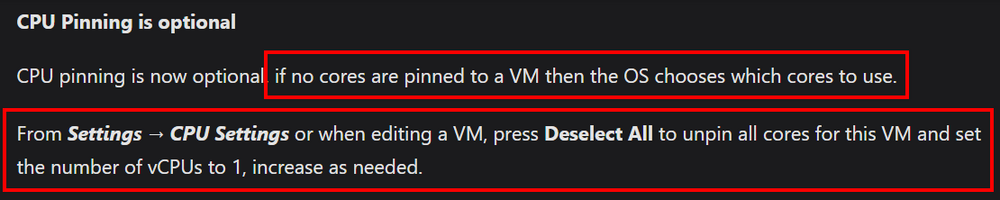
changelogs ... ;) Version 7.1.0 2025-05-05 | Unrai...Version 7.1.0 2025-05-05 | Unraid DocsThis release adds wireless networking, the ability to import TrueNAS and other foreign pools, multiple enhancements to VMs, early steps toward making the webGUI responsive, and more. Uploading Attachment...
-
vorweg, deine internen IP's brauchst du nicht maskieren, damit kann niemand etwas anfangen ;) solange keine certs kommen wird etwas nicht stimmen, was ... lässt sich anhand der Angaben schwer sagen. 1/ du bist sicher das du eine öffentliche ipv4 hast ? 2/ die Port 80 + 443 sind auch sicher darauf gerichtet ? 3/ du nutzt eine Fritz ? Unify ? ... wenn ja, in den Docker Einstellungen auch macvlan aktiviert ? NICHT ipvlan 4/ dass der Docker in der custom mit eigener IP mit dem Host (Unraid) reden kann, muss der Host access in den Docker Einstellungen aktiviert sein ... wenn es mal geklappt hat und mal nicht, prüfe Punkt 3 und nochmals Punkt 2, davon ausgehend das Punkt 1 gewährleistet ist. wenn nur Unraid nicht geht, dann Punkt 4 prüfen ;) abgesehen davon, deinen Server online stellen ... wird meist nicht empfohlen ... besonders nicht mit dem "Spielzeug" NPM ... zumindest swag mit Geo Blocking, fail2ban, ... wäre da empfehlenswerter ... besonders dann wenn man nicht genau weiß was man macht (wie interne IP's maskieren). sorry, musste sein 😺
-
Hi, may a question regarding wol VM (mac) also waking up Host (different mac). Scenario, Gaming Mashine, Unraid Host using s3 sleep hosting a Gaming VM ... now, app like moonlight can send wol to wakeup the VM (working as long the host is running), but that of course doesnt wakeup the host before ... so the question is (and i have no idea if ...) can the physical NIC listen on 2 different mac's (i guess that would be possible) but also then, would a workflow like this even be possible ? 1/ mac VM received 2/ wakeup host (wait N seconds) -- if it was already on, skip 3/ start VM i know ... ;) keep the Server running ;)
-
Nope, kannst nur gerne oben rechts die Suche aktivieren und "btrfs" eingeben ... es gibt einige die haben keine Probleme, es gibt viele die wissen nicht dass dies von btrfs kommt (ganz viele Docker Images werden wegen btrfs neu erstellt, ganz viele korrpute databases .. usw usw), und es gibt Leute wie mich die seit Jahren eher empfehlen, lass es ... ;)
-
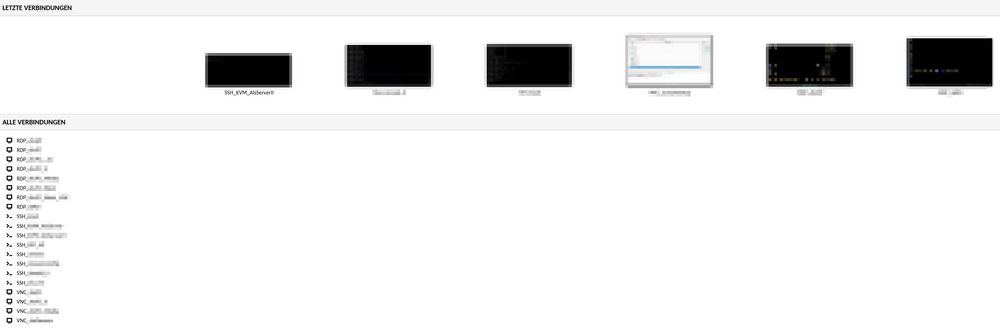
und genau dafür wäre guacamole die bessere Alternative, mit dem "side effect", brauchst nicht unbedingt deinen Unraid ins Netz zu stellen ... Beispiel hier, alles unter https://remote.deine-domain.de dann im Browser erreichbar, zu bedienen, ... egal ;)
-
die Probleme gab es immer, seit 6.12 ist nur zfs als Alternative da
-
doch, daher steht da auch nichts dahinter da "Teilnehmer" ;) kurz, ist korrekt so



