





Vr2Io
Members
-
Joined
Everything posted by Vr2Io
-
From my experience, it likely PSU issue or disk power cabling relate, problem likely happen when all disks in loading but no problem when part of disk loading. I will review / renew disk power cable first. You almost change every hardware.
-
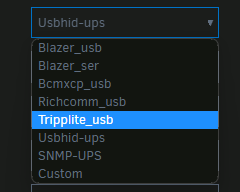
Map be try Tripplite_usb driver and ref. the help doc. https://networkupstools.org/docs/man/tripplite.html
-
Does same if use build-in APCUPSD ? * Stop NUT first *
-
Does anyone replace battery recently, how much raise ? And how long the dead battery last ? My new one cost raise in 25%, the dead battery just last 3 yrs.
-
Yes it is a plugin, SimonF version support all Unraind version.
-
Longtime haven't use APCUPSD, my APC UPS also no nominal power (actually depends on UPS model), use NUT also, but can manual input the power rating, so will calculate by load %.
-
DISKPART> list disk 磁碟 ### 狀態 大小 可用 Dyn Gpt -------- ------------- ------- ------- --- --- 磁碟 0 連線 1863 GB 0 B 磁碟 1 連線 931 GB 52 GB * 磁碟 2 連線 14 GB 14 GB DISKPART> select disk 2 磁碟 2 是所選擇的磁碟。 DISKPART> convert gpt DiskPart 成功地轉換了選擇的磁碟成為 GPT 格式。 DISKPART> convert mbr DiskPart 成功地轉換了選擇的磁碟成為 MBR 格式。
-
Oh yes longtime ago.😀
-
QNAP TL-D1600S JBOD Storage Enclosure is some kind SATA enclosure solution, you always need 4 cable for 12 disks and those cable can't too long. SAS ( can use SATA disks ) always recommend. You may got some problem with those enclosure
-
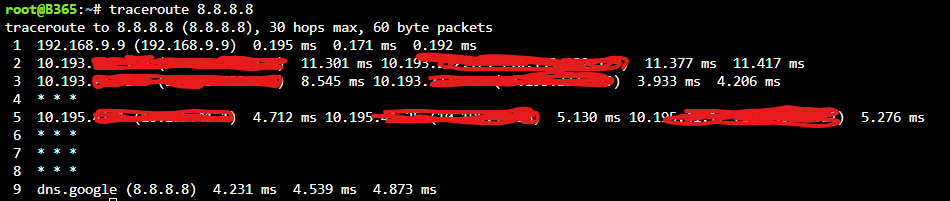
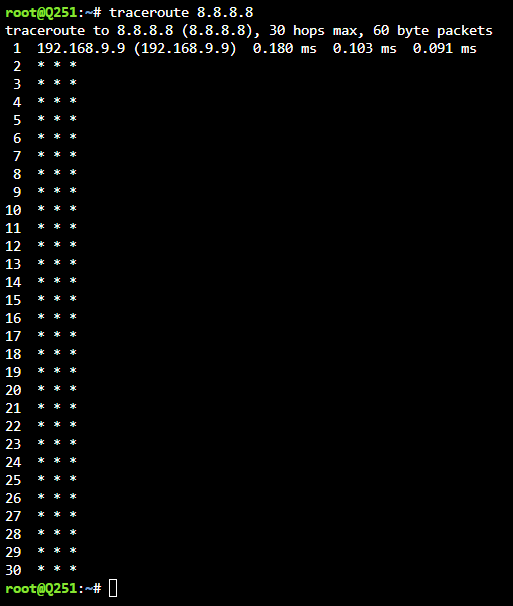
Doesn't like DNS / docker service issue. Your traceroute only have one line and timeout, it indicate you lost access to router. The 1st line should be your router 10.10.12.1 not 10.10.12.18. If router accessible just not internet, then traceroute will be below Try review all setting, stop Swag docker or stop all docker one by one until rule-out which docker cause problem.
-
It likely some problem in filesystem, or may be too many docker, not much idea. No matter img or folder, GUI also have delete option when docker service stop. Folder should better then img, because we can direct access / manage the files. If img, we need mapping to some path if we want to directly access.
-
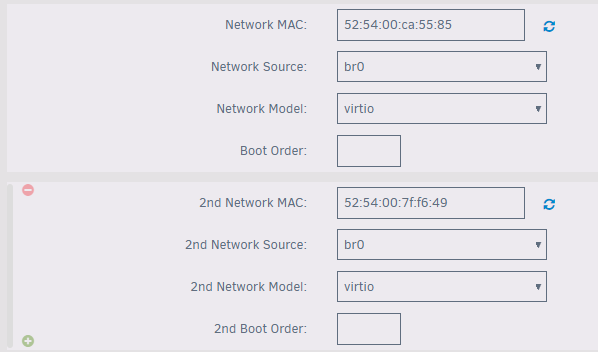
Enable bridge for eth0 and add vlan20, then you will got br0 and br0.20 In HA VM, just add 2 virtual NIC br0 and br0.20 with random MAC address, tag vlan20 in Unraid eth0 port at switch side. But you should setup HA VM and confirm it work 1st, then going vlan20 part. You may backup HA from old PC then restore in HA VM.
-
Or try disable the WiFi and BT in BIOS.
-
Note, those cage not a high end product, the fail LED just a simple signal indicator, but it also detect disk insert or not. I guess even no any SATA cable connect, it also RED when power up with disk insert. Doesn't like SAS protocol, it have enclosure management, fail signal could be inband within protocol.
-
Same problem with Asus PN41 mini-pc, unfortunately no fast-boot option in BIOS, and this PC only allow UEFI boot. Different OS ( also UEFI boot ) no such problem.
-
Because docker network have IPVLAN and MACVLAN mode, in IPVLAN mode, all containers use same MAC address ( real interfaces's MAC address ). Most consumer network equipment will list / count device by MAC address ones only, so you will got either one of IP's with same MAC address instead same MAC address with different IP.
-
Even no disk in that slot still RED ? I vote it is Icydock circuit board failure only, try to cleanup the "HDD-FAIL-IN" header, or disassembly the circuit board to trouble-shoot.
-
Same error (2023.04.26b) when install docker by previous-app. Thanks
-
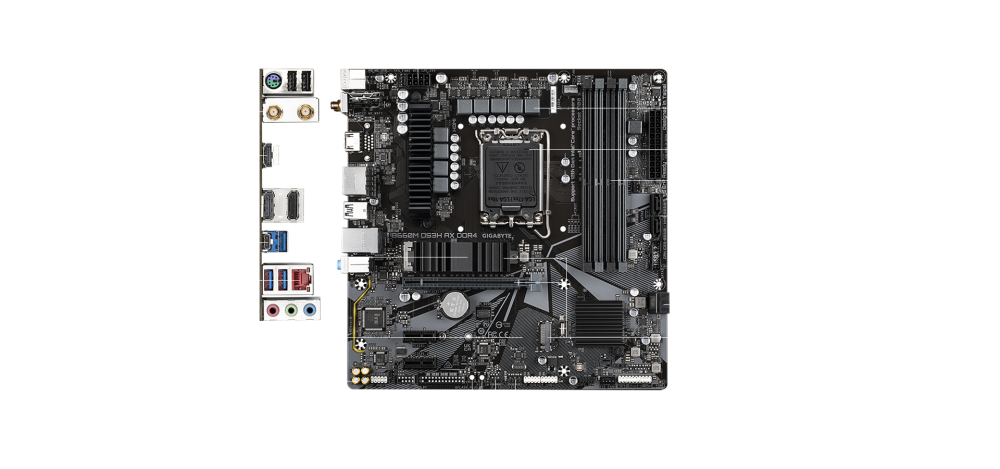
5 type-A port at rear.
-
Conjoined twins with Unraid 😁
-
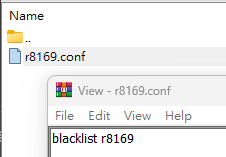
03:00.0 Ethernet controller [0200]: Realtek Semiconductor Co., Ltd. RTL8111/8168/8411 PCI Express Gigabit Ethernet Controller [10ec:8168] (rev 06) Subsystem: Gigabyte Technology Co., Ltd Onboard Ethernet [1458:e000] Kernel modules: r8169 04:00.0 Ethernet controller [0200]: Realtek Semiconductor Co., Ltd. RTL8111/8168/8411 PCI Express Gigabit Ethernet Controller [10ec:8168] (rev 06) Subsystem: Gigabyte Technology Co., Ltd Onboard Ethernet [1458:e000] Kernel modules: r8169 You have blacklist the driver ?
-
It shouldn't relate BIOS, all message quite normal, advertised have 3 speed, auto-negotiation on ..... but just negotiate at 100Mb/s
-
I never got mismatch between Unraid and switch. You should check eth0 instead br0. FYR, too Settings for eth0: Supported ports: [ FIBRE ] Supported link modes: 10000baseT/Full Supported pause frame use: Symmetric Supports auto-negotiation: No Supported FEC modes: Not reported Advertised link modes: 10000baseT/Full Advertised pause frame use: No Advertised auto-negotiation: No Advertised FEC modes: Not reported Speed: 10000Mb/s Duplex: Full Auto-negotiation: off Port: FIBRE PHYAD: 0 Transceiver: internal Supports Wake-on: d Wake-on: d Current message level: 0x00000007 (7) drv probe link Link detected: yes
-
Yes, those for docker / VM usually. You should simply connect Unraid to SW and simple untag the traffic, Unraid don't need to know you connect to which Vlan in your neteotk.
-
Just note you have UDM PRO, that's fine. I don't use jumbo frame, it always troublesome. I also apply VLAN to isolate different network / device / docker ....



