





Kilrah
Members
-
Joined
-
Last visited
Everything posted by Kilrah
-
Are we supposed to guess which container/template you're using?
-
Not working here, log attached. 5.1.0-1-01 is fine. qb.log
-
As long as there isn't a network fluke that interrupts the connection.
-
Then time to check or replace SATA/power cables for that drive. What is it connected to? Motherboard or an HBA? If the latter is it properly cooled?
-
Since you're using a docker image nothing other than appdata should be critically affected. Basically you'll have to restore appdata for / fix perms on it for any containers that don't work. Appdata/system are the shares you never want to run new perms on, system usually not being an issue unless you use Docker folder.
-
Read a few posts up.
-
The post linked above says exactly that... Might want to use the Tmux Terminal Manager plugin to make a peristent session to run that in so it doesn't get interrupted if you accidentally close the terminal window.
-
Parity check does not keep state across a reboot unless you use the parity check tuning plugin. If you do and it didn't work in that case then you should post in that plugin's support thread, if you don't then it's correct and it was cancelled by shutting down.
-
That would be for the "auto update apps" plugin, not this one
-
No. That said the mail thing would typically not require you to use those, the address should be added by the sending service.
-
HEIC files from iOS18 use a new format that requires newer libs, my image includes a fix for that
-
That would be in Post Arguments, not Extra Parameters (just the command, no --entrypoint").
-
That should work yes. Still weird the virtual drive wouldn't work... That's normal, user0 is "all array drives but without pools" where user includes pools. Those are added by the Unassigned Devices plugin.
-
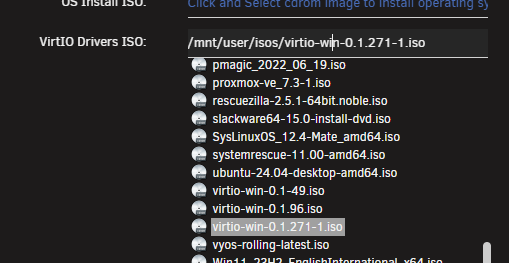
I'd try putting the /mnt/user path manually... Also 221 is old, but that shouldn't affect the "not even appearing"
-
Yes... was the iso selectable from the field as a dropdown? usually should be using the /mnt/user path
-
NerdTools is long dead already, but all it did was put the packages in /boot/extra. So if there's a package there you don't want simply delete it.
-
Nothing wrong there.
-
Stop it and run a SMART test. Seems like the drive is probably failing.
-
Safe mode disables all plugins suggesting the problem is with one of those you have installed so try uninstalling/reinstalling one by one to isolate the culprit.
-
That board has 4 m.2 slots and they should all work with NVMe drives.
-
Yep. You NEVER format a drive that has data you need. That's not at all how you do a filesystem conversion. Best chance at this point is file recovery software like UFS explorer.
-
No, you'd install the new drive as parity 1, resync, then remove parity 2. Should probably have removed parity 2 instead of 1 back then, but now that's how it is.
-
So if it can't be edited it would be because somehow the template file on the flash drive got lost.
-
There is none. How was this installed initially?
-
Yeah maybe got stuck on an old version...



