Leaderboard





Popular Content
Showing content with the highest reputation since 08/03/26 in all areas
-
6 pointsJust an update on this, it looks like due to an influx of 'malicious package adoptions' AUR is currently disabled from pushes, so for now the upstream package cannot be bumped, once this changes it will auto trigger the build, if this has not changed by the end of this week (16th Aug) then i shall look into building the package myself. Link:- https://lists.archlinux.org/archives/list/[email protected]/message/YPJ3FQYJTJXXY3RUXCYLMHUKHLIUNVFF/6 points
-
Hallo zusammen, ich möchte ein Problem mit Community Applications dokumentieren, das bei mir vermutlich mit dem Routing meiner Deutschen-Telekom-DSL-Verbindung zu ca.unraid.net zusammenhing. Vielleicht hilft das anderen Nutzern, die dieselbe Fehlermeldung sehen. FehlerbildBeim Öffnen des Tabs Apps erschien folgende Meldung: Dabei war zunächst auffällig: Unraid hatte grundsätzlich Internetzugang. DNS-Auflösung funktionierte. GitHub war erreichbar. Docker-Updates wurden weiterhin erkannt und konnten installiert werden. Ich hatte vorher keine bewusste Änderung an Unraid oder meinem Netzwerk vorgenommen. Grundlegende TestsDie Internetverbindung funktionierte: ping -c 4 1.1.1.1 ping -c 4 raw.githubusercontent.comBeide Ziele waren ohne Paketverlust erreichbar. Auch HTTPS zu GitHub funktionierte: curl -I -L --max-time 20 https://raw.githubusercontent.com curl -I -L --max-time 20 https://github.comBeide Tests lieferten HTTP 200. Das installierte Community-Applications-Plugin war aktuell und verwendete das offizielle Repository: Version: 2026.07.21 Repository: unraid/community.applicationsDie tatsächlich verwendeten Feed-Adressen waren: https://ca.unraid.net/assets/feed/applicationFeed.json https://ca.unraid.net/cdn/feed/applicationFeed.jsonDie eigentliche UrsacheDer Feed war grundsätzlich erreichbar, wurde über meinen normalen DSL-Anschluss aber extrem langsam übertragen. Testbefehl: curl -4 -L --max-time 30 \ -o /dev/null \ -w "HTTP: %{http_code}\nTempo: %{speed_download} Bytes/s\nIP: %{remote_ip}\n" \ https://ca.unraid.net/cdn/feed/applicationFeed.jsonOhne VPN lag die Geschwindigkeit nur bei ungefähr: HTTP: 200 Tempo: 8.000–22.000 Bytes/sDer Feed ist rund 17 MB groß. Dadurch dauerte der Download viel zu lange. Community Applications brach offenbar ab, bevor die vollständige JSON-Datei geladen war. Die unvollständige Datei führte anschließend vermutlich zu: Last JSON error recorded: Syntax errorAuch auf einem Windows-PC im selben Netzwerk lud dieselbe Feed-Datei sehr langsam und benötigte ungefähr zwei Minuten. Vergleich über andere VerbindungenZum Gegencheck habe ich dieselbe Datei über andere Verbindungen geöffnet: Normaler Telekom-DSL-Weg: ca. 8–22 KB/s Mobilfunk: unter 10 Sekunden VPN: ca. 8 SekundenDamit war klar, dass das Problem sehr wahrscheinlich nicht direkt an Unraid, Community Applications, Docker oder DNS lag. NetzwerkumgebungMein Aufbau: Deutsche Telekom DSL FRITZ!Box nur als DSL-Modem UniFi Cloud Gateway Ultra für PPPoE, Routing, NAT und Firewall MTU erfolgreich mit 1492 getestet IPv6 auf Unraid deaktiviert Auch ein testweises Deaktivieren des UniFi-Bedrohungsschutzes brachte keine ausreichende Verbesserung. WorkaroundIch habe auf der UniFi Cloud Gateway Ultra ein richtlinienbasiertes Routing eingerichtet: Zieldomain: ca.unraid.net Route: über einen VPN-ClientEs wird also ausschließlich der Verkehr zu ca.unraid.net über den VPN-Tunnel geleitet. Der restliche Datenverkehr, darunter Docker, Reverse Proxy, öffentliche Dienste und normaler Internetzugriff, läuft weiterhin über den normalen DSL-Anschluss. Danach ergab derselbe Test: HTTP: 200 Tempo: 7.845.632 Bytes/s Downloadzeit: ungefähr 2 SekundenCommunity Applications funktionierte anschließend sofort wieder. FazitIn meinem Fall deutet alles auf einen sehr langsamen Routing- oder Peering-Weg zwischen meinem Deutsche-Telekom-DSL-Anschluss und der Cloudflare-/Unraid-Infrastruktur hinter ca.unraid.net hin. Ich kann nicht sicher sagen, ob: generell Deutsche-Telekom-Kunden betroffen sind, nur bestimmte Anschlussbereiche oder IP-Bereiche betroffen sind, oder ob es sich um ein vorübergehendes Routingproblem handelt. Der Unterschied zwischen normalem Telekom-Routing und VPN war bei mir jedoch sehr deutlich. Bevor Community Applications neu installiert oder DNS komplett umgebaut wird, würde ich daher empfehlen, zunächst diesen Test auszuführen: curl -4 -L --max-time 30 \ -o /dev/null \ -w "HTTP: %{http_code}\nTempo: %{speed_download} Bytes/s\nIP: %{remote_ip}\n" \ https://ca.unraid.net/cdn/feed/applicationFeed.jsonAnschließend kann man dieselbe Adresse testweise über Mobilfunk oder VPN öffnen. Vielleicht hilft dieser Hinweis anderen Nutzern mit derselben Fehlermeldung.4 points
-
4 pointsUnraid OS 7.4.0-beta.1 installed on three machines. On all 3, Settings > Fix Common Problems doesn't seem to be ready/working. Everything else seems to be working well. "Report bugs / feedback" link (above) sends me to the release notes.4 points
-
As announced in the Unraid August digest Alex is now on the Unraid team. Alex’s Unraid journey started more than a decade ago, when he became an active Unraid community contributor experimenting with virtualization, GPU passthrough, Docker, and more. He later co-founded LinuxServer.io, helping make self-hosting and complex technology easier to understand. Now, Alex is bringing his experience across open source, developer education, networking, enterprise, and technical media back to Unraid. His focus: making Unraid the best-in-class for power users while making self-hosting simpler and more approachable to all.3 points
-
3 pointsUnraid OS 7.4.0-beta.1 is live for testing! Highlights:Shared task tray — background jobs from plugins, Docker, and VMs now queue into one tray with foreground recall from any browser tab, instead of the old bomb-icon workaround. Multiple custom networks for Docker containers — and additional network attachments now survive a container recreate/update instead of getting wiped. Memory limit field for Docker — exposed directly in Advanced View, no more passing it as an extra parameter. Live icon preview on the Docker Add/Edit forms. Configurable power-button behavior — Shut down, Reboot, or Do nothing, under Settings → Power Options. Good news for anyone who's had a case bump take their server down. Boot Device backups can now be downloaded directly or saved to the server, with progress tracking. A few fixes: Enter-to-start on encrypted array passphrase fields, File Manager no longer bounces exclusive shares out of /mnt/user/<share>, Plugins page no longer hangs on a slow/unreachable plugin's update check, and a VM startup PHP deprecation warning is gone. New hardware support: kernel modules/firmware for Realtek RTW88 8812A/8814A/8821A wireless adapters. Security: updates across bind, libXfont2, libarchive, libssh, openssh, p11-kit, php, samba, wpa_supplicant, and xorg-server — CVE details are in the full release notes. Notification integrations also now use certificate-verified requests for the public API. Under the hood: Linux kernel 6.18.44, Docker 29.7.1, 68 packages updated total. Standard beta caveats apply! Please do not run on production. Test on spare hardware or a VM, and back up your flash drive before updating. Full release notes: https://docs.unraid.net/unraid-os/release-notes/7.4.0 Report bugs / feedback: https://product.unraid.net/b/unraid-os-prerelease-bugs-feedback Updating instructions: https://docs.unraid.net/unraid-os/updating-unraid/3 points
-
naja, scheint ja keine so großer fundamentaler Bedarf dafür vorhanden zu sein ;) da du ja bereits 2022 danach gefragt hattest wie es sich mit den vorhandenen plugins verhält, stell mal einen feature request, mal schauen wieviel sich melden und ob es dann seinen Weg findet. Unraid Konzept, es muss nicht alles direkt nativ rein, es soll ja noch einigermaßen "schlank" bleiben ... und wo kein Bedarf ...3 points
-
mir ist es persönlich 2x passiert, seither ist es für mich "ex", einmal (wegen eigen Dummheit) auch fatal ;) und ja, natürlich ist es oft erstmals btrfs, aber man hört halt nach Umstellung nichts mehr ... daher sage ich persönlich klar ja, es liegt darsn ... war ja vor "Docker Directory" noch häufiger im btrfs Image das sehr oft Docker Images corrupt gingen, nicht schlimm da schnell wieder erstellt, aber trotzdem ... Fehlersuche usw usw Und auch ja, bei zfs hatten wir anfangs auch oft "destroy and new please", das hing aber eher an der Implementierung in Unraid, ist halt auch etwas komplexer und schnell mal "fail" 😬 ich nutze weder noch, immer nur single xfs und Backup, seither nie wieder auch nur ansatzweise ein Problem, Backup (bisher) nie gebraucht ... btrfs zu anfällig meiner Erfahrung nach (und auch wie oft ich das gelesen hatte) zfs total overhyped für mein homelab, daher auch nichts für mich Schöne ist, wir haben die Wahl und es war auch nur ein Ratschlag meinerseits.3 points
-
3 pointsI've deduced it to one of my installed plugins, just not sure which one yet, but I don't have many installed so finding the culprit shouldn't be difficult.. Edit: The problematic plugin is the "Dynamix System Buttons" plugin (probably should blacklist this plugin on 7.4.0)3 points
-
3 pointsThe plugin settings no longer loads on 7.4.0-beta.1. Tried to reinstall it. No luck3 points
-
3 pointsQuick resolution for anyone who is also encountering this issue: *hosting the image file on my own domain as it seems like GitHub is blocking non-authenticated requests~ The original file is at https://github.com/unraid/webgui/blob/master/emhttp/plugins/dynamix.docker.manager/images/question.png?raw=true ```bash wget https://from.sg/question.png -P /usr/local/emhttp/plugins/dynamix.docker.manager/images ```3 points
-
3 pointsHi all, i am awaiting a update upstream, once this is updated the build will be triggered automatically: https://aur.archlinux.org/packages/plex-media-server-plexpass#comment-10813533 points
-
3 pointsToday I've released a big update for the plugin: you can now create subcategories, which means the categories.json structure has changed fundamentally (existing files get migrated automatically on update). Also added a new settings dialog per category, replacing the old buttons (looks much cleaner now and not so bloated), plus drag and drop for category ordering and script assignment. Mobile layout should also work flawlessly now, since it automatically switches to panel view below a certain screen width (Thx to Yusseiin for mentioning this in the User Scripts Thread, even tho I just saw it recently) If anything looks off after updating or configs don't work anymore, please let me know. I also changed the direction of default collapsed/expanded, so this is the only thing that has to be changed manually again after updating.3 points
-
3 pointshi, are we behind plex version for some reason? 1.43.3.10861 is out for couple days3 points
-
2 pointsI missed this thread, I actually found out about this in a recent blog entry about UNRAID future. Such is life, we go, our work and footprint sometimes stays. I remember him, as I first used UNRAID about 20 years ago... I remember the change from a simple system, not able to see other "servers" in the eye, to something more user friendly and more modular. Ronald was there to help this evolution. RIP, my condolences to his family. (and I hope that easter egg is in the system now)2 points
-
2 pointsMoin, das geht, du musst nur bedenken, das PCI3 x1 nur ca. 1GB/s kann. Also es werden wenn du voll Speed möchtest nur 4 Ports laufen. Wenn es aber auch langsamer sein kann mit der Datenübertragung, dann gehen auch alle 6. Viele Grüße Tim Eidt: Evtentuell musst du die Karte noch Flashen, damit du in C10 kommst oder keine Fehlermeldungen, so wie ich früher mal.2 points
-
2 points
-
Bei mir sieht's genauso aus, wie bei @dibux : bislang keine Probleme mit btrfs! in meinen beiden unraid-Systemen werkelt auch jeweils ein btrfs-cache, einmal als RAID1 und einmal single mein zusätzlicher 4TB Raid1 Pool läuft sogar auch auf btrfs Aber es läuft einfach ohne Probleme ... bislang klopfaufholz Ja, man liest hier mehr von Problemen mit btrfs, aber ich denke auch einfach weil es bei unraid Standard war/ist und wenn dann "mach mal neu als zfs" kommt, liegt es anschließend immer am "bösen btrfs", aber ist das wirklich so? Auch zu zfs hat man hier schon von Problemen gelesen, da ist dann auch teilweise nichts mehr zu retten und es muss ein Backup restored werden. M.M.n. auch nicht besser, daher hab ich den Änderungs-Aufwand auch noch nicht betrieben. Vielleicht sollte man mal eine Umfrage starten: Wer nutz was? wer hatte schonmal Probleme mit filesystem xy? konnte es repariert werden? war format/restore notwendig? traten nach fs wechsel weitere Probleme auf? Ist halt für die meisten sicher auch schwer zu beurteilen, ob die Probleme wirklich im Filesystem begründet sind, oder ob ein spezielles dafür ursächlich war oder vielleicht auch etwas ganz anderes. Wenn ich formatiere (egal welches fs) und ein lauffähiges Backup zurückspiele, läuft es so oder so immer erstmal wieder, egal auf welchem fs. (erinnert mich hier manchmal auch an Windows-Foren damals: am Ende hieß es dort eh immer "neu installieren" 😆).2 points
-
Kann ich nicht bestätigen mit btrfs (läuft bei mir auf 2 systemen seit langer zeit ohne probleme (ja auch mit datenbanken). man liest ja nichts von den systemen bei denen es ohne probleme läuft, nur von denen mit problemen. daraus würde ich den einsatz von btrfs im cache nicht überdenken (der faktor liegt wahrscheinlich bei 1000 zu 1), da das sogar die vorgabe von unraid ist. ;-)2 points
-
Suprise!!Emby and Jellyfin support have now been added with todays release. Still waiting to hear back from Squid to get added back to community apps.2 points
-
Rewrite coming2026-08-22: I am starting a rewrite/optimization of this plugin, as well as looking at supporting both jellyfin and emby depending on whats possible.2 points
-
2 pointsNa ja, helfen kann ich bei dem Problem auch nicht. Ich wundere mich nur, welchen Sinn so ein Setup überhaupt haben soll? Ein "VPN" ist normalerweise überflüssig wie ein Loch im Kopf, ausser, man möchte zwei oder mehr eigene Filialen verbinden oder auch, wenn man das Geoblocking einiger Dienste austricksen möchte (Hase und Igel, da klappt meist nicht lange). Aber für den "Normalbetrieb" ? Rausgeschmissenes Geld. Mach den Docker weg, dann geht auch wieder alles bestimmt. (die 2te Frage für mich wäre, warum man eine Werbe- und Tracking-Schleuder wie einen LG TV überhaupt ans Netz lassen kann. Meiner kriegt kein LAN Kabel oder WLAN)2 points
-
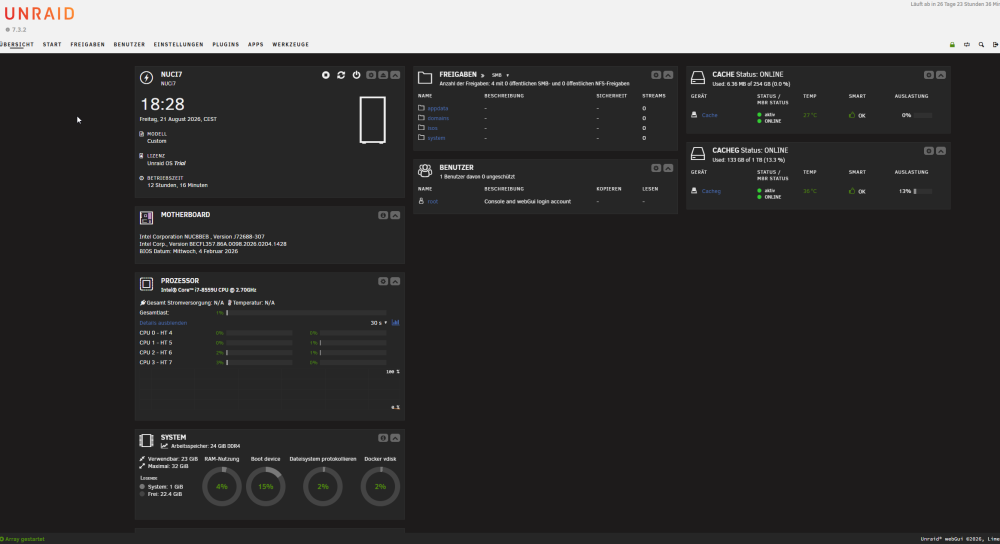
2 pointsBilder sagen mehr als Tausend Worte @alturismo Herzlichen Dank für diesen TIP
 2 points
 -
I've had one in my unraid system for about a year and it's been fine. Very easy to take it for granted :-) And I bought about ~40 more when they were at $3 a pop and haven't had an issue with any of them. Got one for Ventoy, one for general stuff, give them away as stocking stuffers :-)2 points
-
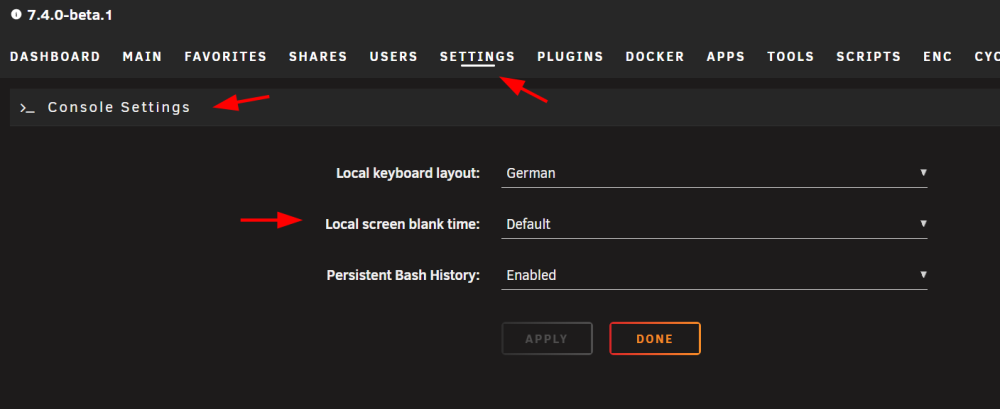
2 pointswürde ich mich anschließen, das beide ... eher nicht. ist dem so ? weil eingangs steht da wenn es ziemlich fix wäre, teste mal hier auf disabled zu stellen.
 2 points
 -
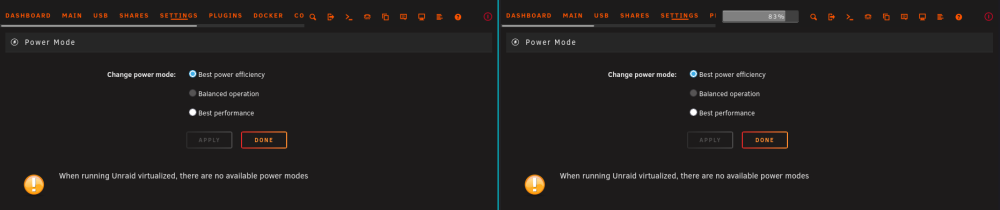
2 pointsNeither of my physical servers have a "power button" tab within power settings 😳
 2 points
 -
2 pointslaut syslog sieht es aus, es hätte dein XFS ein Problem: danach starten die smb Fehler also am besten wie angegeben mal xfs_repair probieren2 points
-
Some past Unraid newsletters and shows mention Multiple Arrays (not pools) coming within the 7.x cycle and within 2026: E.g. https://newsletter.unraid.net/p/unraid-2025-year-in-review E.g. https://youtu.be/PihqSOF8wnA Unraid 7.4 beta is out, Unraid 8 is being discussed above. Multiple Arrays are not mentioned with a single word. I think it would be fair to tell those, that wait for Multiple Array support for so long, if it will ever show up.2 points
-
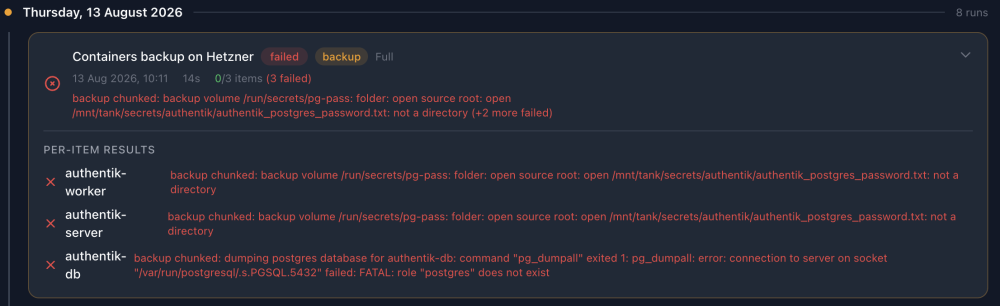
2 points@PanicMechanic007 Thank you so much again for developing such a comprehensive solution. What I love about it is it allows me to manage everything from a single app rather than having different solutions for databases, files, containers, ZFS datasets etc. It's also something I'm hoping my family will be able to manage in my absence. I wish I could contribute to the development with code, but I do not have the skills to unfortunately. I take the opportunity to remind the community we can say thank you to the developer with donations using the sponsor button here: https://github.com/ruaan-deysel After using the app for a while I came across of a few possible improvements: 1 - FEATURE REQUEST - FUTURE JOBS QUEUE When the user triggers multiple actions (start backup jobs, delete backups, etc.) it would be nice to see which are the jobs in the queue. Sometimes I have the feeling the app is not working properly and then I realise it's just that the previous job has not completed yet. The progress of the current backup can already be tracked, but the rest of the jobs is not showing anywhere at the moment. Perhaps the History tab could show future jobs too (backup deletions, backup jobs, restore jobs, etc.)? And allow the user to remove them from the queue if the job has not been triggered yet? 2 - ERROR - DATABASE DUMPS At the moment an error is triggered on Postgres databases if the user is not named 'postgres', if I understand the logs correctly. I guess since this is meant for homelab use perhaps I should just name leave all the usernames as default, but I just wanted to flag it. Screenshot below. 3 - ERROR - SECRETS BACKUP I'm not sure why I get an error when the app tries to backup the bind mount where my secrets files are stored. Again, perhaps this is an overkill for a homlab? 4 - QUESTION - FAILURE TO BACKUP CONTAINERS WITHOUT VOLUMES The app fails to backup containers that do not have volumes or bind mounts. Is this intended behaviour? It would be nice to have those backed up as well so I don't have to worry about backing up compose files separately etc. Or perhaps this is already covered by the boot media backup? 5 - FEATURE REQUEST - RESTORING FILES FROM CONTAINER VOLUMES Would it be possible to restore single files from container volumes and bind mounts, as it already happens for folders? Or is it too much of a hassle for little reward since we could have a separate folders backup job for it? 6 - QUESTION - DATABASES SKIPPED FROM CONTAINER BACKUP When a container's persistent data volume or bind mount contains a database, the app seems to notice it and it automatically excludes it from the backup. I suppose this is intended behaviour since databases are dumped separately. But I cannot see the usual checkbox to enable the database dump here, so I wonder if I stumbled upon a bug? In the example below, the bind mount "app/data" for the Gotify app contains more than just the database, so I'd love to be able to back it up.
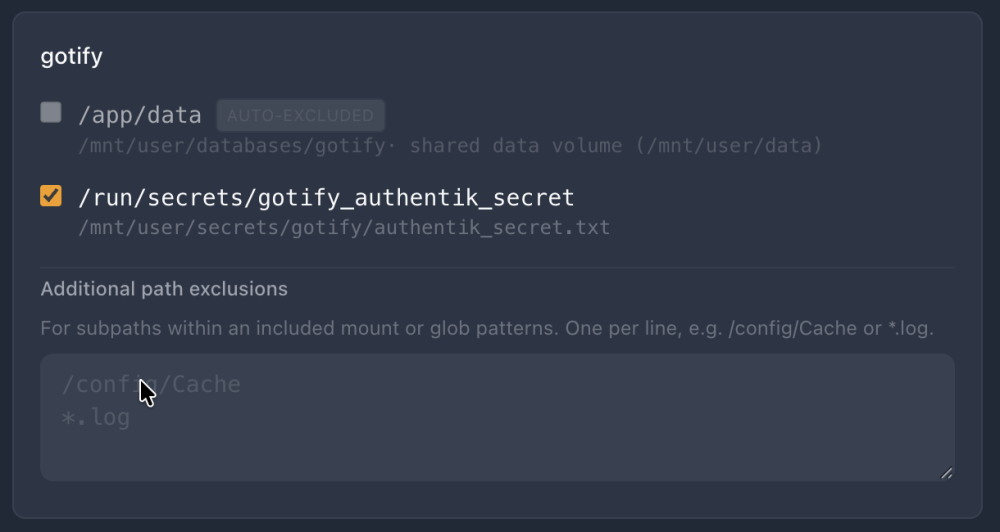
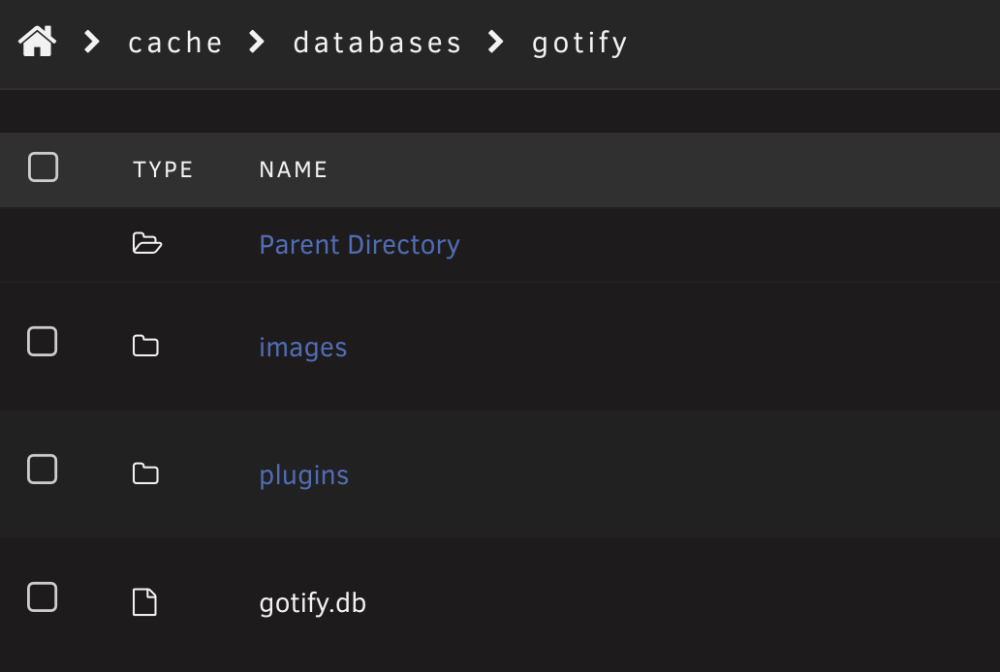 2 points
 -
2 pointsDecided to workaround AUR and perform the install manually, new image built, please pull down latest.2 points
-
2 pointsas satip broadcasts tvheadend wont see it in a regular bridge (or custom network in a bridge) you can try the following host mode custom br0 (eth0) on its own IP and you also may add the xml url as RUN_OPTS env in Tvheadend, like described in the tvheadend docs, sample i run dvb-c (fritz) and dvb-s (digital devices) when i google about your device, may should be something like this cant tell as i run different devices. if you want to keep in bridge mode, then you also need to bind ports on tuners and forward them to the docker, each tuner would need 2 ports, sample here 9998-9999 also may some settings specific for your tuner need to be done, read into it if there are issues. so, may just read some tvheadend docs and enjoy then ;)

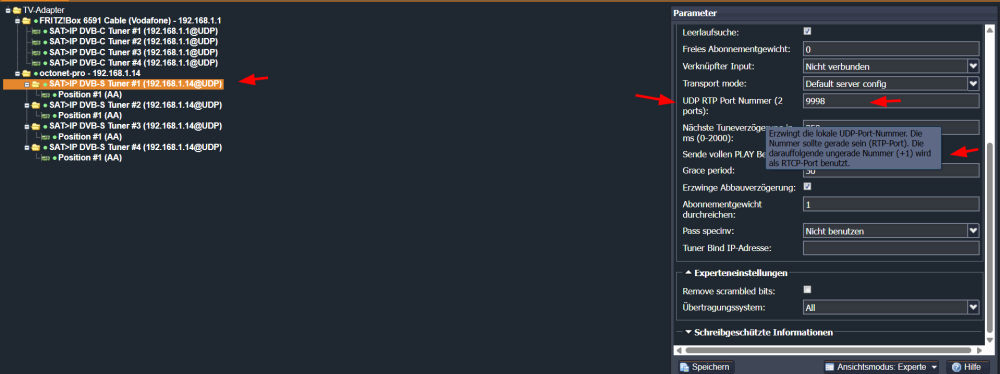 2 points
 -
2 pointsKurzes Update zu Borg Backup UI: Am Freitag habe ich das Plugin offiziell zur Freigabe bei Unraid / Community Applications eingereicht. 🎉 Jetzt heißt es erst einmal abwarten, bis die Prüfung abgeschlossen ist. Sobald das Plugin freigegeben wurde und über Community Applications verfügbar ist, gebe ich hier natürlich Bescheid. Vielen Dank nochmal an alle Tester für das bisherige Feedback und die Unterstützung! Auch nach dem Release sind Bugreports, Verbesserungsvorschläge und Ideen für neue Features jederzeit willkommen.2 points
-
Yeah, seems on this new listing the floor is $3.50.2 points
-
Just in case some else may be interested: Since I don't have a big Unifi environment (just some APs) running an VM and keeping it up to date sounded to be an enormous amount of effort and resources. I switched to unifi-os-server to run the software as native unraid docker ca app 2 weeks ago. Moving to the new setup was no problem (done via site migration). I also added the missing autobackup via https://gitlab.com/faerbit/uos-backup (running as userscript). I'd also like to thank PeteAsking (and the other helpers here) for the great support they've provided for Unifi. Unraid. Reborn. in the past.2 points
-
Hello All, I wanted to document this because I spent a lot of time trying to get an RTX 3060 passed through from Unraid to an Ubuntu VM, and most of the obvious troubleshooting led nowhere. MY SETUP • Unraid 7.2.3 • Ubuntu 24.04.4 LTS VM • NVIDIA GeForce RTX 3060 12 GB, GA106 • NVIDIA driver 580.173.02 • GPU and NVIDIA audio device passed through to the VM • No VBIOS ROM required I did install KDE/Plasma during troubleshooting and was running SDDM/Plasma X11 when I finally diagnosed the problem. However, Kubuntu/KDE was not the fix. The actual problem was in the NVIDIA driver, and the same fix should apply to a normal Ubuntu/GNOME installation exhibiting the same NVIDIA errors. THE PROBLEM The symptom was a black screen on the physical monitor when booting the VM with the RTX 3060 passed through. The monitor would initially display the VM/OVMF boot sequence. Once Linux and the NVIDIA driver took over, the HDMI signal would drop and reinitialize several times and eventually leave me with a black screen. I enabled SSH in the Ubuntu VM and connected to it remotely while the physical display was black. Interestingly, nvidia-smi worked perfectly. It detected the RTX 3060, reported the full 12 GB VRAM, and showed NVIDIA driver 580.173.02. This established that the RTX 3060 was actually being passed through successfully and that the NVIDIA driver could communicate with it. The display manager, however, couldn't start the graphical display. In my case SDDM reported: Failed to read display number from pipe Attempt starting the Display server on vt 2 failed Could not start Display server on vt 2 Looking at /var/log/Xorg.0.log was much more revealing. Xorg successfully: • Loaded the NVIDIA driver • Detected the passed-through RTX 3060 • Detected the connected Samsung monitor on DFP-0 • Read the display information • Validated a display mode Then initialization failed with errors including: Failed to initialize DMA Failed to allocate push buffer AddScreen/ScreenInit failed for driver 0 That was the important clue. This was not a failure to pass through the GPU. It wasn't a missing monitor or EDID problem, and changing from Ubuntu/GNOME to Kubuntu/KDE wasn't what solved it. The failure was occurring in the NVIDIA driver's low-level initialization of the GPU for the graphical display. THE FIX The NVIDIA 580 driver supports NVIDIA's newer GSP firmware architecture. On this passed-through GA106 RTX 3060, the GSP path was apparently failing during DMA/push-buffer initialization. I disabled GSP firmware in the Ubuntu guest. I added: options nvidia NVreg_EnableGpuFirmware=0 to: /etc/modprobe.d/nvidia-graphics-drivers-kms.conf Then rebuilt the initramfs and rebooted the VM. After rebooting, the RTX 3060 produced a working physical display and the graphical desktop started normally. NVreg_EnableGpuFirmware=0 tells the NVIDIA kernel driver not to use its GSP firmware path and instead use the traditional RM driver path. This is not specific to the RTX 3060. NVIDIA documents NVreg_EnableGpuFirmware=0 as the mechanism for disabling GSP firmware, and other NVIDIA GPU users have reported resolving GSP-related Linux problems by disabling it. My specific confirmed configuration is an RTX 3060 with NVIDIA driver 580.173.02 under an Unraid VM, so I can't say that every NVIDIA passthrough black-screen problem has the same cause. However, if another NVIDIA GPU shows the same symptoms, especially the same DMA/push-buffer errors, GSP is worth checking. NVIDIA documentation on GSP firmware and disabling it: NVIDIA vGPU Documentation The particularly misleading part of this problem is that nvidia-smi can work even though the physical display does not. In my case: • The GPU was passed through correctly • The NVIDIA driver was loaded • nvidia-smi worked • The monitor was detected • The display mode was detected • But Xorg still couldn't initialize the actual display The failure occurred later when Xorg attempted DMA/push-buffer initialization. VBIOS WAS NOT REQUIRED The VM is currently working with the VBIOS ROM field left blank. SUMMARY If you're passing an NVIDIA GPU through to an Ubuntu/Linux VM on Unraid and encounter this combination: • VM boots • GPU appears to pass through correctly • nvidia-smi works • Physical monitor goes black when Linux takes over • Monitor/EDID is detected by Xorg • Display manager/Xorg fails to start • Xorg reports DMA or push-buffer initialization errors Try disabling NVIDIA GSP firmware: options nvidia NVreg_EnableGpuFirmware=0 For my RTX 3060 with NVIDIA 580, that was the fix. This workaround is not necessarily limited to the RTX 3060. The important indicators are the NVIDIA driver successfully detecting the passed-through GPU while the graphical display fails during initialization, particularly when the Xorg log contains DMA or push-buffer errors. The move from Ubuntu/GNOME to Kubuntu/KDE during troubleshooting appears to have been unrelated. Based on the eventual diagnosis, I would try the GSP workaround on the original Ubuntu installation before changing desktop environments.2 points
-
2 pointsnunja, wenn du permanent xy GB damit bearbeiten willst bleibt nur eine Lösung mit dGPU um wirklich solche Extreme abfangen zu können. Wundert mich zwar weil mein 40 GB Bilder bequem durch immich gelaufen sind, aber sei es drum, du wirst alles richtig eingestellt habn. Also, extreme CPU oder besser, dGPU für solche tasks dann (GPU Nutzung dann aber auch richtig einstellen). Der genannte Rest ist "unspektakulär", das schafft im normalen Modus so ziemlich alles. lies dich etwas ein, gibt hier ja einige Empfehlungen, aber in deinem Fall eher "oben" angreifen ;)2 points
-
This no longer appears to be the case. A $3.33 offer was immediately declined, and a slightly higher offer expired without a response. I ended up buying a handful of them at the list price. (Still worth it.)2 points
-
This is a community heads-up for anyone running Unraid on USB boot or planning to. The market reality Kioxia (formerly Toshiba) issued a formal End-of-Life notice in March 2026 covering all TSOP MLC NAND production. Final orders accepted until September 15, 2026. Final shipments by March 15, 2027. Samsung completed final MLC shipments in June 2026. The last major MLC producers are done. What this means practically -- genuine industrial MLC USB drives are entering permanent scarcity. The authorized distributor price for the Innodisk 3ME (DEUA1-64GI61BW1SC) currently sits at $120 at specialist distributors and $1,252 at DigiKey for the same drive. That price trajectory reflects what the industrial procurement market already knows about what's coming. The opportunity There is currently a surplus liquidation listing on eBay for this exact drive -- 64GB Innodisk 3ME industrial MLC, purpose-built for always-on embedded applications, confirmed Toshiba MLC NAND via Flash ID decode on purchased units. The drives originated from a LYTX commercial fleet dashcam application -- hardware specified for always-on embedded duty far more demanding than a NAS boot device will ever impose. 🚨🚨 eBay item 327315057865 🚨🚨 Original price: $3.99 Current price: $13.99 (as of August 17) Full specifications: https://www.innodisk.com/en/products/flash-storage/others-usb-usb-edc/usb-drive-3me For context on why this specific drive matters for Unraid boot duty -- 3,000 P/E cycles, 60-bit ECC, metal housing, 30μ gold contacts, industrial BOM, custom industrial firmware, -40°C to +85°C rating, S.M.A.R.T. capable* Why this matters now specifically After Kioxia's March 2027 final shipment deadline new production of this NAND category ends permanently. The $3.99 price reflects surplus liquidation pricing set before the MLC EOL announcements created market awareness of the scarcity. For full technical context see: https://forums.unraid.net/topic/196967-unraid-boot-device-guide-usb-and-internal-boot-hardware-selection-and-risk-tradeoffs/ *Drive health monitoring available via Innodisk’s proprietary iTracker utility -- vendor-specific S.M.A.R.T. like metrics such as health percentage and erase count; not standard ATA S.M.A.R.T. Tool available from Innodisk support on request. This post has no commercial relationship with the seller. No affiliate links. No financial interest in purchases. Just a community heads-up on a closing window that most people won't notice until it's gone.1 point
-
Hello! Thanks for the UnRAID app template! I can't get it to work, and I'm getting this error: {"level":"error","service":"gateway","host.name":"c009ebc3b63d","protocol":"grpc","error":"unable to register services: rgrpc: grpc service gateway could not be started,: parse \"https://[IP]:[PORT:9200]/data\": invalid IP-literal","time":"2026-08-03T00:34:07Z","line":"github.com/opencloud-eu/reva/[email protected]/cmd/revad/runtime/drivenserver.go:91","message":"reva server error"} Error: unable to register services: rgrpc: grpc service gateway could not be started,: parse "https://[IP]:[PORT:9200]/data": invalid IP-literal I can't open a GitHub issue because they are restricted.1 point
-
A quick update, and firstly, apologies that this release has taken a little longer than planned. The usual life pressures got in the way, although I have been working on it on and off over the past few weeks. I have spent most of this weekend completing the remaining updates, bug fixes and security work, followed by smoke and CI testing and dogfooding the new image myself to make sure everything behaves as expected in a real installation. This is a fairly substantial release. Without spoiling the full announcement, it adds: Backup-aware container health reporting Optional recovery from known stall conditions A live terminal upload monitor Improved version reporting Installation diagnostics A safe way to produce sanitised support bundles on demand There has also been a considerable amount of hardening behind the scenes, particularly around recovery behaviour, diagnostic privacy and preventing broken images from being published. The final burn-in tests are running now after they caught a couple of minor issues that I wanted to correct rather than knowingly ship. Assuming nothing else appears, I expect the release to drop tomorrow. Wine upload-speed patch I am still not entirely comfortable shipping a patch before it has been properly reviewed and merged upstream into Wine. However, there is clearly a significant appetite both for the fix and for a straightforward way to try it without rebuilding Wine or injecting scripts into a running container. I will therefore provide an explicitly labelled beta image based on Ubuntu 26.04 with the patch already baked in. It will be easily selectable alongside the two stable release channels (Ubuntu 24, Ubuntu 26). Upcoming Backblaze client release I am also aware of an upcoming Backblaze client release that may introduce compatibility issues because it includes a newer version of cURL. As soon as Backblaze begins serving that build, I will test it against the Backblaze64 container and make any changes needed to maintain compatibility. More details, upgrade guidance and the full changelog tomorrow.1 point
-
Hi, all is working great, except for very large files backup (more than 1 Tb), always getting this error at 11 hours 59 minutes

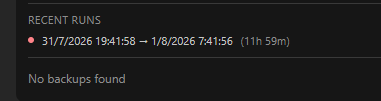 1 point
 -
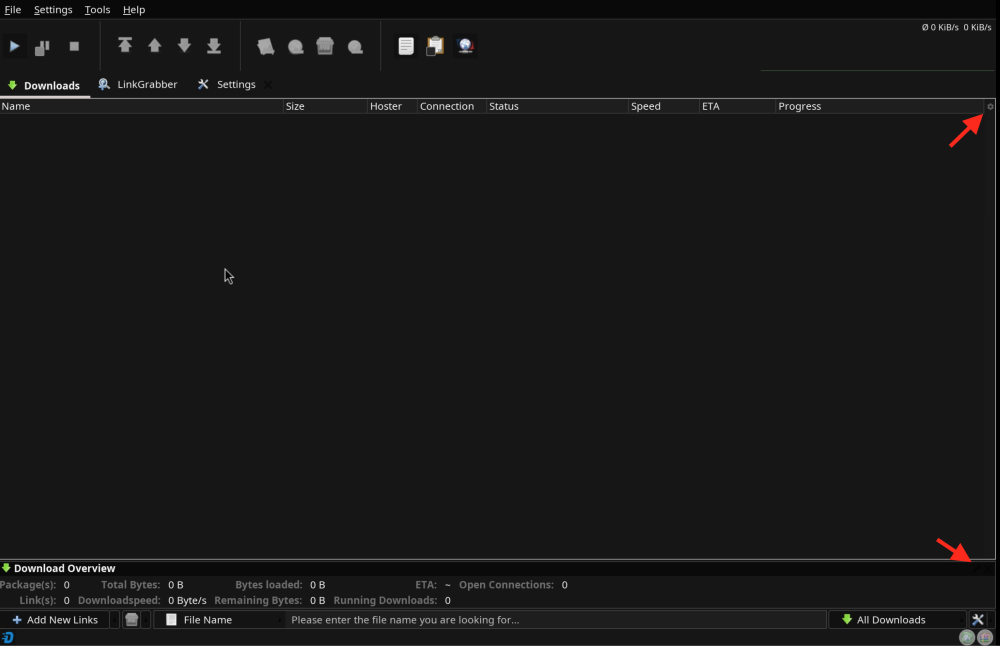
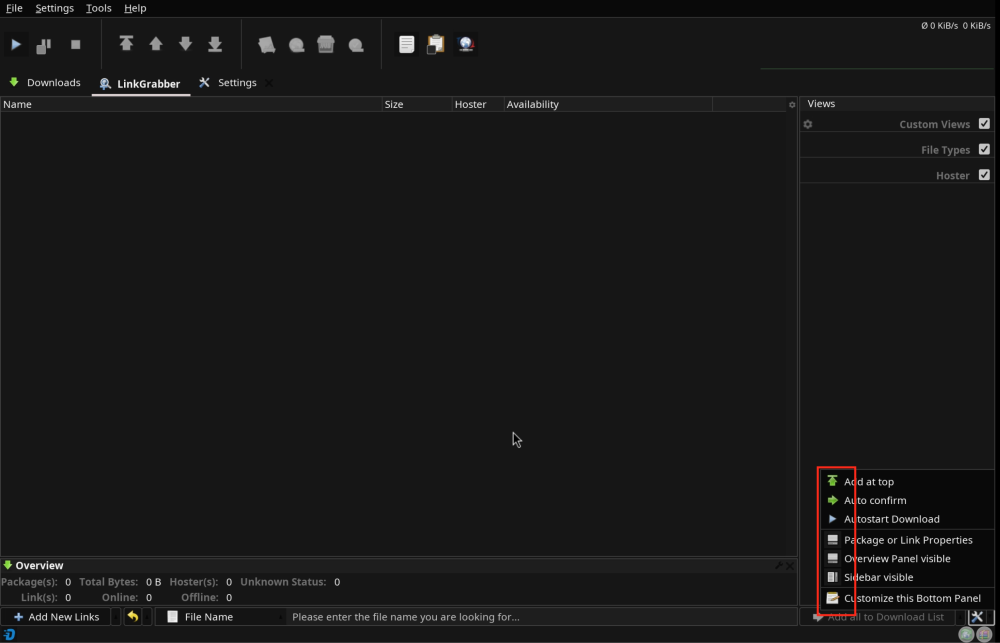
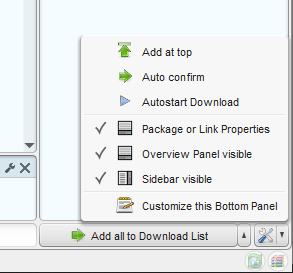
Many thanks, the JD_UI_SCALE is super useful. I set that to 2 and now I've a perfectly clear and defined text. I've never had a so cool looking JD 😎 I've just noticed other two little things; maybe have a look in your spare time, these are not issues just minor things: 1) The JD download tab has a bottom option panel that has a gear and a X in the right corner. Here it's missing, it should looks like the one on the upper corner, which frankly is not that visible either 😅 2) The linkgrabber tab has a settings menu in which the selections are not visible, if you compare it with a standard JD you'll get what I mean
 1 point
 -
I was able to find the main issue which was that after the update it automatically had the plugins still setup. The Intel GPU TOP plugin was installed and looked fine. But something was not. I uninstalled it and re-installed it and most of my errors have gone away. Still fighting a lockup but that was a big issue.1 point
-
I’ve been using BombVault for a while now and have been very happy with both its functionality and the frequency of updates so great work! That being said Is there currently a way to configure the order in which containers are stopped, backed up, and restarted to account for service dependencies? I know it uses a per-container option to stop other dependent containers during a backup, but I’m not sure whether that can also control the overall restart order or wait for a dependency to become healthy before continuing. In my case, Nextcloud was restarted 36 seconds before Pi-hole, and Authelia was restarted more than 12 minutes before Pi-hole. Both failed to start because pihole was not yet available and they remained stopped afterward. Authelia also protects my Pelican panel and Wings web endpoints, so its failure made the game-server management stack inaccessible until I manually started panel/wings some time later. Is there a way to set the startup order such as Pi-hole first, then wait for it to become healthy, followed by Authelia, Nextcloud, Pelican, and other dependent services? If not it would be extremely useful.1 point
-
I've bought way more of these than I need at the moment, but at the price it's a no brainer. I will say, seller typically auto accepts offers of $3.1 point
-
Thanks, I already got 2 and immediately formatted them to erase whatever was on them from LYTX. At $4, it was kind of hard to pass them up even with no immediate need. They appear to be solid units and will hopefully be good Unraid flash drive replacements if/when my current flash drives fail. All of them have been running multiple years without issue; perhaps that is just a sign they are due to fail soon. I am stubbornly resisting using an internal boot option.1 point
-
Update on the Innodisk 3ME USB flash drive on ebay. After appearing to sell out earlier yesterday the drive has been relisted. The seller has confirmed approximately 200 units remaining. At the current depletion pace -- accelerated by recent bulk orders -- this is the genuine final window. The last bulk order placed on July 22nd was for 171 unit. eBay item 327273841855 -- $3.99 per unit. For anyone who saw this thread and didn't act yet -- this is the last realistic opportunity.1 point
-
Clearing the secure boot keys was the issue, you don't want to do that.1 point
-
Okay I solved it. Before anyone is going crazy like me: 1: Unplug any boot device from your asrock motherboard 2: Reset secureboot to factory keys and set to disabled. It needs to say setup mode. NOT user mode. 3: Keep clearing until it hits and you can verify in bios. 4: Only then reattach your boot device and boot like normal. Nothing to do with your ssd/usb. Just secure boot being weird and having some suboptimal implantation on some systems.1 point
-
Since you don't want to use fTPM, your license needs to remain on a USB drive. When you migrate to internal boot the two Innodisk drives handle the boot function -- but the license anchor stays on a separate USB drive that must remain permanently connected. So your actual configuration will be three USB drives total -- two Innodisk drives in the mirrored boot pool plus your existing USB drive repurposed as a dedicated license anchor. On hardware portability -- when you move to new hardware you'll need to bring all three USB drives along with your array and cache drives. The license travels with the dedicated USB license drive, not with the boot pool drives. Worth considering an alternative -- a discrete dTPM module for your motherboard's TPM header (if available) typically costs $10-20 and eliminates the third USB drive requirement entirely while avoiding the fTPM vulnerabilities the guide covers. If your motherboard has a physical TPM header this is worth looking at before committing to the three USB drive approach but your future migration would be restricted by the TPM header availability on the new machine. Now to your specific questions: The mirror continues operating on the surviving drive after a failure and Unraid notifies you. Be aware of a documented in an NVMe configuration bug in 7.3.1 where replacing the failed mirror member can leave a stale device entry requiring a terminal zpool detach command to clean up. Supposedly fixed by now. For port selection -- USB 2.0 ports for all three drives. USB 3.x drives in USB 3.x ports generate more heat. Use your motherboard's internal USB 2.0 headers with 9-pin adapter cables. On the partition structure -- the boot partition is ZFS not BTRFS. 8GB minimum -- sufficient for boot but it's up to you which size to select. The remainder becomes the data partition if you choose to use it. The Innodisk drives are the right choice for this application -- but make sure you account for the third drive in your planning before purchasing. One final note: the mirrored USB boot pool is the least utilized and tested configuration among all available Unraid boot options. Real world deployments are rare and documented cases even rarer. I've documented it in the guide based on JorgeB's confirmation that it's supported, but I don't use this configuration myself and can't speak from personal experience. Proceed with that context in mind and make sure you have solid backups of your config folder before attempting the migration. One more thought on the redundancy goal specifically -- it's worth stepping back and evaluating whether the additional complexity of this setup is justified for your situation. A mirrored boot pool protects against a single drive failure. But Unraid's config folder backup -- which you should be maintaining regardless of boot configuration -- already provides recovery from a complete boot drive failure in minutes. The question is whether the seamless failover of a mirror justifies three USB drives, the barely tested configuration complexity, and the migration process compared to simply maintaining a current config backup and keeping a spare USB drive on hand. For some use cases the mirror makes sense. For others the simpler answer is a quality boot drive with a current backup. Worth thinking through before committing1 point
-
Fair question. The surplus origin isn't stated in the listing but it's inferable from several details. The drives carry LYTX DriveCam DVR-S70 custom branding -- LYTX is a commercial fleet dashcam company. Innodisk produces custom branded drives for OEM customers as a standard service. The drives arrive in individual anti-static bags which is Innodisk's factory new packaging. The iTracker output across tested units shows an erase count of 2 -- consistent with factory bench testing, not field deployment. The most likely scenario: LYTX transitioned to a different drive format for their DriveCam systems. The remaining inventory of custom branded Innodisk units had no further use to them and entered the secondary market through this eBay seller. The seller's other listings confirm the pattern -- they specialize in surplus industrial and laboratory equipment including Watlow process controllers, Laurel panel meters, and LabJack data acquisition hardware. This is an industrial surplus liquidation seller, not a consumer electronics reseller. None of this is stated explicitly in the listing -- it's assembled from the available evidence. But the combination of OEM branding, specific factory packaging, factory-baseline iTracker readings, and the seller's overall inventory profile makes the surplus origin the most coherent explanation by a significant margin.1 point