ConnerVT
Members
-
Joined
-
Last visited
Everything posted by ConnerVT
-
Try setting Enhanced macOS interoperability to No, if it isn't already (Settings > SMB Settings)
-
I would start by posting your Diagnostics in your next post. You should then run extended SMART. The problem being, the issue could be any of the drives in your array. Hopefully there is something in the logs that helps narrow down which drive is the problem.
-
You could free up some space on your flash drive if you don't keep 3 copies of everything. 😄
-
There are already a number of turnkey-like NAS solutions on the market - Synology, QNAP, Asustor, and many more. Already configured, plug them in and go. But you are in a walled garden environment - You can do what they allow you to do, with the things they give you. Unraid is an operating system designed around NAS activities, with virtual machines and Docker containerization support. A completely different product, in a completely different market. When Limetech first started, they were building servers for sale. Quickly decided that wasn't where they wanted to be. In 2026, the absolutely worst place to be is in the consumer computer hardware market.
-
My parity checks run on average around 180MB/s. The array is a mix of 18TB and 16TB drives. If you have some smaller capacity drives in your array, 143MB/s seems very reasonable.
-
Your DRAM is clocked way too fast. Refer the the FAQ that JorgeB referred to earlier.
-
Used T400 are available on eBay for as low as $50USD. I recently bought a new A400 for $180, delivered. Replaced a P400. Figure I'm good for several years now. There really isn't anything a GT730 can be used for anymore. Even Win10 required a GT740 as the minimum GPU it would support.
-
Frank1940 is correct. If the server is in an unsecured location, there is not much you can do to eliminate risk. Locks only work to deter honest people. Be it on a flash drive or a SSD/HD, there will still be a need to have a bootable partition free of encryption, at least until the system is able to handle encrypted data. If devices are in an area which isn't secure, it allows someone time to do as they wish, copy what they want, and develop a way to circumvent any security measures you may have implemented.
-
Is it yellow? If so, lick it. If it taste sour, it is probably a lemon. Sorry. Sometimes I just can't help myself. 😆
-
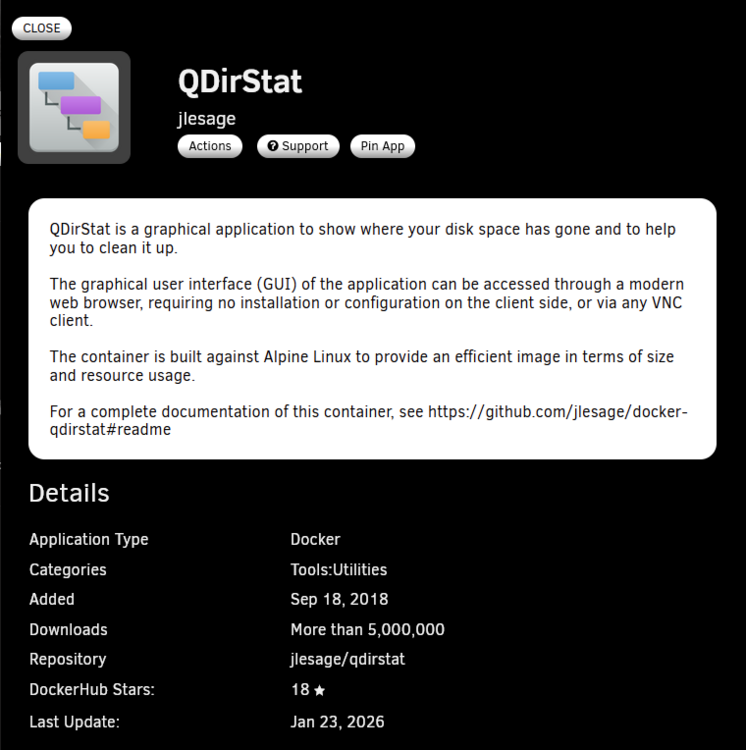
If you just want to visualize your file system, this is a good utility:
-
As long as the hardware running Proxmox you should be fine, as far as drive file access speed. You didn't mention your network, which is where there is more potential for bottlenecks than the drives. I like having the media, media server and transcoding hardware all in one system, so the only data that needs to move is heading outbound from that system.
-
I hope you meant 100-150 MB/s. Unless you are streaming 4K media with insanely high fps rates, streaming 2 or 3 media files should not be an issue, assuming Jellyfin is running on the same server and your hardware is relatively modern and adequate.
-
Set your memory speed in BIOS to 3200 (not 3600). The TeamGroup memory is likely Dual Bank, while not called out specifically for Zen3, has always been less stable than Single Bank in earlier Ryzen CPUs. From Unraid FAQ for Zen3:
-
Currently you cannot boot Unraid from a SSD drive, only from a USB flash drive. Typically USB to SATA/NVME adapters do not provide a unique GUID identifier, which is part of the equation that verifies you have a valid license. You can use the SSD in a pool, where it is a good choice for putting your Docker image (where the docker programs reside) and your Docker appdata (where the docker settings and other support files are stored).
-
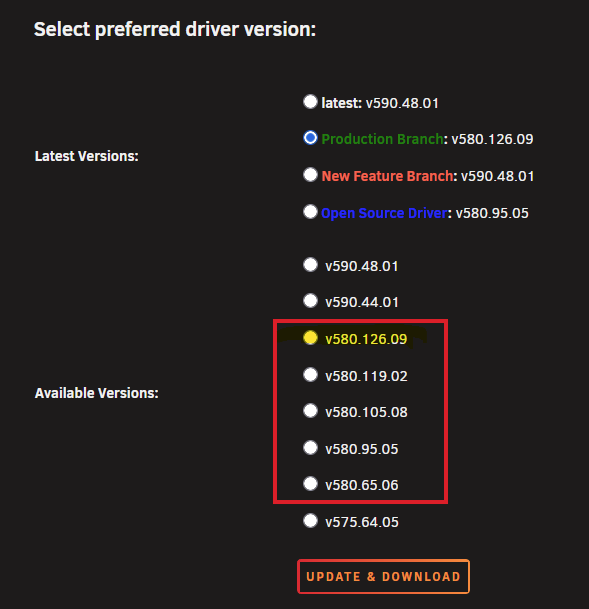
Personally, I liked the lull in releases. Finally updated to 7.2.3 this morning.Correct. The same is true in CMOS logic semiconductors as well. In planer logic, the node corresponded with an actual physical dimension of a transistor. Starting with 14nm, the industry moved from planer to FinFET, a 3D modeled transistor. The node then became a marketing tool, where they state what the theoretical size of a 2D planer chip would be for equivalent performance. And as the marketing departments tend to do, they one-upsmanship the competition. TSMC's 14nm was basically the same dimensions as Intel's 16nm. 🤫I (and others) over the years have seen Unraid not boot unless a monitor is plugged into a Nvidia card. Simple solution is to use a DisplayPort dummy plug. Less than $10 on Amazon.I'll give my input here, as ich777 is offline and it is after midnight at his house. I gave a short answer earlier, as I was unsure of the current behavior of the plugin code. If you scroll through the past few pages of this thread, you will see a number of people having issues after updating their driver after removed support for the Pascal cards in the 590.xx.xx drivers. ich777's response made it more clear how the plugin is handling it. I would proceed like this: Select your current version (v580.82.09) in the Available Versions area of the Nvidia plugin (not Latest v580.82.09). Click UPDATE and DOWNLOAD. The plugin will check, see that it is already installed, and quickly give you the Done button. You can now update the Unraid OS During the Unraid update, there is a Nvidia helper program that checks if an Nvidia driver is installed, and updates it if the driver version currently installed is one that is available for the Unraid version you are upgrading to (ich777 needs to recompile drivers for each kernel that Unraid uses). If the driver version is not available for that kernel, it updates to one that is. In the past, it updated to the "Latest" version. Worked great for a long time. Then things got funny. The latest RTX 5xxx GPUs require the open source drivers. The Pascal cards now only work with the 580.xx.xx (and older) drivers. Looks as ich777 now added additional checks, so if you are on a 580.xx.xx driver, it will only update to the latest version of 580.xx.xx (and not 590.xx.xx, which won't work for the Quadro Pxxxx GPUs). I think an Available Version is a good safety net to prevent accidentally finding yourself on a 590.xx.xx version after unthinkingly updating. You also may want to start thinking about updating to a newer GPU. I recently replaced my Quadro P400 with a RTX A400. The P400 will probably be supported for a year or more, but its time is running out. Eventually there won't be a diver that supports the card that can be compiled against a future Unraid kernel, or a change to the runtime code used in Docker containers may require a later Nvidia driver version.If you are still using the Quadro P2000 you will want to stay on 580.xx.xx. Nvidia has obsoleted the Pascal based cards and is removing support for them from 590.xx.xx. Best to manually select a 580.xx.xx version (latest one is fine).
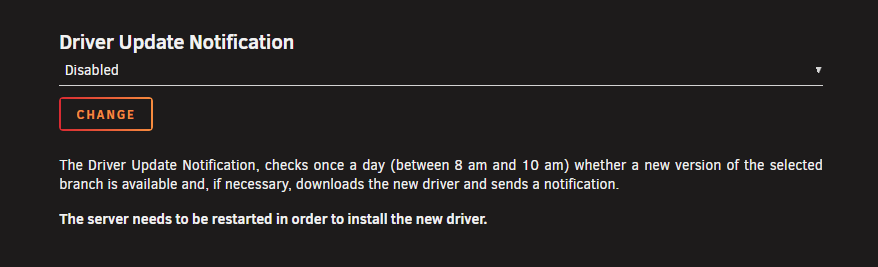
 Another option you can take is to preemptively replace the parity drive with a larger one, then put the removed drive in a drawer as a cold spare. You then won't be worrying and scurrying when you have a drive fail.Here. If Enabled, will download the latest driver version and send a notification. When rebooted, the new driver takes affect.
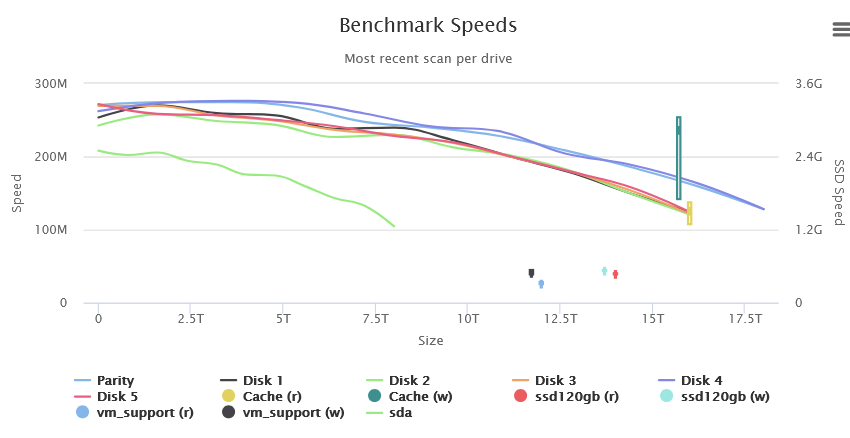
 This message means that Plex did not find a USB TV Tuner device. 99%+ of all Plex users in the world have this in their log. It can be ignored.Yes, this is the typical write speed to a parity enabled Array. Each write requires a read of the data drive being written and the parity drive(s), a parity calculation, then a write to the data drive and parity drives(s). If you have a cache set up for the Share being written, it does "speed up" the write access time - But just to make your "While you wait" at the keyboard time go more quickly. The write speed will be the same when the Mover transfers the data from Cache -> Array.Assuming all drives are functioning correctly, the 40 hour parity rebuild is due to the small capacity drives. A spinning hard drive's access time is at it's fasted when accessing its first sector, and its slowest accessing the last. The difference is approximately 50% slower. The parity rebuild can only run as fast as the slowest drive in the array, at the sector which is being read at at hat time. So let's use an example that is a bit simpler than your server - 3 drives, a 8TB, 4TB and 2TB. I'll assume that all have identical access times (which in real life, won't be true, as the smaller drives typically are older technology and are slower at both first and last sector). Let's say 200MB/s to start, 100MB/s at last sector. At starting the parity check, speeds are at 200MB/s. At 1TB done, the 2TB drive is at 150MB/s. Just before 2TB, at 100MB/s. (An 8TB drive would be capable of 175 and 150MB/s respectively) Once past 2TB, the speed will jump back up to 150MB/s, as the 2TB drive is now idle. It will work its way back down to 100MB/s at the 4TB mark. Now just 8TB drives are being red, so speeds again jump to 150MB/s, ramping down to 100MB/s until the parity is completed. As your server now is just a Proof Of Concept test, these old drives are fine to do your testing with. Ideally, a smaller number of larger capacity drives are a better choice, as you benefit from faster access speeds, lower power consumption and less things to go wrong or fail. My main server has 18TB and 16TB drives. My parity checks, run quarterly, average 185MB/s and run for just under 27 hours. The image is a screenshot from the DiskSpeed docker, available on Community Applications. It is a great benchmark/diagnostic tool to see the performance of your drives. Oh... And welcome to Unraid.