Leaderboard




Popular Content
Showing content with the highest reputation since 10/18/26 in all areas
-
8 pointsUnraid OS 7.3.4 is now available. This release includes WebGUI security fixes, updates the Linux kernel to 6.18.58, and fixes Docker icon handling and File Manager operations. It also includes PHP 8.4.27, which patches CVE-2026-109618 and CVE-2026-109619, a pair of critical (CVSS 9.2) unauthenticated remote code execution vulnerabilities in PHP. All users are encouraged to update. For step-by-step instructions, see Updating Unraid. HighlightsSecurity PHP 8.4.27 patches CVE-2026-109618 and CVE-2026-109619, critical (CVSS 9.2) unauthenticated remote code execution vulnerabilities WebGUI security fixes Updated packages with CVE remediations, including curl (21 CVEs), OpenSSL (13 CVEs), xorg-server (11 CVEs), libXi (8 CVEs), libX11, libXtst, libXpm, libXrender, libpng, and nginx; openssh and libarchive also receive security fixes Linux Kernel Update to 6.18.58-Unraid Containers / Docker Fix: Docker icon handling Storage Fix: File Manager operations Base Distro 44 packages updated Links Release Notes Updating Unraid8 points
-
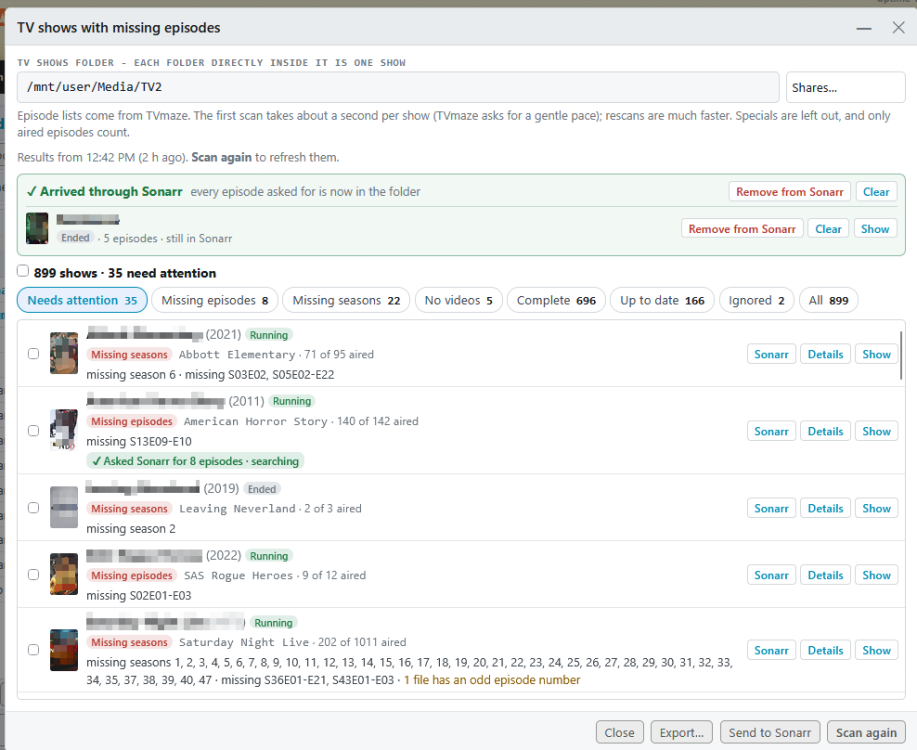
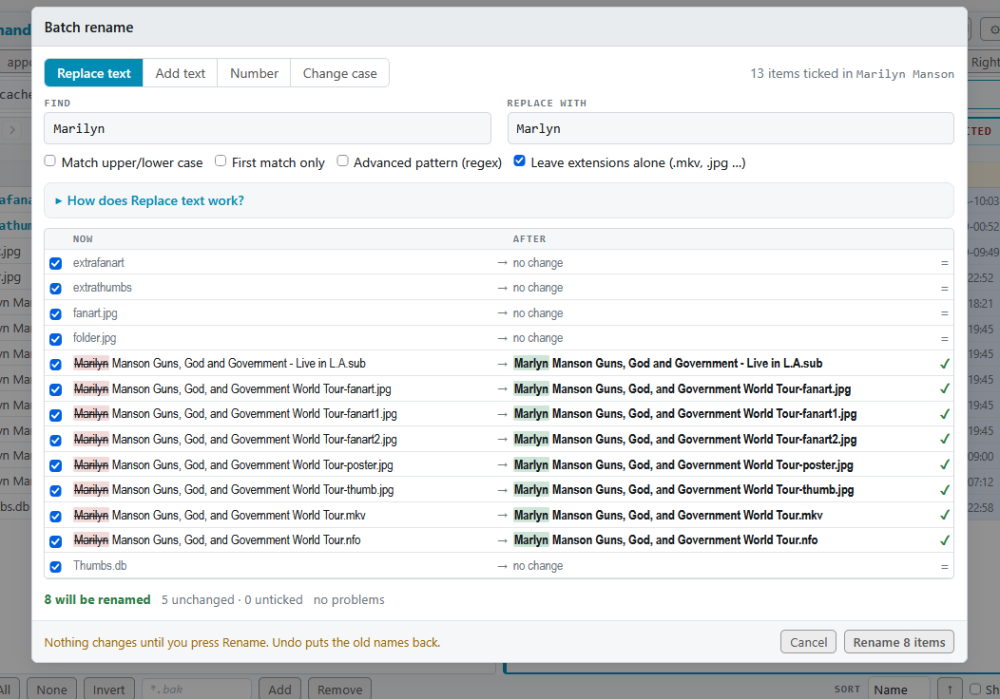
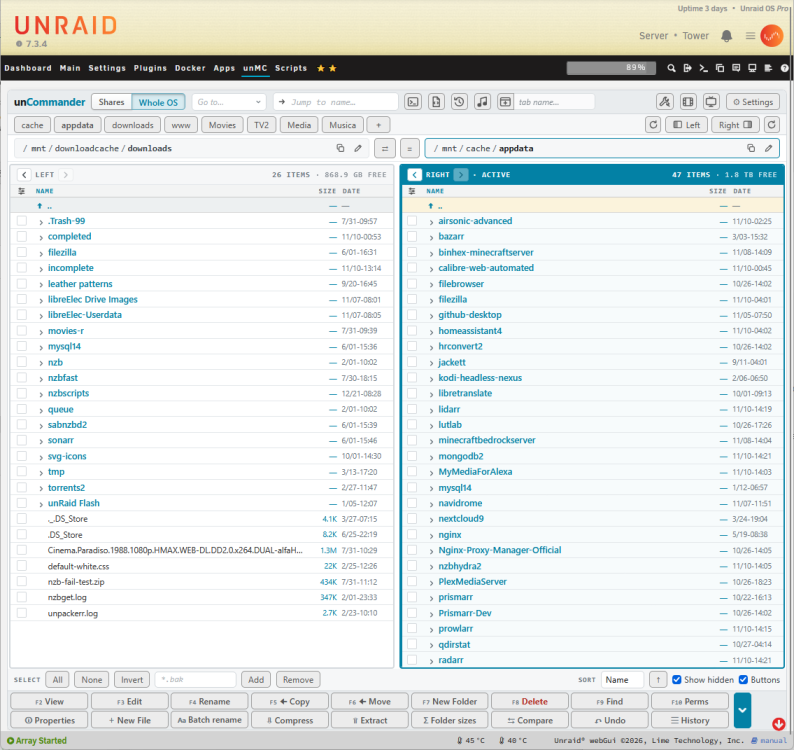
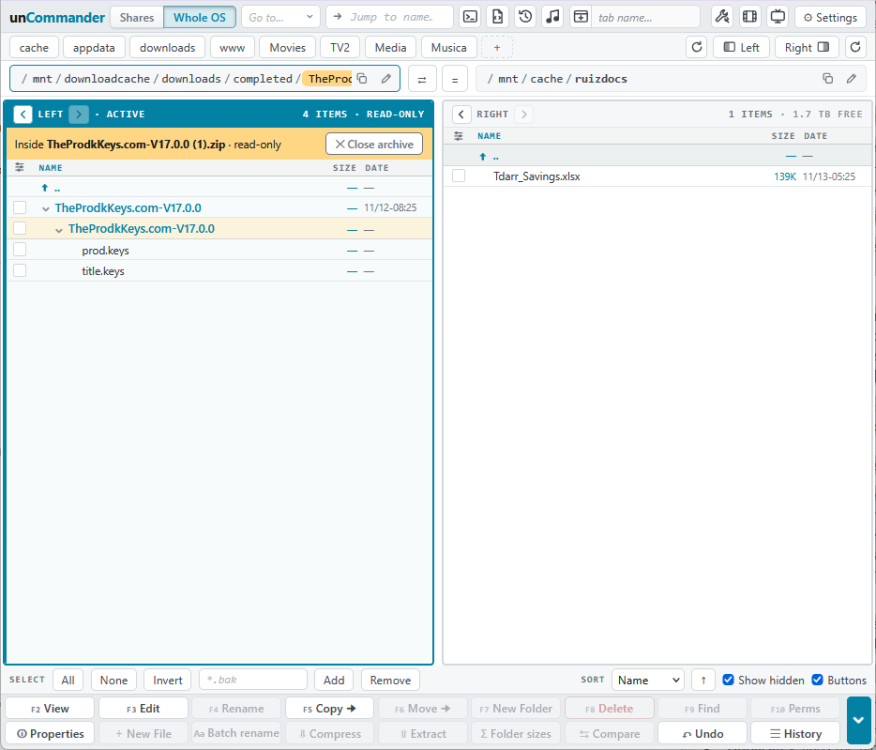
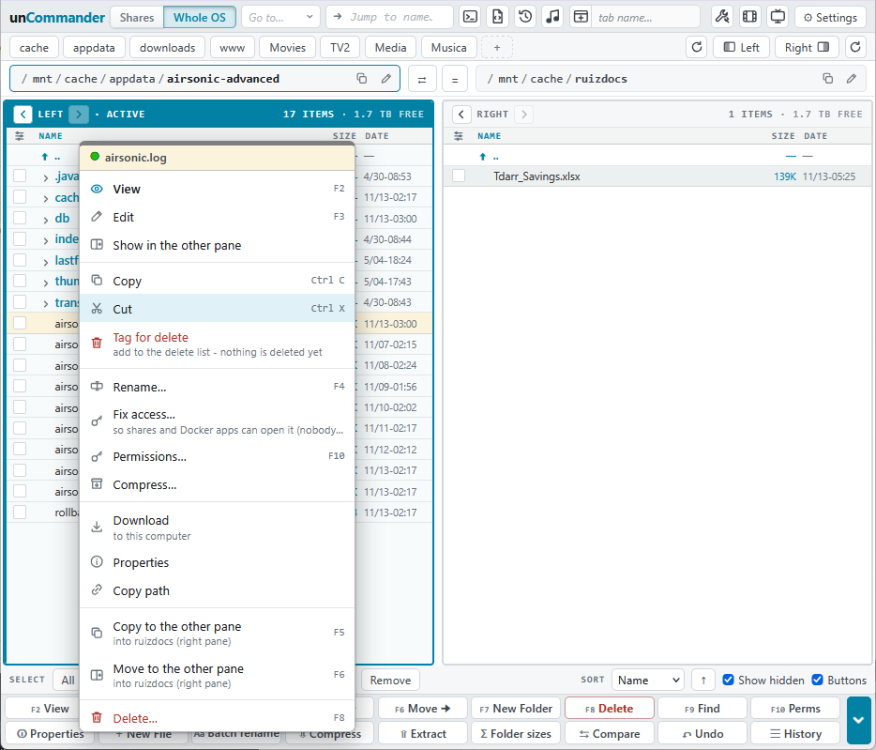
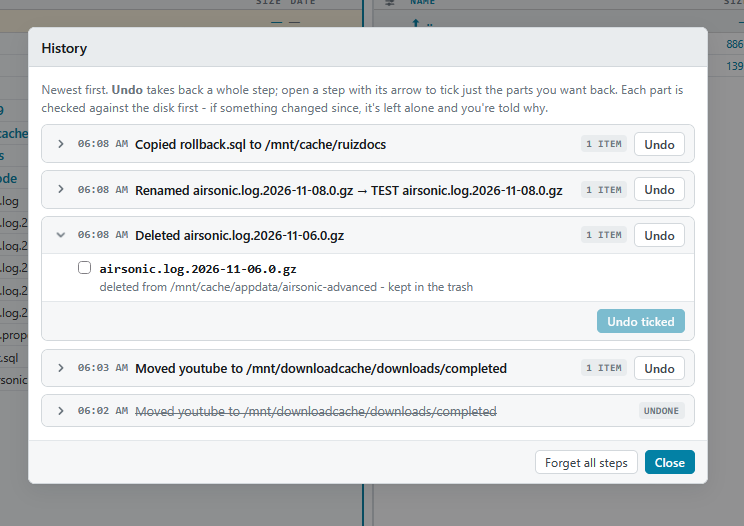
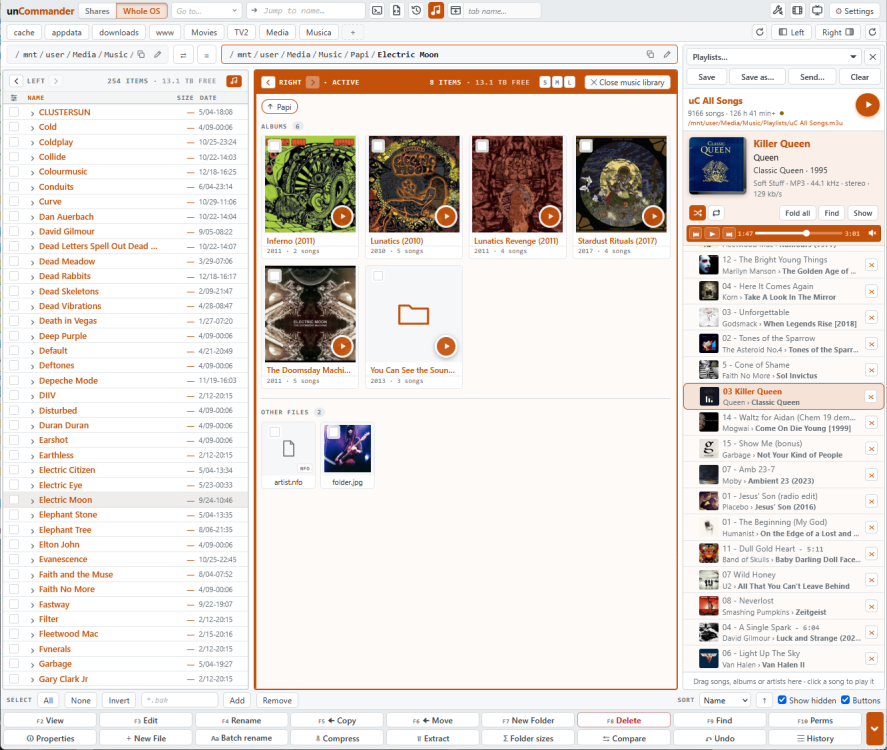
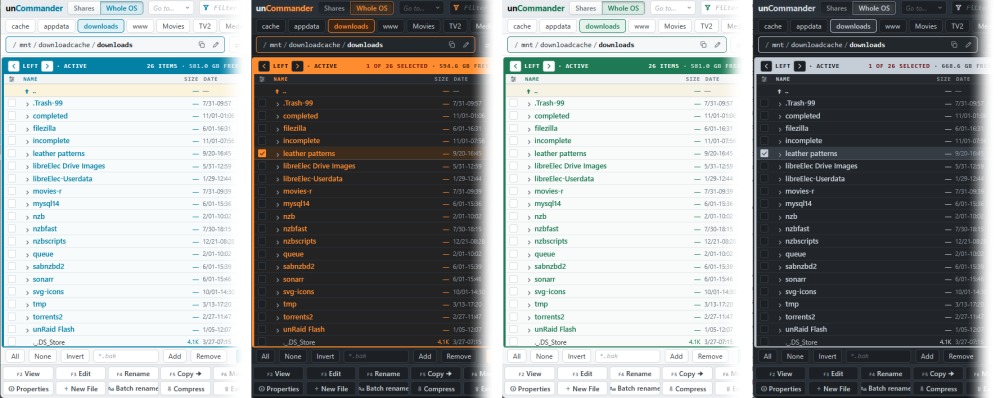
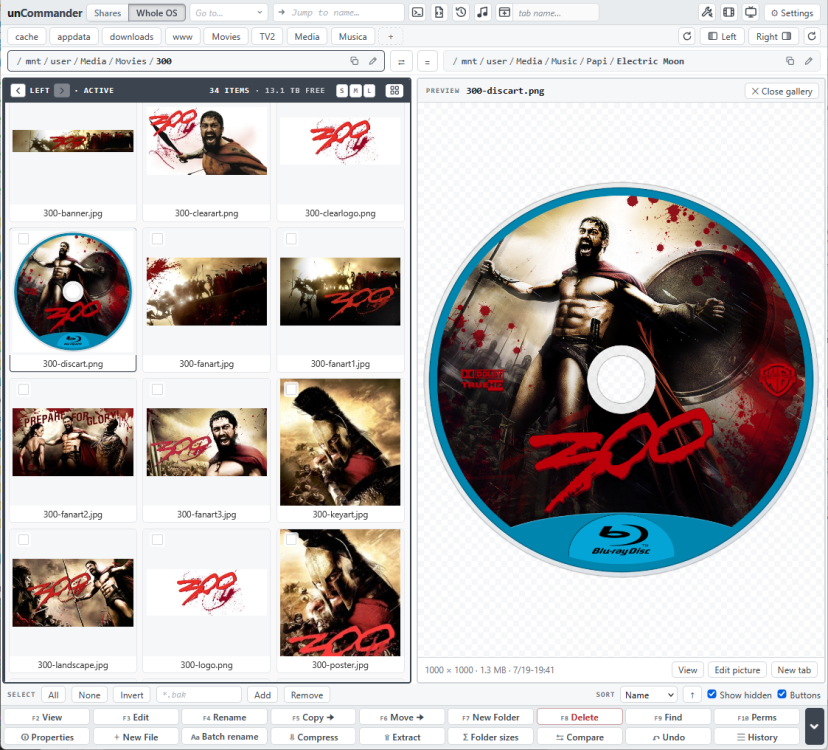
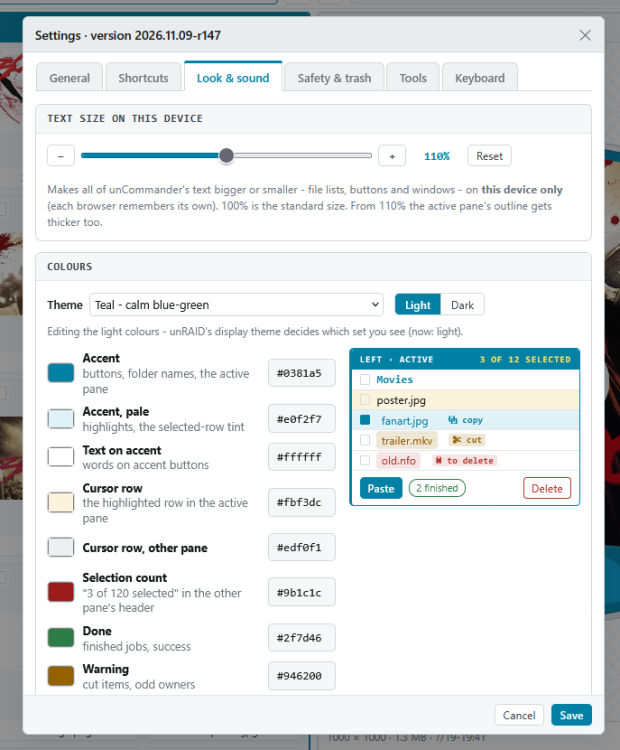
Hi everyone, I've used Midnight Commander on my servers for well over a decade, and I always missed it when I was on the unRAID web UI - especially on my iPad. So I built: A FAST proper two-pane file manager that lives in its own tab of the unRAID menu bar. Two folders side by side. Pick files on one side, press Copy or Move, and they go to the other side. If you know Midnight Commander, Norton Commander or Total Commander you'll feel at home straight away - F5 copies, F6 moves, Tab switches panes, Insert ticks. If you don't, everything also has a button, and it works great with a finger on a tablet. Made with Claude AI WHAT IT DOES File management - Copy, move, rename, new folder, delete, permissions and find - with F-keys, buttons or taps - Copies and moves run as background jobs with progress - close the tab and they keep going, and you get a notification when they finish - Delete goes to a trash on the same share or disk; Restore puts things back where they came from (or delete for good when you want the space now) - Undo for rename, move, delete, new folder and even copies - Before anything is overwritten you see a list, and the old versions are kept in the trash - Batch rename with a live before/after preview - all-or-nothing, with one Undo - Compress to .zip / .tar.gz; extract .zip, .rar (incl. RAR5), .7z, .tar.gz and more - Folder sizes in the background, and Compare two folders (including subfolders) - Viewer and editor for config files, scripts, compose files, logs, .nfo and more, with colour highlighting; picture and PDF viewer - Disk column: see which disk(s) or pool a file in /mnt/user really lives on - Copy/move guard: it refuses things that would destroy data, like copying a disk folder onto the same folder in its share Made for unRAID - Starts at /mnt: shares, every disk and pool, Unassigned Devices, plus /boot - Optional "Whole OS" view: one tap and the top becomes / - /boot, /etc, /var, /tmp and the rest, just like MC on the console (switch it on in Settings first) - Practice mode for learning without risk - anything that could change your files is locked - Optional auto-refresh when other programs change a folder Media tools (Settings > Tools, or the little film / TV buttons next to Settings) - Empty folders on disks - finds the leftover empty folders Unraid's share view hides, and removes them safely - Movie folders without a video - folders with only posters, .nfo files or a sample left. Send them back to Radarr to download again into the same folder - TV shows with missing episodes - checks every show folder against its episode list on TVmaze (no account or key needed) and shows exactly what's missing, season by season. Shows numbered differently from TVmaze are checked against Sonarr's numbering, and a "What's wrong" box explains anything odd in plain words - Sonarr integration - get a show's missing episodes (or one season) with one tap. Shows Sonarr doesn't have are added with their existing folder and only the missing episodes are wanted; whole missing seasons are also searched as season packs. If Sonarr downloads something but won't import it ("matched to series by ID"), unCommander can import it for you Make it yours - Text size per device - bigger text on the desktop, normal on the iPad, without zooming the rest of unRAID - A Midnight Commander theme: blue panels, cyan bars, yellow ticked files - Your own CSS with live preview and a colour picker, sounds, shortcut buttons for your favourite folders, and you can rename the menu tab - All keyboard shortcuts are listed in Settings > Keyboard See more screenshots at my GitHub Repository NEW FEATURES ADDED: 11/13/2026 - Please see this post for the largest update to date: 11/17/2026 - Update: What’s new in 2026.11.14 Profiles: save what both panes show (folders, sort, hidden files, columns, list or Gallery, open tree folders, ticks, filter, even the music library view and the player) under a name, and bring it back with one click from the box next to the New tab button. A dot shows when you’ve changed something since. New tab, New window and the tab row’s + (right-click) can start with a profile. Settings > Profiles renames, reorders and removes them. Kept on the server, so every browser has them. RAW photos: Fuji RAF, Nikon NEF, Canon CR2/CR3, Sony ARW, DNG, Olympus, Panasonic, Pentax and Samsung open in the viewer and Gallery, using the camera’s own preview inside the file. Right-click > Save as JPG. RAW files are never changed, and there’s nothing to install. Photo details: camera, lens, shutter, aperture, ISO, focal length, date taken and size, plus where it was taken with a Google Maps link when the photo has GPS. Shown beside the picture in the viewer, and beside or under it in the Gallery preview (a Details tick box hides them). A bigger picture viewer that fills the window, with ‹ › arrows over the picture. Gallery, reworked: drag the line between the panes to make the preview bigger; cards keep their S/M/L size and wrap, and a narrow gallery turns into the normal file list; ‹ › over the preview; folders show a fan of the pictures inside them, with a count of what’s in the folder; Gallery turns itself off when you leave the folder you started it in. Batch rename: save rules you use often and pick them again later; each box remembers what you renamed with recently; a Regex cheat sheet with ready-made patterns to click; accented names (é, í…) match however the file spells them. Links: right-click > Link in the other pane makes hard links (files or whole folders, checked to stay on one disk or pool) or symbolic links. Undo removes them. Files with more than one hard link show a 🔗 badge with the count; symbolic links show a “link” badge. New themes: Mist (soft grey with a little steel blue) and unRAID orange with a grey frame. Norton is softer and more modern (pick it again to get the new colours). Open in a new tab: Settings > General can make unCommander’s entry in unRAID’s top menu open it in a new browser tab, with or without unRAID’s menu. Intel/AMD graphics: if unRAID lacks the VA-API drivers, Settings says so and videos use the CPU. No more ffmpeg error. Settings > About now links to the User Guide, and the playlist folders box says “Enter path here…”. INSTALL We are now listed in Community Apps. - Apps tab: search for "unCommander" and click Install, or Manual Install - Plugins > Install Plugin, and paste: https://raw.githubusercontent.com/hernandito/unCommander/main/uncommander.plg Then reload the page - unCommander appears in the menu bar. Requires unRAID 6.12 or newer. Your settings are kept on the flash drive (/boot/config/plugins/uncommander). Removing the plugin leaves them, and any trash folders, in place. GOOD TO KNOW - Nothing runs in the background unless you start it, and the tools only read your files until you choose to change something - The TV tool uses TVmaze's free public API, politely paced - 7-Zip (for .rar and .7z) is downloaded once at install from the official 7-Zip releases, checksum-checked, and kept inside the plugin's own folder LINKS - GitHub (source, full user guide, issues): https://github.com/hernandito/unCommander - User guide: https://github.com/hernandito/unCommander/blob/main/docs/USER-GUIDE.md This is the first public release, so I'd love to hear how it works for you - bugs, ideas and screenshots of your setups are all welcome in this thread or on GitHub. Enjoy!

 4 points
-
4 pointsThis should have been merged. GitHubfix(docker): use resolved manifest URL for update checks...With recent unraid updates, docker update checks for lscr.io images showed up as "not available". This seems due to lscr.io redirecting to ghcr.io and this caused part of the authorizatio... Expect questions about why all containers using lsio will show "not available" ("fix" by switching lscr.io to ghcr.io in the repository url for now). Maybe put in known issues for the release. Edit: Preview for the PR I mentioned can now be installed as plugin until next release: https://github.com/unraid/webgui/pull/2786#issuecomment-68052578524 points
-
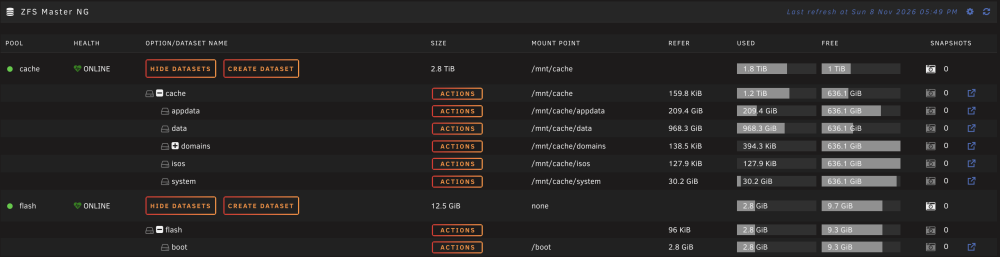
4 pointsI’m not sure if anyone is interested but I built on dlangs fork to try keep the ZFS Master ongoing. It appears on the Main tab the same and the menus are similar. This will install over the top of dlangs or Ikers version. I do want to say thankyou to d3m3z for ZFS Director but I imagine this plugin will become a thing of the past once Unraid 8 comes along and I just wanted something to get me through to then. I’ve tried to keep it nice and basic. I think it takes a few weeks to get into the CA and I’ll start that process sometime next week once I’ve built a main/stable release. Note: The current beta is pretty well tested and stable but I’d appreciate some feedback before it goes to main. Also, some features are not available on Unraid installs pre Unraid 7.0. https://raw.githubusercontent.com/chodeus/ZFS-Master-NG/beta/zfs.master.plg https://github.com/chodeus/ZFS-Master-NG New: Rewrite Files (Unraid 7.3+) rewrites a dataset's files in the background, so new compression or checksum settings apply. Convert clones files where the pool supports it, which is faster and takes no extra space. It also reviews before converting. You can browse a snapshot's files, or see what changed since it. Snapshots Admin filters, sorts and can include child datasets' snapshots. Destroy, rollback and bulk delete show everything first, flagging Sanoid/Syncoid snapshots and the boot pool. "Dataset is busy" names the container or process using it. Optional alerts for pool health problems and stale snapshots. Snapshot names can use UTC time. Everything works from the keyboard, dialogs follow every Unraid theme, and settings have tooltips. Admin actions go to the system log. It installs over either upstream versions of ZFS Master and keeps your settings, and supports Unraid 6.9.2+. Issues from upstream resolved: Compress Ratio showed 0.01 for every dataset. Notifications showed HTML tags in Discord and email. Convert lost hardlinks and ACLs. Shares and datasets with spaces in their names couldn't be managed or converted. A ZFS stuck in the kernel could hang the page despite the time limit. A failed upgrade could break the plugin, and the old background daemon came back on page load. It changed other Main-tab plugins' requests. One pool's unreadable snapshots blanked every pool. Saving settings on a full flash drive lost them, and adding or removing a directory listing dropped the others. Forced delete and convert didn't check for mounts inside the folder. And I’ve got some more features in the pipeline. Just attached a picture of the Main page and the settings page but all the sub menus have had updates too. Snapshot admin, snapshot viewer
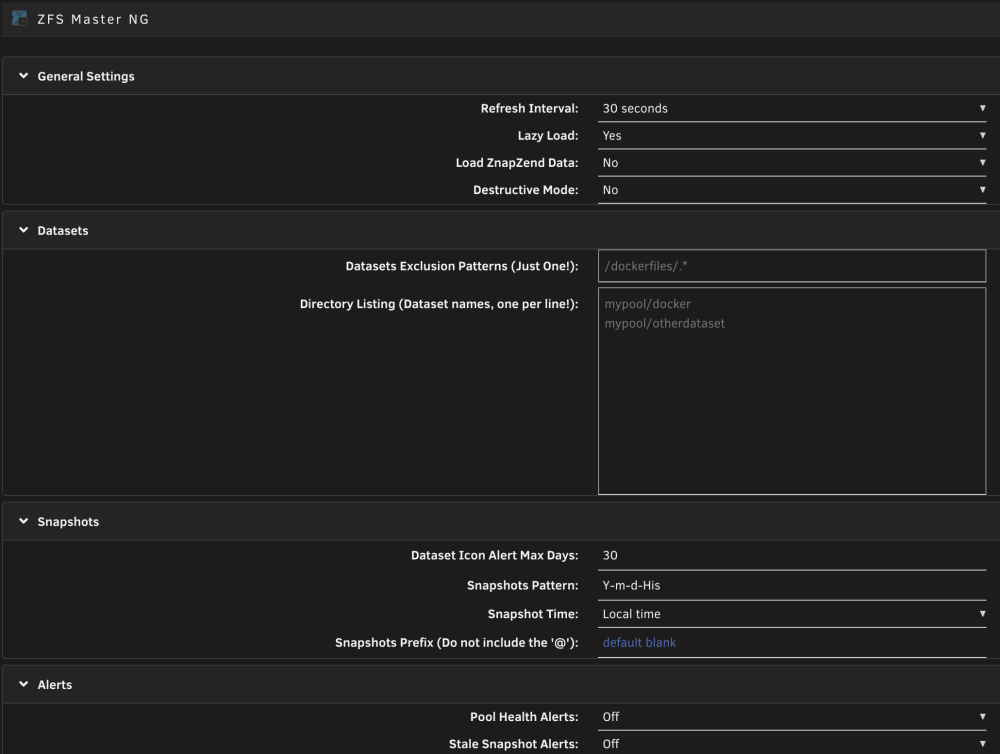
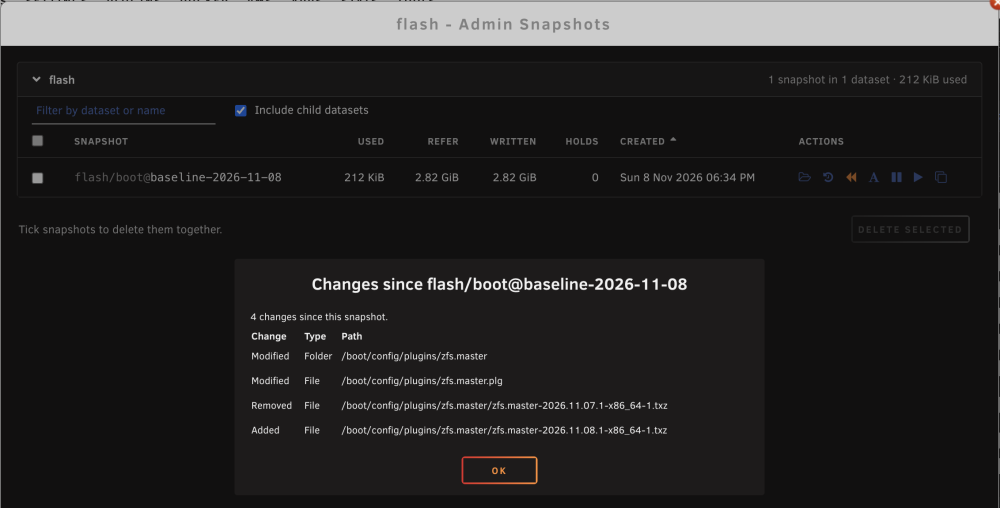 4 points
-
4 pointsI'm happy to deprecate my plugin in favor of @dcoulson 's NUT fork so new installations will be steered toward that. Existing installations would have to uninstall my version and then install their version as there's no clean way to port users over. Right now it's not available on CA yet, but once it's there I'd appreciate a ping and I can set my plugin to deprecated (which will otherwise happen latest on 30/11/2026 as announced).4 points
-
4 pointsMultiple arrays: a working proof of concept Multiple arrays turned out to be within easy reach, so I built a proof of concept to show how little is actually needed. It is meant as a demonstration for Limetech and anyone curious, not as something to run on your server. Please don't install this on a production server. It loads its own copies of the parity driver and has only been tested in a VM. Use a test box or a VM with disks you don't care about. The goal is to show that proper built-in support is close, not to replace it. Why it's simpler than it sounds Each array is already a self-contained unit, so a second array just needs a second copy of the same stack: - Parity driver: one more copy of Unraid's own md driver per extra array, under its own name (a ~200-line rename patch). - Array management, user shares, mover: unchanged. Each extra array runs Unraid's own components with its own config, state and /mnt. - Main tab: Main2, Main3 … are generated from the stock Main page of the running Unraid version, so they look and work the same (Start/Stop, Check, Spin up/down, live stats). - Disks: Settings › Multi Arrays has a pinning grid, same idea as CPU Pinning: each disk belongs to one array, and an array only sees its own disks. Hot-plugged disks show up on their own. No Unraid file is modified and the whole thing is under 800 lines. The arrays never need to talk to each other; moving data between them is just a copy from one mount to another. To make the GUI side even easier to adopt, I've opened a pull request on the webGUI that lets the stock Main page sections take an array number instead of assuming a single array (no change for existing setups): https://github.com/unraid/webgui/pull/2813 What was tested (Unraid 7.3.4 in a VM, three arrays running at once): parallel parity syncs and checks (0 errors), a pulled disk with emulated reads and a rebuild, start/stop of the main array taking the others along, and install/upgrade/removal. What a proof of concept leaves out: share export (SMB/NFS) and scheduled jobs for the extra arrays, per-disk pages and parity history on the extra tabs, and a driver build for every kernel. All of that is ordinary work once it lives inside Unraid itself. Why now, and not wait for Unraid 8 @tjb_altf4 asked whether multiple arrays will still come in the 7 series or move to Unraid 8. Unraid 8 was announced in August without a release date, and moving to a new base OS is a big job of its own, so my estimate is that it is well over a year away. And a release date is not the date people can use it: nobody moves a multi-TB production server to a new base OS on day one. Most will wait for it to settle, and for the whole ecosystem built up over the 6 and 7 series, every plugin and every App (container template), to be ported and field-tested on the new base. That adds many months more. Plenty of servers are still on 6 today, simply because their owners have had no real reason to change, and a new base OS alone won't give them one. Multiple arrays were promised for the 7 series, and this shows they fit there: nothing in this approach depends on the base OS, so the same design carries straight over to Unraid 8 afterwards. Carrying the arrays themselves from 7 to 8 is just as simple. Unraid 8 will read the same on-disk format and use the same methods as 7, because otherwise nobody could upgrade: nobody is going to be asked to convert multi-TB arrays. An extra array is exactly that format (the same parity layout and the same disk filesystems), with its own config folder on the flash. So Unraid 8 will support it natively from day one. And even if Unraid 8 shipped with no multi-array support at all, upgrading a multi-array server would still just work: the main array is untouched by all this and starts as usual, and the extra arrays simply sit idle as unassigned disks with their data and parity intact, waiting for the logic to arrive. That is how native this is: nothing about the main array or the disk format changes. (The one rule while they wait: don't assign or format those disks elsewhere.) The only thing that decides whether multiple arrays are there is whether the logic is included in Limetech's code, and that logic can go into the 7 series today. For everyone who has asked for this over the years: @Lolight @my.name.jeff @Raki72 @hawihoney @marcelunraid @niteman1969 @Gabcraftia @jcm808 @I Enjoy Creating Videos @PeterDB@Jerky_san @swamiforlife @Rudder2 @jortan @XDUDE3D @Maximus01701 @aglyons @StancuFlorin @PiMan314159265 Disclaimer: Multi Arrays is an independent project, not made or supported by Lime Technology. Neither its author nor Lime Technology takes any responsibility for any results caused by this plugin or its implementation. It is a proof of concept, meant only to show how simple support for multiple arrays could be. If that doesn't sit well with you, wait for the official support for multiple arrays in Unraid.4 points
-
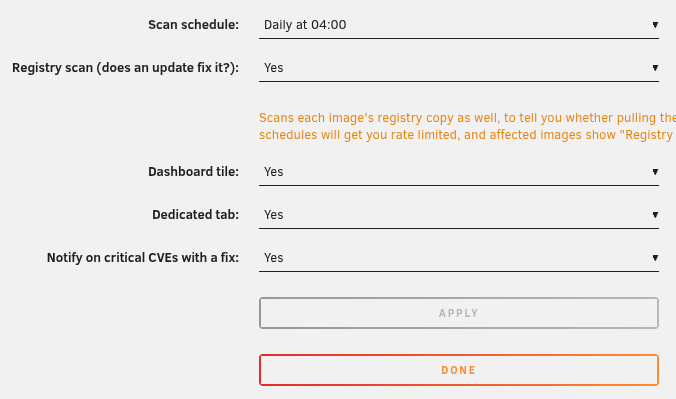
4 pointsGood callout. Instead of doing this for a single vulnerability/image/package -- I went ahead and vibe coded a plugin using claude that employs Trivy to scan for all CVEs in your docker environment, per-package-per-image-per-container. The numbers get quite alarming, but it does give good visibility to the landscape. I also added pagination and collapsible sections to the report view, a dashboard card, and rudimentary progress output. There's also the ability to toggle off CVEs which have no fix available to help filter out noise. This obviously doesn't address the concern you've raised about "who is managing these potential threat vectors" but it does provide an easy way for users to see what they are exposed to and make intelligent decisions based on that information. I've attached it here and can provide source if there's interest. I don't have bandwidth to maintain something like this due to my day-to-day obligations. trivy-scan.plg
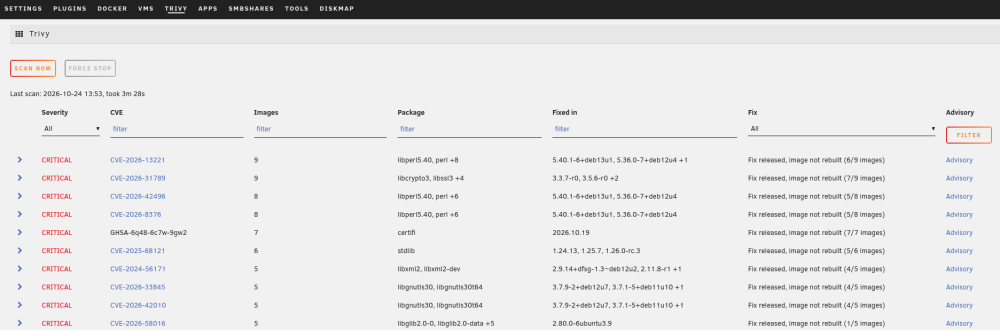
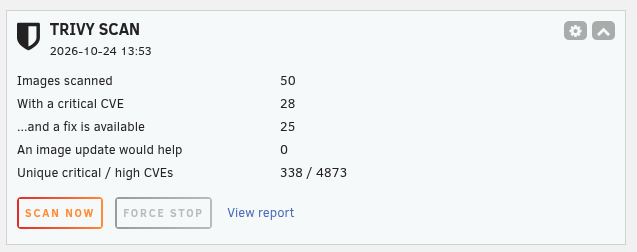
 4 points
-
4 pointsWhile I do not need it, I like that you release it. Thank you for the effort. (Interesting that there is only silence from all the complainers….)4 points
-
3 pointsUnraid OS 7.4.0 is out now! It adds multiple custom networks and memory limits for Docker containers, Mover progress tracking, improved file operations, a shared task tray, and new boot-device backup and power-button options. It also includes WebGUI and Unraid API security fixes, Linux kernel 6.18.60-Unraid, and base package updates that address reported CVEs. Highlights (changes vs. 7.3.4) Containers / Docker New: multiple custom networks per container template, retained through update/recreate New: Memory limit field in Advanced View and a live icon preview in Add/Edit forms Improvement: registry update checks support OCI manifests and indexes and identify the Unraid client Fix: Docker icon handling and orphan-image date display Storage New: Mover progress and status tracking (finally!) Improvement: Mover preserves hard links Improvement: File Manager keeps exclusive shares under /mnt/user, fixing cross-share and pool moves that could lose source files Improvement: Enter after a valid encrypted-array passphrase starts the array Fix: stopped-array utilization and boot partition used/free display WebGUI / System New: shared task tray for background operations, with output available from any browser tab New: boot-device backups, downloaded to your computer or saved to the server, with compression options and progress reporting New: physical power button options (Shut down, Reboot, Do nothing) under Settings → Power Settings → Power Button Improvement: live plugin-install progress and faster Installed Plugins page loading Fix: several Plugin Manager, Unraid API Status, and Power Options fixes Security WebGUI pages render runtime-provided values as text rather than markup OpenTerminal validates request inputs; root-password setup shows only when root is unconfigured Anonymous diagnostics mask network addresses and user-controlled identifiers Notification agents verify TLS certificates for public APIs Unraid API: GraphQL authorization, request-size and query-complexity limits, introspection blocked when Developer Sandbox is disabled, and OIDC secret and request hardening. Clients that rely on introspection in that mode or exceed the limits may need adjusting. Kernel and base distro Linux kernel 6.18.60-Unraid 16 packages updated, including bind, brotli, patch, and util-linux (CVE fixes), btrfs-progs 7.3, and dynamix.unraid.net 4.37.11 Community Contributions Thanks to junkerderprovinz, Mainfrezzer, Joly0, chodeus, and Sacred-Shadow for changes included in the 7.4 series. Known Issues No new release-specific known issues are listed. See the 7.3.4 release notes for known issues carried forward. Rolling Back No new release-specific rollback warnings are documented. See the 7.3.4 release notes for earlier guidance. Links Release Notes Blog Post Updating Unraid License FAQ As always, please report any bugs on the Bug Reports board.3 points
-
3 pointsUnraid OS 7.3.5 is a maintenance release. It updates several base packages to address CVEs, adds Unraid API security hardening, updates the Linux kernel to 6.18.60-Unraid, and adds support for the British Columbia timezone. We recommend upgrading to receive these security updates. Changes vs. 7.3.4 WebGUI / System New: support for the British Columbia timezone Unraid API Security: protected GraphQL operations enforce authorization Security: request-size and query-complexity limits, and introspection blocked when Developer Sandbox is disabled. Clients that rely on introspection in that mode or exceed the limits may need adjusting. Security: stored OIDC client secrets are no longer returned in API settings or provider responses Fix: repeated OIDC authorization requests and callbacks are bounded Kernel and base distro Linux kernel 6.18.60-Unraid 16 packages updated, including bind, brotli, patch, and util-linux (CVE fixes), btrfs-progs 7.3, and dynamix.unraid.net 4.37.11 Known Issues No new release-specific known issues are listed. See the 7.3.4 release notes for the previous release’s known issues. Rolling Back No release-specific rollback limitations are listed. Links Release Notes Blog Post Updating Unraid License FAQ3 points
-
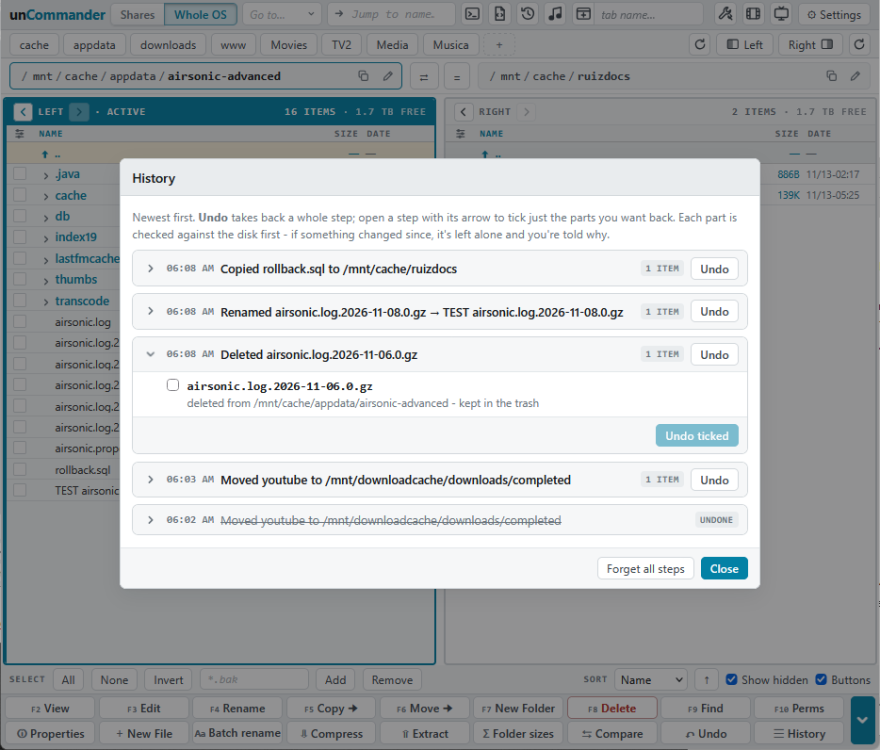
A note on how unCommander was built, and how it was tested unCommander was built with heavy use of an AI assistant (Claude). I’d rather say that up front, because AI-assisted plugins rightly draw some skepticism here. It matters even more for a file manager: unlike most plugins, it exists to copy, move, rename and delete your files, and like every plugin it runs as root. “Trust me” isn’t good enough, so here is how it was made and what protects your data. How it was built and tested The code was written and tested in two steps: Automated tests. Each feature was first checked in a test setup that imitates an unRAID server: automated checks of every server action, plus scripted browser tests that click through the interface and confirm the results. My own server. Every build was then installed on my live unRAID server, with real array disks, pools and years of real media, and used day to day before it was released. unCommander went through more than 140 test builds this way. When something looked wrong, it was traced, fixed and checked again. My role was direction, design, testing and judgment; the AI’s role was writing and refactoring the code to that direction. What protects your files Deletes go to a trash first, and you can restore them. Emptying the trash is a separate, deliberate step. Almost everything can be undone. Every rename, move, copy, delete, and new folder is recorded in History, and you can undo any step, or just part of one, days later. Practice mode is on for new installs. You can try everything, and nothing on disk changes until you switch it off. It refuses the classic unRAID data-loss mistake: copying or moving between a disk (/mnt/diskX) and the user share (/mnt/user) that shows the same files. Archives open read-only. You can look inside a zip, rar or iso and copy files out, but nothing inside one can be changed. Big operations run as background jobs with progress and Cancel. When a file already exists, you choose Skip or Replace. The whole system is a separate mode. It starts in your shares, and seeing the whole OS is a deliberate switch. What it connects to, and when No telemetry, and no account or sign-up. Outside services only when you use a feature that needs them: TVmaze, for the TV episodes tool; MusicBrainz and the Cover Art Archive, for music tags and covers; your own Radarr, Sonarr, Lidarr, Plex, Kodi or Jellyfin, when you send something to them. Downloads: it fetches 7-Zip when you install it and ffmpeg the first time you play a video that needs it. Each comes from a fixed version, is checked against a known SHA-256 checksum, and isn’t used if it doesn’t match. Your settings are a small file in /boot/config/plugins/uncommander. Lists and History are kept off the flash drive to save it from wear. It’s fully open source Every line is on GitHub. Read it, audit it, or have your own AI go through it. Bug reports, corrections and ideas are genuinely welcome, and I’ll keep responding and maintaining it. I’d rather earn your trust with specifics than hide how it was made. Source: https://github.com/hernandito/unCommander3 points
-
3 pointsCan confirm this issue is happening. Bit odd not to include this fix in the final release given the bug report thread has been open for a while too. This needs to be fixed and/or at least acknowledged with workarounds noted.3 points
-
3 pointsThat is the kind of disrespectful behavior that has gotten many projects to just close their reporting system. Everything has CVEs all the time and most of them are irrelevant to a particular context, it's completely pointless to just list them all. If you wanted to be actually useful then instead of flooding the report system with the output of a tool they can run themselves you would assess how each of them apply to Unraid's usecase and only report those that are actually relevant and important, there might be one or 2 at most. Just dumping all without assessment only creates noise and unnecessary effort that would be better spent on what actually matters.3 points
-
3 pointsThe below is ChatGPT, but I was able to run through this and wanted to make sure my AI-assisted journey was captured for future searches. Successfully updated Intel ME firmware directly from Unraid Linux — No Windows or bootable PE requiredWanted to document a successful native Linux Intel Management Engine firmware update on my Unraid server, since the usual recommendations involve booting Windows PE or Hiren's BootCD. Hardware/software: Motherboard: ASUS Pro WS W680-ACE IPMI CPU: Intel Core i7-12700K OS: Unraid 7.3.4, Linux kernel 6.18.58 Original BIOS: 3401 Original Intel ME: 16.1.25.1885 Updated Intel ME: 16.1.40.2765 Final BIOS: 4601 What worked: Downloaded the official MEUpdateTool_16.1.40.2765_TP.zip from ASUS for my exact motherboard. Extracted FW/ME.bin, which contains the firmware image. Obtained the Linux x64 version of Intel's FWUpdLcl (version 16.1.25.1991) from the Win-Raid CSME 16 discussion. Verified file hashes, motherboard identity, existing ME firmware, and updater functionality. Stopped the Unraid array and ensured backups were available outside the NAS. Ran the firmware update directly from the Unraid terminal. Commands: # Confirm existing firmware cat /sys/class/mei/mei0/fw_ver # Confirm updater can communicate with Intel ME ./FWUpdLcl -fwver # Verify firmware image version ./FWUpdLcl -fwver ME.bin # Optional: save existing ME update image ./FWUpdLcl -save ME_before.bin # Actual firmware update ./FWUpdLcl -f ME.binThe update completed with: Sending the update image to FW for verification: [ COMPLETE ] FW Update: [ 100% ] FW Update completed successfully and a reboot will run the new FW.After reboot, Linux reported: 0:16.1.40.2765 0:16.1.40.2765 0:16.1.25.1885The third firmware-version entry remained unchanged, but the primary firmware updated successfully. ASUS BIOS also confirmed ME firmware 16.1.40.2765. I subsequently updated to BIOS 4601 using ASUS BIOS FlashBack, and Unraid booted successfully. All 22 array data disks and ZFS cache pools came online and reported healthy. Important caveats: This is one confirmed successful update on the ASUS Pro WS W680-ACE IPMI, not a guarantee for other motherboards. ASUS officially distributes a Windows updater; this Linux approach is not ASUS-supported. The Linux utility is an older, community-redistributed Intel executable. Its version predates the target firmware. Use only firmware intended for your exact motherboard. Verify the firmware hashes and retain off-system backups before attempting an update. A failed firmware flash may require specialized hardware recovery. The saved ME image is not a complete SPI-flash backup. Result: Intel ME 16.1.25.1885 → 16.1.40.2765 successfully updated directly under Unraid Linux, without Windows, a VM, or a temporary boot environment. Hopefully this helps others running Linux-only servers who need Intel ME firmware updates.3 points
-
3 pointsUnraid OS 7.2.9 is a targeted maintenance release for the 7.2 branch. It includes PHP security fixes, an Unraid API update from 4.36.1 to 4.37.7, and updates addressing the compromised CA certificates referenced in the eMudhra certificate-compromise report. The kernel version is unchanged from 7.2.8. We highly recommend updating to the latest stable release, Unraid OS 7.3.4, for its newer kernel and broader package security updates. Changes vs. 7.2.8SecurityPHP 8.4.23 → 8.4.27 to address multiple CVEs Addressed the compromised CA certificates referenced in the Unit 42 report Unraid APIUpdated from 4.36.1 to 4.37.7 Bundled Node.js runtime updated to 22.23.4, resolving the Node.js certificate-compromise issue (full API comparison) Base Distro4 packages updated: ca-certificates 20261020, dynamix.unraid.net (Unraid API) 4.37.7, libvirt-php 0.5.8-8.4.27_LT, and php 8.4.27-1_LT Security Advisory: Additional Potential Vulnerabilities7.2.9 does not include the broader distro-package or kernel security updates available in newer releases. As of October 23, 2026, upstream package advisories identify 115 potential CVEs associated with included package versions, across curl, BIND, OpenSSL, libssh, p11-kit, xorg-server and X11 libraries, Samba, libpcap, util-linux, and libpng. Newer upstream kernel releases also contain security fixes not included in 7.2.9. Full breakdown in the release notes. Updating to 7.2.9 alone should not be interpreted as resolving every potential finding. Known Issues No new release-specific known issues are documented. See the 7.2.8 release notes for issues that may still apply. Rolling Back No release-specific rollback warnings or compatibility limits are documented. Links Release Notes Updating Unraid License FAQ As always, please report any bugs on the Bug Reports board.3 points
-
3 pointsUnraid OS 7.4.0-rc.2 is the second release candidate for the upcoming 7.4.0 stable release. This build brings updated system packages with security fixes, including PHP 8.4.27, which patches CVE-2026-109618 and CVE-2026-109619, a pair of critical (CVSS 9.2) unauthenticated remote code execution vulnerabilities in PHP. It also updates the Linux kernel to 6.18.58-Unraid. This is a pre-release build. Please use it on test servers only to help validate existing workflows before stable availability. What's new in rc.2PHP 8.4.27, patching CVE-2026-109618 and CVE-2026-109619 Updated system packages with security fixes and maintenance updates Linux kernel update to 6.18.58-Unraid 7.4 series highlights (changes vs. 7.3.2)Security Base distro updates address a range of reported CVEs, including curl, OpenSSL, xorg-server, libxml2, libpcap, jq, Samba, util-linux, glibc, PHP, and nginx OpenTerminal validates request inputs before they are used by shell commands VM Manager displays guest-agent-supplied network-interface names as text rather than active HTML Diagnostics anonymization hides public IPv6 addresses and related diagnostic output Containers / Docker New: multiple custom networks per container template, retained through recreate/update New: live container icon URL preview in Add/Edit forms New: Memory limit field in Advanced View Improvement: registry update checks accept OCI manifests and indexes, identify the Unraid client, and refresh local image info Fix: Dashboard Docker icon fallback no longer retries indefinitely Storage New: Mover progress and status tracking (finally!) New: SGPIO/IBPI drive-location identification when SES is unavailable Improvement: Enter in the encrypted array passphrase field starts the array when valid Fix: Mover handles hard links within the same share across separate subfolders Fix: File Manager moves between shares on different pools/drives no longer silently remove the source when a transfer fails Fix: File Manager keeps exclusive shares on /mnt/user Fix: shfs FUSE worker-pool deadlock and unlink assertion crash Fix: stopped-array utilization and Boot Device used/free display WebGUI / System New: shared task tray for plugin, Docker, and VM background operations, with recall from any browser tab New: physical power button configuration under Settings → Power Settings → Power Button Improvement: live plugin-install progress, independent plugin update checks, viewport-scaling task sheets, and license check retries Fix: several Plugin Manager and Power Options fixes Networking / Hardware New: additional Intel, MediaTek, and Realtek wireless support (incl. RTW88 8812A/8814A/8821A and RTW89 8851BU/8852BU) New: additional game controllers, hardware sensors, and audio codecs New: optional Linux netconsole module Improvement: network defaults aligned with Fedora's /etc/sysctl.conf baseline Virtualization New: Hyper-V kernel support (storage, balloon, keyboard, virtual-socket) Fix: no PHP deprecation warning on VM startup when the QEMU lookup returns nothing Base distro 319 packages updated, 1 added, 1 downgraded, including Docker 29.8.2, ZFS 2.4.4, and dynamix.unraid.net 4.37.5 Known Issues For known issues from the previous release, see the 7.3.2 release notes. Rolling Back No new release-specific rollback warnings are documented. For earlier rollback guidance, see the 7.3.2 release notes. Links Release Notes Updating Unraid3 points
-
3 points7.4 hasn't been released yet, so you are EOL 7.2 before 7.4 is officially launched? That can't be right? 7.4 isn't stable. Unraid states current stable and previous stable branches maintained. 7.2 should still be maintained until 7.4 is released fully.3 points
-
3 pointsI just upgraded to 7.3.3 and found my older GTX1080 is not supported by the NVIDIA driver plugin. Are Pascal cards going to get support for archived drivers? Or do I need to roll back Unraid to a previous build that does support the card?3 points
-
3 pointsWhile there's no official confirmation on this, NUT (the package, not this plugin) may be integrated into the base OS. I'm suspecting the majority of plugins will require a complete rewrite to be compatible or even exist for Fedora. So this is likely not limited to my plugins, maintenance mode or not, and I suspect new plugins will have to emerge. In any case, to answer your question, I think NUT will be part of the core OS to replace apcupsd which has been stale for years.3 points
-
2 pointsHi all, Thankyou to those that helped me test the BETA release. This update is built from what I have been reading on reddit and this forum thread and also from PR's and issue reports submitted to github. I hope todays main release exceeds expectations! Please keep providing feedback, issue reports and PRs. And thanks @KluthR for trusting me with your plugin. 2026.11.18➕ Optional snapshot mode for ZFS and btrfs: containers restart while the backup continues (chodeus) ➕ Extra backup schedule for selected containers, with its own destination and retention (chodeus) ➕ Backup type "Flash only": backs up just the flash drive (chodeus) ➕ Optional: start containers in the Docker tab order (thanks to luuvasara) ➕ New backups include checksums of verified archives, checked with the Verify button on the Restore page (chodeus) ➕ Backup summary: latest backup, retained sets, next run and free space (chodeus) ➕ Warnings for outdated backups and low destination space (chodeus) ➕ A filter and Skip all above the container lists (chodeus) 🩹 Fix Abort leaving containers stopped and being able to stop an unrelated process (chodeus) 🩹 Fix flash drive backup on Unraid 7.4 (chodeus) 🩹 Fix failed or aborted runs being reported as successful or applying retention (chodeus) 🩹 Fix failed container updates being reported as successful (chodeus) 🩹 Fix a container update that leaves the old image in place being reported as successful (KluthR) 🩹 Containers that fail to stop are no longer backed up while running (chodeus) 🩹 Fix a backup set name collision after the daylight saving time change (KluthR) 🩹 Fix Discard not restoring the saved settings (chodeus) 🩹 Fix non-numeric autostart delays aborting the backup (thanks to Shyrka973) 🩹 Fix exclusions being dropped when the settings file has LF-only line endings (thanks to rnkang) 🩹 More fixes to retention, exclusions and stop order (chodeus) 🔧 Restoring to the original folders stops running containers first and starts them again afterwards (chodeus) 🔧 Reworked Settings and Restore layouts, backup steps, help and wording (chodeus, thanks to kajusnau and GlassedSilver)2 points
-
Hey, I was having some trouble with my system, drive spinning up constantly for no apparent reason.....Until i noticed. You know how youve had this ever growing collection of media, and all the extra Jellyfin files that end up getting spread across 4 drives so you have 1 season of The Simpsons with mkvs on 1 drive, the NFO on another, and the metadata on yet another meaning your drives never actually spin down..... Yeah me too, and I couldnt be bothered to try and fix it through unbalance so I made a thing....Media Folder Consolidation ```Jellyfin on an Unraid array can spread one movie or show across several disks: the video lands on one disk while trickplay images, subtitles, artwork and NFO files stay on another. This script finds the disk holding the video for each movie and show, treats it as the master, and copies everything from the other disks onto it with rsync. Folders are merged, never replaced. It ships as a dry run. The first pass over a real library moves nothing, writes a log, and lists every folder it could not decide.```2 points
-
2 pointsCA 2026.07.21 / Unraid 7.3.4: Apps tab fails with "Browser failed to communicate with Unraid Server" — PHP memory_limit 256M exhausted Since tonight (Nov 14, ~00:26 CET) the Apps tab on my server only shows "Browser failed to communicate with Unraid Server". Reloading doesn't help. /var/log/phplog shows on every attempt: PHP Fatal error: Allowed memory size of 268435456 bytes exhausted (tried to allocate 2097152 bytes) in /usr/local/emhttp/plugins/community.applications/include/helpers.php on line 138 Line 138 is the unserialize(file_get_contents()) in readJsonFile(). Details: - Unraid 7.3.4, CA 2026.07.21 (latest), 32 GB RAM, plenty free - /tmp/community.applications/tempFiles/templates_new.json is 35.6 MB (~5,400 templates), displayed.json is 30.9 MB - No single oversized template: average ~7 KB per entry, largest ~230 KB (dify-aio, FreeLLMAPI) - include/exec.php line 12 hard-codes ini_set('memory_limit','256M'), so raising memory_limit in php.ini has no effect This looks like the same root cause as dky2101's post above (Nov 13, 128M on 6.8.3): the app feed has simply grown beyond the hard-coded limit. Since the limit was already raised from 128M to 256M once, I assume everyone on the current version will hit this as soon as they refresh the feed. Could the limit be raised (or the feed be loaded in a less memory-hungry way)? Happy to provide diagnostics if needed. (Analysis and wording done with the help of an AI assistant; all data is from my own server.)2 points
-
2 points@Thorsten da du dir ja auch die Mühe machst mit 2 Support Threads hab ich hier eine separate App Support Section eröffnet. Nur als Info.2 points
-
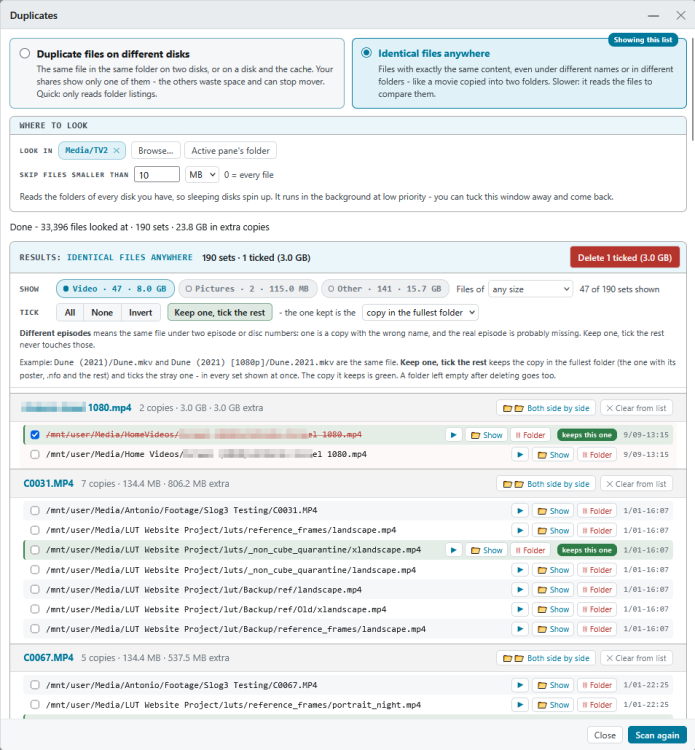
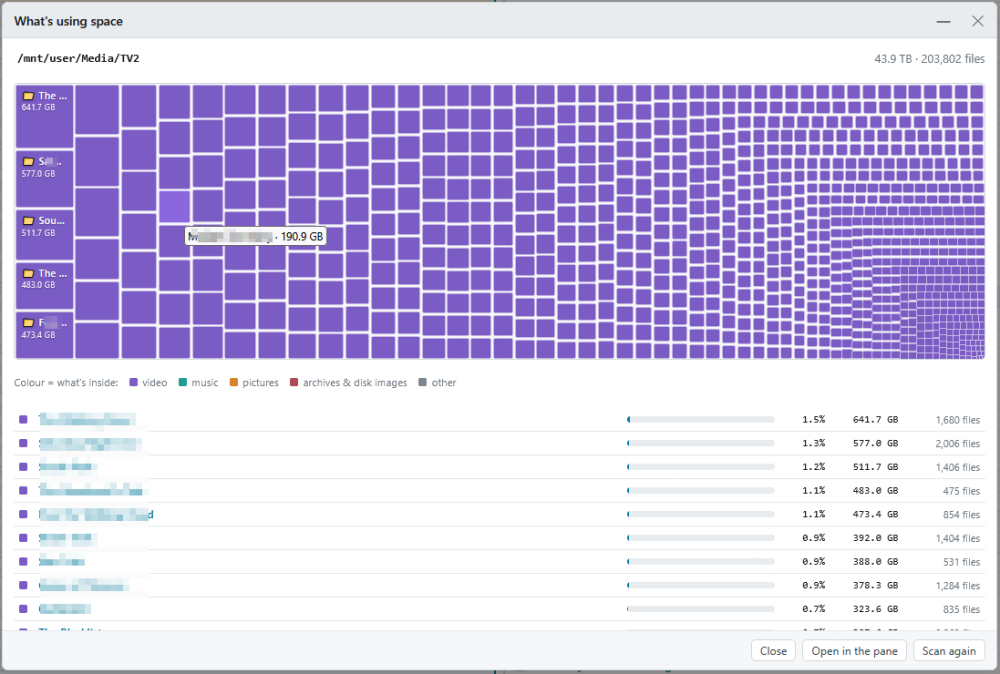
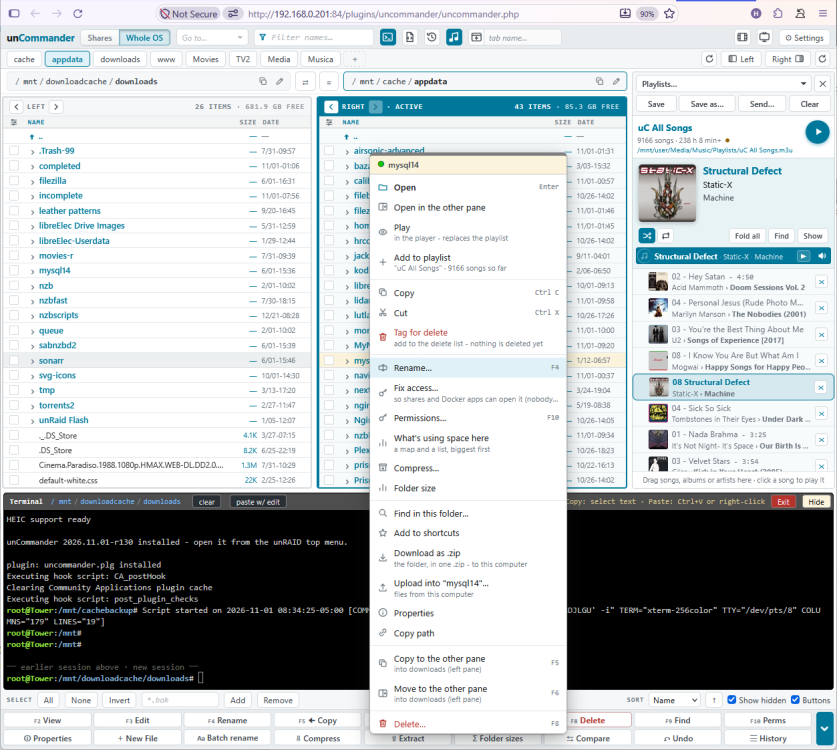
unCommander 2026.11.09a: now in Community Applications, and the biggest update yet 🎉 unCommander is now in Community Applications. Open the Apps tab and search unCommander. If you already have it, Plugins → Check for Updates brings you up to date, and your settings, shortcuts, trash and History are all kept. Here’s what’s new since the first release: ↩️ Undo for everything. Every change is recorded in History: renames, moves, copies, deletes, and new folders. You can undo any step, or just part of one, even days later. 🖱️ Works like a desktop file manager. There’s a right-click menu (press and hold on the iPad), Copy/Cut/Paste, drag and drop between panes, upload by dropping files in, and downloads as one zip. A cart collects files from several folders, and a folder tree opens folders in place. 🗜️ Archives open like folders. Walk into a zip, 7z, rar, tar.gz or iso just like in Midnight Commander. You can browse, view pictures, play videos and copy files out with Undo, and nothing inside can change. 🎧 A music player, built in. Your music library plays right inside unCommander, with artists and albums, covers, and a bottom-bar player with a queue. No separate music server needed. Drag and drop songs, albums or whole artists to build playlists, then export them to your apps: Plex, Kodi, Jellyfin/Emby, Navidrome or a USB drive. There’s also a tag editor with MusicBrainz lookup, and Music check finds missing covers and tracks and can ask Lidarr for what’s missing. 🎬 Pictures and video. There’s a Gallery view, a picture editor (crop, rotate, straighten, resize), HEIC support, and a video player that plays almost anything in the browser, subtitles included. 🧰 Powerful tools, one click from the new Tools button in the top bar: What’s using space: a map of any folder or disk. Open a folder in the pane, clean up, come back, and the map is already updated. Duplicates: finds the hidden copies your shares merge away, and identical files anywhere. Movies, TV and Music checks that work with Radarr, Sonarr and Lidarr, plus Empty folders, Clean up, Fix access, a User Scripts button, and Unassigned Devices mount and unmount from the panes. ⌨️ A built-in terminal under the panes, with clickable folders, a paste box, and a session that survives a reload. 🎨 Make it yours. Color themes, including Norton - an homage for us old-timers. There are also F-key layouts (Windows / MC or your own), typing that filters the list, and right-click ticking like Total Commander. 🗂️ Tabs and windows. Use it inside unRAID, in its own browser tab, as an app window, or as an iPad Home Screen app. The full guide with every feature is on GitHub: https://github.com/hernandito/unCommander Thanks to everyone who sent feedback and ideas. Keep it coming! ☕ https://www.buymeacoffee.com/hernandito
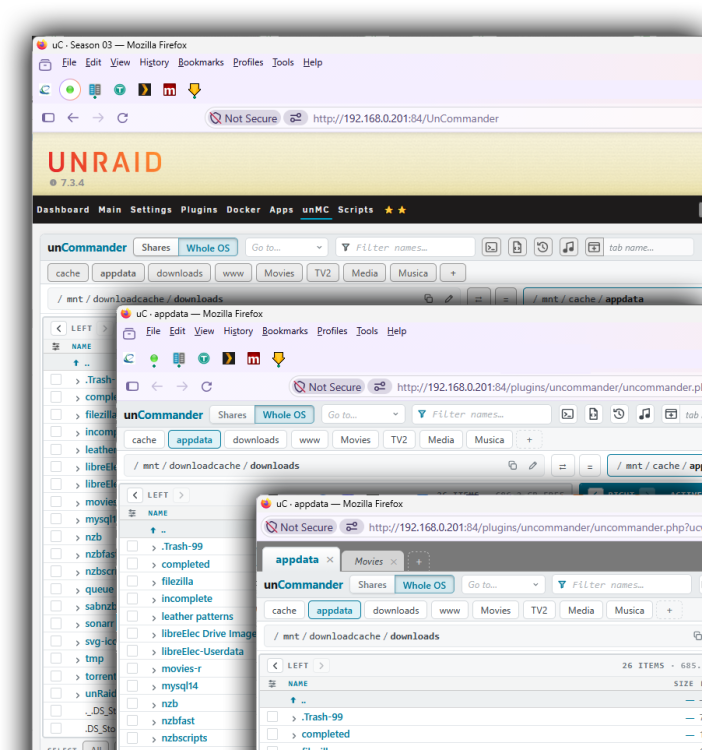 2 points
-
2 pointsMust say, this is a very nice feature, and it's about darn time 😁
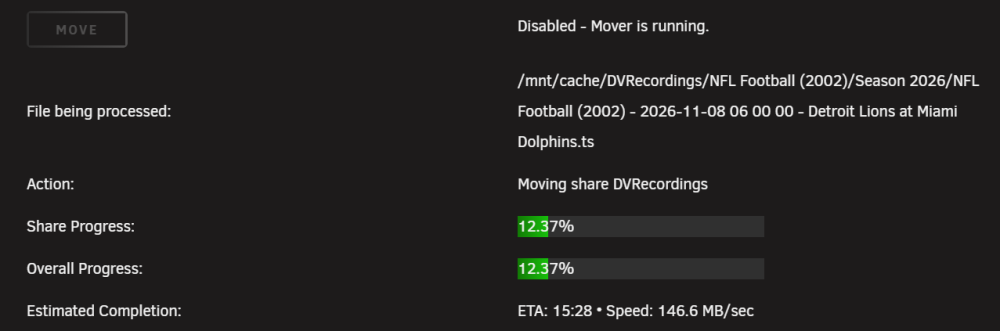 2 points
-
2 points
-
you can work around it by changing the Repository field in each affected container's template from lscr.io/linuxserver/<app> to ghcr.io/linuxserver/<app>. It's the same image with the same digests, so the container won't really change.2 points
-
I recommend testing old drives before trusting them in the array.2 points
-
2 pointsDer Hinweis wird in fixcommomproblems gegeben inkl eines links auf weitere Erklärung. Hast du diese Doku schon gelesen? Der Frage nach also nicht 😉 Eher nur bei /mnt/remotes/…. Es geht um deine shares auf unassigned Devices, die du im Docker gemountet hast. Das Problem ist, dass diese unsssigned Devices nicht unbedingt immer zur Verfügung stehen (usb bzw. Remote eingebundene smb/nfs-shares). Der Docker Container startet z.B. nicht wenn deinem zweites NAS nicht gemountet ist und er bekommt Probleme im Betrieb, wenn du ihm das Laufwerk wegnimmst. Kurz: Diese Themen werden umgangen, wenn du die Slave Option nutzt.2 points
-
2 pointsMaybe you can print out some stickers, and stick them on your monitor... 🫣2 points
-
2 pointsSorry, da bin ich raus. Meine letzte Fregatte hab ich Ende der 80er Jahre im Marinehafen von Wilhelmshaven an der Reede liegen sehen 😂2 points
-
2 pointsAlso Home Assistant als VM könnte schon etwas stressen. Gar nicht so vom Speicher und CPU Verbrauch, sondern weil die VMs und UNRAID doch mal hier und da eine kurze Auszeit bekommen (z.B. Backup) und dann bricht die Protokollierung von HA eben ab und es entstehen Lücken in der Auswertung. Da die Probleme doch mannigfaltig gestaltet sein können, hab ich dann irgendwann Docker und VM Adieu gesagt und nun läuft HA-OS auf einem Raspberry Pi. Der macht auch Backups aber das weiß HA dann und stellt sich darauf ein. Wenns nicht um Auswertungen geht, ist der Einwand aber hinfällig und kann ignoriert werden 😁 Für den restlichen Betrieb als NAS ist die Hardware ok (sofern genug SATA Anschlüsse vorhanden sind). Wie schon von @alturismo erwähnt können die Platten nicht "einfach so weiter" verwendet werden, sondern Du muss über Backup, Neuformattierung und Daten rücksichern gehen. Das dauert.2 points
-
2 pointsnaja, da steht ja nicht viel ;) NAS, klar Homeassistant braucht auch nicht viel Foto App, Bsp. immich, auch klar Interessant ist, Kameras ... wie lange hält man vor, wo speichert man dass die HDD nicht permanent am Laufen sind, je nach Wunsch ... Umzug, hast du ein Backup der Daten ? weil das Syno disk Format ist leider meist nicht einfach zu übernehmen sondern setzt ein formatieren voraus. Anmerkungen die sind meines Wissens nicht bekannt dafür stromsparend laufen zu wollen (aspm), wenn das kein Thema bei dir ist (Solar ...), ok. wie realisierst du diesen heute ? GF Anschlüsse sind (leider) meist reine ipv6 hinter cgnat, dazu dann einlesen wie du das realisieren möchtest. Kurz, klar reicht die Hardware für fast alle Anliegen im Homelab, viele nutzen n100 er Systeme welche nicht wirklich stärker sind ;) Was Power brauchst sind VM's (vor allem mit Desktop), da sollte klarer spezifiziert sein was du eventuell vor hast, vor allem RAM da dieser dann fix weg ist für die VM/s.2 points
-
2 pointsVielen Dank euch allen. Sobald ich etwas Zeit und Ruhe habe, werde ich mich mal an das Updade trauen. Melde mich wieder wenn es "geknallt" hat 🤣, drückt mir die Daumen.2 points
-
2 pointsAlo verwendet die .15 Version. Wenn ich mich recht erinnere nutzt diese schon diverse rückportierte Funktionen, die nach der 7.0.1 kamen. Deshalb bekommt er direkt die 7.2.3 angeboten. Du bist bei .12. Diese Version ist ein erheblich älterer Stand, der notwendige Funktionen noch nicht rückportiert bekam. Geh die normal angebotenen onlineschritte über das Tool Update OS. Gehe nicht über Los, ziehe keine 4000 Euro ein und vertraue dem Tool. Die Situation bei alo ist leider anders. Und vergiss nicht vorher das Backup.2 points
-
2 points
-
Hi, i get the python 3.10 error. I'm using this docker for a few years and still running octoprint 1.11 inside. How to upgrade this dockers python and octoprint version? Greetings Dominik
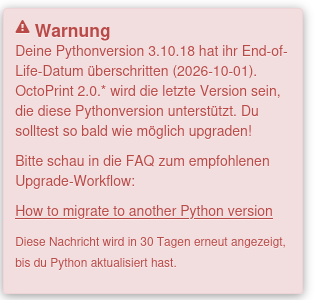 2 points
-
2 pointsHere's a quick script that can be used to scan all installed docker containers to see if they are vulnerable or not. This will at least let users know they have vulnerable packages installed and make informed decisions on what to do next - be it switching upstream sources, disabling that service or its external exposure, or looking for a maintained alternative. #!/bin/bash for c in $(docker ps --format "{{.Names}}"); do if docker exec "$c" php -v >/dev/null 2>&1; then echo "Container: $c" # Grab full version string line 1 (e.g., "PHP 8.2.20 (cli)...") ver_string=$(docker exec "$c" php -v | head -n 1) echo " Version: $ver_string" # Extract major.minor.patch cleanly using awk/sed clean_ver=$(echo "$ver_string" | grep -oE '[0-9]+\.[0-9]+\.[0-9]+' | head -n 1) if [ -z "$clean_ver" ]; then echo " Status: Could not parse exact version number." else # Parse version components major=$(echo "$clean_ver" | cut -d. -f1) minor=$(echo "$clean_ver" | cut -d. -f2) patch=$(echo "$clean_ver" | cut -d. -f3) is_vulnerable=false # Logic for vulnerability status based on official patch levels if [ "$major" -lt 8 ] || { [ "$major" -eq 8 ] && [ "$minor" -lt 2 ]; }; then is_vulnerable=true # EOL versions (< 8.2) are unpatched and vulnerable elif [ "$major" -eq 8 ] && [ "$minor" -eq 2 ] && [ "$patch" -lt 35 ]; then is_vulnerable=true elif [ "$major" -eq 8 ] && [ "$minor" -eq 3 ] && [ "$patch" -lt 36 ]; then is_vulnerable=true elif [ "$major" -eq 8 ] && [ "$minor" -eq 4 ] && [ "$patch" -lt 27 ]; then is_vulnerable=true elif [ "$major" -eq 8 ] && [ "$minor" -eq 5 ] && [ "$patch" -lt 12 ]; then is_vulnerable=true fi if [ "$is_vulnerable" = true ]; then echo " Status: VULNERABLE to CVE-2026-109618 / CVE-2026-109619" else echo " Status: Patched / Not Affected" fi fi echo "-----------------------------------" fi done2 points
-
2 pointsCurrently they are saying no as they seem to think 7.4, although not yet being stable is a valid release so 7.3 is the previous branch. I think this is honestly wrong.2 points
-
Good point about the adapter. People recommend industrial microSD cards for Unraid boot but rarely mention that the USB adapter isn’t a passive pass-through. There’s a card reader controller chip in there, and most of those adapters aren’t built to run 24/7, so the adapter can end up as the weak link however good the card is. Your suspicion sounds plausible. Glad the drives got to you so fast. The Innodisk is a different class of hardware from the Ultra Fit too, so this should be a solid upgrade on both counts.2 points
-
I ordered 2 of these drives on 10/20. Already delivered today, 10/22. Pretty quick from California to Ohio. I had one prior USB boot drive failure. I was using an industrial Kingston microSD in a Sandisk microSD-USB adapter. I think the USB adapter failed. My current drive is a Sandisk 32GB Ultra Fit but these Innodisk drives sounds like they may be more reliable. I was thinking about switching to internal boot but this remains simpler.2 points
-
2 pointsyou sure about that?, i thought the known vulnerabilities were patched in 1.43.3.10861 or later (already built a while ago):- https://forums.plex.tv/t/important-security-update-for-plex-media-server-v1-43-2-and-earlier/942319/3 in any case 1.43.5.x was built automatically 2 hours ago.2 points
-
https://www.youtube.com/watch?v=YokafZ9WVeI Eli (Director of Product) and Alex (Head of Product Marketing) work through your top questions from Reddit. We discuss licensing, the move to Fedora, plugins, Docker Compose, security, and when you can try it.2 points
-
2 pointsI've pushed hotfix version 2026.10.18 that should solve this issue. Give it a test! The problem was that the usb boot drive is formatted as FAT32, and Unraid mounts it without execution file permissions, which disallows running a script file from its filename and shebang only. To work around this, you can either type "bash /boot/config/plugins/buddybackup/hooks/pre-snapshot.sh" in the hook field, or just update the plugin since it will now detect this and automatically execute the hooks via bash (or set shebang interpreter) when needed.2 points
-
With the news around U8, I'm deciding to step back from maintaining any plugins that I don't actively use. I picked up this plugin as a service to the community when the previous developer removed it, but it's not one that I use myself outside of testing. As such, I won't be doing any further updates to the plugin. I will leave it in Community Applications. If someone wants to fork the plugin and continue maintaining it, feel free; once a replacement is ready, I'd be happy to help facilitate the migration to the new repo.1 point
-
1 point
-
Borg Backup UI 2026.10.17.1802 Fehlerbehebungen Der Job-Assistent zeigt Zeitplanfelder und die Vorschau des nächsten Starts nur noch bei aktivierter Zeitplanung an. Bei deaktivierter Zeitplanung wird deutlich angezeigt, dass der Job manuell ausgeführt wird. Bereits eingegebene Werte bleiben beim Umschalten erhalten. (#568) Verbesserungen Bestehende Backup-Jobs lassen sich in Job-Gruppen nacheinander ausführen – mit eigenen Zeitplänen, festgelegter Reihenfolge, konfigurierbarem Fehlerverhalten und integrierten Logs. Einzelne Jobs behalten ihre Einstellungen, Skripte und Zeitpläne. (#570) Die Gruppenzugehörigkeit wird an den einzelnen Jobs angezeigt und bleibt in Historie und Reports nachvollziehbar. Vollständige Job-Gruppen können zusammen mit ihren Jobs exportiert und importiert werden. (#570) Statusanzeigen für Gruppenläufe werden einheitlich ausgerichtet. Zugehörige Jobs im Dashboard zeigen verlinkte Gruppennamen und Schrittnummern. Die Größe des Log-Bereichs bleibt beim Wechsel zwischen Live- und gespeicherten Logs erhalten. (#570) Beim Öffnen des aktuellen Live-Logs bleibt das automatische Mitlaufen aktiviert. Auch wenn kurze Jobs zwischen zwei Aktualisierungen abgeschlossen werden, wird das letzte verfügbare Job-Log angezeigt. (#570) Mehrere Jobs können gemeinsam über eine übersichtliche Auswahl mit Suche, Standortfiltern und eindeutiger Job-Zuordnung ausgewählt werden. Diese ersetzt das bisherige kompakte Auswahlmenü. (#570) Gruppenkennzeichnungen und Startzeiten im Dashboard bleiben in einer Zeile. Beim Löschen von Gruppen und Verwerfen ungespeicherter Änderungen werden anwendungseigene Dialoge verwendet. Unveränderte Gruppeneinstellungen lassen sich ohne Rückfrage schließen. (#570) Gleich große Aktionsschaltflächen für Gruppen sind einheitlich in der Reihenfolge „Bearbeiten“, „Löschen“ und „Starten“ angeordnet und passend beschriftet. (#570)1 point
-
1 pointOne last update: I wrote down my basic settings and fully deleted the container and cleaned up some of the unheaded broken dockers that had been floating around for months. Reinstalling it cleanly (not from the previous apps menu) and reapplying my settings got the bluray drive to work again. Thanks for all the help. I still have NO idea what the issue was or why reinstalling fixed it, but my guess still is that something broke with the decodes. At the least, hopefully some of the steps will help someone in the future.1 point
-
1 pointThat was my though too watching the video. I think/hope that I'll be OK with my 16GB flashdrive. When I started, the archive for the full system was 213MB (6.8.3). We are at 1.15GB now and v8 seems to be larger. The impact is probably not only for the boot device, but also for RAM. I am afraid that small or old servers will have more and more trouble running Unraid. But everything is not so bad, we are lucky that the hardware is cheap nowadays ! PS : I hate this new trend of starting almost every answer by telling how great the question is. Especially since Eli probably new the questions in advance and perhaps even helped write them from all the questions provided by the community.1 point
-
1 pointVersion 2026.10.16 is now out! Changelog: - Support multi-dataset replication using a single shared SSH key across multiple destination datasets [#38] - Support custom SSH ports for remote BuddyBackup destinations - Configurable daily snapshot time with 1-minute cron heartbeat and asynchronous backup triggers [#25] (from your suggestion @cherrybullet ) - Native atomic ZFS recursion and automatic baseline snapshots for newly created child datasets [#36] - Automatically restore receiver user and group configuration across server reboots [#37] (fix for your issue @Bladeinger ) - Auto-suggest destination sub-dataset paths from source dataset and detect duplicate destinations [#26]1 point